
This thread has been locked.

If you have a related question, please click the "Ask a related question" button in the top right corner. The newly created question will be automatically linked to this question.

IWR1843BOOST: 搭配DCA1000EVM进行采集时的文件配置和数据格式问题

Part Number: IWR1843BOOST


注:下图中所用数据,采集时的空间环境相同。

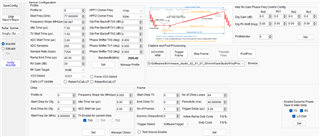
我使用mmWave Studio按照下图所示的配置进行数据采集
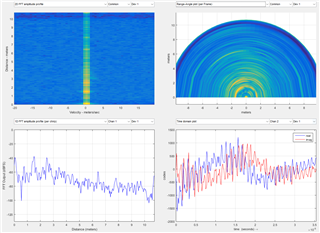
处理结果为:
根据此配置,我生成下面的.cfg文件:

sensorStop
flushCfg
dfeDataOutputMode 1
channelCfg 15 1 0
adcCfg 2 1
adcbufCfg -1 0 1 1 1
profileCfg 0 77 7 3 40 0 0 99.987 1 256 7200 0 0 30
chirpCfg 0 0 0 0 0 0 0 1
frameCfg 0 0 64 1 40 1 0
lowPower 0 0
guiMonitor -1 1 1 0 0 0 1
cfarCfg -1 0 2 8 4 3 0 15 1
cfarCfg -1 1 0 4 2 3 1 15 1
multiObjBeamForming -1 1 0.5
clutterRemoval -1 0
calibDcRangeSig -1 0 -5 8 256
extendedMaxVelocity -1 0
lvdsStreamCfg -1 0 1 0
compRangeBiasAndRxChanPhase 0.0 1 0 1 0 1 0 1 0 1 0 1 0 1 0 1 0 1 0 1 0 1 0 1 0
measureRangeBiasAndRxChanPhase 0 1.5 0.2
CQRxSatMonitor 0 3 5 121 0
CQSigImgMonitor 0 127 8
analogMonitor 0 0
aoaFovCfg -1 -90 90 -90 90
cfarFovCfg -1 0 0 8.92
cfarFovCfg -1 1 -1 1.00
calibData 0 0 0
sensorStart

将其导入mmWave Demo Visualizer,结果为:
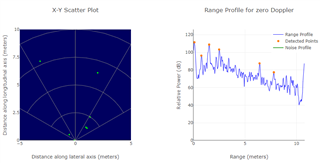
可以看出,这一配置在mmWave Studio和mmWave Demo Visualizer中都可以得到正确的结果。

我尝试通过调用官方exe文件的方法进行数据采集。修改后的包含相关配置的.json文件为

{
    "DCA1000Config": {
        "dataLoggingMode": "raw",
        "dataTransferMode": "LVDSCapture",
        "dataCaptureMode": "ethernetStream",
        "lvdsMode": 2,
        "dataFormatMode": 3,
        "packetDelay_us": 10,
        "ethernetConfig": {
            "DCA1000IPAddress": "192.168.33.180",
            "DCA1000ConfigPort": 4096,
            "DCA1000DataPort": 4098
        },
        "ethernetConfigUpdate": {
            "systemIPAddress": "192.168.33.30",
            "DCA1000IPAddress": "192.168.33.180",
            "DCA1000MACAddress": "12.34.56.78.90.12",
            "DCA1000ConfigPort": 4096,
            "DCA1000DataPort": 4098
        },
        "captureConfig": {
            "fileBasePath": "D:\\Files",
            "filePrefix": "mmWaveData",
            "maxRecFileSize_MB": 1024,
            "sequenceNumberEnable": 1,
            "captureStopMode": "infinite",
            "bytesToCapture": 10250000,
            "durationToCapture_ms": 1000000,
            "framesToCapture": 1000
        },
        "dataFormatConfig": {
            "MSBToggle": 0,
            "reorderEnable": 1,
            "laneFmtMap": 0,
            "dataPortConfig": [
                {
                    "portIdx": 0,
                    "dataType": "complex"
                },
                {
                    "portIdx": 1,
                    "dataType": "complex"
                },
                {
                    "portIdx": 2,
                    "dataType": "complex"
                },
                {
                    "portIdx": 3,
                    "dataType": "complex"
                },
                {
                    "portIdx": 4,
                    "dataType": "complex"
                }
            ]
        }
    }
}

然而,通过上述.cfg和.json文件进行数据采集后,通过mmWave Studio进行数据处理的结果为:
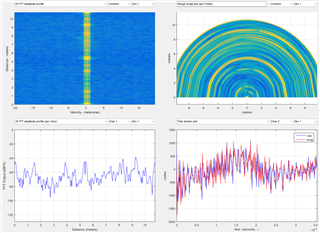
这是一个错误的结果。我发现这一结果可能与.json文件的“reorderEnable”项有关。在mmwave_sdk_user_guide.pdf的第14页写着“‘reorderEnable’ should be set to 1.”当我将其设为0并重新进行数据采集后,处理结果为:
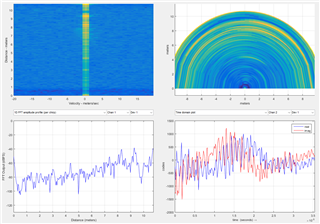
可以明显看出,此处理结果是正确结果的“反向”,在距离和角度上都与正确结果相反。

请问造成这一现象的原因是什么?应该如何改正?谢谢!