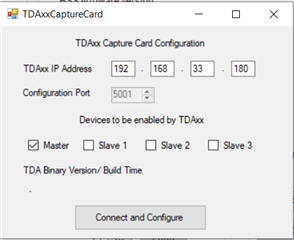
配置脚本如下:
--[[
Sequence being followed

A. CONFIGURATION
1. Connecting to TDA
1. Configuring Master from SOP till Channel Config
2. Configuring Slave (i) sequentially from SOP till SPI Connect. i = 1, 2, 3
3. Configuring Slaves together from F/W download till Channel Config
4. Configuring all devices together from LDO Bypass till Frame Config

NOTE:
Update the following in the script accordingly before running
1. metaImage F/W path on line 32
2. TDA Host Board IP Address on line 39
--]]

----------------------------------------User Constants--------------------------------------------

dev_list          =    {1, 2, 4, 8}       -- Device map
RadarDevice       =    {1, 0, 0, 0}       -- {dev1, dev2, dev3, dev4}, 1: Enable, 0: Disable
cascade_mode_list =    {0, 2, 2, 2}       -- 0: Single chip, 1: Master, 2: Slave

-- F/W Download Path

-- Uncomment the next line if you wish to pop-up a dialog box to select the firmware image file
-- Otherwise, hardcode the path to the firmware metaimage below
-- By default, the firmware filename is: xwr22xx_metaImage.bin

-- metaImagePath  =   RSTD.BrowseForFile(RSTD.GetSettingsPath(), "bin", "Browse to .bin file")
-- For 2243 ES1.1 devices
metaImagePath            =   "D:\\ti\\mmwave_dfp_02_02_03_01\\firmware\\xwr22xx_metaImage.bin"
-- For 2243 ES1.0 devices
-- metaImagePath            =   "D:\\ti\\mmwave_dfp_02_03_00_01\\firmware\\xwr22xx_metaImage.bin"

-- IP Address for the TDA2 Host Board
-- Change this accordingly for your setup

TDA_IPAddress     =   "192.168.33.180"

-- Device map of all the devices to be enabled by TDA
-- 1 - master ; 2- slave1 ; 4 - slave2 ; 8 - slave3

deviceMapOverall  =   RadarDevice[1] + (RadarDevice[2]*2) + (RadarDevice[3]*4) + (RadarDevice[4]*8)
deviceMapSlaves   =   (RadarDevice[2]*2) + (RadarDevice[3]*4) + (RadarDevice[4]*8)

-- Enable/Disable Test Source
-- This is useful during bringup

test_source_enable  =   0      -- 0: Disable, 1: Enable

------------------------------------------- Sensor Configuration ------------------------------------------------
--[[
The sensor configuration consists of 3 sections:
1) Profile Configuration (common to all 4 AWR devices)
2) Chirp Configuration (unique for each AWR device - mainly because TXs to use are
                        different for each chirp)
3) Frame Configuration (common to all 4 AWR devices, except for the trigger mode for the master)
Change the values below as needed. --]]

-- Profile configuration
local profile_indx              =   0
local start_freq                =   76.284     -- GHz
local slope                     =   3.911     -- MHz/us
local idle_time                 =   5      -- us
local adc_start_time            =   4      -- us
local adc_samples               =   1024    -- Number of samples per chirp
local sample_freq               =   10000   -- ksps
local ramp_end_time             =   110.4     -- us
local rx_gain                   =   48     -- dB
local tx0OutPowerBackoffCode    =   0
local tx1OutPowerBackoffCode    =   0
local tx2OutPowerBackoffCode    =   0
local tx0PhaseShifter           =   0
local tx1PhaseShifter           =   0
local tx2PhaseShifter           =   0
local txStartTimeUSec           =   0
local hpfCornerFreq1            =   0      -- 0: 175KHz, 1: 235KHz, 2: 350KHz, 3: 700KHz
local hpfCornerFreq2            =   0      -- 0: 350KHz, 1: 700KHz, 2: 1.4MHz, 3: 2.8MHz

-- Frame configuration
local start_chirp_tx            =   0
local end_chirp_tx              =   3
local nchirp_loops              =   4     -- Number of chirps per frame
local nframes_master            =   4     -- Number of Frames for Master
local nframes_slave             =   10     -- Number of Frames for Slaves
local Inter_Frame_Interval      =   100    -- ms
local trigger_delay             =   0      -- us
local trig_list                 =   {1,2,2,2} -- 1: Software trigger, 2: Hardware trigger

--[[
Function to configure the chirps specific to a device
12 chirps are configured below, individually for each AWR device

|-------|-------|-------|-------|-------|-------|-------|-------|-------|-------|-------|-------|-------|
|       | Dev 1 | Dev 1 | Dev 1 | Dev 2 | Dev 2 | Dev 2 | Dev 3 | Dev 3 | Dev 3 | Dev 4 | Dev 4 | Dev 4 |
| Chirp |  TX0  |  TX1  |  TX2  |  TX 0 |  TX1  |  TX2  |  TX0  |  TX1  |  TX2  |  TX0  |  TX1  |  TX2  |
|-------|-------|-------|-------|-------|-------|-------|-------|-------|-------|-------|-------|-------|
|     0 |     0 |     0 |     0 |     0 |     0 |     0 |     0 |     0 |     0 |     0 |     0 |     1 |
|     1 |     0 |     0 |     0 |     0 |     0 |     0 |     0 |     0 |     0 |     0 |     1 |     0 |
|     2 |     0 |     0 |     0 |     0 |     0 |     0 |     0 |     0 |     0 |     1 |     0 |     0 |
|     3 |     0 |     0 |     0 |     0 |     0 |     0 |     0 |     0 |     1 |     0 |     0 |     0 |
|     4 |     0 |     0 |     0 |     0 |     0 |     0 |     0 |     1 |     0 |     0 |     0 |     0 |
|     5 |     0 |     0 |     0 |     0 |     0 |     0 |     1 |     0 |     0 |     0 |     0 |     0 |
|     6 |     0 |     0 |     0 |     0 |     0 |     1 |     0 |     0 |     0 |     0 |     0 |     0 |
|     7 |     0 |     0 |     0 |     0 |     1 |     0 |     0 |     0 |     0 |     0 |     0 |     0 |
|     8 |     0 |     0 |     0 |     1 |     0 |     0 |     0 |     0 |     0 |     0 |     0 |     0 |
|     9 |     0 |     0 |     1 |     0 |     0 |     0 |     0 |     0 |     0 |     0 |     0 |     0 |
|    10 |     0 |     1 |     0 |     0 |     0 |     0 |     0 |     0 |     0 |     0 |     0 |     0 |
|    11 |     1 |     0 |     0 |     0 |     0 |     0 |     0 |     0 |     0 |     0 |     0 |     0 |
|-------|-------|-------|-------|-------|-------|-------|-------|-------|-------|-------|-------|-------|
--]]
-- Note: The syntax for this API is:
-- ar1.ChirpConfig_mult(RadarDeviceId, chirpStartIdx, chirpEndIdx, profileId, startFreqVar,
--                      freqSlopeVar, idleTimeVar, adcStartTimeVar, tx0Enable, tx1Enable, tx2Enable)

function Configure_Chirps(i)

    if (i == 1) then

            -- Chirp 0
            if (0 == ar1.ChirpConfig_mult(dev_list[i], 0, 0, 0, 0, 0, 0, 0, 1, 0, 0)) then
                WriteToLog("Device "..i.." : Chirp 0 Configuration successful\n", "green")
            else
                WriteToLog("Device "..i.." : Chirp 0 Configuration failed\n", "red")
                return -4
            end

            -- Chirp 1
            if (0 == ar1.ChirpConfig_mult(dev_list[i], 1, 1, 0, 0, 0, 40, 0, 1, 0, 0)) then
                WriteToLog("Device "..i.." : Chirp 1 Configuration successful\n", "green")
            else
                WriteToLog("Device "..i.." : Chirp 1 Configuration failed\n", "red")
                return -4
            end

            -- Chirp 2
            if (0 == ar1.ChirpConfig_mult(dev_list[i], 2, 2, 0, 0, 0, 14, 0, 1, 0, 0)) then
                WriteToLog("Device "..i.." : Chirp 2 Configuration successful\n", "green")
            else
                WriteToLog("Device "..i.." : Chirp 2 Configuration failed\n", "red")
                return -4
            end

            -- Chirp 3
            if (0 == ar1.ChirpConfig_mult(dev_list[i], 3, 3, 0, 0, 0, 14, 0, 0, 1, 0)) then
                WriteToLog("Device "..i.." : Chirp 3 Configuration successful\n", "green")
            else
                WriteToLog("Device "..i.." : Chirp 3 Configuration failed\n", "red")
                return -4
            end

    elseif (i == 2) then

            -- Chirp 0
            if (0 == ar1.ChirpConfig_mult(dev_list[i], 0, 0, 0, 0, 0, 0, 0, 1, 0, 0)) then
                WriteToLog("Device "..i.." : Chirp 0 Configuration successful\n", "green")
            else
                WriteToLog("Device "..i.." : Chirp 0 Configuration failed\n", "red")
                return -4
            end

            -- Chirp 1
            if (0 == ar1.ChirpConfig_mult(dev_list[i], 1, 1, 0, 0, 0, 40, 0, 1, 0, 0)) then
                WriteToLog("Device "..i.." : Chirp 1 Configuration successful\n", "green")
            else
                WriteToLog("Device "..i.." : Chirp 1 Configuration failed\n", "red")
                return -4
            end

            -- Chirp 2
            if (0 == ar1.ChirpConfig_mult(dev_list[i], 2, 2, 0, 0, 0, 14, 0, 1, 0, 0)) then
                WriteToLog("Device "..i.." : Chirp 2 Configuration successful\n", "green")
            else
                WriteToLog("Device "..i.." : Chirp 2 Configuration failed\n", "red")
                return -4
            end

            -- Chirp 3
            if (0 == ar1.ChirpConfig_mult(dev_list[i], 3, 3, 0, 0, 0, 14, 0, 0, 1, 0)) then
                WriteToLog("Device "..i.." : Chirp 3 Configuration successful\n", "green")
            else
                WriteToLog("Device "..i.." : Chirp 3 Configuration failed\n", "red")
                return -4
            end

    elseif (i == 3) then

             -- Chirp 0
            if (0 == ar1.ChirpConfig_mult(dev_list[i], 0, 0, 0, 0, 0, 0, 0, 1, 0, 0)) then
                WriteToLog("Device "..i.." : Chirp 0 Configuration successful\n", "green")
            else
                WriteToLog("Device "..i.." : Chirp 0 Configuration failed\n", "red")
                return -4
            end

            -- Chirp 1
            if (0 == ar1.ChirpConfig_mult(dev_list[i], 1, 1, 0, 0, 0, 40, 0, 1, 0, 0)) then
                WriteToLog("Device "..i.." : Chirp 1 Configuration successful\n", "green")
            else
                WriteToLog("Device "..i.." : Chirp 1 Configuration failed\n", "red")
                return -4
            end

            -- Chirp 2
            if (0 == ar1.ChirpConfig_mult(dev_list[i], 2, 2, 0, 0, 0, 14, 0, 1, 0, 0)) then
                WriteToLog("Device "..i.." : Chirp 2 Configuration successful\n", "green")
            else
                WriteToLog("Device "..i.." : Chirp 2 Configuration failed\n", "red")
                return -4
            end

            -- Chirp 3
            if (0 == ar1.ChirpConfig_mult(dev_list[i], 3, 3, 0, 0, 0, 14, 0, 0, 1, 0)) then
                WriteToLog("Device "..i.." : Chirp 3 Configuration successful\n", "green")
            else
                WriteToLog("Device "..i.." : Chirp 3 Configuration failed\n", "red")
                return -4
            end

    elseif (i == 4) then

             -- Chirp 0
            if (0 == ar1.ChirpConfig_mult(dev_list[i], 0, 0, 0, 0, 0, 0, 0, 1, 0, 0)) then
                WriteToLog("Device "..i.." : Chirp 0 Configuration successful\n", "green")
            else
                WriteToLog("Device "..i.." : Chirp 0 Configuration failed\n", "red")
                return -4
            end

            -- Chirp 1
            if (0 == ar1.ChirpConfig_mult(dev_list[i], 1, 1, 0, 0, 0, 40, 0, 1, 0, 0)) then
                WriteToLog("Device "..i.." : Chirp 1 Configuration successful\n", "green")
            else
                WriteToLog("Device "..i.." : Chirp 1 Configuration failed\n", "red")
                return -4
            end

            -- Chirp 2
            if (0 == ar1.ChirpConfig_mult(dev_list[i], 2, 2, 0, 0, 0, 14, 0, 1, 0, 0)) then
                WriteToLog("Device "..i.." : Chirp 2 Configuration successful\n", "green")
            else
                WriteToLog("Device "..i.." : Chirp 2 Configuration failed\n", "red")
                return -4
            end

            -- Chirp 3
            if (0 == ar1.ChirpConfig_mult(dev_list[i], 3, 3, 0, 0, 0, 14, 0, 0, 1, 0)) then
                WriteToLog("Device "..i.." : Chirp 3 Configuration successful\n", "green")
            else
                WriteToLog("Device "..i.." : Chirp 3 Configuration failed\n", "red")
                return -4
            end

    end

end

------------------------------ API Configuration ------------------------------------------------

-- 1. Connection to TDA. 2. Selecting Cascade/Single Chip.  3. Selecting 2-chip/4-chip

WriteToLog("Setting up Studio for Cascade started..\n", "blue")

if(0 == ar1.ConnectTDA(TDA_IPAddress, 5001, deviceMapOverall)) then
    WriteToLog("ConnectTDA Successful\n", "green")
else
    WriteToLog("ConnectTDA Failed\n", "red")
    return -1
end

if(0 == ar1.selectCascadeMode(1)) then
    WriteToLog("selectCascadeMode Successful\n", "green")
else
    WriteToLog("selectCascadeMode Failed\n", "red")
    return -1
end

WriteToLog("Setting up Studio for Cascade ended..\n", "blue")

--Master Initialization

-- SOP Mode Configuration
if (0 == ar1.SOPControl_mult(1, 4)) then
    WriteToLog("Master : SOP Reset Successful\n", "green")
else
    WriteToLog("Master : SOP Reset Failed\n", "red")
    return -1
end

-- SPI Connect
if (0 == ar1.PowerOn_mult(1, 0, 1000, 0, 0)) then
    WriteToLog("Master : SPI Connection Successful\n", "green")
else
    WriteToLog("Master : SPI Connection Failed\n", "red")
    return -1
end

-- Firmware Download. (SOP 4 - MetaImage)
if (0 == ar1.DownloadBssFwOvSPI_mult(1, metaImagePath)) then
    WriteToLog("Master : FW Download Successful\n", "green")
else
    WriteToLog("Master : FW Download Failed\n", "red")
    return -1
end

-- RF Power Up
if (0 == ar1.RfEnable_mult(1)) then
    WriteToLog("Master : RF Power Up Successful\n", "green")
else
    WriteToLog("Master : RF Power Up Failed\n", "red")
    return -1
end

-- Channel & ADC Configuration
if (0 == ar1.ChanNAdcConfig_mult(1,1,1,1,1,1,1,1,2,1,0,1)) then
    WriteToLog("Master : Channel & ADC Configuration Successful\n", "green")
else
    WriteToLog("Master : Channel & ADC Configuration Failed\n", "red")
    return -2
end


-- All devices together

-- Including this depends on the type of board being used.
-- LDO configuration
if (0 == ar1.RfLdoBypassConfig_mult(deviceMapOverall, 3)) then
    WriteToLog("LDO Bypass Successful\n", "green")
else
    WriteToLog("LDO Bypass failed\n", "red")
    return -2
end

-- Low Power Mode Configuration
if (0 == ar1.LPModConfig_mult(deviceMapOverall,0, 0)) then
    WriteToLog("Low Power Mode Configuration Successful\n", "green")
else
    WriteToLog("Low Power Mode Configuration failed\n", "red")
    return -2
end

-- Miscellaneous Control Configuration
if (0 == ar1.SetMiscConfig_mult(deviceMapOverall, 1, 0, 0, 0)) then
    WriteToLog("Misc Control Configuration Successful\n", "green")
else
    WriteToLog("Misc Control Configuration failed\n", "red")
    return -2
end

-- Edit this API to enable/disable the boot time calibration. Enabled by default.
-- RF Init Calibration Configuration
if (0 == ar1.RfInitCalibConfig_mult(deviceMapOverall, 1, 1, 1, 1, 1, 1, 1, 65537)) then
    WriteToLog("RF Init Calibration Successful\n", "green")
else
    WriteToLog("RF Init Calibration failed\n", "red")
    return -2
end

-- RF Init
if (0 == ar1.RfInit_mult(deviceMapOverall)) then
    WriteToLog("RF Init Successful\n", "green")
else
    WriteToLog("RF Init failed\n", "red")
    return -2
end

---------------------------Data Configuration----------------------------------

-- Data path Configuration
if (0 == ar1.DataPathConfig_mult(deviceMapOverall, 0, 1, 0)) then
    WriteToLog("Data Path Configuration Successful\n", "green")
else
    WriteToLog("Data Path Configuration failed\n", "red")
    return -3
end

-- Clock Configuration
if (0 == ar1.LvdsClkConfig_mult(deviceMapOverall, 1, 1)) then
    WriteToLog("Clock Configuration Successful\n", "green")
else
    WriteToLog("Clock Configuration failed\n", "red")
    return -3
end

-- CSI2 Configuration
if (0 == ar1.CSI2LaneConfig_mult(deviceMapOverall, 1, 0, 2, 0, 4, 0, 5, 0, 3, 0, 0)) then
    WriteToLog("CSI2 Configuration Successful\n", "green")
else
    WriteToLog("CSI2 Configuration failed\n", "red")
    return -3
end

----------------------------Test Source Configuration------------------------------
-- This is useful for initial bringup.
-- Each device is configured with a test object at a different location.

if(test_source_enable == 1) then

    if(RadarDevice[1] == 1) then
        -- Object at 5 m with x = 4m and y = 3m
        if (0 == ar1.SetTestSource_mult(1, 4, 3, 0, 0, 0, 0, -327, 0, -327, 327, 327, 327, -2.5, 327, 327, 0,
                 0, 0, 0, -327, 0, -327, 327, 327, 327, -95, 0, 0, 0.5, 0, 1, 0, 1.5, 0, 0, 0, 0, 0, 0, 0, 0)) then
            WriteToLog("Device 1 : Test Source Configuration Successful\n", "green")
        else
            WriteToLog("Device 1 : Test Source Configuration failed\n", "red")
            return -3
        end
    end

    if(RadarDevice[2] == 1) then
        -- Object at 5 m with x = 3m and y = 4m
        if (0 == ar1.SetTestSource_mult(2, 3, 4, 0, 0, 0, 0, -327, 0, -327, 327, 327, 327, -2.5, 327, 327, 0,
                 0, 0, 0, -327, 0, -327, 327, 327, 327, -95, 0, 0, 0.5, 0, 1, 0, 1.5, 0, 0, 0, 0, 0, 0, 0, 0)) then
            WriteToLog("Device 2 : Test Source Configuration Successful\n", "green")
        else
            WriteToLog("Device 2 : Test Source Configuration failed\n", "red")
            return -3
        end
    end

    if(RadarDevice[3] == 1) then
        -- Object at 13 m with x = 12m and y = 5m
        if (0 == ar1.SetTestSource_mult(4, 12, 5, 0, 0, 0, 0, -327, 0, -327, 327, 327, 327, -2.5, 327, 327, 0,
                 0, 0, 0, -327, 0, -327, 327, 327, 327, -95, 0, 0, 0.5, 0, 1, 0, 1.5, 0, 0, 0, 0, 0, 0, 0, 0)) then
            WriteToLog("Device 3 : Test Source Configuration Successful\n", "green")
        else
            WriteToLog("Device 3 : Test Source Configuration failed\n", "red")
            return -3
        end
    end

    if(RadarDevice[4] == 1) then
        -- Object at 13 m with x = 5m and y = 12m
        if (0 == ar1.SetTestSource_mult(8, 5, 12, 0, 0, 0, 0, -327, 0, -327, 327, 327, 327, -2.5, 327, 327, 0,
                 0, 0, 0, -327, 0, -327, 327, 327, 327, -95, 0, 0, 0.5, 0, 1, 0, 1.5, 0, 0, 0, 0, 0, 0, 0, 0)) then
            WriteToLog("Device 4 : Test Source Configuration Successful\n", "green")
        else
            WriteToLog("Device 4 : Test Source Configuration failed\n", "red")
            return -3
        end
    end

end

---------------------------Sensor Configuration-------------------------

-- Profile Configuration
if (0 == ar1.ProfileConfig_mult(deviceMapOverall, 0, start_freq, idle_time, adc_start_time, ramp_end_time,
                                0, 0, 0, 0, 0, 0, slope, 0, adc_samples, sample_freq, 0, 0, rx_gain)) then
    WriteToLog("Profile Configuration successful\n", "green")
else
    WriteToLog("Profile Configuration failed\n", "red")
    return -4
end

-- Chirp Configuration
for i=1,table.getn(RadarDevice) do
    if ((RadarDevice[1]==1) and (RadarDevice[i]==1)) then
        Configure_Chirps(i)
    end
end

-- Enabling/ Disabling Test Source
if(test_source_enable == 1) then
    ar1.EnableTestSource_mult(deviceMapOverall, 1)
    WriteToLog("Enabling Test Source Configuration successful\n", "green")
end

-- Frame Configuration
-- Master
if (0 == ar1.FrameConfig_mult(1,start_chirp_tx,end_chirp_tx,nframes_master, nchirp_loops,
                              Inter_Frame_Interval, 0, 1)) then
    WriteToLog("Master : Frame Configuration successful\n", "green")
else
    WriteToLog("Master : Frame Configuration failed\n", "red")
end
抓取数据脚本如下:
--[[
    A. STREAMING & CAPTURE
    1. Streaming Slave (3, 2, 1) sequentially.
    2. Streaming Master.

    B. TRANSFERRING FILES
    1. The data is stored in file(s) with max cap placed at 2 GB.
    2. The files can be retrieved from the SSD (/mnt/ssd folder) using WinSCP.

Note: Update lines 18 to 66 as needed before using this script.

--]]

---------------------------   Streaming Configuration -------------------------------------------
-- Change the values below as needed.

-- Streaming configuration
local start_freq                =   76.284                -- GHz
local sample_freq               =   10000             -- ksps
local rx_gain                   =   48               -- dB
local tx0OutPowerBackoffCode    =   0
local tx1OutPowerBackoffCode    =   0
local tx2OutPowerBackoffCode    =   0
local tx0PhaseShifter           =   0
local tx1PhaseShifter           =   0
local tx2PhaseShifter           =   0
local hpfCornerFreq1            =   0                -- 0: 175KHz, 1: 235KHz, 2: 350KHz, 3: 700KHz
local hpfCornerFreq2            =   0                -- 0: 350KHz, 1: 700KHz, 2: 1.4MHz, 3: 2.8MHz

-- Basic configuration for Analysis
local numSamples                =   524288

-- Streaming Configuration
if (0 == ar1.ContStrConfig_mult(deviceMapOverall, start_freq, sample_freq, rx_gain, hpfCornerFreq1,
         hpfCornerFreq2, tx0OutPowerBackoffCode, tx1OutPowerBackoffCode, tx2OutPowerBackoffCode,
         tx0PhaseShifter, tx1PhaseShifter, tx2PhaseShifter)) then
    WriteToLog("Streaming Configuration successful\n", "green")
else
    WriteToLog("Streaming Configuration failed\n", "red")
    return -4
end

-- Note: "capture_time"  is a timeout till which the devices are streaming continuously.
-- It does not affect the amount of data/samples being captured by the TDA2XX.
-- Data captured by TDA2XX depends on the number of samples being programmed at line 31

capture_time                    =    2000                             -- ms
inter_loop_time                 =    2000                             -- ms
num_loops                       =    1

--[[
Note:
Change the parameter as desired:
1. capture_directory: is the filename under which captures are stored on the SSD
   and is also the directory to which files will be transferred back to the host
   The captures are copied to the PostProc folder within mmWave Studio.
Note:
If this script is called multiple times without changing the directory name, then all
captured files will be in the same directory with filename suffixes incremented automatically.
It may be hard to know which captured files correspond to which run of the script.
Note:
It is strongly recommended to change this directory name between captures.
--]]
------------------------------DATA CAPTURE------------------------------
-- Function to start/stop Streaming
function Streaming_Control(Device_ID, En1_Dis0)
    local status = 0
        if (En1_Dis0 == 1) then
            status = ar1.ContStrModEnable_mult(dev_list[Device_ID]) --Start Streaming
            if (status == 0) then
                WriteToLog("Device "..Device_ID.." : Start Streaming Successful\n", "green")
            else
                WriteToLog("Device "..Device_ID.." : Start Streaming Failed\n", "red")
                return -5
            end
        else
            status = ar1.ContStrModDisable_mult(dev_list[Device_ID]) --Stop Streaming
            if (status == 0) then
                WriteToLog("Device "..Device_ID.." : Stop Streaming Successful\n", "green")
            else
                WriteToLog("Device "..Device_ID.." : Stop Streaming Failed\n", "red")
                return -5
            end
        end

    return status
end


while (num_loops > 0)
do

WriteToLog("Loops Remaining : "..num_loops.."\n", "purple")

-- Start Streaming
WriteToLog("Starting Streaming Start sequence...\n", "blue")

if (RadarDevice[4]==1)then
    Streaming_Control(4,1)
end

if (RadarDevice[3]==1)then
    Streaming_Control(3,1)
end

if (RadarDevice[2]==1)then
    Streaming_Control(2,1)
end

Streaming_Control(1,1)

RSTD.Sleep(1000)

-- Basic Configuration for Analysis
if (0 == ar1.BasicConfigurationForAnalysis(numSamples, numSamples, 1, 0, 0, 0, 1)) then
    WriteToLog("Basic Configuration for Analysis successful\n", "green")
else
    WriteToLog("Basic Configuration for Analysis failed\n", "red")
    return -4
end

RSTD.Sleep(1000)

-- TDA ARM
capture_directory               =   "Cascade_22xx_Cont_Stream_Capture_"..num_loops.."_iteration"
WriteToLog("Starting TDA ARM for Cont Stream...\n", "blue")
status = ar1.TDAContStream_StartRecord_mult(15, capture_directory)
if (status == 0) then
    WriteToLog("TDA ARM for Cont Stream Successful\n", "green")
else
    WriteToLog("TDA ARM for Cont Stream Failed\n", "red")
    return -5
end

WriteToLog("Capturing AWR device data to the TDA SSD...\n", "blue")
RSTD.Sleep(capture_time)

-- Stop Streaming
WriteToLog("Starting Streaming Stop sequence...\n", "blue")
if (RadarDevice[4]==1)then
    Streaming_Control(4,0)
end

if (RadarDevice[3]==1)then
    Streaming_Control(3,0)
end

if (RadarDevice[2]==1)then
    Streaming_Control(2,0)
end

Streaming_Control(1,0)

WriteToLog("Capture sequence completed...\n", "blue")

num_loops = num_loops - 1
RSTD.Sleep(inter_loop_time)

end

-- Enable the below if required
WriteToLog("Starting Transfer files using WinSCP for Cont Stream..\n", "blue")
status = ar1.TransferFilesUsingWinSCPContStream_mult(1)
if(status == 0) then
    WriteToLog("Transferred files! COMPLETE!\n", "green")
else
    WriteToLog("Transferring files FAILED!\n", "red")
    return -5
end
配置脚本没有问题,在运行第二个抓取数据脚本的时候,提示RESP TIMEOUT错误,请问需要修改什么参数吗


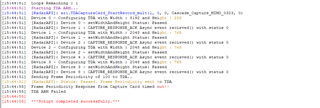
 这是失败的vlog