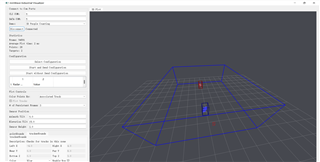
想问下,用mmWave_Industrial_Visualizer.exe文件识别出人员后,每个人代表的框框里面包含的点云数据怎么保存?然后怎么提取出来呢?

This thread has been locked.
If you have a related question, please click the "Ask a related question" button in the top right corner. The newly created question will be automatically linked to this question.
想问下,用mmWave_Industrial_Visualizer.exe文件识别出人员后,每个人代表的框框里面包含的点云数据怎么保存?然后怎么提取出来呢?

目前这个功能还没添加到visualizer,请看下面帖子的讨论。
We are working on adding the save data functionality back into the visualizer. If you look through the code, you'll see the visualizer was significantly updated from ITB 4.11 to ITB 4.12, and this prevented us from adding the save function in. You're more than welcome to modify 4.12 to add it back. It is just a python script after all.
https://e2e.ti.com/support/sensors-group/sensors/f/sensors-forum/1158055/awr6843aopevm-cannot-save-the-point-cloud-output-while-running-3d-people-counting-lab/4392840
您可以考虑用mmwave_industrial_toolbox_4_11_0,通过设置oob_parser.py文件
The output data from the mmWave sensor can be saved for future use in 2 ways: as a binary bitstream of the UART data, and as a csv file of the frame headers and TLVs.

To save either of these files, in oob_parser.py, set self.saveBinary and/or self.saveTextFile equal to 1, save the file, then run start the gui as described above. The output data will be recorded relative to the mmWave sensor, not rotated for world coordinates as the display is.
https://dev.ti.com/tirex/explore/node?a=VLyFKFf__4.11.0&node=A__AFeCG.cycMsnuvXQEgIEyw__com.ti.mmwave_industrial_toolbox__VLyFKFf__4.11.0