
This thread has been locked.

If you have a related question, please click the "Ask a related question" button in the top right corner. The newly created question will be automatically linked to this question.

MMWCAS-DSP-EVM: Not able to connect with the TDA board. Please check whether the Capture Card is connected to the network!

Part Number: MMWCAS-DSP-EVM


如题,Not able to connect with the TDA board. Please check whether the Capture Card is connected to the network!

电脑配置如下:
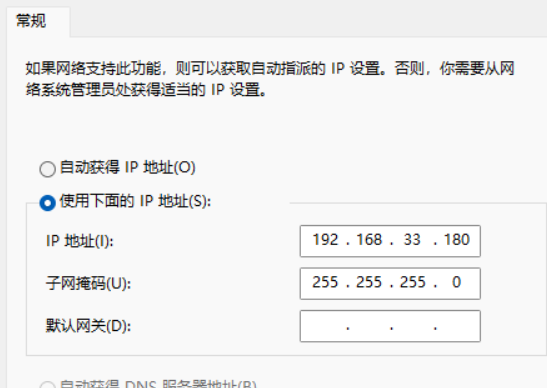
ping IP地址后显示不通。
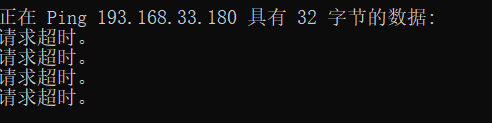
但是雷达以前是用过的,以前测没这些问题,驱动都是安装过的。这次链接则一直不正常。

  • 请看一下C:\ti\MMWAVE-STUDIO-2G\mmwave_studio_03_00_00_14\docs\mmwave_studio_cascade_user_guide.pdf里的troubleshooting。
     Not able to connect TDA2XX from mmWaveStudio over the network
    a. Check the Ethernet cable connection, LED status on TDA2xx Ethernet port connection.
    b. Ensure the PC IP address to be the same as mentioned in the Section 7.3.1.
     Try to ping TDA2XX IP address from PC to verify if the network connection is proper.
    c. Check the terminal screen if it had any error message while booting up.
     If yes, then try to reboot.
     Flash the SD card again if the error persists.
    d. At the terminal screen, check if apps.out process is running with the command ‘ps | grep ‘apps.out’’ apps.out is the application running on TDA2XX which establishes network connection with mmWaveStudio.
     Ideally this application should run automatically on boot up. If not, then run it manually. Refer Section 10.4 on how to run it manually.
    e. The trace files created on the SD card needs to be deleted manually once in a while to avoid the SD card being full. This is explained in the Section 9.
    f. Restart the TDA2XX board if none of above solution works.

  • Thank you!May I ask you how to refresh the SD card。

  • 请参考上面mmwave_studio_cascade_user_guide.pdf文档里的4.2 Flashing the TDA Firmware章节。