CCSTUDIO-THEIA: CCS-THEIA的formatter相关的配置

Part Number: CCSTUDIO-THEIA


目前我希望更改“Format Document”功能相关的配置,比如配置格式化之后的缩进空格数,我没有找到相关的配置,我已经把"editor.tabSize"设置为了4,但是进行格式化时,依然会给我缩进改为2。我还希望更改格式化之后代码块的起始花括号是否换行的行为,这些配置似乎都没有,以前在eclipse版本的CCS是可以控制格式化的一些格式的。

  • 您好,收到了您的案例,调查需要些时间,感您的耐心等待。

  • 这是我的配置文件内容

    { "window.titleBarStyle": "custom", "CCS.debug.targetConfigurations.directory": "/c:/Users/56887/ti/CCSTargetConfigurations", "CCS.gettingStarted.showOnStartup": false, "files.encoding": "utf8", "editor.mouseWheelZoom": true, "files.autoSave": "afterDelay", "editor.fontFamily": "Fira Code, Consolas, 'Courier New', monospace", "editor.fontLigatures": true, "editor.columnSelection": false, "editor.multiCursorModifier": "alt", "clangd.inactiveRegions.useBackgroundHighlight": false, "workbench.colorTheme": "light", "editor.codeLens": true, "editor.minimap.showSlider": "always", "editor.minimap.enabled": true, "files.autoGuessEncoding": false, "toolbar.showToolbar": true, "ai-features.AiEnable.enableAI": true, "editor.wordWrap": "off", "workbench.tree.indent": 12, "editor.detectIndentation": false, "workbench.tree.renderIndentGuides": "always", "clangd.checkUpdates": true, "clangd.path": "c:\\Users\\56887\\AppData\\Local\\Texas Instruments\\CCS\\ccstheia151\\0\\theia\\globalStorage\\llvm-vs-code-extensions.vscode-clangd\\install\\21.1.8\\clangd_21.1.8\\bin\\clangd.exe", "clangd.restartAfterCrash": true, "editor.defaultFormatter": "llvm-vs-code-extensions.vscode-clangd", "editor.tabSize": 4 }

  • 我已经把"editor.tabSize"设置为了4,但是进行格式化时,依然会给我缩进改为2。

    还添加:

        "editor.detectIndentation": false

    这将防止其覆盖您的 tabSize 设置。

    我还希望更改格式化之后代码块的起始花括号是否换行的行为,这些配置似乎都没有

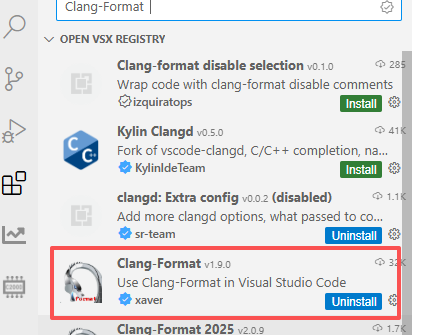
    您可以安装一些扩展来添加此类配置。 在 Theia IDE 中尝试 Clang 格式扩展。

  • "editor.detectIndentation": false

    我已经添加了这个设置,你在我的配置文件中可以看到。

    在 Theia IDE 中尝试 Clang 格式扩展

    能告诉我扩展的名称吗

  • 我通过下载Clang-Format插件解决了此问题,感谢您的解答