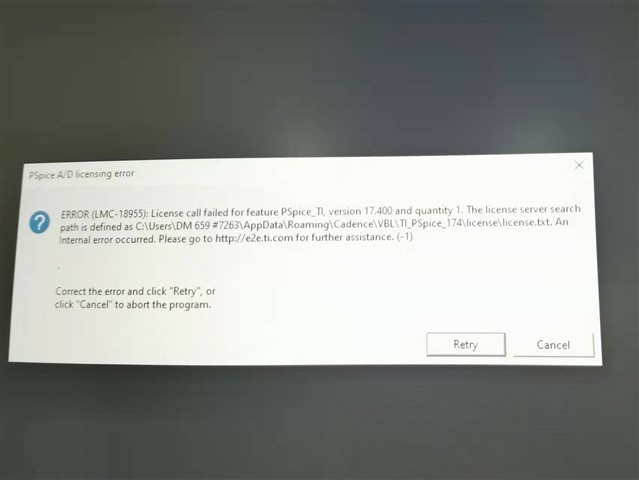
安装pspice forTI时出现许可证检索失败,是需要在哪里下载许可证呢
This thread has been locked.
If you have a related question, please click the "Ask a related question" button in the top right corner. The newly created question will be automatically linked to this question.

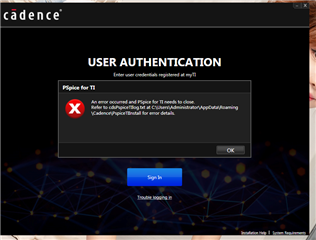
你好,在官网重新下载后又出现了如下的问题:
1、新下载的安装包依旧弹出警告,将VBL文件移入安装文件后依旧检索不到lisence,VBL中的lisence.text是空文档,
2、启动另一个安装程序后依旧提示有错误
如下为错误截图和反馈报告

16:38:15 2021年9月21日 : parameter count = 1
16:38:15 2021年9月21日 : -wrapper
16:38:16 2021年9月21日 : Initializing
16:38:16 2021年9月21日 : Downloading URLs file from : https://pcb.cadence.com/startPages/PSpiceTI_data/TI_URLs.txt
16:38:18 2021年9月21日 : Response Content length = 1724
16:38:18 2021年9月21日 : C:\Users\Administrator\AppData\Roaming\Cadence\PspiceTIInstall\TI_URLs.txt bytes downloaded = 1724
16:38:18 2021年9月21日 : Reading Json URL File
16:38:18 2021年9月21日 : setting media download server URL from Json File
16:38:18 2021年9月21日 : Reading Json URL File
16:38:18 2021年9月21日 : setting Dll path from Json File
16:38:18 2021年9月21日 : Chws URL is: https://cdsplicwc.cadence.com/chws/b2c/v1
16:38:18 2021年9月21日 : DownloadServerPath is: https://software-dl.ti.com/pspice/esd/installer
16:38:18 2021年9月21日 : parameter count = 1
16:38:18 2021年9月21日 : -wrapper
16:38:19 2021年9月21日 : ReleaseVersion in XML: 17.40.007 InstalledVersion on system:
16:39:39 2021年9月21日 : An exception occured which is causing the program to close.
16:39:39 2021年9月21日 : Details of exception are : 无法加载 DLL“cdsVbl.dll”: 找不到指定的程序。 (异常来自 HRESULT:0x8007007F)。
16:39:39 2021年9月21日 : Stack Trace for the exception is    在 TIPSpice.Utilities.cdsVblRegisterInstallation(String productKey, String bundleName, String chwsUrl)
   在 TIPSpice.Utilities.RegisterInstallation(String ProdKey)
   在 TIPSpice.AuthWindow.AuthenticateUser()
   在 System.Windows.EventRoute.InvokeHandlersImpl(Object source, RoutedEventArgs args, Boolean reRaised)
   在 System.Windows.UIElement.RaiseEventImpl(DependencyObject sender, RoutedEventArgs args)
   在 System.Windows.Controls.Primitives.ButtonBase.OnClick()
   在 System.Windows.Controls.Button.OnClick()
   在 System.Windows.Controls.Primitives.ButtonBase.OnMouseLeftButtonUp(MouseButtonEventArgs e)
   在 System.Windows.RoutedEventArgs.InvokeHandler(Delegate handler, Object target)
   在 System.Windows.RoutedEventHandlerInfo.InvokeHandler(Object target, RoutedEventArgs routedEventArgs)
   在 System.Windows.EventRoute.InvokeHandlersImpl(Object source, RoutedEventArgs args, Boolean reRaised)
   在 System.Windows.UIElement.ReRaiseEventAs(DependencyObject sender, RoutedEventArgs args, RoutedEvent newEvent)
   在 System.Windows.UIElement.OnMouseUpThunk(Object sender, MouseButtonEventArgs e)
   在 System.Windows.RoutedEventArgs.InvokeHandler(Delegate handler, Object target)
   在 System.Windows.RoutedEventHandlerInfo.InvokeHandler(Object target, RoutedEventArgs routedEventArgs)
   在 System.Windows.EventRoute.InvokeHandlersImpl(Object source, RoutedEventArgs args, Boolean reRaised)
   在 System.Windows.UIElement.RaiseEventImpl(DependencyObject sender, RoutedEventArgs args)
   在 System.Windows.UIElement.RaiseTrustedEvent(RoutedEventArgs args)
   在 System.Windows.Input.InputManager.ProcessStagingArea()
   在 System.Windows.Input.InputManager.ProcessInput(InputEventArgs input)
   在 System.Windows.Input.InputProviderSite.ReportInput(InputReport inputReport)
   在 System.Windows.Interop.HwndMouseInputProvider.ReportInput(IntPtr hwnd, InputMode mode, Int32 timestamp, RawMouseActions actions, Int32 x, Int32 y, Int32 wheel)
   在 System.Windows.Interop.HwndMouseInputProvider.FilterMessage(IntPtr hwnd, WindowMessage msg, IntPtr wParam, IntPtr lParam, Boolean& handled)
   在 System.Windows.Interop.HwndSource.InputFilterMessage(IntPtr hwnd, Int32 msg, IntPtr wParam, IntPtr lParam, Boolean& handled)
   在 MS.Win32.HwndWrapper.WndProc(IntPtr hwnd, Int32 msg, IntPtr wParam, IntPtr lParam, Boolean& handled)
   在 MS.Win32.HwndSubclass.DispatcherCallbackOperation(Object o)
   在 System.Windows.Threading.ExceptionWrapper.InternalRealCall(Delegate callback, Object args, Int32 numArgs)
   在 System.Windows.Threading.ExceptionWrapper.TryCatchWhen(Object source, Delegate callback, Object args, Int32 numArgs, Delegate catchHandler)
   在 System.Windows.Threading.Dispatcher.LegacyInvokeImpl(DispatcherPriority priority, TimeSpan timeout, Delegate method, Object args, Int32 numArgs)
   在 MS.Win32.HwndSubclass.SubclassWndProc(IntPtr hwnd, Int32 msg, IntPtr wParam, IntPtr lParam)
   在 MS.Win32.UnsafeNativeMethods.DispatchMessage(MSG& msg)
   在 System.Windows.Threading.Dispatcher.PushFrameImpl(DispatcherFrame frame)
   在 System.Windows.Application.RunDispatcher(Object ignore)
   在 System.Windows.Application.RunInternal(Window window)
   在 TIPSpice.App.Main()
16:39:39 2021年9月21日 : Message: An error occurred and PSpice for TI needs to close.
Refer to cdsPspiceTIlog.txt at C:\Users\Administrator\AppData\Roaming\Cadence\PspiceTIInstall for error details.
16:40:37 2021年9月21日 : parameter count = 1
16:40:37 2021年9月21日 : -wrapper
16:40:37 2021年9月21日 : Initializing
16:40:37 2021年9月21日 : Deleting file : C:\Users\Administrator\AppData\Roaming\Cadence\PspiceTIInstall\TI_URLs.txt
16:40:37 2021年9月21日 : Downloading URLs file from : https://pcb.cadence.com/startPages/PSpiceTI_data/TI_URLs.txt
16:40:37 2021年9月21日 : Response Content length = 1724
16:40:37 2021年9月21日 : C:\Users\Administrator\AppData\Roaming\Cadence\PspiceTIInstall\TI_URLs.txt bytes downloaded = 1724
16:40:37 2021年9月21日 : Reading Json URL File
16:40:37 2021年9月21日 : setting media download server URL from Json File
16:40:37 2021年9月21日 : Reading Json URL File
16:40:37 2021年9月21日 : setting Dll path from Json File
16:40:37 2021年9月21日 : Chws URL is: https://cdsplicwc.cadence.com/chws/b2c/v1
16:40:37 2021年9月21日 : DownloadServerPath is: https://software-dl.ti.com/pspice/esd/installer
16:40:37 2021年9月21日 : parameter count = 1
16:40:37 2021年9月21日 : -wrapper
16:40:38 2021年9月21日 : ReleaseVersion in XML: 17.40.007 InstalledVersion on system:
16:47:04 2021年9月21日 : An exception occured which is causing the program to close.
16:47:04 2021年9月21日 : Details of exception are : 无法加载 DLL“cdsVbl.dll”: 找不到指定的程序。 (异常来自 HRESULT:0x8007007F)。
16:47:04 2021年9月21日 : Stack Trace for the exception is    在 TIPSpice.Utilities.cdsVblRegisterInstallation(String productKey, String bundleName, String chwsUrl)
   在 TIPSpice.Utilities.RegisterInstallation(String ProdKey)
   在 TIPSpice.AuthWindow.AuthenticateUser()
   在 System.Windows.EventRoute.InvokeHandlersImpl(Object source, RoutedEventArgs args, Boolean reRaised)
   在 System.Windows.UIElement.RaiseEventImpl(DependencyObject sender, RoutedEventArgs args)
   在 System.Windows.Controls.Primitives.ButtonBase.OnClick()
   在 System.Windows.Controls.Button.OnClick()
   在 System.Windows.Controls.Primitives.ButtonBase.OnMouseLeftButtonUp(MouseButtonEventArgs e)
   在 System.Windows.RoutedEventArgs.InvokeHandler(Delegate handler, Object target)
   在 System.Windows.RoutedEventHandlerInfo.InvokeHandler(Object target, RoutedEventArgs routedEventArgs)
   在 System.Windows.EventRoute.InvokeHandlersImpl(Object source, RoutedEventArgs args, Boolean reRaised)
   在 System.Windows.UIElement.ReRaiseEventAs(DependencyObject sender, RoutedEventArgs args, RoutedEvent newEvent)
   在 System.Windows.UIElement.OnMouseUpThunk(Object sender, MouseButtonEventArgs e)
   在 System.Windows.RoutedEventArgs.InvokeHandler(Delegate handler, Object target)
   在 System.Windows.RoutedEventHandlerInfo.InvokeHandler(Object target, RoutedEventArgs routedEventArgs)
   在 System.Windows.EventRoute.InvokeHandlersImpl(Object source, RoutedEventArgs args, Boolean reRaised)
   在 System.Windows.UIElement.RaiseEventImpl(DependencyObject sender, RoutedEventArgs args)
   在 System.Windows.UIElement.RaiseTrustedEvent(RoutedEventArgs args)
   在 System.Windows.Input.InputManager.ProcessStagingArea()
   在 System.Windows.Input.InputManager.ProcessInput(InputEventArgs input)
   在 System.Windows.Input.InputProviderSite.ReportInput(InputReport inputReport)
   在 System.Windows.Interop.HwndMouseInputProvider.ReportInput(IntPtr hwnd, InputMode mode, Int32 timestamp, RawMouseActions actions, Int32 x, Int32 y, Int32 wheel)
   在 System.Windows.Interop.HwndMouseInputProvider.FilterMessage(IntPtr hwnd, WindowMessage msg, IntPtr wParam, IntPtr lParam, Boolean& handled)
   在 System.Windows.Interop.HwndSource.InputFilterMessage(IntPtr hwnd, Int32 msg, IntPtr wParam, IntPtr lParam, Boolean& handled)
   在 MS.Win32.HwndWrapper.WndProc(IntPtr hwnd, Int32 msg, IntPtr wParam, IntPtr lParam, Boolean& handled)
   在 MS.Win32.HwndSubclass.DispatcherCallbackOperation(Object o)
   在 System.Windows.Threading.ExceptionWrapper.InternalRealCall(Delegate callback, Object args, Int32 numArgs)
   在 System.Windows.Threading.ExceptionWrapper.TryCatchWhen(Object source, Delegate callback, Object args, Int32 numArgs, Delegate catchHandler)
   在 System.Windows.Threading.Dispatcher.LegacyInvokeImpl(DispatcherPriority priority, TimeSpan timeout, Delegate method, Object args, Int32 numArgs)
   在 MS.Win32.HwndSubclass.SubclassWndProc(IntPtr hwnd, Int32 msg, IntPtr wParam, IntPtr lParam)
   在 MS.Win32.UnsafeNativeMethods.DispatchMessage(MSG& msg)
   在 System.Windows.Threading.Dispatcher.PushFrameImpl(DispatcherFrame frame)
   在 System.Windows.Application.RunDispatcher(Object ignore)
   在 System.Windows.Application.RunInternal(Window window)
   在 TIPSpice.App.Main()
16:47:04 2021年9月21日 : Message: An error occurred and PSpice for TI needs to close.
Refer to cdsPspiceTIlog.txt at C:\Users\Administrator\AppData\Roaming\Cadence\PspiceTIInstall for error details.
16:47:20 2021年9月21日 : parameter count = 1
16:47:20 2021年9月21日 : -wrapper
16:47:20 2021年9月21日 : Initializing
16:47:20 2021年9月21日 : Deleting file : C:\Users\Administrator\AppData\Roaming\Cadence\PspiceTIInstall\TI_URLs.txt
16:47:20 2021年9月21日 : Downloading URLs file from : https://pcb.cadence.com/startPages/PSpiceTI_data/TI_URLs.txt
16:47:21 2021年9月21日 : Response Content length = 1724
16:47:21 2021年9月21日 : C:\Users\Administrator\AppData\Roaming\Cadence\PspiceTIInstall\TI_URLs.txt bytes downloaded = 1724
16:47:21 2021年9月21日 : Reading Json URL File
16:47:21 2021年9月21日 : setting media download server URL from Json File
16:47:21 2021年9月21日 : Reading Json URL File
16:47:21 2021年9月21日 : setting Dll path from Json File
16:47:21 2021年9月21日 : Chws URL is: https://cdsplicwc.cadence.com/chws/b2c/v1
16:47:21 2021年9月21日 : DownloadServerPath is: https://software-dl.ti.com/pspice/esd/installer
16:47:21 2021年9月21日 : parameter count = 1
16:47:21 2021年9月21日 : -wrapper
16:47:24 2021年9月21日 : ReleaseVersion in XML: 17.40.007 InstalledVersion on system:
16:49:48 2021年9月21日 : An exception occured which is causing the program to close.
16:49:48 2021年9月21日 : Details of exception are : 无法加载 DLL“cdsVbl.dll”: 找不到指定的程序。 (异常来自 HRESULT:0x8007007F)。
16:49:48 2021年9月21日 : Stack Trace for the exception is    在 TIPSpice.Utilities.cdsVblRegisterInstallation(String productKey, String bundleName, String chwsUrl)
   在 TIPSpice.Utilities.RegisterInstallation(String ProdKey)
   在 TIPSpice.AuthWindow.AuthenticateUser()
   在 System.Windows.EventRoute.InvokeHandlersImpl(Object source, RoutedEventArgs args, Boolean reRaised)
   在 System.Windows.UIElement.RaiseEventImpl(DependencyObject sender, RoutedEventArgs args)
   在 System.Windows.Controls.Primitives.ButtonBase.OnClick()
   在 System.Windows.Controls.Button.OnClick()
   在 System.Windows.Controls.Primitives.ButtonBase.OnMouseLeftButtonUp(MouseButtonEventArgs e)
   在 System.Windows.RoutedEventArgs.InvokeHandler(Delegate handler, Object target)
   在 System.Windows.RoutedEventHandlerInfo.InvokeHandler(Object target, RoutedEventArgs routedEventArgs)
   在 System.Windows.EventRoute.InvokeHandlersImpl(Object source, RoutedEventArgs args, Boolean reRaised)
   在 System.Windows.UIElement.ReRaiseEventAs(DependencyObject sender, RoutedEventArgs args, RoutedEvent newEvent)
   在 System.Windows.UIElement.OnMouseUpThunk(Object sender, MouseButtonEventArgs e)
   在 System.Windows.RoutedEventArgs.InvokeHandler(Delegate handler, Object target)
   在 System.Windows.RoutedEventHandlerInfo.InvokeHandler(Object target, RoutedEventArgs routedEventArgs)
   在 System.Windows.EventRoute.InvokeHandlersImpl(Object source, RoutedEventArgs args, Boolean reRaised)
   在 System.Windows.UIElement.RaiseEventImpl(DependencyObject sender, RoutedEventArgs args)
   在 System.Windows.UIElement.RaiseTrustedEvent(RoutedEventArgs args)
   在 System.Windows.Input.InputManager.ProcessStagingArea()
   在 System.Windows.Input.InputManager.ProcessInput(InputEventArgs input)
   在 System.Windows.Input.InputProviderSite.ReportInput(InputReport inputReport)
   在 System.Windows.Interop.HwndMouseInputProvider.ReportInput(IntPtr hwnd, InputMode mode, Int32 timestamp, RawMouseActions actions, Int32 x, Int32 y, Int32 wheel)
   在 System.Windows.Interop.HwndMouseInputProvider.FilterMessage(IntPtr hwnd, WindowMessage msg, IntPtr wParam, IntPtr lParam, Boolean& handled)
   在 System.Windows.Interop.HwndSource.InputFilterMessage(IntPtr hwnd, Int32 msg, IntPtr wParam, IntPtr lParam, Boolean& handled)
   在 MS.Win32.HwndWrapper.WndProc(IntPtr hwnd, Int32 msg, IntPtr wParam, IntPtr lParam, Boolean& handled)
   在 MS.Win32.HwndSubclass.DispatcherCallbackOperation(Object o)
   在 System.Windows.Threading.ExceptionWrapper.InternalRealCall(Delegate callback, Object args, Int32 numArgs)
   在 System.Windows.Threading.ExceptionWrapper.TryCatchWhen(Object source, Delegate callback, Object args, Int32 numArgs, Delegate catchHandler)
   在 System.Windows.Threading.Dispatcher.LegacyInvokeImpl(DispatcherPriority priority, TimeSpan timeout, Delegate method, Object args, Int32 numArgs)
   在 MS.Win32.HwndSubclass.SubclassWndProc(IntPtr hwnd, Int32 msg, IntPtr wParam, IntPtr lParam)
   在 MS.Win32.UnsafeNativeMethods.DispatchMessage(MSG& msg)
   在 System.Windows.Threading.Dispatcher.PushFrameImpl(DispatcherFrame frame)
   在 System.Windows.Application.RunDispatcher(Object ignore)
   在 System.Windows.Application.RunInternal(Window window)
   在 TIPSpice.App.Main()
16:49:48 2021年9月21日 : Message: An error occurred and PSpice for TI needs to close.
Refer to cdsPspiceTIlog.txt at C:\Users\Administrator\AppData\Roaming\Cadence\PspiceTIInstall for error details.
17:10:50 2021年9月21日 : parameter count = 1
17:10:50 2021年9月21日 : -wrapper
17:10:51 2021年9月21日 : Initializing
17:10:51 2021年9月21日 : Deleting file : C:\Users\Administrator\AppData\Roaming\Cadence\PspiceTIInstall\TI_URLs.txt
17:10:51 2021年9月21日 : Downloading URLs file from : https://pcb.cadence.com/startPages/PSpiceTI_data/TI_URLs.txt
17:10:51 2021年9月21日 : Response Content length = 1724
17:10:51 2021年9月21日 : C:\Users\Administrator\AppData\Roaming\Cadence\PspiceTIInstall\TI_URLs.txt bytes downloaded = 1724
17:10:51 2021年9月21日 : Reading Json URL File
17:10:51 2021年9月21日 : setting media download server URL from Json File
17:10:51 2021年9月21日 : Reading Json URL File
17:10:51 2021年9月21日 : setting Dll path from Json File
17:10:51 2021年9月21日 : Chws URL is: https://cdsplicwc.cadence.com/chws/b2c/v1
17:10:51 2021年9月21日 : DownloadServerPath is: https://software-dl.ti.com/pspice/esd/installer
17:10:52 2021年9月21日 : ReleaseVersion in XML: 17.40.007 InstalledVersion on system: 17.40.004
17:10:52 2021年9月21日 : Check if CDS_HOME is set
17:10:52 2021年9月21日 : HOME is present but CDS_HOME is not. Need to set CDS_HOME
17:10:52 2021年9月21日 : HOME is set to an invalid location during update.
17:10:52 2021年9月21日 : Message: HOME environment variable on machine is set to an invalid location.
CDS_HOME will be set to default working directory : C:\cds_spb_home
Click Yes to continue or No to abort the installation.
17:11:03 2021年9月21日 : parameter count = 1
17:11:03 2021年9月21日 : -wrapper
17:11:04 2021年9月21日 : ReleaseVersion in XML: 17.40.007 InstalledVersion on system: 17.40.004
17:11:04 2021年9月21日 : Manual update mode
17:11:05 2021年9月21日 : Checking for memory space
17:11:05 2021年9月21日 : Memory space available
17:11:05 2021年9月21日 : An exception occured which is causing the program to close.
17:11:05 2021年9月21日 : Details of exception are : 无法加载 DLL“cdsVbl.dll”: 找不到指定的程序。 (异常来自 HRESULT:0x8007007F)。
17:11:06 2021年9月21日 : Stack Trace for the exception is    在 TIPSpice.Utilities.cdsVblRequestLicense(String bundleName)
   在 TIPSpice.Utilities.RequestLicense()
   在 TIPSpice.DownloadingMediaDlg.RunUpdateModeCheck()
   在 TIPSpice.DownloadingMediaDlg..ctor()
   在 TIPSpice.Utilities.LaunchDownloadingMediaDlg()
   在 System.Windows.Application.<.ctor>b__1_0(Object unused)
   在 System.Windows.Threading.ExceptionWrapper.InternalRealCall(Delegate callback, Object args, Int32 numArgs)
   在 System.Windows.Threading.ExceptionWrapper.TryCatchWhen(Object source, Delegate callback, Object args, Int32 numArgs, Delegate catchHandler)
   在 System.Windows.Threading.DispatcherOperation.InvokeImpl()
   在 System.Threading.ExecutionContext.RunInternal(ExecutionContext executionContext, ContextCallback callback, Object state, Boolean preserveSyncCtx)
   在 System.Threading.ExecutionContext.Run(ExecutionContext executionContext, ContextCallback callback, Object state, Boolean preserveSyncCtx)
   在 System.Threading.ExecutionContext.Run(ExecutionContext executionContext, ContextCallback callback, Object state)
   在 MS.Internal.CulturePreservingExecutionContext.Run(CulturePreservingExecutionContext executionContext, ContextCallback callback, Object state)
   在 System.Windows.Threading.DispatcherOperation.Invoke()
   在 System.Windows.Threading.Dispatcher.ProcessQueue()
   在 System.Windows.Threading.Dispatcher.WndProcHook(IntPtr hwnd, Int32 msg, IntPtr wParam, IntPtr lParam, Boolean& handled)
   在 MS.Win32.HwndWrapper.WndProc(IntPtr hwnd, Int32 msg, IntPtr wParam, IntPtr lParam, Boolean& handled)
   在 MS.Win32.HwndSubclass.DispatcherCallbackOperation(Object o)
   在 System.Windows.Threading.ExceptionWrapper.InternalRealCall(Delegate callback, Object args, Int32 numArgs)
   在 System.Windows.Threading.ExceptionWrapper.TryCatchWhen(Object source, Delegate callback, Object args, Int32 numArgs, Delegate catchHandler)
   在 System.Windows.Threading.Dispatcher.LegacyInvokeImpl(DispatcherPriority priority, TimeSpan timeout, Delegate method, Object args, Int32 numArgs)
   在 MS.Win32.HwndSubclass.SubclassWndProc(IntPtr hwnd, Int32 msg, IntPtr wParam, IntPtr lParam)
   在 MS.Win32.UnsafeNativeMethods.DispatchMessage(MSG& msg)
   在 System.Windows.Threading.Dispatcher.PushFrameImpl(DispatcherFrame frame)
   在 System.Windows.Application.RunDispatcher(Object ignore)
   在 System.Windows.Application.RunInternal(Window window)
   在 TIPSpice.App.Main()
17:11:06 2021年9月21日 : Message: An error occurred and PSpice for TI needs to close.
Refer to cdsPspiceTIlog.txt at C:\Users\Administrator\AppData\Roaming\Cadence\PspiceTIInstall for error details.
17:11:26 2021年9月21日 : parameter count = 1
17:11:26 2021年9月21日 : -wrapper
17:11:27 2021年9月21日 : Initializing
17:11:27 2021年9月21日 : Deleting file : C:\Users\Administrator\AppData\Roaming\Cadence\PspiceTIInstall\TI_URLs.txt
17:11:27 2021年9月21日 : Downloading URLs file from : https://pcb.cadence.com/startPages/PSpiceTI_data/TI_URLs.txt
17:11:27 2021年9月21日 : Response Content length = 1724
17:11:27 2021年9月21日 : C:\Users\Administrator\AppData\Roaming\Cadence\PspiceTIInstall\TI_URLs.txt bytes downloaded = 1724
17:11:27 2021年9月21日 : Reading Json URL File
17:11:27 2021年9月21日 : setting media download server URL from Json File
17:11:27 2021年9月21日 : Reading Json URL File
17:11:27 2021年9月21日 : setting Dll path from Json File
17:11:27 2021年9月21日 : Chws URL is: https://cdsplicwc.cadence.com/chws/b2c/v1
17:11:27 2021年9月21日 : DownloadServerPath is: https://software-dl.ti.com/pspice/esd/installer
17:11:28 2021年9月21日 : ReleaseVersion in XML: 17.40.007 InstalledVersion on system: 17.40.004
17:11:28 2021年9月21日 : Check if CDS_HOME is set
17:11:28 2021年9月21日 : HOME is present but CDS_HOME is not. Need to set CDS_HOME
17:11:28 2021年9月21日 : HOME is set to an invalid location during update.
17:11:28 2021年9月21日 : Message: HOME environment variable on machine is set to an invalid location.
CDS_HOME will be set to default working directory : C:\cds_spb_home
Click Yes to continue or No to abort the installation.
17:12:12 2021年9月21日 : parameter count = 1
17:12:12 2021年9月21日 : -wrapper
17:12:12 2021年9月21日 : ReleaseVersion in XML: 17.40.007 InstalledVersion on system: 17.40.004
17:12:12 2021年9月21日 : Manual update mode
17:12:13 2021年9月21日 : Checking for memory space
17:12:13 2021年9月21日 : Memory space available
17:12:13 2021年9月21日 : An exception occured which is causing the program to close.
17:12:13 2021年9月21日 : Details of exception are : 无法加载 DLL“cdsVbl.dll”: 找不到指定的程序。 (异常来自 HRESULT:0x8007007F)。
17:12:13 2021年9月21日 : Stack Trace for the exception is    在 TIPSpice.Utilities.cdsVblRequestLicense(String bundleName)
   在 TIPSpice.Utilities.RequestLicense()
   在 TIPSpice.DownloadingMediaDlg.RunUpdateModeCheck()
   在 TIPSpice.DownloadingMediaDlg..ctor()
   在 TIPSpice.Utilities.LaunchDownloadingMediaDlg()
   在 System.Windows.Application.<.ctor>b__1_0(Object unused)
   在 System.Windows.Threading.ExceptionWrapper.InternalRealCall(Delegate callback, Object args, Int32 numArgs)
   在 System.Windows.Threading.ExceptionWrapper.TryCatchWhen(Object source, Delegate callback, Object args, Int32 numArgs, Delegate catchHandler)
   在 System.Windows.Threading.DispatcherOperation.InvokeImpl()
   在 System.Threading.ExecutionContext.RunInternal(ExecutionContext executionContext, ContextCallback callback, Object state, Boolean preserveSyncCtx)
   在 System.Threading.ExecutionContext.Run(ExecutionContext executionContext, ContextCallback callback, Object state, Boolean preserveSyncCtx)
   在 System.Threading.ExecutionContext.Run(ExecutionContext executionContext, ContextCallback callback, Object state)
   在 MS.Internal.CulturePreservingExecutionContext.Run(CulturePreservingExecutionContext executionContext, ContextCallback callback, Object state)
   在 System.Windows.Threading.DispatcherOperation.Invoke()
   在 System.Windows.Threading.Dispatcher.ProcessQueue()
   在 System.Windows.Threading.Dispatcher.WndProcHook(IntPtr hwnd, Int32 msg, IntPtr wParam, IntPtr lParam, Boolean& handled)
   在 MS.Win32.HwndWrapper.WndProc(IntPtr hwnd, Int32 msg, IntPtr wParam, IntPtr lParam, Boolean& handled)
   在 MS.Win32.HwndSubclass.DispatcherCallbackOperation(Object o)
   在 System.Windows.Threading.ExceptionWrapper.InternalRealCall(Delegate callback, Object args, Int32 numArgs)
   在 System.Windows.Threading.ExceptionWrapper.TryCatchWhen(Object source, Delegate callback, Object args, Int32 numArgs, Delegate catchHandler)
   在 System.Windows.Threading.Dispatcher.LegacyInvokeImpl(DispatcherPriority priority, TimeSpan timeout, Delegate method, Object args, Int32 numArgs)
   在 MS.Win32.HwndSubclass.SubclassWndProc(IntPtr hwnd, Int32 msg, IntPtr wParam, IntPtr lParam)
   在 MS.Win32.UnsafeNativeMethods.DispatchMessage(MSG& msg)
   在 System.Windows.Threading.Dispatcher.PushFrameImpl(DispatcherFrame frame)
   在 System.Windows.Application.RunDispatcher(Object ignore)
   在 System.Windows.Application.RunInternal(Window window)
   在 TIPSpice.App.Main()
17:12:13 2021年9月21日 : Message: An error occurred and PSpice for TI needs to close.
Refer to cdsPspiceTIlog.txt at C:\Users\Administrator\AppData\Roaming\Cadence\PspiceTIInstall for error details.
17:13:27 2021年9月21日 : Message: Another instance of this installation is in progress. Close or complete that instance, and then launch the installer.
17:13:35 2021年9月21日 : parameter count = 0
17:13:35 2021年9月21日 : Initializing
17:13:35 2021年9月21日 : Deleting file : C:\Users\Administrator\AppData\Roaming\Cadence\PspiceTIInstall\TI_URLs.txt
17:13:35 2021年9月21日 : Downloading URLs file from : https://pcb.cadence.com/startPages/PSpiceTI_data/TI_URLs.txt
17:13:36 2021年9月21日 : Response Content length = 1724
17:13:36 2021年9月21日 : C:\Users\Administrator\AppData\Roaming\Cadence\PspiceTIInstall\TI_URLs.txt bytes downloaded = 1724
17:13:36 2021年9月21日 : Reading Json URL File
17:13:36 2021年9月21日 : setting media download server URL from Json File
17:13:36 2021年9月21日 : Reading Json URL File
17:13:36 2021年9月21日 : setting Dll path from Json File
17:13:36 2021年9月21日 : Chws URL is: https://cdsplicwc.cadence.com/chws/b2c/v1
17:13:36 2021年9月21日 : DownloadServerPath is: https://software-dl.ti.com/pspice/esd/installer
17:13:37 2021年9月21日 : ReleaseVersion in XML: 17.40.007 InstalledVersion on system: 17.40.004
17:13:37 2021年9月21日 : Check if CDS_HOME is set
17:13:37 2021年9月21日 : HOME is present but CDS_HOME is not. Need to set CDS_HOME
17:13:37 2021年9月21日 : HOME is set to an invalid location during update.
17:13:37 2021年9月21日 : Message: HOME environment variable on machine is set to an invalid location.
CDS_HOME will be set to default working directory : C:\cds_spb_home
Click Yes to continue or No to abort the installation.
17:13:39 2021年9月21日 : Wrapper Not Found..Exiting Installation
17:13:41 2021年9月21日 : parameter count = 0
17:13:41 2021年9月21日 : Initializing
17:13:41 2021年9月21日 : Deleting file : C:\Users\Administrator\AppData\Roaming\Cadence\PspiceTIInstall\TI_URLs.txt
17:13:41 2021年9月21日 : Downloading URLs file from : https://pcb.cadence.com/startPages/PSpiceTI_data/TI_URLs.txt
17:13:42 2021年9月21日 : Response Content length = 1724
17:13:42 2021年9月21日 : C:\Users\Administrator\AppData\Roaming\Cadence\PspiceTIInstall\TI_URLs.txt bytes downloaded = 1724
17:13:42 2021年9月21日 : Reading Json URL File
17:13:42 2021年9月21日 : setting media download server URL from Json File
17:13:42 2021年9月21日 : Reading Json URL File
17:13:42 2021年9月21日 : setting Dll path from Json File
17:13:42 2021年9月21日 : Chws URL is: https://cdsplicwc.cadence.com/chws/b2c/v1
17:13:42 2021年9月21日 : DownloadServerPath is: https://software-dl.ti.com/pspice/esd/installer
17:13:42 2021年9月21日 : ReleaseVersion in XML: 17.40.007 InstalledVersion on system: 17.40.004
17:13:42 2021年9月21日 : Check if CDS_HOME is set
17:13:42 2021年9月21日 : HOME is present but CDS_HOME is not. Need to set CDS_HOME
17:13:42 2021年9月21日 : HOME is set to an invalid location during update.
17:13:42 2021年9月21日 : Message: HOME environment variable on machine is set to an invalid location.
CDS_HOME will be set to default working directory : C:\cds_spb_home
Click Yes to continue or No to abort the installation.
17:13:44 2021年9月21日 : Wrapper Not Found..Exiting Installation
17:13:51 2021年9月21日 : parameter count = 0
17:13:51 2021年9月21日 : Initializing
17:13:51 2021年9月21日 : Deleting file : C:\Users\Administrator\AppData\Roaming\Cadence\PspiceTIInstall\TI_URLs.txt
17:13:51 2021年9月21日 : Downloading URLs file from : https://pcb.cadence.com/startPages/PSpiceTI_data/TI_URLs.txt
17:13:52 2021年9月21日 : Response Content length = 1724
17:13:52 2021年9月21日 : C:\Users\Administrator\AppData\Roaming\Cadence\PspiceTIInstall\TI_URLs.txt bytes downloaded = 1724
17:13:52 2021年9月21日 : Reading Json URL File
17:13:52 2021年9月21日 : setting media download server URL from Json File
17:13:52 2021年9月21日 : Reading Json URL File
17:13:52 2021年9月21日 : setting Dll path from Json File
17:13:52 2021年9月21日 : Chws URL is: https://cdsplicwc.cadence.com/chws/b2c/v1
17:13:52 2021年9月21日 : DownloadServerPath is: https://software-dl.ti.com/pspice/esd/installer
17:13:52 2021年9月21日 : ReleaseVersion in XML: 17.40.007 InstalledVersion on system: 17.40.004
17:13:52 2021年9月21日 : Check if CDS_HOME is set
17:13:52 2021年9月21日 : HOME is present but CDS_HOME is not. Need to set CDS_HOME
17:13:52 2021年9月21日 : HOME is set to an invalid location during update.
17:13:52 2021年9月21日 : Message: HOME environment variable on machine is set to an invalid location.
CDS_HOME will be set to default working directory : C:\cds_spb_home
Click Yes to continue or No to abort the installation.
17:13:54 2021年9月21日 : Wrapper Not Found..Exiting Installation
17:13:55 2021年9月21日 : parameter count = 0
17:13:56 2021年9月21日 : Initializing
17:13:56 2021年9月21日 : Deleting file : C:\Users\Administrator\AppData\Roaming\Cadence\PspiceTIInstall\TI_URLs.txt
17:13:56 2021年9月21日 : Downloading URLs file from : https://pcb.cadence.com/startPages/PSpiceTI_data/TI_URLs.txt
17:13:56 2021年9月21日 : Response Content length = 1724
17:13:56 2021年9月21日 : C:\Users\Administrator\AppData\Roaming\Cadence\PspiceTIInstall\TI_URLs.txt bytes downloaded = 1724
17:13:56 2021年9月21日 : Reading Json URL File
17:13:56 2021年9月21日 : setting media download server URL from Json File
17:13:56 2021年9月21日 : Reading Json URL File
17:13:56 2021年9月21日 : setting Dll path from Json File
17:13:56 2021年9月21日 : Chws URL is: https://cdsplicwc.cadence.com/chws/b2c/v1
17:13:56 2021年9月21日 : DownloadServerPath is: https://software-dl.ti.com/pspice/esd/installer
17:13:57 2021年9月21日 : ReleaseVersion in XML: 17.40.007 InstalledVersion on system: 17.40.004
17:13:57 2021年9月21日 : Check if CDS_HOME is set
17:13:57 2021年9月21日 : HOME is present but CDS_HOME is not. Need to set CDS_HOME
17:13:57 2021年9月21日 : HOME is set to an invalid location during update.
17:13:57 2021年9月21日 : Message: HOME environment variable on machine is set to an invalid location.
CDS_HOME will be set to default working directory : C:\cds_spb_home
Click Yes to continue or No to abort the installation.
17:13:58 2021年9月21日 : Aborting installation. User does not want to proceed with installation.
17:14:01 2021年9月21日 : parameter count = 0
17:14:01 2021年9月21日 : Initializing
17:14:01 2021年9月21日 : Deleting file : C:\Users\Administrator\AppData\Roaming\Cadence\PspiceTIInstall\TI_URLs.txt
17:14:01 2021年9月21日 : Downloading URLs file from : https://pcb.cadence.com/startPages/PSpiceTI_data/TI_URLs.txt
17:14:01 2021年9月21日 : Response Content length = 1724
17:14:01 2021年9月21日 : C:\Users\Administrator\AppData\Roaming\Cadence\PspiceTIInstall\TI_URLs.txt bytes downloaded = 1724
17:14:01 2021年9月21日 : Reading Json URL File
17:14:01 2021年9月21日 : setting media download server URL from Json File
17:14:01 2021年9月21日 : Reading Json URL File
17:14:01 2021年9月21日 : setting Dll path from Json File
17:14:01 2021年9月21日 : Chws URL is: https://cdsplicwc.cadence.com/chws/b2c/v1
17:14:01 2021年9月21日 : DownloadServerPath is: https://software-dl.ti.com/pspice/esd/installer
17:14:02 2021年9月21日 : ReleaseVersion in XML: 17.40.007 InstalledVersion on system: 17.40.004
17:14:02 2021年9月21日 : Check if CDS_HOME is set
17:14:02 2021年9月21日 : HOME is present but CDS_HOME is not. Need to set CDS_HOME
17:14:02 2021年9月21日 : HOME is set to an invalid location during update.
17:14:02 2021年9月21日 : Message: HOME environment variable on machine is set to an invalid location.
CDS_HOME will be set to default working directory : C:\cds_spb_home
Click Yes to continue or No to abort the installation.
17:14:03 2021年9月21日 : Wrapper Not Found..Exiting Installation
17:14:05 2021年9月21日 : parameter count = 0
17:14:05 2021年9月21日 : Initializing
17:14:05 2021年9月21日 : Deleting file : C:\Users\Administrator\AppData\Roaming\Cadence\PspiceTIInstall\TI_URLs.txt
17:14:05 2021年9月21日 : Downloading URLs file from : https://pcb.cadence.com/startPages/PSpiceTI_data/TI_URLs.txt
17:14:05 2021年9月21日 : Response Content length = 1724
17:14:05 2021年9月21日 : C:\Users\Administrator\AppData\Roaming\Cadence\PspiceTIInstall\TI_URLs.txt bytes downloaded = 1724
17:14:05 2021年9月21日 : Reading Json URL File
17:14:05 2021年9月21日 : setting media download server URL from Json File
17:14:05 2021年9月21日 : Reading Json URL File
17:14:05 2021年9月21日 : setting Dll path from Json File
17:14:05 2021年9月21日 : Chws URL is: https://cdsplicwc.cadence.com/chws/b2c/v1
17:14:05 2021年9月21日 : DownloadServerPath is: https://software-dl.ti.com/pspice/esd/installer
17:14:06 2021年9月21日 : ReleaseVersion in XML: 17.40.007 InstalledVersion on system: 17.40.004
17:14:06 2021年9月21日 : Check if CDS_HOME is set
17:14:06 2021年9月21日 : HOME is present but CDS_HOME is not. Need to set CDS_HOME
17:14:06 2021年9月21日 : HOME is set to an invalid location during update.
17:14:06 2021年9月21日 : Message: HOME environment variable on machine is set to an invalid location.
CDS_HOME will be set to default working directory : C:\cds_spb_home
Click Yes to continue or No to abort the installation.
17:14:12 2021年9月21日 : Wrapper Not Found..Exiting Installation
17:14:38 2021年9月21日 : parameter count = 0
17:14:38 2021年9月21日 : Initializing
17:14:38 2021年9月21日 : Deleting file : C:\Users\Administrator\AppData\Roaming\Cadence\PspiceTIInstall\TI_URLs.txt
17:14:38 2021年9月21日 : Downloading URLs file from : https://pcb.cadence.com/startPages/PSpiceTI_data/TI_URLs.txt
17:14:39 2021年9月21日 : Response Content length = 1724
17:14:39 2021年9月21日 : C:\Users\Administrator\AppData\Roaming\Cadence\PspiceTIInstall\TI_URLs.txt bytes downloaded = 1724
17:14:39 2021年9月21日 : Reading Json URL File
17:14:39 2021年9月21日 : setting media download server URL from Json File
17:14:39 2021年9月21日 : Reading Json URL File
17:14:39 2021年9月21日 : setting Dll path from Json File
17:14:39 2021年9月21日 : Chws URL is: https://cdsplicwc.cadence.com/chws/b2c/v1
17:14:39 2021年9月21日 : DownloadServerPath is: https://software-dl.ti.com/pspice/esd/installer
17:14:39 2021年9月21日 : ReleaseVersion in XML: 17.40.007 InstalledVersion on system: 17.40.004
17:14:39 2021年9月21日 : Check if CDS_HOME is set
17:14:39 2021年9月21日 : HOME is present but CDS_HOME is not. Need to set CDS_HOME
17:14:39 2021年9月21日 : HOME is set to an invalid location during update.
17:14:39 2021年9月21日 : Message: HOME environment variable on machine is set to an invalid location.
CDS_HOME will be set to default working directory : C:\cds_spb_home
Click Yes to continue or No to abort the installation.
17:14:43 2021年9月21日 : Wrapper Not Found..Exiting Installation
17:32:37 2021年9月21日 : parameter count = 1
17:32:37 2021年9月21日 : -wrapper
17:32:37 2021年9月21日 : Initializing
17:32:37 2021年9月21日 : Deleting file : C:\Users\Administrator\AppData\Roaming\Cadence\PspiceTIInstall\TI_URLs.txt
17:32:37 2021年9月21日 : Downloading URLs file from : https://pcb.cadence.com/startPages/PSpiceTI_data/TI_URLs.txt
17:32:38 2021年9月21日 : Response Content length = 1724
17:32:38 2021年9月21日 : C:\Users\Administrator\AppData\Roaming\Cadence\PspiceTIInstall\TI_URLs.txt bytes downloaded = 1724
17:32:38 2021年9月21日 : Reading Json URL File
17:32:38 2021年9月21日 : setting media download server URL from Json File
17:32:38 2021年9月21日 : Reading Json URL File
17:32:38 2021年9月21日 : setting Dll path from Json File
17:32:38 2021年9月21日 : Chws URL is: https://cdsplicwc.cadence.com/chws/b2c/v1
17:32:38 2021年9月21日 : DownloadServerPath is: https://software-dl.ti.com/pspice/esd/installer
17:32:39 2021年9月21日 : ReleaseVersion in XML: 17.40.007 InstalledVersion on system: 17.40.004
17:32:39 2021年9月21日 : Check if CDS_HOME is set
17:32:39 2021年9月21日 : HOME is present but CDS_HOME is not. Need to set CDS_HOME
17:32:39 2021年9月21日 : HOME is set to an invalid location during update.
17:32:41 2021年9月21日 : Message: HOME environment variable on machine is set to an invalid location.
CDS_HOME will be set to default working directory : C:\cds_spb_home
Click Yes to continue or No to abort the installation.
17:34:25 2021年9月21日 : parameter count = 1
17:34:25 2021年9月21日 : -wrapper
17:34:25 2021年9月21日 : ReleaseVersion in XML: 17.40.007 InstalledVersion on system: 17.40.004
17:34:25 2021年9月21日 : Manual update mode
17:34:27 2021年9月21日 : Checking for memory space
17:34:27 2021年9月21日 : Memory space available
17:34:27 2021年9月21日 : An exception occured which is causing the program to close.
17:34:27 2021年9月21日 : Details of exception are : 无法加载 DLL“cdsVbl.dll”: 找不到指定的程序。 (异常来自 HRESULT:0x8007007F)。
17:34:27 2021年9月21日 : Stack Trace for the exception is    在 TIPSpice.Utilities.cdsVblRequestLicense(String bundleName)
   在 TIPSpice.Utilities.RequestLicense()
   在 TIPSpice.DownloadingMediaDlg.RunUpdateModeCheck()
   在 TIPSpice.DownloadingMediaDlg..ctor()
   在 TIPSpice.Utilities.LaunchDownloadingMediaDlg()
   在 System.Windows.Application.<.ctor>b__1_0(Object unused)
   在 System.Windows.Threading.ExceptionWrapper.InternalRealCall(Delegate callback, Object args, Int32 numArgs)
   在 System.Windows.Threading.ExceptionWrapper.TryCatchWhen(Object source, Delegate callback, Object args, Int32 numArgs, Delegate catchHandler)
   在 System.Windows.Threading.DispatcherOperation.InvokeImpl()
   在 System.Threading.ExecutionContext.RunInternal(ExecutionContext executionContext, ContextCallback callback, Object state, Boolean preserveSyncCtx)
   在 System.Threading.ExecutionContext.Run(ExecutionContext executionContext, ContextCallback callback, Object state, Boolean preserveSyncCtx)
   在 System.Threading.ExecutionContext.Run(ExecutionContext executionContext, ContextCallback callback, Object state)
   在 MS.Internal.CulturePreservingExecutionContext.Run(CulturePreservingExecutionContext executionContext, ContextCallback callback, Object state)
   在 System.Windows.Threading.DispatcherOperation.Invoke()
   在 System.Windows.Threading.Dispatcher.ProcessQueue()
   在 System.Windows.Threading.Dispatcher.WndProcHook(IntPtr hwnd, Int32 msg, IntPtr wParam, IntPtr lParam, Boolean& handled)
   在 MS.Win32.HwndWrapper.WndProc(IntPtr hwnd, Int32 msg, IntPtr wParam, IntPtr lParam, Boolean& handled)
   在 MS.Win32.HwndSubclass.DispatcherCallbackOperation(Object o)
   在 System.Windows.Threading.ExceptionWrapper.InternalRealCall(Delegate callback, Object args, Int32 numArgs)
   在 System.Windows.Threading.ExceptionWrapper.TryCatchWhen(Object source, Delegate callback, Object args, Int32 numArgs, Delegate catchHandler)
   在 System.Windows.Threading.Dispatcher.LegacyInvokeImpl(DispatcherPriority priority, TimeSpan timeout, Delegate method, Object args, Int32 numArgs)
   在 MS.Win32.HwndSubclass.SubclassWndProc(IntPtr hwnd, Int32 msg, IntPtr wParam, IntPtr lParam)
   在 MS.Win32.UnsafeNativeMethods.DispatchMessage(MSG& msg)
   在 System.Windows.Threading.Dispatcher.PushFrameImpl(DispatcherFrame frame)
   在 System.Windows.Application.RunDispatcher(Object ignore)
   在 System.Windows.Application.RunInternal(Window window)
   在 TIPSpice.App.Main()
17:34:28 2021年9月21日 : Message: An error occurred and PSpice for TI needs to close.
Refer to cdsPspiceTIlog.txt at C:\Users\Administrator\AppData\Roaming\Cadence\PspiceTIInstall for error details.
因软件需要,比较急,烦请尽快帮助提供解决方案,感谢

您好,关于上面license的文件缺失,您看下 C:\Users\Vilas folder文件夹里是否这个文件不存在?然后看下这个文件夹是否有将其disable,如果disable的话,将其enable之后然后重新安装再试试呢。