This thread has been locked.

If you have a related question, please click the "Ask a related question" button in the top right corner. The newly created question will be automatically linked to this question.

关于GATT_ReadCharValue 命令的回复

如题,当我使用BTool 给设备的 UUID 0x2902 的 UUID Description (Client Characteristic Configuration)发送 GATT_ReadCharValue 命令时,BTool读取到的数据一直为 00:00   。 

问题:此返回值的意义?此返回值是否可以设置? 及如何设置?   请知道的朋友给个思路? 

  • 你好,

    这个值是让你订阅notification与否。

    如果你订阅,每次service值改变就通知client去读取。

    你可以参考

    软件设置如下所示:

    第一在SimpleProfile_AddService函数里面高亮部分:

    bStatus_t SimpleProfile_AddService( uint32 services )
    {
    uint8 status;

    // Allocate Client Characteristic Configuration table
    simpleProfileChar4Config = (gattCharCfg_t *)ICall_malloc( sizeof(gattCharCfg_t) *
    linkDBNumConns );
    if ( simpleProfileChar4Config == NULL )

    return ( bleMemAllocError );
    }

    // Initialize Client Characteristic Configuration attributes
    GATTServApp_InitCharCfg( INVALID_CONNHANDLE, simpleProfileChar4Config );

    if ( services & SIMPLEPROFILE_SERVICE )
    {
    // Register GATT attribute list and CBs with GATT Server App
    status = GATTServApp_RegisterService( simpleProfileAttrTbl, 
    GATT_NUM_ATTRS( simpleProfileAttrTbl ),
    GATT_MAX_ENCRYPT_KEY_SIZE,
    &simpleProfileCBs );
    }

    2在

    bStatus_t SimpleProfile_SetParameter( uint8 param, uint8 len, void *value )函数里面:

    case SIMPLEPROFILE_CHAR4:
    if ( len == sizeof ( uint8 ) ) 
    {
    simpleProfileChar4 = *((uint8*)value);
    //One choice
    // See if Notification has been enabled
    GATTServApp_ProcessCharCfg( simpleProfileChar4Config, &simpleProfileChar4, FALSE,
      simpleProfileAttrTbl, GATT_NUM_ATTRS( simpleProfileAttrTbl ),
    // INVALID_TASK_ID, simpleProfile_ReadAttrCB );
    // the other choice
    dValue = GATTServApp_ReadCharCfg( notify_Handle, simpleProfileChar4Config );//读出CCC的值 

    static attHandleValueNoti_t pReport;
    if ( dValue & GATT_CLIENT_CFG_NOTIFY ) //判断是否打开通知开关,打开了则发送数据 

    pReport.handle = simpleProfileAttrTbl[11].handle; 
    pReport.len = 1; 
    //osal_memcpy( pReport.pValue, &simpleProfileChar4, len); //数据 
    pReport.pValue[0] = simpleProfileChar4; 
    GATT_Notification( notify_Handle, &pReport, FALSE ); 

    }
    else
    {
    ret = bleInvalidRange;
    }
    break;

  • 不错,谢谢分享。
  • hi kqian0327 ! 谢谢您的解答。

    我还有二个问题不是很明白:

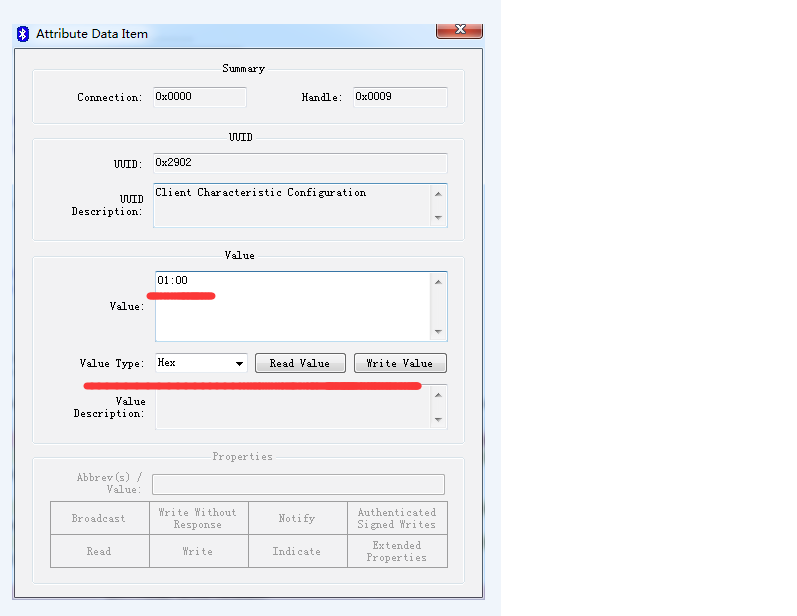
    1> 当我写入[01:00]时,Notify 功能是开启了,但此时去读取该值,取得该值仍然为[00:00];  此值是固定值? 还是可自定义?

    2> 如下图所示,从其他模块取的初始值为[01:00];且写入跟读取对应,即写入[00:00]读取到的值为[00:00]。请问应该如何操作?

       谢谢!