This thread has been locked.

If you have a related question, please click the "Ask a related question" button in the top right corner. The newly created question will be automatically linked to this question.

蓝牙链接状态移植读取。

Other Parts Discussed in Thread: CONTROLSUITE, CC2650, CC2640R2F

我用的官方的hid工程文件。里面没有蓝牙状态的读取。需要从simple_peripheral中移植这部分事件已经函数处理部分。现在移植了
1、#define SBP_ICALL_EVT ICALL_MSG_EVENT_ID // Event_Id_31
#define SBP_QUEUE_EVT UTIL_QUEUE_EVENT_ID // Event_Id_30
#define SBP_PERIODIC_EVT Event_Id_00

2、 if (events & SBP_QUEUE_EVT)
{
while (!Queue_empty(appMsgQueue))
{
sbpEvt_t *pMsg = (sbpEvt_t *)Util_dequeueMsg(appMsgQueue);
if (pMsg)
{
// Process message.
SimpleBLEPeripheral_processAppMsg(pMsg);

// Free the space from the message.
ICall_free(pMsg);
}
}
}

3、 SimpleBLEPeripheral_processAppMsg(pMsg);
4、 SimpleBLEPeripheral_processStateChangeEvt((gaprole_States_t)pMsg->
hdr.state);
在SimpleBLEPeripheral_processStateChangeEvt 处理函数里面。读取几种状态,对应点亮

  • 请问遇到的问题是什么?
  • 在另一个帖子中看到你的问题了,LED灯没有点亮。是否可以单步调试看一下,程序有没有进入LED控制部分?
  • 使用XDS110,在蓝牙模块和主机链接配对过程中可以的 但不调试吗?
  • 使用XDS110,在蓝牙模块和主机链接配对过程中可以单步调试吗?
  • CCS可以单步调试,或者程序里设置断点
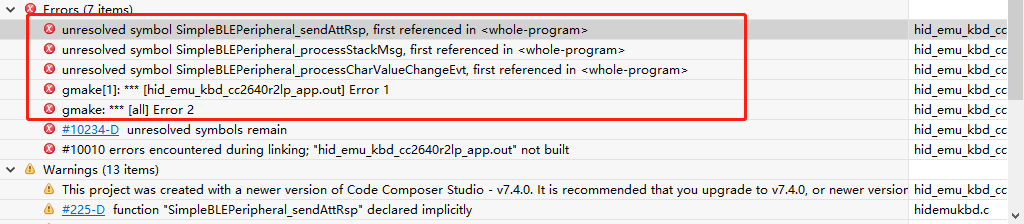
  • 从smipeSDK移值函数到HID工程里面出现如下错误

  • 造成这一报错的主要原因是未定义或者相关文件未包含,具体解释请看下边:
    Error #10234-D: unresolved symbols remain
    See processors.wiki.ti.com/.../10234

    It is quite common to hit this error if you try to create your own project based on a TivaWare or ControlSuite example but forget to add the required libraries to the project using the --library option in the linker's File Search Path options. These software examples typically require one or more driver libraries or other libraries to resolve references. Examples of libraries are driverlib, grlib, usblib from Tivaware, and driverlib, IQMath library etc from ControlSuite.

    The same concept applies even when you are working with other libraries, including the C runtime library included with the TI compiler tools.

    You can add the required libraries to your project in one of two ways:
    Under Project Properties → Build → Linker → File Search Path

    directly specify the full path and library name in the "--library" option or
    specify the path in the "--search_path" option and the library name in the "--library" option
    Another reason you could see this error is if you are using C header from C++ code. If you are including a C header file that isn't provided by the system, and if you are able to change the C header, you should strongly consider adding the extern "C" {...} logic inside the header to make it easier for C++ users to #include it into their C++ code. Since a C compiler won't understand the extern "C" construct, you must wrap the extern "C" { and } lines in an #ifdef so they won't be seen by normal C compilers.

    Error: undefined symbol "ResetISR", unresolved symbols remain
    If this error appears when creating a new CCS project or using the "Hello World" project template for CC26xx or CC13xx devices, the reason is that the New CCS Project wizard does not add the required device startup files and driverlib that are needed for a successful build. The linker error about undefined symbol "ResetISR" appears because that function is defined in a startup file that is not added to the project by default. The startup files and driverlib typically can be found in the SimpleLink SDK software (or in the case of CC2650, the BLE SDK software).

    Rather than creating a new project in CCS, the preferred and recommended method of starting development with Wireless Connectivity devices is to start with the examples in the Simplelink SDK.

    If you still wish to create and build a new project or "Hello World" project, you can follow the steps below to fix the undefined symbol error. However, please note that although these steps may resolve build errors, there is no guarantee that the program will run as expected. This is not a tested/validated build environment, and is generally not recommended.

    These are the steps to fix the unresolved symbol ResetISR error for a CC13xx device (similar steps would work for CC26xx):

    copy the file startup_ccs.c from C:\ti\simplelink_cc13x0_sdk_1_30_00_06\source\ti\devices\cc13x0\startup_files to your CCS project
    Under Project Properties → Build → Compiler → Include Options, add the path to the startup_files folder to --include_path option (eg: "C:\ti\simplelink_cc13x0_sdk_1_30_00_06\source\ti\devices\cc13x0\startup_files")
    Under Project Properties → Build → Linker → File Search Path, add driverlib.lib to --library option, and add the path to driverlib.lib to --search_path option (eg: "C:\ti\simplelink_cc13x0_sdk_1_30_00_06\source\ti\devices\cc13x0\driverlib\bin\ccs")
  • 现在的问题是
    1、我用官方的HID 工程文件,里面没有蓝牙状态灯的初始化部分。
    2、我用了simplelink的工程文件中的初始化部分移植到到HID初始化
    3、发现无法读取读取状态,且HID发送蓝牙指令也无法发送。
    请问下如何配置HID工程文件中增加蓝牙状态读取的初始化。
    void HidEmuKbd_init(void) //可以发送键盘指令
    {
    // ******************************************************************
    // N0 STACK API CALLS CAN OCCUR BEFORE THIS CALL TO ICall_registerApp
    // ******************************************************************
    // Register the current thread as an ICall dispatcher application
    // so that the application can send and receive messages.
    //客户端根据不同任务进行注册,我们的这里的SimpleBLEPeripheral_taskFxn完成该任务的Icall客户端注册,并且返回selfEntity作为改客户端Icall通信的源地址。

    ICall_registerApp(&selfEntity, &syncEvent);

    // Create an RTOS queue for message from profile to be sent to app.
    appMsgQueue = Util_constructQueue(&appMsg);

    // Setup the GAP
    //@brief Minimum time upon connection establishment before the peripheral starts a connection update procedure (seconds)

    VOID GAP_SetParamValue(TGAP_CONN_PAUSE_PERIPHERAL,
    DEFAULT_CONN_PAUSE_PERIPHERAL);

    // Setup the GAP Peripheral Role Profile
    {
    uint8_t initial_advertising_enable = TRUE;

    // By setting this to zero, the device will go into the waiting state after
    // being discoverable for 30.72 second, and will not being advertising again
    // until the enabler is set back to TRUE
    uint16_t gapRole_AdvertOffTime = 0;

    uint8_t enable_update_request = DEFAULT_ENABLE_UPDATE_REQUEST;
    uint16_t desired_min_interval = DEFAULT_DESIRED_MIN_CONN_INTERVAL;
    uint16_t desired_max_interval = DEFAULT_DESIRED_MAX_CONN_INTERVAL;
    uint16_t desired_slave_latency = DEFAULT_DESIRED_SLAVE_LATENCY;
    uint16_t desired_conn_timeout = DEFAULT_DESIRED_CONN_TIMEOUT;

    // Set the GAP Role Parameters
    GAPRole_SetParameter(GAPROLE_ADVERT_ENABLED, sizeof(uint8_t),
    &initial_advertising_enable);
    GAPRole_SetParameter(GAPROLE_ADVERT_OFF_TIME, sizeof(uint16_t),
    &gapRole_AdvertOffTime);

    GAPRole_SetParameter(GAPROLE_ADVERT_DATA, sizeof(advData), advData);
    GAPRole_SetParameter(GAPROLE_SCAN_RSP_DATA, sizeof(scanData), scanData);

    GAPRole_SetParameter(GAPROLE_PARAM_UPDATE_ENABLE, sizeof(uint8_t),
    &enable_update_request);
    GAPRole_SetParameter(GAPROLE_MIN_CONN_INTERVAL, sizeof(uint16_t),
    &desired_min_interval);
    GAPRole_SetParameter(GAPROLE_MAX_CONN_INTERVAL, sizeof(uint16_t),
    &desired_max_interval);
    GAPRole_SetParameter(GAPROLE_SLAVE_LATENCY, sizeof(uint16_t),
    &desired_slave_latency);
    GAPRole_SetParameter(GAPROLE_TIMEOUT_MULTIPLIER, sizeof(uint16_t),
    &desired_conn_timeout);
    }

    // Set the GAP Characteristics
    GGS_SetParameter(GGS_DEVICE_NAME_ATT, GAP_DEVICE_NAME_LEN,
    (void *)attDeviceName);

    // Setup the GAP Bond Manager
    {
    uint8_t pairMode = DEFAULT_PAIRING_MODE;
    uint8_t mitm = DEFAULT_MITM_MODE;
    uint8_t ioCap = DEFAULT_IO_CAPABILITIES;
    uint8_t bonding = DEFAULT_BONDING_MODE;

    GAPBondMgr_SetParameter(GAPBOND_PAIRING_MODE, sizeof(uint8_t), &pairMode);
    GAPBondMgr_SetParameter(GAPBOND_MITM_PROTECTION, sizeof(uint8_t), &mitm);
    GAPBondMgr_SetParameter(GAPBOND_IO_CAPABILITIES, sizeof(uint8_t), &ioCap);
    GAPBondMgr_SetParameter(GAPBOND_BONDING_ENABLED, sizeof(uint8_t), &bonding);
    }

    // Setup Battery Characteristic Values
    {
    uint8_t critical = DEFAULT_BATT_CRITICAL_LEVEL;

    Batt_SetParameter(BATT_PARAM_CRITICAL_LEVEL, sizeof (uint8_t), &critical);
    }

    // Set up HID keyboard service
    HidKbdCC_AddService();

    // Register for HID Dev callback
    HidDev_Register(&hidEmuKbdCfg, &hidEmuKbdHidCBs);

    // Start the GAP Role and Register the Bond Manager.
    HidDev_StartDevice();

    // Initialize keys on SmartRF06EB.
    Board_initKeys(HidEmuKbd_keyPressHandler);


    #if !defined (USE_LL_CONN_PARAM_UPDATE)
    // Get the currently set local supported LE features
    // The HCI will generate an HCI event that will get received in the main
    // loop
    HCI_LE_ReadLocalSupportedFeaturesCmd();
    #endif // !defined (USE_LL_CONN_PARAM_UPDATE)

    // Use default data Tx / Rx data length and times
    HCI_EXT_SetMaxDataLenCmd(LL_MIN_LINK_DATA_LEN, LL_MIN_LINK_DATA_TIME, LL_MIN_LINK_DATA_LEN, LL_MIN_LINK_DATA_TIME);

    /**********************自定义初始化*********************/

    GUA_Led_Set( GUA_LED_NO_1, GUA_LED_MODE_ON);
    GUA_Led_Set( GUA_LED_NO_2, GUA_LED_MODE_ON);
    GUA_Led_Set( GUA_LED_NO_1, GUA_LED_MODE_OFF);
    GUA_Led_Set( GUA_LED_NO_2, GUA_LED_MODE_OFF);


    VOID GAPRole_StartDevice(&SimpleBLEPeripheral_gapRoleCBs);

    Util_constructClock(&GUA_periodicClock, SimpleBLECentral_GUAHandler, SBP_GUA_PERIODIC_EVT_PERIOD, 0, false, SBP_GUA_PERIODIC_EVT); //定时器

    Util_startClock(&GUA_periodicClock);//启动定时器


    }
  • 我找下实验室,看能不能测试下你的代码,有结果会来更新
  • 我需要一个初始化工程文件,带有蓝牙连接状态初始化判断的。
    能否给一个电话联系方式?
  • 我这边没有“带有蓝牙连接状态初始化判断”的工程文件,我会问问实验室那边有没有
  • 请问你使用的SDK版本是什么?
  • C:\ti\simplelink_cc2640r2_sdk_1_50_00_58
    C:\ti\simplelink_cc2640r2_sdk_ble_example_pack_1_50_00_62
  • 请按照以下步骤操作一下,经测试功能正常:

    1、github.com/.../cc2650lp 从此链接获取 CC2650 LP hid_emu_kbd 例程并且移植到 CC2640R2F SDKv1.50 simple_peripheral

    2、用上述代码可成功实现BLE HID Game Controller Project,例程在此:github.com/.../TI-CC2640R2F-BLE-Game-Controller

    3、同样的方法把 hid_emu_kbd移植到 SDK 3.40 simple_peripheral,运行正常