Other Parts Discussed in Thread: LAUNCHXL-CC26X2R1, TM4C1294NCPDT
之前开发板是好的,同事用开发板做实验后,不能被电脑识别端口了。今天他没来,猜测是不是固件升级之类的出错了,现在不能被电脑识别了。求教,该如何处理?
This thread has been locked.
If you have a related question, please click the "Ask a related question" button in the top right corner. The newly created question will be automatically linked to this question.
之前开发板是好的,同事用开发板做实验后,不能被电脑识别端口了。今天他没来,猜测是不是固件升级之类的出错了,现在不能被电脑识别了。求教,该如何处理?
您使用的是LAUNCHXL-CC26X2R1?
请参阅下面的页面,查看是否有解决问题的建议
https://software-dl.ti.com/ccs/esd/documents/xdsdebugprobes/emu_xds110.html
https://software-dl.ti.com/ccs/esd/documents/xdsdebugprobes/emu_xds_software_package_download.html
好的,请您先参考我之前给出的链接,看是否能解决问题。若还是不行的话,请附上相关说明,谢谢
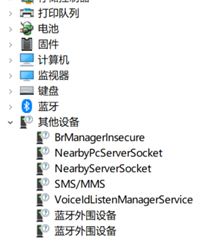
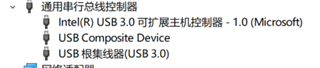
您现在设备管理器是如何显示的?请给出截图
建议您使用 https://software-dl.ti.com/ccs/esd/documents/xdsdebugprobes/emu_xds110.html#troubleshooting 给出的步骤来重新安装下驱动程序
开发板正常情况下设备管理器里会有一个端口选项,但是现在这个开发板固件升级失败后,什么都不显示了。
那您强制 XDS110 设备运行其默认 ROM 引导加载程序(在下面链接的Flashing the bootloader )
https://software-dl.ti.com/ccs/esd/documents/xdsdebugprobes/emu_xds110.html#troubleshooting
If that does not happen, the XDS110 needs to be forced into its ROM bootloader:
1. Disconnect the XDS110 from the USB port, powering it down.
2. Connect the JTAG TDO pin of the XDS110 TM4C1294NCPDT device (pin 97 of the 128-pin package device) to ground.
3. Re-connect the XDS110 to the USB port, powering it up. At this moment the XDS110 should be in DFU Mode.
4. Disconnect the JTAG TDO pin from ground.