
CC1352P: CC1352P1 LaunchPad 进入standby后无法用按键唤醒

Part Number: CC1352P


代码仅做最简进入standby后按键唤醒,测试用外部供电仅能进入休眠,无法唤醒,调试器供电也一样,有没有大佬知道怎么解决

#include <stdint.h>
#include <stdbool.h>
#include <ti/drivers/Power.h>
#include <ti/drivers/power/PowerCC26XX.h>
#include <ti/drivers/GPIO.h>
#include "ti_drivers_config.h"


volatile bool isKeyWakeup = false;
#define AON_WAKEUP_PIN 14  
#define LED_PIN 6       


void keyWakeupCallback(uint_least8_t index)
{
    isKeyWakeup = true;
    GPIO_clearInt(index);
}


void initWakeupSystem(void)
{
    Power_init();
    Power_releaseConstraint(PowerCC26XX_DISALLOW_STANDBY);
    Power_setPolicy(PowerCC26XX_standbyPolicy);
    GPIO_init();
    GPIO_PinConfig wakeupConfig = GPIO_CFG_IN_PU | GPIO_CFG_IN_INT_FALLING | GPIO_CFG_INT_ENABLE | GPIO_CFG_SHUTDOWN_WAKE_LOW;
    GPIO_setConfig(AON_WAKEUP_PIN, wakeupConfig);
    GPIO_setCallback(AON_WAKEUP_PIN, keyWakeupCallback);   
    GPIO_setConfig(LED_PIN, GPIO_CFG_OUT_STD | GPIO_CFG_OUT_LOW);
}


void *mainThread(void *arg0)
{
    initWakeupSystem();

    while(1)
    {
        isKeyWakeup = false;
       
        Power_sleep(PowerCC26XX_STANDBY);
        
       
        if (isKeyWakeup)
        {
            GPIO_toggle(LED_PIN);
          
            for (volatile uint32_t i=0; i<200000; i++);
        }
    }
}
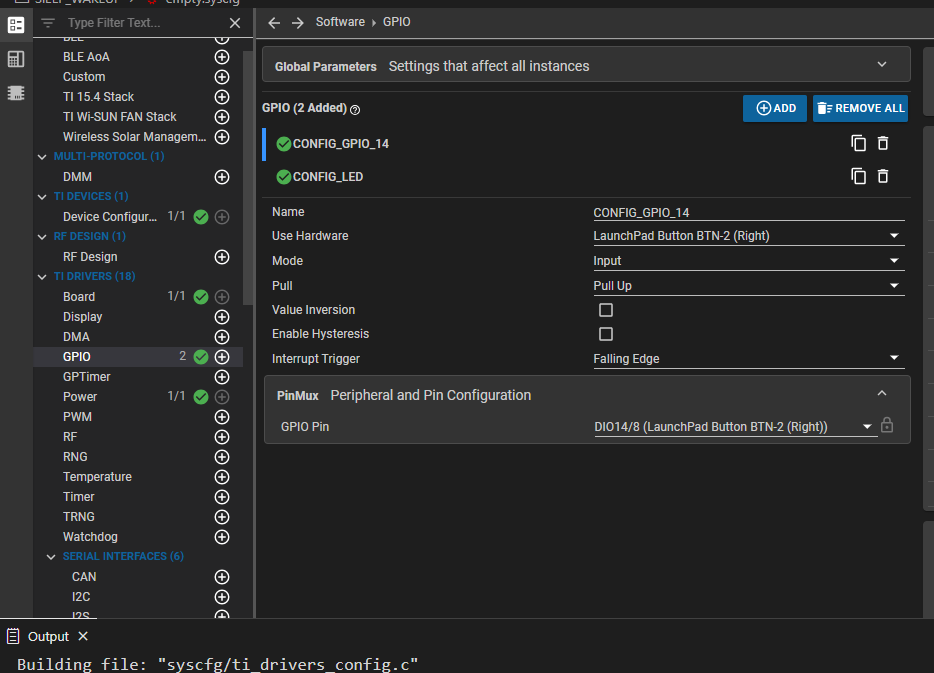
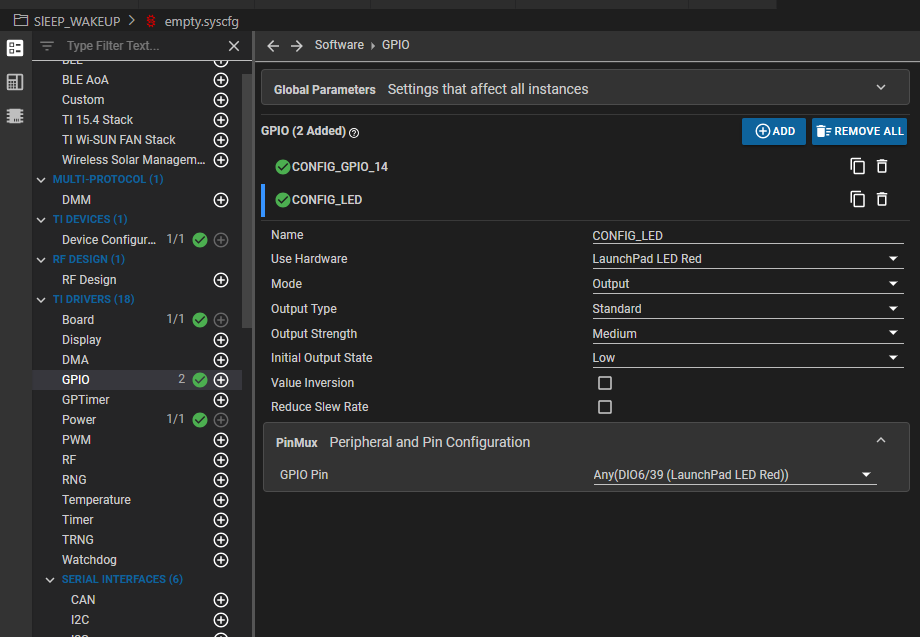
PixPin_2026-02-27_10-13-50.pngPixPin_2026-02-27_10-13-36.png

  • 您好

    已经收到了您的案例,调查需要些时间,感谢您的耐心等待

  • 您好

    客户在使用该示例时遇到相同问题吗?: gpiointerrupt

  • 你好,我用示例测试了,可以正常控制亮灭,只是没有消抖会有一些抖动现象

    /*
     * Copyright (c) 2015-2020, Texas Instruments Incorporated
     * All rights reserved.
     *
     * Redistribution and use in source and binary forms, with or without
     * modification, are permitted provided that the following conditions
     * are met:
     *
     * *  Redistributions of source code must retain the above copyright
     *    notice, this list of conditions and the following disclaimer.
     *
     * *  Redistributions in binary form must reproduce the above copyright
     *    notice, this list of conditions and the following disclaimer in the
     *    documentation and/or other materials provided with the distribution.
     *
     * *  Neither the name of Texas Instruments Incorporated nor the names of
     *    its contributors may be used to endorse or promote products derived
     *    from this software without specific prior written permission.
     *
     * THIS SOFTWARE IS PROVIDED BY THE COPYRIGHT HOLDERS AND CONTRIBUTORS "AS IS"
     * AND ANY EXPRESS OR IMPLIED WARRANTIES, INCLUDING, BUT NOT LIMITED TO,
     * THE IMPLIED WARRANTIES OF MERCHANTABILITY AND FITNESS FOR A PARTICULAR
     * PURPOSE ARE DISCLAIMED. IN NO EVENT SHALL THE COPYRIGHT OWNER OR
     * CONTRIBUTORS BE LIABLE FOR ANY DIRECT, INDIRECT, INCIDENTAL, SPECIAL,
     * EXEMPLARY, OR CONSEQUENTIAL DAMAGES (INCLUDING, BUT NOT LIMITED TO,
     * PROCUREMENT OF SUBSTITUTE GOODS OR SERVICES; LOSS OF USE, DATA, OR PROFITS;
     * OR BUSINESS INTERRUPTION) HOWEVER CAUSED AND ON ANY THEORY OF LIABILITY,
     * WHETHER IN CONTRACT, STRICT LIABILITY, OR TORT (INCLUDING NEGLIGENCE OR
     * OTHERWISE) ARISING IN ANY WAY OUT OF THE USE OF THIS SOFTWARE,
     * EVEN IF ADVISED OF THE POSSIBILITY OF SUCH DAMAGE.
     */
    
    /*
     *  ======== gpiointerrupt.c ========
     */
    #include <stdint.h>
    #include <stddef.h>
    
    /* Driver Header files */
    #include <ti/drivers/GPIO.h>
    
    /* Driver configuration */
    #include "ti_drivers_config.h"
    
    /*
     *  ======== gpioButtonFxn0 ========
     *  Callback function for the GPIO interrupt on CONFIG_GPIO_BUTTON_0.
     *
     *  Note: GPIO interrupts are cleared prior to invoking callbacks.
     */
    void gpioButtonFxn0(uint_least8_t index)
    {
        /* Toggle an LED */
        GPIO_toggle(CONFIG_GPIO_LED_0);
    }
    
    /*
     *  ======== gpioButtonFxn1 ========
     *  Callback function for the GPIO interrupt on CONFIG_GPIO_BUTTON_1.
     *  This may not be used for all boards.
     *
     *  Note: GPIO interrupts are cleared prior to invoking callbacks.
     */
    void gpioButtonFxn1(uint_least8_t index)
    {
        /* Toggle an LED */
        GPIO_toggle(CONFIG_GPIO_LED_1);
    }
    
    /*
     *  ======== mainThread ========
     */
    void *mainThread(void *arg0)
    {
        /* Call driver init functions */
        GPIO_init();
    
        /* Configure the LED and button pins */
        GPIO_setConfig(CONFIG_GPIO_LED_0, GPIO_CFG_OUT_STD | GPIO_CFG_OUT_LOW);
        GPIO_setConfig(CONFIG_GPIO_LED_1, GPIO_CFG_OUT_STD | GPIO_CFG_OUT_LOW);
        GPIO_setConfig(CONFIG_GPIO_BUTTON_0, GPIO_CFG_IN_PU | GPIO_CFG_IN_INT_FALLING);
    
        /* Turn on user LED */
        GPIO_write(CONFIG_GPIO_LED_0, CONFIG_GPIO_LED_ON);
    
        /* Install Button callback */
        GPIO_setCallback(CONFIG_GPIO_BUTTON_0, gpioButtonFxn0);
    
        /* Enable interrupts */
        GPIO_enableInt(CONFIG_GPIO_BUTTON_0);
    
        /*
         *  If more than one input pin is available for your device, interrupts
         *  will be enabled on CONFIG_GPIO_BUTTON1.
         */
        if (CONFIG_GPIO_BUTTON_0 != CONFIG_GPIO_BUTTON_1)
        {
            /* Configure BUTTON1 pin */
            GPIO_setConfig(CONFIG_GPIO_BUTTON_1, GPIO_CFG_IN_PU | GPIO_CFG_IN_INT_FALLING);
    
            /* Install Button callback */
            GPIO_setCallback(CONFIG_GPIO_BUTTON_1, gpioButtonFxn1);
            GPIO_enableInt(CONFIG_GPIO_BUTTON_1);
        }
    
        return (NULL);
    }