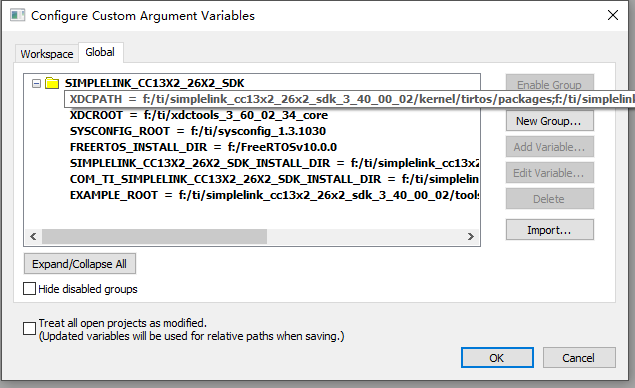
参照《Quick Start Guide for SimpleLink™ CC13x2 or CC26x2 SDK》中关于zigbee协议栈的操作指引《TI Z-Stack Quick Start Guide》,想在IAR中建立一个zigbee协议栈的工程,按照文档的说明一步步配置:
1、在IAR的菜单中,选择 Tools -> Configure Custom Argument Variables
2、选择 Global , 然后点击 Import..
3、导入文件“SIMPLELINK_CC13X2_26X2_SDK.custom_argvars”,路径为:ti\simplelink_cc13x2_26x2_sdk_3_40_00_02\tools\iar
4、编辑 文件“SIMPLELINK_CC13X2_26X2_SDK.custom_argvars”,因为我的SDK安装路径是F盘,不是默认的C盘,因此把这个文件里的c:都改成了f:
5、Restart IAR
6、Open an IAR workspace project: File → Open → Workspace。
选择了一个例程:F:\ZIGBEE3.0-coor\ti\simplelink_cc13x2_26x2_sdk_3_40_00_02\examples\rtos\CC1352R1_LAUNCHXL\zstack\zc_cie\tirtos\iar
7、选择里边的工程文件后,IAR提示:“this will open a workspace from a template and save it in a new folder”,然后选择了一个新的目录:F:\ZIGBEE3.0-coor\ti\simplelink_cc13x2_26x2_sdk_3_40_00_02\1352R-coorCIE
指引文档中有个个下边的提示,说的是新建工程的目录应该是在SDK的安装目录,我上边选择的应该也没错,在安装目录新建了一个文件夹“1352R-coorCIE”,然后工程文件放到了这个文件夹里。
Note:
After selecting, IAR will open a workspace from a template and save it in a new folder. It is important to create this IAR workspace folder directly inside the <SDK_INSTALL_DIR> in order for the project to build properly. Do not use spaces in the folder name.
8、工程打开后,就发现所有文件的路径都对应不上,如下图:
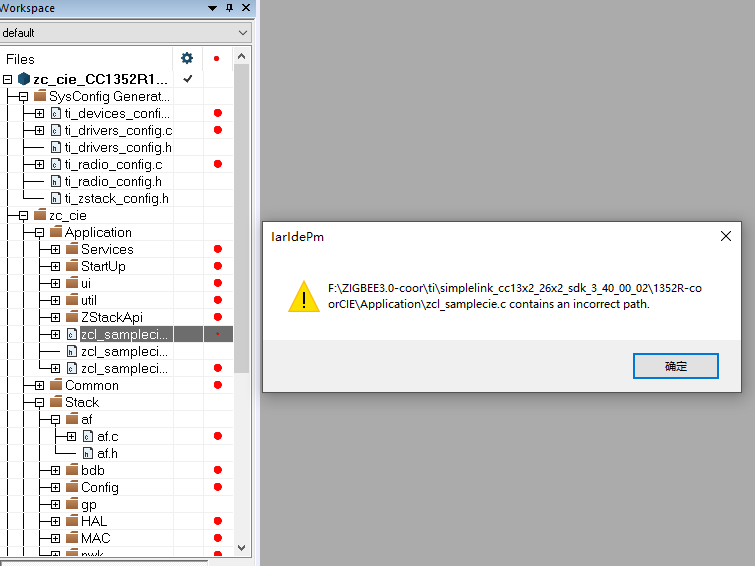
我看SDK中,这个c文件的正确路径应该是:F:\ZIGBEE3.0-coor\ti\simplelink_cc13x2_26x2_sdk_3_40_00_02\source\ti\zstack\apps\cie
9、所有的文件路径都对不上,感觉IAR的这个工程打开文件的路径,还都是从工程目录开始往下查找的,和SDK安装包中的路径方式没有扯上关系??