Other Parts Discussed in Thread: SYSCONFIG, MSPM0C1106
请注意,本文内容源自机器翻译,可能存在语法或其它翻译错误,仅供参考。如需获取准确内容,请参阅链接中的英语原文或自行翻译。
器件型号: LP-MSPM0C1106
Thread 中讨论的其他器件: SysConfig、 MSPM0C1106
我正在使用 MSPM0C106 微控制器、并尝试将 PA11 配置 为具有唤醒功能(具有唤醒功能的 SDIO) 引脚的标准驱动器。
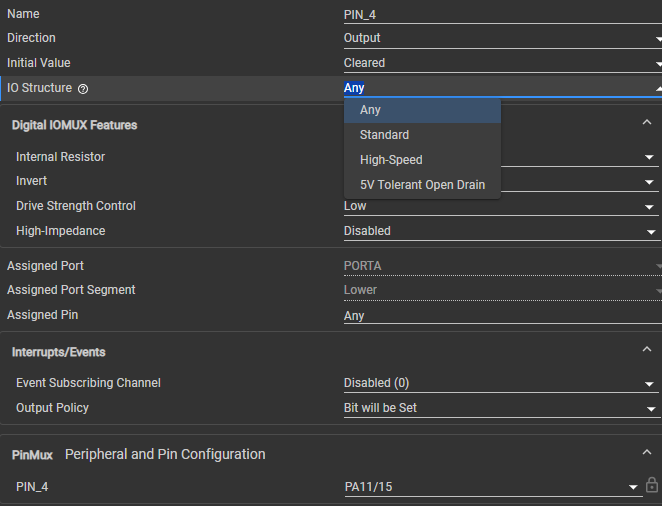
",="" arial,="" sans-serif;="" font-size:="" 16px;="" font-weight:="" 400;="" margin:="" 12px="" 0px="" text-decoration:="" none;="" border-bottom:="" rgb(10,="" 10,="" 10);"="" data-processed="true" data-complete="true" data-hveid="CAEICRAA" data-sfc-cb="" data-sfc-root="ep" data-sfc-cp="">根据器件数据表、PA11 在物理上被归类为具有唤醒 结构的 SDIO(标准)。 但是、在 SysConfig 实用程序工具中、“IO 结构 “下拉菜单仅提供三个广泛的筛选选项:
- ",="" arial,="" sans-serif;="" font-size:="" 16px;="" font-weight:="" 400;="" margin:="" 12px="" 0px="" text-decoration:="" none;="" border-bottom:="" rgb(10,="" 10,="" 10);"="" data-processed="true" data-complete="true" data-sfc-cb="" data-sfc-root="ep">
- ",="" arial,="" sans-serif;="" font-size:="" 16px;="" font-weight:="" 400;="" margin:="" 0px="" 12px;="" text-decoration:="" none;="" border-bottom:="" rgb(10,="" 10,="" 10);"="" data-sae="" data-complete="true" data-hveid="CAEIChAA" data-sfc-cb="" data-sfc-root="ep" data-sfc-cp="">",="" arial,="" sans-serif;="" font-size:="" 16px;="" font-weight:="" 400;="" margin:="" 0px;="" text-decoration:="" none;="" border-bottom:="" 0px="" rgb(10,="" 10,="" 10);"="" data-complete="true" data-sfc-cb="" data-sfc-root="ep" data-sfc-cp="">标准
- ",="" arial,="" sans-serif;="" font-size:="" 16px;="" font-weight:="" 400;="" margin:="" 0px="" 12px;="" text-decoration:="" none;="" border-bottom:="" rgb(10,="" 10,="" 10);"="" data-sae="" data-complete="true" data-hveid="CAEIChAB" data-sfc-cb="" data-sfc-root="ep" data-sfc-cp="">",="" arial,="" sans-serif;="" font-size:="" 16px;="" font-weight:="" 400;="" margin:="" 0px;="" text-decoration:="" none;="" border-bottom:="" 0px="" rgb(10,="" 10,="" 10);"="" data-complete="true" data-sfc-cb="" data-sfc-root="ep" data-sfc-cp="">高速
- ",="" arial,="" sans-serif;="" font-size:="" 16px;="" font-weight:="" 400;="" margin:="" 0px="" 12px;="" text-decoration:="" none;="" border-bottom:="" rgb(10,="" 10,="" 10);"="" data-sae="" data-complete="true" data-hveid="CAEIChAC" data-sfc-cb="" data-sfc-root="ep" data-sfc-cp="">",="" arial,="" sans-serif;="" font-size:="" 16px;="" font-weight:="" 400;="" margin:="" 0px;="" text-decoration:="" none;="" border-bottom:="" 0px="" rgb(10,="" 10,="" 10);"="" data-complete="true" data-sfc-cb="" data-sfc-root="ep" data-sfc-cp="">5V 容限开漏
",="" arial,="" sans-serif;="" font-size:="" 16px;="" font-weight:="" 400;="" margin:="" 12px="" 0px="" text-decoration:="" none;="" border-bottom:="" rgb(10,="" 10,="" 10);"="" data-processed="true" data-complete="true" data-hveid="CAEICxAA" data-sfc-cb="" data-sfc-root="ep" data-sfc-cp="">该下拉列表中没有标记为“Standard with Wake“或“Wakeup“的明确选项。