This thread has been locked.

If you have a related question, please click the "Ask a related question" button in the top right corner. The newly created question will be automatically linked to this question.

[参考译文] AM2431:多核应用入门(1个主 R5F 内核和1个支持 M4F 内核)

Guru**** 2528360 points


请注意,本文内容源自机器翻译,可能存在语法或其它翻译错误,仅供参考。如需获取准确内容,请参阅链接中的英语原文或自行翻译。

https://e2e.ti.com/support/microcontrollers/arm-based-microcontrollers-group/arm-based-microcontrollers/f/arm-based-microcontrollers-forum/1406210/am2431-getting-started-with-a-multi-core-application-1-main-r5f-core-and-1support-m4f-core

器件型号:AM2431
主题中讨论的其他器件:UNIFLASH

工具与软件:

我已在  \examples\Development Tools\empty\system_nortos\中打开 MCU-PLUS-SDK -AM243X 中的示例空项目

尝试使用 RF5_0_0和 M4F_0这两个内核构建空工程时、显示错误构建:

Building target: "empty_am243x-evm_m4fss0-0_nortos_ti-arm-clang.out"
Invoking: Arm Linker
"C:/ti/ccs1271/ccs/tools/compiler/ti-cgt-armllvm_3.2.2.LTS/bin/tiarmclang.exe" -mcpu=cortex-m4 -mfloat-abi=hard -mlittle-endian -mthumb -DSOC_AM243X -D_DEBUG_=1 -g -Wall -Wno-gnu-variable-sized-type-not-at-end -Wno-unused-function -Wl,-m"empty.Debug.map" -Wl,-i"C:/ti/mcu_plus_sdk_am243x_09_02_01_05/source/kernel/nortos/lib" -Wl,-i"C:/ti/mcu_plus_sdk_am243x_09_02_01_05/source/drivers/lib" -Wl,-i"C:/ti/ccs1271/ccs/tools/compiler/ti-cgt-armllvm_3.2.2.LTS/lib" -Wl,--reread_libs -Wl,--diag_wrap=off -Wl,--display_error_number -Wl,--warn_sections -Wl,--xml_link_info="empty_am243x-evm_m4fss0-0_nortos_ti-arm-clang_linkInfo.xml" -Wl,--ram_model -o "empty_am243x-evm_m4fss0-0_nortos_ti-arm-clang.out" "./empty.o" "./syscfg/ti_dpl_config.o" "./syscfg/ti_drivers_config.o" "./syscfg/ti_drivers_open_close.o" "./syscfg/ti_pinmux_config.o" "./syscfg/ti_power_clock_config.o" "./syscfg/ti_board_config.o" "./syscfg/ti_board_open_close.o" "./syscfg/ti_enet_config.o" "./syscfg/ti_enet_open_close.o" "./syscfg/ti_enet_soc.o" "./syscfg/ti_enet_lwipif.o" "./main.o" -Wl,-l"syscfg/linker.cmd" -Wl,-lnortos.am243x.m4f.ti-arm-clang.debug.lib -Wl,-ldrivers.am243x.m4f.ti-arm-clang.debug.lib -Wl,-llibc.a -Wl,-llibsysbm.a
makefile:149: recipe for target 'empty_am243x-evm_m4fss0-0_nortos_ti-arm-clang.out' failed
"syscfg/linker.cmd", line 57: warning #10097: memory range not found: USER_SHM_MEM on page 0
"syscfg/linker.cmd", line 56: error #10099-D: program will not fit into available memory, or the section contains a call site that requires a trampoline that can't be generated for this section. run placement with alignment fails for section ".bss.user_shared_mem" size 0
"syscfg/linker.cmd", line 60: warning #10097: memory range not found: LOG_SHM_MEM on page 0
"syscfg/linker.cmd", line 59: error #10099-D: program will not fit into available memory, or the section contains a call site that requires a trampoline that can't be generated for this section. run placement with alignment fails for section ".bss.log_shared_mem" size 0
"syscfg/linker.cmd", line 63: warning #10097: memory range not found: IPC_VRING_MEM on page 0
"syscfg/linker.cmd", line 62: error #10099-D: program will not fit into available memory, or the section contains a call site that requires a trampoline that can't be generated for this section. run placement with alignment fails for section ".bss.ipc_vring_mem" size 0
error #10010: errors encountered during linking; "empty_am243x-evm_m4fss0-0_nortos_ti-arm-clang.out" not built
tiarmclang: error: tiarmlnk command failed with exit code 1 (use -v to see invocation)
gmake[1]: *** [empty_am243x-evm_m4fss0-0_nortos_ti-arm-clang.out] Error 1
gmake: *** [all] Error 2
makefile:145: recipe for target 'all' failed

**** Build Finished ****

**** Build of configuration Debug for project empty_am243x-evm_system_nortos ****

"C:\\ti\\ccs1271\\ccs\\utils\\bin\\gmake" -k system-post-build

C:/ti/ccs1271/ccs/utils/bin/gmake -C C:\dev\ccs\empty_am243x-evm_system_nortos -f makefile_system_ccs_bootimage_gen OUTNAME=empty_system PROFILE=Debug MCU_PLUS_SDK_PATH=C:/ti/mcu_plus_sdk_am243x_09_02_01_05 CG_TOOL_ROOT=C:/ti/ccs1271/ccs/tools/compiler/ti-cgt-armllvm_3.2.2.LTS CCS_INSTALL_DIR=C:\ti\ccs1271\ccs CCS_IDE_MODE=desktop
gmake[1]: Entering directory 'C:/dev/ccs/empty_am243x-evm_system_nortos'
Boot multi-core image: Debug/empty_system.appimage ...
C:\ti\ccs1271\ccs/tools/node/node C:/ti/mcu_plus_sdk_am243x_09_02_01_05/tools/boot/multicoreImageGen/multicoreImageGen.js --devID 55 --out Debug/empty_system.appimage ../empty_am243x-evm_r5fss0-0_nortos_ti-arm-clang/Debug/empty_am243x-evm_r5fss0-0_nortos_ti-arm-clang.rprc@4 ../empty_am243x-evm_r5fss0-1_nortos_ti-arm-clang/Debug/empty_am243x-evm_r5fss0-1_nortos_ti-arm-clang.rprc@5 ../empty_am243x-evm_r5fss1-0_nortos_ti-arm-clang/Debug/empty_am243x-evm_r5fss1-0_nortos_ti-arm-clang.rprc@6 ../empty_am243x-evm_r5fss1-1_nortos_ti-arm-clang/Debug/empty_am243x-evm_r5fss1-1_nortos_ti-arm-clang.rprc@7 ../empty_am243x-evm_m4fss0-0_nortos_ti-arm-clang/Debug/empty_am243x-evm_m4fss0-0_nortos_ti-arm-clang.rprc@14 >> Debug/temp_stdout_Debug.txt
makefile_system_ccs_bootimage_gen:64: recipe for target 'all' failed
File ../empty_am243x-evm_r5fss0-0_nortos_ti-arm-clang/Debug/empty_am243x-evm_r5fss0-0_nortos_ti-arm-clang.rprc does not exist
gmake[1]: *** [all] Error 1
gmake[1]: Leaving directory 'C:/dev/ccs/empty_am243x-evm_system_nortos'
makefile:15: recipe for target 'system-post-build' failed
gmake: [system-post-build] Error 2 (ignored)

**** Build Finished ****

我还收到以下消息:

**** Build of configuration Debug for project empty_am243x-evm_system_nortos ****

"C:\\ti\\ccs1271\\ccs\\utils\\bin\\gmake" -k system-post-build

C:/ti/ccs1271/ccs/utils/bin/gmake -C C:\dev\ccs\empty_am243x-evm_system_nortos -f makefile_system_ccs_bootimage_gen OUTNAME=empty_system PROFILE=Debug MCU_PLUS_SDK_PATH=C:/ti/mcu_plus_sdk_am243x_09_02_01_05 CG_TOOL_ROOT=C:/ti/ccs1271/ccs/tools/compiler/ti-cgt-armllvm_3.2.2.LTS CCS_INSTALL_DIR=C:\ti\ccs1271\ccs CCS_IDE_MODE=desktop
gmake[1]: Entering directory 'C:/dev/ccs/empty_am243x-evm_system_nortos'
Boot multi-core image: Debug/empty_system.appimage ...
C:\ti\ccs1271\ccs/tools/node/node C:/ti/mcu_plus_sdk_am243x_09_02_01_05/tools/boot/multicoreImageGen/multicoreImageGen.js --devID 55 --out Debug/empty_system.appimage ../empty_am243x-evm_r5fss0-0_nortos_ti-arm-clang/Debug/empty_am243x-evm_r5fss0-0_nortos_ti-arm-clang.rprc@4 ../empty_am243x-evm_r5fss0-1_nortos_ti-arm-clang/Debug/empty_am243x-evm_r5fss0-1_nortos_ti-arm-clang.rprc@5 ../empty_am243x-evm_r5fss1-0_nortos_ti-arm-clang/Debug/empty_am243x-evm_r5fss1-0_nortos_ti-arm-clang.rprc@6 ../empty_am243x-evm_r5fss1-1_nortos_ti-arm-clang/Debug/empty_am243x-evm_r5fss1-1_nortos_ti-arm-clang.rprc@7 ../empty_am243x-evm_m4fss0-0_nortos_ti-arm-clang/Debug/empty_am243x-evm_m4fss0-0_nortos_ti-arm-clang.rprc@14 >> Debug/temp_stdout_Debug.txt
makefile_system_ccs_bootimage_gen:64: recipe for target 'all' failed
File ../empty_am243x-evm_r5fss0-0_nortos_ti-arm-clang/Debug/empty_am243x-evm_r5fss0-0_nortos_ti-arm-clang.rprc does not exist
gmake[1]: *** [all] Error 1
gmake[1]: Leaving directory 'C:/dev/ccs/empty_am243x-evm_system_nortos'
makefile:15: recipe for target 'system-post-build' failed
gmake: [system-post-build] Error 2 (ignored)

**** Build Finished ****

是否有人知道如何解决此问题、以便我可以构建这个空的多核工程并将其刷写到电路板中? (我已经尝试了多个 SDK、以了解 SDK 是否可能是个问题)

或者、如果有其他方法可以将多核程序写入我的芯片/电路板并将其刷写到我的芯片/电路板上、请告诉我。

  • 请注意,本文内容源自机器翻译,可能存在语法或其它翻译错误,仅供参考。如需获取准确内容,请参阅链接中的英语原文或自行翻译。

    你好、Jacob、

    这是意料之外的。 请允许我花几个小时来研究这个问题。 我将在设置和检查的基础上构建相同的结构。

    谢谢!

    Vaibhav

  • 请注意,本文内容源自机器翻译,可能存在语法或其它翻译错误,仅供参考。如需获取准确内容,请参阅链接中的英语原文或自行翻译。

    你好、Jacob、

    我在设置中对这些感到厌倦、只导入系统 nortos 示例。  

    然后我执行了以下操作:

    发布此内部版本是为我进行的、我没有看到任何错误。

    此致、

    Vaibhav

  • 请注意,本文内容源自机器翻译,可能存在语法或其它翻译错误,仅供参考。如需获取准确内容,请参阅链接中的英语原文或自行翻译。

    您使用了 am243x-lp 示例。 我将使用 am243x-evm 示例。 您没有收到相同构建问题的原因。 我相信这是一个问题,由长路径的名称在建设。 但如果是这样、那就说明 SDK 中存在错误。 我必须更改整个工作区和路径、以便创建更短的路径。

  • 请注意,本文内容源自机器翻译,可能存在语法或其它翻译错误,仅供参考。如需获取准确内容,请参阅链接中的英语原文或自行翻译。

    您好!

    借助 AM243-EVM、我也会成功构建 TI EVM。

    您能否详细说明以下内容是什么意思?

    [报价 userid="619314" url="~/support/microcontrollers/arm-based-microcontrollers-group/arm-based-microcontrollers/f/arm-based-microcontrollers-forum/1406210/am2431-getting-started-with-a-multi-core-application-1-main-r5f-core-and-1support-m4f-core/5385970 #5385970"]但是如果是这样的话、那是 SDK 中的错误。 我必须更改我的整个工作区和路径、以便创建更短的路径。

    因为不应将路径名称远程靠近导致生成故障。

    此致、

    Vaibhav

  • 请注意,本文内容源自机器翻译,可能存在语法或其它翻译错误,仅供参考。如需获取准确内容,请参阅链接中的英语原文或自行翻译。

    嗯、当我尝试编译正常示例(hello_world_ccp_am243x-evm_r5fss0-0_nortos_ti-arm-clang.rprc)时、我会遇到编译后处理和签名步骤中的编译错误。

    下面是我在一个正常示例中得到的输出(注意:我正在运行 Windows 11. . 他的编译后错误已发生 都很有用 我尝试过跑步 Windows 11. ):

    Finished building target: "hello_world_cpp_am243x-evm_r5fss0-0_nortos_ti-arm-clang.out"
     
    C:/ti/ccs1271/ccs/utils/bin/gmake -C C:\dev\V280\ccs\hello_world_cpp_am243x-evm_r5fss0-0_nortos_ti-arm-clang -f makefile_ccs_bootimage_gen OUTNAME=hello_world_cpp_am243x-evm_r5fss0-0_nortos_ti-arm-clang PROFILE=Debug MCU_PLUS_SDK_PATH=C:/ti/mcu_plus_sdk_am243x_10_00_00_20 CG_TOOL_ROOT=C:/ti/ccs1271/ccs/tools/compiler/ti-cgt-armllvm_3.2.2.LTS CCS_INSTALL_DIR=C:\ti\ccs1271\ccs CCS_IDE_MODE=desktop DEVICE=am243x
     Boot image: am243x:r5fss0-0:nortos:ti-arm-clang C:/dev/V280/ccs/hello_world_cpp_am243x-evm_r5fss0-0_nortos_ti-arm-clang/Debug/hello_world_cpp_am243x-evm_r5fss0-0_nortos_ti-arm-clang.appimage  ...
    C:\ti\ccs1271\ccs/tools/node/node C:/ti/mcu_plus_sdk_am243x_10_00_00_20/tools/boot/out2rprc/elf2rprc.js Debug/hello_world_cpp_am243x-evm_r5fss0-0_nortos_ti-arm-clang.out >> Debug/temp_stdout_Debug.txt
    C:\ti\ccs1271\ccs/utils/cygwin/cp hello_world_cpp_am243x-evm_r5fss0-0_nortos_ti-arm-clang.rprc C:/dev/V280/ccs/hello_world_cpp_am243x-evm_r5fss0-0_nortos_ti-arm-clang/Debug/hello_world_cpp_am243x-evm_r5fss0-0_nortos_ti-arm-clang.rprc
    C:\ti\ccs1271\ccs/utils/cygwin/cp C:/dev/V280/ccs/hello_world_cpp_am243x-evm_r5fss0-0_nortos_ti-arm-clang/Debug/hello_world_cpp_am243x-evm_r5fss0-0_nortos_ti-arm-clang.rprc C:/dev/V280/ccs/hello_world_cpp_am243x-evm_r5fss0-0_nortos_ti-arm-clang/Debug/hello_world_cpp_am243x-evm_r5fss0-0_nortos_ti-arm-clang.rprc_tmp
    C:\ti\ccs1271\ccs/utils/cygwin/rm -f C:/dev/V280/ccs/hello_world_cpp_am243x-evm_r5fss0-0_nortos_ti-arm-clang/Debug/hello_world_cpp_am243x-evm_r5fss0-0_nortos_ti-arm-clang.rprc
    C:/ti/mcu_plus_sdk_am243x_10_00_00_20/tools/boot/xipGen/xipGen.exe -i C:/dev/V280/ccs/hello_world_cpp_am243x-evm_r5fss0-0_nortos_ti-arm-clang/Debug/hello_world_cpp_am243x-evm_r5fss0-0_nortos_ti-arm-clang.rprc_tmp -o C:/dev/V280/ccs/hello_world_cpp_am243x-evm_r5fss0-0_nortos_ti-arm-clang/Debug/hello_world_cpp_am243x-evm_r5fss0-0_nortos_ti-arm-clang.rprc -x C:/dev/V280/ccs/hello_world_cpp_am243x-evm_r5fss0-0_nortos_ti-arm-clang/Debug/hello_world_cpp_am243x-evm_r5fss0-0_nortos_ti-arm-clang.rprc_xip --flash-start-addr 0x60000000 -v > Debug/temp_stdout_Debug.txt
    C:\ti\ccs1271\ccs/tools/node/node C:/ti/mcu_plus_sdk_am243x_10_00_00_20/tools/boot/multicoreImageGen/multicoreImageGen.js --devID 55 --out C:/dev/V280/ccs/hello_world_cpp_am243x-evm_r5fss0-0_nortos_ti-arm-clang/Debug/hello_world_cpp_am243x-evm_r5fss0-0_nortos_ti-arm-clang.appimage C:/dev/V280/ccs/hello_world_cpp_am243x-evm_r5fss0-0_nortos_ti-arm-clang/Debug/hello_world_cpp_am243x-evm_r5fss0-0_nortos_ti-arm-clang.rprc@4  >> Debug/temp_stdout_Debug.txt
    C:\ti\ccs1271\ccs/tools/node/node C:/ti/mcu_plus_sdk_am243x_10_00_00_20/tools/boot/multicoreImageGen/multicoreImageGen.js --devID 55 --out C:/dev/V280/ccs/hello_world_cpp_am243x-evm_r5fss0-0_nortos_ti-arm-clang/Debug/hello_world_cpp_am243x-evm_r5fss0-0_nortos_ti-arm-clang.appimage_xip C:/dev/V280/ccs/hello_world_cpp_am243x-evm_r5fss0-0_nortos_ti-arm-clang/Debug/hello_world_cpp_am243x-evm_r5fss0-0_nortos_ti-arm-clang.rprc_xip@4  >> Debug/temp_stdout_Debug.txt
    python C:/ti/mcu_plus_sdk_am243x_10_00_00_20/source/security/security_common/tools/boot/signing/appimage_x509_cert_gen.py --bin C:/dev/V280/ccs/hello_world_cpp_am243x-evm_r5fss0-0_nortos_ti-arm-clang/Debug/hello_world_cpp_am243x-evm_r5fss0-0_nortos_ti-arm-clang.appimage --authtype 1 --key C:/ti/mcu_plus_sdk_am243x_10_00_00_20/source/security/security_common/tools/boot/signing/app_degenerateKey.pem --output C:/dev/V280/ccs/hello_world_cpp_am243x-evm_r5fss0-0_nortos_ti-arm-clang/Debug/hello_world_cpp_am243x-evm_r5fss0-0_nortos_ti-arm-clang.appimage.hs_fs
    makefile_ccs_bootimage_gen:75: recipe for target 'all' failed
    python: can't open file '/c/dev/V280/ccs/hello_world_cpp_am243x-evm_r5fss0-0_nortos_ti-arm-clang/C:/ti/mcu_plus_sdk_am243x_10_00_00_20/source/security/security_common/tools/boot/signing/appimage_x509_cert_gen.py': [Errno 2] No such file or directory
    gmake[3]: *** [all] Error 2
    makefile:168: recipe for target 'post-build' failed
    gmake[2]: [post-build] Error 2 (ignored)


    我要强调、这可能是 SDK 或 CCS 的 python 和/或路径问题、因为这似乎是编译后处理的问题、如我的输出中所示:  Python:无法打开文件"/c/dev/V280/ccs/hello_world_cpp_am243x-evm_r5fss0-0_nortos_ti-arm-clang/C:/ti/mcu_plus_sdk_am243x_10_00_00_20/source/security/security_common/tools/boot/signing/appimage_x509_cert_gen.py ":[errno 2]没有这样的文件或目录

    为了解决该问题、我必须拖动 post signing python 脚本和其他相关文件并运行批处理文件。 以下是我为了获取正确的输出文件而必须运行的批处理文件(post-build.bat):

    python appimage_x509_cert_gen.py --bin hello_world_cpp_am243x-evm_r5fss0-0_nortos_ti-arm-clang.appimage --authtype 1 --key app_degenerateKey.pem --output hello_world_cpp_am243x-evm_r5fss0-0_nortos_ti-arm-clang.appimage.hs_fs

    为什么我必须对每个示例执行此操作才能在 Windows 11机器上进行构建? SDK 或 python 似乎存在路径问题(可能路径太长)。

    您建议如何解决此问题? 最后、我想用一个多核应用程序(主内核和 MCU 内核)闪存到电路板上。

  • 请注意,本文内容源自机器翻译,可能存在语法或其它翻译错误,仅供参考。如需获取准确内容,请参阅链接中的英语原文或自行翻译。

    你好、Jacob、

    我看到这是您遇到的构建问题。

    请允许我们在某个时间对此问题做出回应、因为我将指派给另一位专家。

    此致、

    Vaibhav

  • 请注意,本文内容源自机器翻译,可能存在语法或其它翻译错误,仅供参考。如需获取准确内容,请参阅链接中的英语原文或自行翻译。

    你好、Jacob、

    您可以共享 makefile_ccs_bootimage_gen 文件来进一步调试吗?

    此外、请分享编译后处理步骤。

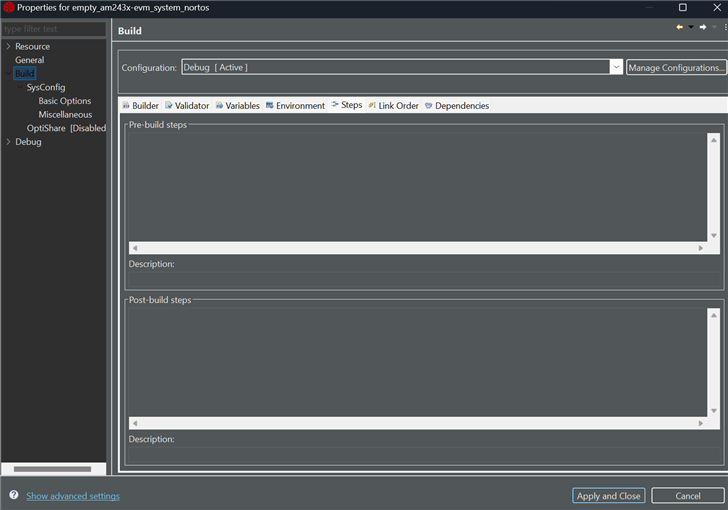
    请参阅下图。

    请复制并共享编译后处理步骤中编写的完整命令。

    我可以看到获取签名脚本的路径不正确。

    此致、

    Tushar

  • 请注意,本文内容源自机器翻译,可能存在语法或其它翻译错误,仅供参考。如需获取准确内容,请参阅链接中的英语原文或自行翻译。

    很抱歉这么晚才回复。 我没有收到有关消息的通知。

    以下是我在首选项中的构建配置(空多核项目):

    以下是编译后处理(空多核项目):

    以下是   空多核工程的 makefile_ccs_bootimage_gen 文件:

    #
    # Auto generated makefile
    #
    
    # Below variables need to be defined outside this file or via command line
    # - MCU_PLUS_SDK_PATH
    # - PROFILE
    # - OUTNAME
    # - CCS_INSTALL_DIR
    
    CCS_PATH=$(CCS_INSTALL_DIR)
    include $(MCU_PLUS_SDK_PATH)/imports.mak
    include $(MCU_PLUS_SDK_PATH)/devconfig/devconfig.mak
    
    ifeq ($(OS), Windows_NT)
    	PYTHON=python
    else
    	PYTHON=python3
    endif
    
    MULTI_CORE_BOOTIMAGE_PATH=$(abspath $(PROFILE))
    MULTI_CORE_BOOTIMAGE_NAME:=$(PROFILE)/$(OUTNAME).appimage
    MULTI_CORE_BOOTIMAGE_NAME_SIGNED:=$(PROFILE)/$(OUTNAME).appimage.signed
    MULTI_CORE_BOOTIMAGE_NAME_XIP:=$(PROFILE)/$(OUTNAME).appimage_xip
    
    #
    # Generation of multi-core boot image which can be loaded by Secondary Boot Loader (SBL)
    #
    ifeq ($(OS),Windows_NT)
    EXE_EXT=.exe
    endif
    BOOTIMAGE_TEMP_OUT_FILE=$(PROFILE)/temp_stdout_$(PROFILE).txt
    
    BOOTIMAGE_CORE_ID_r5fss0-0 = 4
    BOOTIMAGE_CORE_ID_r5fss0-1 = 5
    BOOTIMAGE_CORE_ID_r5fss1-0 = 6
    BOOTIMAGE_CORE_ID_r5fss1-1 = 7
    BOOTIMAGE_CORE_ID_m4fss0-0 = 14
    SBL_RUN_ADDRESS=0x70000000
    SBL_DEV_ID=55
    
    MULTI_CORE_IMAGE_GEN = $(CCS_NODE) $(MCU_PLUS_SDK_PATH)/tools/boot/multicoreImageGen/multicoreImageGen.js
    OUTRPRC_CMD = $(CCS_NODE) $(MCU_PLUS_SDK_PATH)/tools/boot/out2rprc/elf2rprc.js
    APP_IMAGE_SIGN_CMD = $(MCU_PLUS_SDK_PATH)/tools/boot/signing/appimage_x509_cert_gen.py
    
    MULTI_CORE_APP_PARAMS = \
    	../empty_am243x-evm_r5fss0-0_nortos_ti-arm-clang/$(PROFILE)/empty_am243x-evm_r5fss0-0_nortos_ti-arm-clang.rprc@$(BOOTIMAGE_CORE_ID_r5fss0-0) \
    	../empty_am243x-evm_r5fss0-1_nortos_ti-arm-clang/$(PROFILE)/empty_am243x-evm_r5fss0-1_nortos_ti-arm-clang.rprc@$(BOOTIMAGE_CORE_ID_r5fss0-1) \
    	../empty_am243x-evm_r5fss1-0_nortos_ti-arm-clang/$(PROFILE)/empty_am243x-evm_r5fss1-0_nortos_ti-arm-clang.rprc@$(BOOTIMAGE_CORE_ID_r5fss1-0) \
    	../empty_am243x-evm_r5fss1-1_nortos_ti-arm-clang/$(PROFILE)/empty_am243x-evm_r5fss1-1_nortos_ti-arm-clang.rprc@$(BOOTIMAGE_CORE_ID_r5fss1-1) \
    	../empty_am243x-evm_m4fss0-0_nortos_ti-arm-clang/$(PROFILE)/empty_am243x-evm_m4fss0-0_nortos_ti-arm-clang.rprc@$(BOOTIMAGE_CORE_ID_m4fss0-0) \
    
    MULTI_CORE_APP_PARAMS_XIP = \
    	../empty_am243x-evm_r5fss0-0_nortos_ti-arm-clang/$(PROFILE)/empty_am243x-evm_r5fss0-0_nortos_ti-arm-clang.rprc_xip@$(BOOTIMAGE_CORE_ID_r5fss0-0) \
    	../empty_am243x-evm_r5fss0-1_nortos_ti-arm-clang/$(PROFILE)/empty_am243x-evm_r5fss0-1_nortos_ti-arm-clang.rprc_xip@$(BOOTIMAGE_CORE_ID_r5fss0-1) \
    	../empty_am243x-evm_r5fss1-0_nortos_ti-arm-clang/$(PROFILE)/empty_am243x-evm_r5fss1-0_nortos_ti-arm-clang.rprc_xip@$(BOOTIMAGE_CORE_ID_r5fss1-0) \
    	../empty_am243x-evm_r5fss1-1_nortos_ti-arm-clang/$(PROFILE)/empty_am243x-evm_r5fss1-1_nortos_ti-arm-clang.rprc_xip@$(BOOTIMAGE_CORE_ID_r5fss1-1) \
    	../empty_am243x-evm_m4fss0-0_nortos_ti-arm-clang/$(PROFILE)/empty_am243x-evm_m4fss0-0_nortos_ti-arm-clang.rprc_xip@$(BOOTIMAGE_CORE_ID_m4fss0-0) \
    
    all:
    ifeq ($(CCS_IDE_MODE),cloud)
    #	No post build steps
    else
    	@echo  Boot multi-core image: $(MULTI_CORE_BOOTIMAGE_NAME) ...
    	$(MULTI_CORE_IMAGE_GEN) --devID $(SBL_DEV_ID) --out $(MULTI_CORE_BOOTIMAGE_NAME) $(MULTI_CORE_APP_PARAMS) >> $(BOOTIMAGE_TEMP_OUT_FILE)
    	$(MULTI_CORE_IMAGE_GEN) --devID $(SBL_DEV_ID) --out $(MULTI_CORE_BOOTIMAGE_NAME_XIP) $(MULTI_CORE_APP_PARAMS_XIP) >> $(BOOTIMAGE_TEMP_OUT_FILE)
    
    ifeq ($(DEVICE_TYPE),HS)
    # Sign the appimage using appimage signing script
    ifeq ($(ENC_ENABLED),no)
    	@echo Boot image signing: Encryption is disabled.
    	$(PYTHON) $(APP_IMAGE_SIGN_CMD) --bin $(MULTI_CORE_BOOTIMAGE_NAME) --authtype 1 --key $(APP_SIGNING_KEY) --output $(MULTI_CORE_BOOTIMAGE_NAME).hs
    	$(RM) $(MULTI_CORE_BOOTIMAGE_NAME)
    else
    	@echo Boot image signing: Encryption is enabled.
    	$(PYTHON) $(APP_IMAGE_SIGN_CMD) --bin $(MULTI_CORE_BOOTIMAGE_NAME) --authtype 1 --key $(APP_SIGNING_KEY) --enc y --enckey $(APP_ENCRYPTION_KEY) --output $(MULTI_CORE_BOOTIMAGE_NAME).hs
    	$(RM) $(MULTI_CORE_BOOTIMAGE_NAME)-enc
    endif
    else
    # Sign the appimage for HS-FS using appimage signing script
    	$(PYTHON) $(APP_IMAGE_SIGN_CMD) --bin $(MULTI_CORE_BOOTIMAGE_NAME) --authtype 1 --key $(APP_SIGNING_KEY) --output $(MULTI_CORE_BOOTIMAGE_NAME).hs_fs
    	$(RM) $(MULTI_CORE_BOOTIMAGE_NAME)
    endif
    
    ifeq ($(DEVICE_TYPE),HS)
    	@echo  Boot multi-core image: $(MULTI_CORE_BOOTIMAGE_NAME).hs Done !!!
    else
    	@echo  Boot multi-core image: $(MULTI_CORE_BOOTIMAGE_NAME).hs_fs Done !!!
    endif
    	@echo  .
    endif
    

    以下是正常 M4工程的构建配置:

    对于常规的 M4 post-build、这里采用了以下格式:

     常规 M4工程的 makefile_ccs_bootimage_gen 文件:

    #
    # Auto generated makefile
    #
    
    # Below variables need to be defined outside this file or via command line
    # - MCU_PLUS_SDK_PATH
    # - PROFILE
    # - CG_TOOL_ROOT
    # - OUTNAME
    # - CCS_INSTALL_DIR
    # - CCS_IDE_MODE
    
    CCS_PATH=$(CCS_INSTALL_DIR)
    include $(MCU_PLUS_SDK_PATH)/imports.mak
    include $(MCU_PLUS_SDK_PATH)/devconfig/devconfig.mak
    
    STRIP=$(CG_TOOL_ROOT)/bin/tiarmstrip
    OBJCOPY=$(CG_TOOL_ROOT)/bin/tiarmobjcopy
    ifeq ($(OS), Windows_NT)
    	PYTHON=python
    else
    	PYTHON=python3
    endif
    
    OUTFILE=$(PROFILE)/$(OUTNAME).out
    BOOTIMAGE_PATH=$(abspath ${PROFILE})
    BOOTIMAGE_NAME:=$(BOOTIMAGE_PATH)/$(OUTNAME).appimage
    BOOTIMAGE_NAME_XIP:=$(BOOTIMAGE_PATH)/$(OUTNAME).appimage_xip
    BOOTIMAGE_NAME_SIGNED:=$(BOOTIMAGE_PATH)/$(OUTNAME).appimage.signed
    BOOTIMAGE_RPRC_NAME:=$(BOOTIMAGE_PATH)/$(OUTNAME).rprc
    BOOTIMAGE_RPRC_NAME_XIP:=$(BOOTIMAGE_PATH)/$(OUTNAME).rprc_xip
    BOOTIMAGE_RPRC_NAME_TMP:=$(BOOTIMAGE_PATH)/$(OUTNAME).rprc_tmp
    
    #
    # Generation of boot image which can be loaded by Secondary Boot Loader (SBL)
    #
    ifeq ($(OS),Windows_NT)
    EXE_EXT=.exe
    endif
    ifeq ($(OS),Windows_NT)
      BOOTIMAGE_CERT_GEN_CMD=powershell -executionpolicy unrestricted -command $(MCU_PLUS_SDK_PATH)/tools/boot/signing/x509CertificateGen.ps1
    else
      BOOTIMAGE_CERT_GEN_CMD=$(MCU_PLUS_SDK_PATH)/tools/boot/signing/x509CertificateGen.sh
    endif
    BOOTIMAGE_TEMP_OUT_FILE=$(PROFILE)/temp_stdout_$(PROFILE).txt
    
    BOOTIMAGE_CORE_ID_r5fss0-0 = 4
    BOOTIMAGE_CORE_ID_r5fss0-1 = 5
    BOOTIMAGE_CORE_ID_r5fss1-0 = 6
    BOOTIMAGE_CORE_ID_r5fss1-1 = 7
    BOOTIMAGE_CORE_ID_m4fss0-0 = 14
    SBL_RUN_ADDRESS=0x70000000
    SBL_DEV_ID=55
    
    MULTI_CORE_IMAGE_GEN = $(CCS_NODE) $(MCU_PLUS_SDK_PATH)/tools/boot/multicoreImageGen/multicoreImageGen.js
    OUTRPRC_CMD = $(CCS_NODE) $(MCU_PLUS_SDK_PATH)/tools/boot/out2rprc/elf2rprc.js
    APP_IMAGE_SIGN_CMD = $(MCU_PLUS_SDK_PATH)/tools/boot/signing/appimage_x509_cert_gen.py
    
    ifeq ($(OS),Windows_NT)
      XIPGEN_CMD=$(MCU_PLUS_SDK_PATH)/tools/boot/xipGen/xipGen.exe
    else
      XIPGEN_CMD=$(MCU_PLUS_SDK_PATH)/tools/boot/xipGen/xipGen.out
    endif
    
    MULTI_CORE_IMAGE_PARAMS = \
    	$(BOOTIMAGE_RPRC_NAME)@$(BOOTIMAGE_CORE_ID_m4fss0-0) \
    
    MULTI_CORE_IMAGE_PARAMS_XIP = \
    	$(BOOTIMAGE_RPRC_NAME_XIP)@$(BOOTIMAGE_CORE_ID_m4fss0-0)  \
    
    all:
    ifeq ($(CCS_IDE_MODE),cloud)
    #	No post build steps
    else
    	@echo  Boot image: am243x:m4fss0-0:nortos:ti-arm-clang $(BOOTIMAGE_NAME)  ...
    	$(OUTRPRC_CMD) $(OUTFILE) >> $(BOOTIMAGE_TEMP_OUT_FILE)
    	$(COPY) $(OUTNAME).rprc $(BOOTIMAGE_RPRC_NAME)
    	$(COPY) $(BOOTIMAGE_RPRC_NAME) $(BOOTIMAGE_RPRC_NAME_TMP)
    	$(RM) $(BOOTIMAGE_RPRC_NAME)
    	$(XIPGEN_CMD) -i $(BOOTIMAGE_RPRC_NAME_TMP) -o $(BOOTIMAGE_RPRC_NAME) -x $(BOOTIMAGE_RPRC_NAME_XIP) --flash-start-addr 0x60000000 -v > $(BOOTIMAGE_TEMP_OUT_FILE)
    	$(MULTI_CORE_IMAGE_GEN) --devID $(SBL_DEV_ID) --out $(BOOTIMAGE_NAME) $(MULTI_CORE_IMAGE_PARAMS) >> $(BOOTIMAGE_TEMP_OUT_FILE)
    	$(MULTI_CORE_IMAGE_GEN) --devID $(SBL_DEV_ID) --out $(BOOTIMAGE_NAME_XIP) $(MULTI_CORE_IMAGE_PARAMS_XIP) >> $(BOOTIMAGE_TEMP_OUT_FILE)
    ifeq ($(DEVICE_TYPE),HS)
    # Sign the appimage using appimage signing script
    ifeq ($(ENC_ENABLED),no)
    	@echo Boot image signing: Encryption is disabled.
    	$(PYTHON) $(APP_IMAGE_SIGN_CMD) --bin $(BOOTIMAGE_NAME) --authtype 1 --key $(APP_SIGNING_KEY) --output $(BOOTIMAGE_NAME).hs
    	$(RM) $(BOOTIMAGE_NAME)
    else
    	@echo Boot image signing: Encryption is enabled.
    	$(PYTHON) $(APP_IMAGE_SIGN_CMD) --bin $(BOOTIMAGE_NAME) --authtype 1 --key $(APP_SIGNING_KEY) --enc y --enckey $(APP_ENCRYPTION_KEY) --output $(BOOTIMAGE_NAME).hs
    	$(RM) $(BOOTIMAGE_NAME)-enc
    endif
    else
    # Sign the appimage for HS-FS using appimage signing script
    	$(PYTHON) $(APP_IMAGE_SIGN_CMD) --bin $(BOOTIMAGE_NAME) --authtype 1 --key $(APP_SIGNING_KEY) --output $(BOOTIMAGE_NAME).hs_fs
    	$(RM) $(BOOTIMAGE_NAME)
    endif
    	$(RM) $(BOOTIMAGE_RPRC_NAME_TMP)
    ifeq ($(DEVICE_TYPE),HS)
    	@echo  Boot image: am243x:m4fss0-0:nortos:ti-arm-clang $(BOOTIMAGE_NAME).hs Done !!!
    	@echo  .
    else
    	@echo  Boot image: am243x:m4fss0-0:nortos:ti-arm-clang $(BOOTIMAGE_NAME).hs_fs Done !!!
    	@echo  .
    endif
    endif
    

    配置和项目都会导致编译后处理错误!

  • 请注意,本文内容源自机器翻译,可能存在语法或其它翻译错误,仅供参考。如需获取准确内容,请参阅链接中的英语原文或自行翻译。

    尊敬的 Jacob:

    我对上面的描述有点困惑。 我可以看到您在构建时遇到编译后错误 hello_world_cpp_r5fss0-0_nortos 但您分享了有关的详细信息 empty_system_nortos  和 hello_world_cpp_m4f_nortos 项目。

    您能准确说出您要尝试构建的示例是什么吗?

    我已经在结尾处尝试了构建示例、现在我能够正确构建示例。

    期待您的答复。

    此致、

    Tushar

  • 请注意,本文内容源自机器翻译,可能存在语法或其它翻译错误,仅供参考。如需获取准确内容,请参阅链接中的英语原文或自行翻译。

    尊敬的 Tushar:

    我想我已经在之前的消息中说明了这一点。 如果我没有,我的道歉。 我的最终目标是构建和闪存一个多核应用程序(在 R5和 M4内核上)。

    如前所述、我在正常示例工程中有编译错误、但我会移动文件并运行自定义的编译后处理脚本来解决该问题。 下面是一个示例.bat 文件、我在编译后错误后运行与一个正常示例:

    python appimage_x509_cert_gen.py --bin hello_world_cpp_am243x-evm_m4fss0-0_nortos_ti-arm-clang.appimage --authtype 1 --key app_degenerateKey.pem --output hello_world_cpp_am243x-evm_m4fss0-0_nortos_ti-arm-clang.appimage.hs_fs

    空多核项目的问题是、我认为在构建时、空项目会尝试重新构建 R5和 M4项目、然后将它们构建/合并为一个单个 elf 文件。 由于我无法运行在这个空项目场景中所做的编译后处理脚本修复、因此我认为这就是未能为我创建一个编写的组合 elf 文件的原因。

    我认为所有这些编译后处理错误都与 SDK 和/或 python 无法正确解析和使用路径有关。 似乎会在输出期间将路径粉碎并创建一个较长的错误路径。

    我该如何解决此问题、以便为 M4和 R5内核构建多核空工程示例?

  • 请注意,本文内容源自机器翻译,可能存在语法或其它翻译错误,仅供参考。如需获取准确内容,请参阅链接中的英语原文或自行翻译。

    尊敬的 Jacob:

    我无法在我的设置中重现此问题。 我能够构建 empty_system_nortos 项目。

    您能否提供在期间观察到的完整错误日志 empty_system_nortos 项目构建?

    尝试构建默认值 empty_system_nortos 示例(无需修改)并共享完整的错误日志。 先前共享的错误日志与空工程无关。

    请提供准确的错误日志、以更快地调试问题。

    此致、

    Tushar

  • 请注意,本文内容源自机器翻译,可能存在语法或其它翻译错误,仅供参考。如需获取准确内容,请参阅链接中的英语原文或自行翻译。

    你好、Jacob、

    默认值 empty_system_nortos 示例将生成 多核 appimage、通过组合为所有内核构建的空项目的 appimage 来实现 .  

    但从上面的日志中、我可以看到它 empty_system_nortos   尝试使用生成多核 appimage 的示例 hello_world_cpp 项目。

    您似乎已将 empty system 项目配置为使用 hello_world_cpp 项目来为 M4F 内核构建 appimage。 您未以某种方式正确配置它。

    您能否简单地告诉我们您在 empty_system 项目中所做的所有更改?

    此外、您是否能够为单个工程(即不使用系统工程)构建 appimage?

    此致、

    Tushar

  • 请注意,本文内容源自机器翻译,可能存在语法或其它翻译错误,仅供参考。如需获取准确内容,请参阅链接中的英语原文或自行翻译。

    嗯、

     目标是编写两个程序。 一个用于 R5的程序和一个用于 M4的程序。 如果我将所有内核保留为"epty"项目默认值、这对我实现自己的个人多内核应用没有帮助。 所以、为了对此进行测试、我将使用我目前在这些内核上构建并运行的演示驱动程序。  

    我已选择在 system.xml 设置中将其用于空项目、如屏幕截图所示:

    这不是正确的方法吗? 或者、我是以正确的方式来处理这件事吗?

    我可以使用我的 post-build 脚本构建单个 appimage 项目、以获得已签名的版本并将其刷写到电路板上。 但是、我无法为这个空的多核工程获得正确的 appimage。 一个确实会产生、但看起来并不完整、  

  • 请注意,本文内容源自机器翻译,可能存在语法或其它翻译错误,仅供参考。如需获取准确内容,请参阅链接中的英语原文或自行翻译。

    尊敬的 Jacob:

    您是否试图构建包含所有内核的多核 appimage?

    或者、您只需要一个包含 R5F 和 M4F 二进制文件的多核 appimage?

    如果支持、请从 system.xml 文件中删除其他内核工程。

    您是否还更新了 Makefile_ccs_bootimage_gen 使用所选示例工程构建多核 appimage 的文件?

    我能够使用我的编译后脚本构建单个 appimage 项目以获取签名版本并将其刷写到电路板上

    如果您能够为单核构建 appimage、那么您可以使用多核图像生成器来构建多核 appimage。

    使用以下命令。

    cd ${SDK_INSTALL_PATH}/tools/boot/multicoreImageGen
    ${NODE} multicoreImageGen.js --devID {DEV_ID} --out {Output image file (.appimage)} {core 1 rprc file}@{core 1 id} [ {core n rprc file}@{core n id} ... ]

    请参阅  tools_boot 。  

    此致、

    Tushar

  • 请注意,本文内容源自机器翻译,可能存在语法或其它翻译错误,仅供参考。如需获取准确内容,请参阅链接中的英语原文或自行翻译。

    好的、谢谢。

    让我尝试一下,然后回到你!

  • 请注意,本文内容源自机器翻译,可能存在语法或其它翻译错误,仅供参考。如需获取准确内容,请参阅链接中的英语原文或自行翻译。

    尊敬的 Jacob:

    期待您的答复。

    此致、

    Tushar

  • 请注意,本文内容源自机器翻译,可能存在语法或其它翻译错误,仅供参考。如需获取准确内容,请参阅链接中的英语原文或自行翻译。
    您是否也更新了 Makefile_ccs_bootimage_gen 使用选定的示例项目构建多核 appimage 的文件?[/QUOT]

    不好意思、但我对这里的意思感到困惑、makefile 是自动生成的。 那么在构建时编辑它就会被覆盖、对吧?

    #
    # Auto generated makefile
    #
    
    # Below variables need to be defined outside this file or via command line
    # - MCU_PLUS_SDK_PATH
    # - PROFILE
    # - OUTNAME
    # - CCS_INSTALL_DIR
    
    CCS_PATH=$(CCS_INSTALL_DIR)
    ....

  • 请注意,本文内容源自机器翻译,可能存在语法或其它翻译错误,仅供参考。如需获取准确内容,请参阅链接中的英语原文或自行翻译。

    运行 multicoreImageGen 似乎起到了作用。 这是一个遗憾,我不能让它在空项目中工作,但这至少是进展。 谢谢!