工具与软件:
您好!
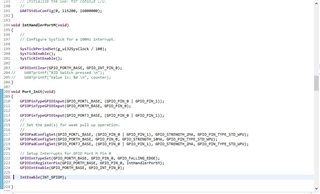
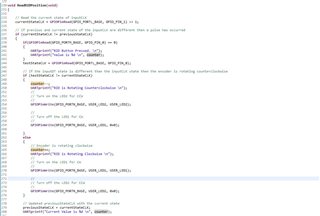
我正在尝试在 GPIO 端口 M Pin0...上实现按钮中断 我在示波器上看到、当按下开关时、开关确实变为低电平、但通过 UART 端口没有显示任何内容。 我是否遗漏了针对中断初始化引脚的步骤? 我在开关上连接了一个硬件去抖电路。
下面是我的代码:

This thread has been locked.
If you have a related question, please click the "Ask a related question" button in the top right corner. The newly created question will be automatically linked to this question.
工具与软件:
您好!
我正在尝试在 GPIO 端口 M Pin0...上实现按钮中断 我在示波器上看到、当按下开关时、开关确实变为低电平、但通过 UART 端口没有显示任何内容。 我是否遗漏了针对中断初始化引脚的步骤? 我在开关上连接了一个硬件去抖电路。
下面是我的代码:

你(们)好
[报价 userid="617391" url="~/support/microcontrollers/arm-based-microcontrollers-group/arm-based-microcontrollers/f/arm-based-microcontrollers-forum/1451550/sw-ek-tm4c1294xl-ek-tm4c1294xl-eval-board-trying-to-set-portm-pin0-for-a-push-button-interrupt "]下面是我的代码:

您的代码对我来说没有问题。 我看到唯一缺失的是下面一行。
IntEnable (INT_GPIIOM);
您好!
您是如何实现去抖的? 您是否确定去抖未完全滤除输入?
这是您的定制 PCB 还是 LaunchPad? 我之所以提出这个问题、是因为如果您在 LaunchPad 上运行、LaunchPad 不会使用 PM0作为开关、而是使用 PJ0和 PJ1作为开关。 为何不修改代码来尝试 PJ0 (SW1)或 PJ1 (SW2)、并确保其在 LaunchPad 上正常工作。 如果 PM0是您在定制电路板上实现的代码、则可与您的现有代码进行比较。
当我停止调试时、似乎是默认 ISR 指令
这意味着不会进行中断矢量的动态分配。 当我再次仔细查看你的代码时,你用 GPIOIntRegisterPin ()来插入你的 ISR。 不能将其用于 PortM。 您需要使用 GPIOIntRegister (),因为 PortM 不会为每个单独的引脚分配 ISR 矢量。 只有 PortP 和 PortQ 可以为每个引脚具有单独的 ISR。 请参阅 下面 GPIOIntRegisterPin 与 GPIOIntRegister 之间的差异。


请参阅下面的矢量表。 端口 M 中的所有引脚都映射到一个 ISR、而对于 PP 和 PQ、可以具有单独的引脚及其自己的 ISR。

您好、Erwin:
在调试中、按下该按钮后仍将转至 IntDefaultHandler。[/QUOT]如果您正在 IntDefaultHandler 上暂停、则表示由于某种原因未注册 PQ1的向量。 就 GPIO 而言、它会生成中断。 只是处理器跳转到默认矢量、该矢量除了旋转而不是跳转到 IntHandlerPortQ。
您能否尝试以静态方式代替使用 GPIOIntRegisterPin 来为 PQ1插入 ISR ? 请参阅以下示例。
1.注释掉您下面的行。
GPIOIntRegisterPin (GPIO_PORTQ_BASE、GPIO_PIN_1、IntHandlerPortQ);
2.在启动文件中添加以下行。
extern void IntHandlerPortQ (void);
3.将 PQ1矢量替换为以下内容。
这很奇怪。 为什么不试试下面的代码呢? 这对我来说很有用。 我没有实现任何去抖。 每次将 PQ1拉至低电平时、我都会看到 LED 以更快的速率闪烁。 首先在 LaunchPad 上尝试它。 稍后您可以为您的应用修改它。
BTW、您可以插入如下代码。 您无需截取代码的屏幕截图。
#include <stdbool.h>
#include <stdint.h>
#include "inc/hw_ints.h"
#include "inc/hw_memmap.h"
#include "driverlib/gpio.h"
#include "driverlib/interrupt.h"
#include "driverlib/pin_map.h"
#include "driverlib/sysctl.h"
#include "driverlib/timer.h"
#include "driverlib/uart.h"
#include "utils/uartstdio.h"
#define USER_LED1 GPIO_PIN_0
#define USER_LED2 GPIO_PIN_1
uint32_t ui32SysClock;
//*****************************************************************************
//
// Counter to count the number of interrupts that have been called.
//
//*****************************************************************************
static volatile uint32_t g_ui32Counter = 0;
//*****************************************************************************
//
// The interrupt handler for the Timer0 interrupt.
//
//*****************************************************************************
void
Timer0IntHandler(void)
{
//
// Clear the timer interrupt flag.
//
TimerIntClear(TIMER0_BASE, TIMER_TIMA_TIMEOUT);
if ((g_ui32Counter % 2) == 0){
GPIOPinWrite(GPIO_PORTN_BASE, (USER_LED1|USER_LED2), USER_LED1);
} else {
GPIOPinWrite(GPIO_PORTN_BASE, (USER_LED1|USER_LED2), USER_LED2);
}
//
// Update the periodic interrupt counter.
//
g_ui32Counter++;
}
void UserButton2ISR (void)
{
GPIOIntClear(GPIO_PORTQ_BASE, GPIO_PIN_1);
ui32SysClock *= 0.995;
TimerLoadSet(TIMER0_BASE, TIMER_A, ui32SysClock / 2);
}
//*****************************************************************************
//
// Configure Timer0B as a 16-bit periodic counter with an interrupt
// every 1ms.
//
//*****************************************************************************
int
main(void)
{
//
// Set the clocking to run directly from the external crystal/oscillator.
// TODO: The SYSCTL_XTAL_ value must be changed to match the value of the
// crystal on your board.
//
ui32SysClock = SysCtlClockFreqSet((SYSCTL_XTAL_25MHZ |
SYSCTL_OSC_MAIN |
SYSCTL_USE_OSC), 25000000);
//
// The Timer0 peripheral must be enabled for use.
//
SysCtlPeripheralEnable(SYSCTL_PERIPH_TIMER0);
//
// Enable and wait for the port to be ready for access
//
SysCtlPeripheralEnable(SYSCTL_PERIPH_GPION);
while(!SysCtlPeripheralReady(SYSCTL_PERIPH_GPION))
{
}
//
// Configure the GPIO port for the LED operation.
//
GPIOPinTypeGPIOOutput(GPIO_PORTN_BASE, (USER_LED1|USER_LED2));
SysCtlPeripheralEnable(SYSCTL_PERIPH_GPIOQ);
while(!SysCtlPeripheralReady(SYSCTL_PERIPH_GPIOQ))
{
}
GPIOPinTypeGPIOInput(GPIO_PORTQ_BASE, GPIO_PIN_1);
GPIOPadConfigSet(GPIO_PORTQ_BASE, GPIO_PIN_1, GPIO_STRENGTH_4MA, GPIO_PIN_TYPE_STD_WPU);
GPIOIntTypeSet(GPIO_PORTQ_BASE, GPIO_PIN_1, GPIO_FALLING_EDGE);
//
// These interrupts are re-mapped to ISR functions
// found within this file.
//
IntRegister(INT_GPIOQ1, UserButton2ISR);
GPIOIntEnable(GPIO_PORTQ_BASE, GPIO_INT_PIN_1);
IntEnable(INT_GPIOQ1);
IntMasterEnable();
//
// Configure Timer0B as a 16-bit periodic timer.
//
TimerConfigure(TIMER0_BASE, TIMER_CFG_PERIODIC);
//
// Set the Timer0B load value to 1ms.
//
TimerLoadSet(TIMER0_BASE, TIMER_A, ui32SysClock / 2);
//
// Enable processor interrupts.
//
IntMasterEnable();
//
// Configure the Timer0B interrupt for timer timeout.
//
TimerIntEnable(TIMER0_BASE, TIMER_TIMA_TIMEOUT);
//
// Enable the Timer0B interrupt on the processor (NVIC).
//
IntEnable(INT_TIMER0A);
//
// Initialize the interrupt counter.
//
g_ui32Counter = 0;
//
// Enable Timer0B.
//
TimerEnable(TIMER0_BASE, TIMER_A);
//
// Loop forever while the Timer0B runs.
//
while(1)
{
}
}您要讨论哪个按钮? SW1还是 SW2?
我觉得你错了。 这两个 Launchpad 开关位于 PJ0和 PJ1上。 我使用 PQ1是因为您说 PQ1不能为您效劳。 在本示例中、您不能按 SW1或 SW2、因为我不在使用它们。 您可以使用蓝线在 PQ1和 GND 之间短接。 在 ISR 中放置一个断点。 当它运行时、每次 PQ1对地短路时、都会生成一个中断、并应在 PQ1 ISR 中的断点处停止、 ISR 中有代码用于缩短 LaunchPad 上 LED 的闪烁速率。
我尝试使示例尽可能简单。 请参阅以下代码。 没有 LED。 如果生成了 PQ1中断、ISR 将仅增大变量 g_ui32Counter。 你为什么不试试呢? 我不使用任何开关。 我只需使用一根蓝线在 PQ1和接地引脚之间进行触摸即可。 由于我不实现去抖、因此 PQ1输入与 GND 之间的导线触控可以生成很多中断。 我想您是否遇到了硬件问题。 如果您有多个 LaunchPad、请尝试所有这些 LaunchPad。
#include <stdbool.h>
#include <stdint.h>
#include "inc/hw_ints.h"
#include "inc/hw_memmap.h"
#include "driverlib/gpio.h"
#include "driverlib/interrupt.h"
#include "driverlib/pin_map.h"
#include "driverlib/sysctl.h"
#include "driverlib/timer.h"
#include "driverlib/uart.h"
#include "utils/uartstdio.h"
#define USER_LED1 GPIO_PIN_0
#define USER_LED2 GPIO_PIN_1
uint32_t ui32SysClock;
//*****************************************************************************
//
// Counter to count the number of interrupts that have been called.
//
//*****************************************************************************
static volatile uint32_t g_ui32Counter = 0;
//*****************************************************************************
//
// The interrupt handler for the Timer0 interrupt.
//
//*****************************************************************************
void
Timer0IntHandler(void)
{
}
void UserButton2ISR (void)
{
GPIOIntClear(GPIO_PORTQ_BASE, GPIO_PIN_1);
g_ui32Counter++;
}
//*****************************************************************************
//
// Configure Timer0B as a 16-bit periodic counter with an interrupt
// every 1ms.
//
//*****************************************************************************
int
main(void)
{
//
// Set the clocking to run directly from the external crystal/oscillator.
// TODO: The SYSCTL_XTAL_ value must be changed to match the value of the
// crystal on your board.
//
ui32SysClock = SysCtlClockFreqSet((SYSCTL_XTAL_25MHZ |
SYSCTL_OSC_MAIN |
SYSCTL_USE_OSC), 25000000);
SysCtlPeripheralEnable(SYSCTL_PERIPH_GPIOQ);
while(!SysCtlPeripheralReady(SYSCTL_PERIPH_GPIOQ))
{
}
GPIOPinTypeGPIOInput(GPIO_PORTQ_BASE, GPIO_PIN_1);
GPIOPadConfigSet(GPIO_PORTQ_BASE, GPIO_PIN_1, GPIO_STRENGTH_4MA, GPIO_PIN_TYPE_STD_WPU);
GPIOIntTypeSet(GPIO_PORTQ_BASE, GPIO_PIN_1, GPIO_FALLING_EDGE);
IntRegister(INT_GPIOQ1, UserButton2ISR);
GPIOIntEnable(GPIO_PORTQ_BASE, GPIO_INT_PIN_1);
IntEnable(INT_GPIOQ1);
IntMasterEnable();
//
// Initialize the interrupt counter.
//
g_ui32Counter = 0;
//
// Loop forever while the Timer0B runs.
//
while(1)
{
}
}