
器件型号: TLV320AIC3254-Q1
你(们)好
我们测试 3.3V 乘积的 THD + N 电平为–30dB。
失真仅开始在数据表上出现在 20kHz 左右、
是否有任何寄存器可以修改?


This thread has been locked.
If you have a related question, please click the "Ask a related question" button in the top right corner. The newly created question will be automatically linked to this question.
器件型号: TLV320AIC3254-Q1
你(们)好
我们测试 3.3V 乘积的 THD + N 电平为–30dB。
失真仅开始在数据表上出现在 20kHz 左右、
是否有任何寄存器可以修改?

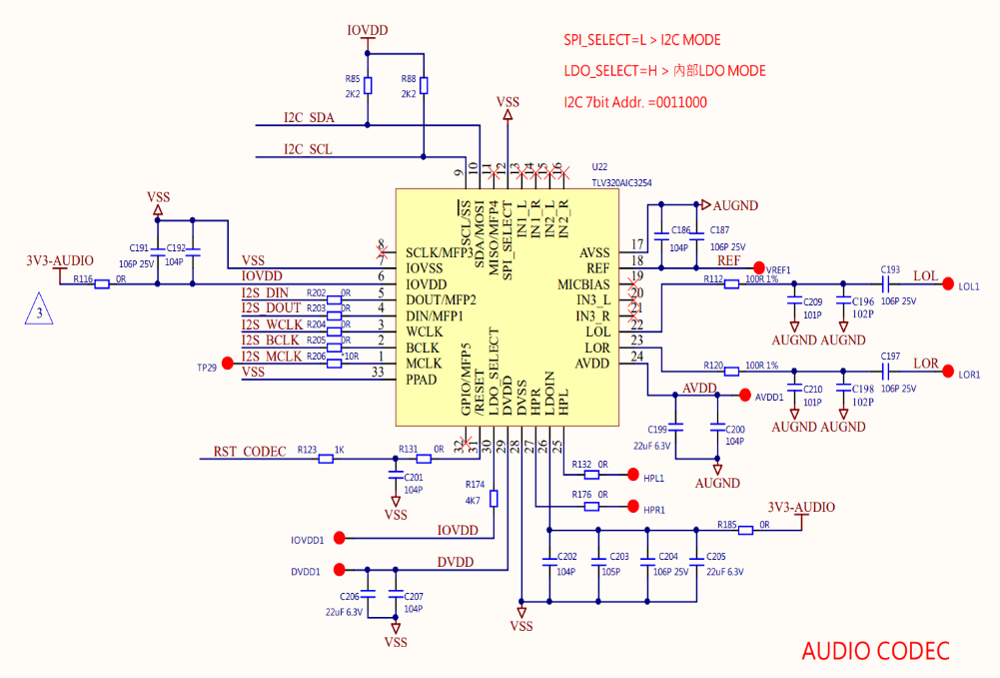
您好、
好的、我看到了。 AIC3254-Q1 数据表中未包含该参数。
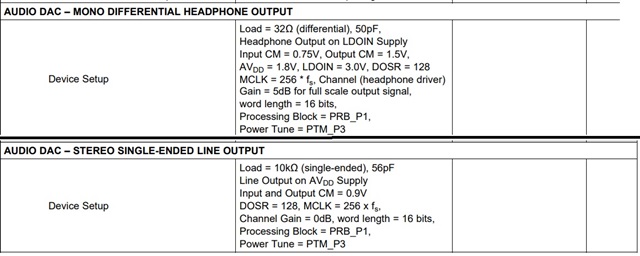
仔细查看您的图、我看到您的规格约为 30dB。 在我进行自我测试时、我意识到给定的 THD 曲线 适用于差分线路输出、这不是器件的典型用例。 默认的“线路输出“脚本是立体声单端脚本、这意味着您将 LOL 引用到 GND、将 LOR 引用到 GND。 在这种情况下、THD + N 加重~6dB、每通道约–85dB。
有助于进行 THD + N 测量的一些事项是确保在 20kHz 时进行滤波并对结果进行 A 加权。
另一件事 — 您正在运行什么脚本? 您能否发送寄存器配置、以便我可以验证或查看可以更改的内容以帮助提高噪声性能。
此致、
Mir
您好、
应用参考指南中提供了寄存器设置和寄存器映射示例: https://www.ti.com/lit/an/slaa408a/slaa408a.pdf
我将使用“48ksps 采样率和高性能的立体声 DAC 回放“示例来构建脚本。
以下是具有指定更改的耳机输出示例脚本:
# !headphone output on ldoin supply # !cm = 0.75V input , or 1.5v on output # !avdd=1.8v, ldoin=3.v, dosr128 # !gain =5db # !16 bit # !prb_p1, ptm_p3 # Initialize to Page 0 w 30 00 00 # Initialize the device through software reset w 30 01 01 # Power up the NDAC divider with value 1 w 30 0b 81 # Power up the MDAC divider with value 2 w 30 0c 82 # Program the OSR of DAC to 128 w 30 0d 00 w 30 0e 80 w 30 1b 00 #16 bit, i2s w 30 3c 01 # Set the DAC Mode to PRB_P1 # Select Page 1 w 30 00 01 # Disable Internal Crude AVdd in presence of external AVdd supply or before #powering up internal AVdd LDO w 30 01 08 # Enable Master Analog Power Control w 30 02 00 # Set the REF charging time to 40ms w 30 7b 01 # HP soft stepping settings for optimal pop performance at power up # Rpop used is 6k with N = 6 and soft step = 20usec. This should work with 47uF coupling # capacitor. Can try N=5,6 or 7 time constants as well. Trade-off delay vs “pop” sound. w 30 14 25 ## Input Common Mode # w 30 0a 00 w 30 0a 6b #0110 1011 full chip cm=.75, output cm for hp=1.5V, hp powered with LDOIN supply, LDOIN is 3.3V # Route Left DAC to HPL w 30 0c 08 # Route Right DAC to HPR w 30 0d 08 # Set the DAC PTM mode to PTM_P3/4 w 30 03 00 w 30 04 00 w 30 10 05 # set HPL gain to 5dB w 30 11 05 # set HPR gain to 5dB # Power up HPL and HPR drivers w 30 09 30 # Wait for 2.5 sec for soft stepping to take effect # Else read Page 1, Register 63d, D(7:6). When = “11” soft-stepping is complete # Select Page 0 w 30 00 00 # Power up the Left and Right DAC Channels with route the Left Audio digital data to # Left Channel DAC and Right Audio digital data to Right Channel DAC w 30 3f d6 # Unmute the DAC digital volume control w 30 40 00
# second example: # !10k single ended line output on avdd supply # !input and output cm=0.9V # !dosr=128, mclk=256fs # !gain=0db, wordlength=16bit # !prb_p1, ptm_p3 # Initialize to Page 0 w 30 00 00 # Initialize the device through software reset w 30 01 01 # Power up the NDAC divider with value 1 w 30 0b 81 # Power up the MDAC divider with value 2 w 30 0c 82 # Program the OSR of DAC to 128 w 30 0d 00 w 30 0e 80 w 30 1b 00 #16 bit, i2s w 30 3c 01 # Set the DAC Mode to PRB_P1 # Select Page 1 w 30 00 01 # Disable Internal Crude AVdd in presence of external AVdd supply or before #powering up internal AVdd LDO w 30 01 08 # Enable Master Analog Power Control w 30 02 00 # Set the REF charging time to 40ms w 30 7b 01 # HP soft stepping settings for optimal pop performance at power up # Rpop used is 6k with N = 6 and soft step = 20usec. This should work with 47uF coupling # capacitor. Can try N=5,6 or 7 time constants as well. Trade-off delay vs “pop” sound. w 30 14 25 ## Input Common Mode w 30 0a 00 #full chip cm=0.9V, powered by avdd supply w 30 0e 08 #left DAC to LOL w 30 0f 08 #right DAC to LOR # Set the DAC PTM mode to PTM_P3/4 w 30 03 00 w 30 04 00 w 30 12 00 #LOL driver not muted, gain=0dB w 30 13 00 #LOR driver not muted, gain=0db # Power up LOL and LOR drivers w 30 09 0c # Wait for 2.5 sec for soft stepping to take effect # Else read Page 1, Register 63d, D(7:6). When = “11” soft-stepping is complete # Select Page 0 w 30 00 00 # Power up the Left and Right DAC Channels with route the Left Audio digital data to # Left Channel DAC and Right Audio digital data to Right Channel DAC w 30 3f d6 # Unmute the DAC digital volume control w 30 40 00
如果您需要更多帮助、请告诉我。
此致、
Mir