
This thread has been locked.

If you have a related question, please click the "Ask a related question" button in the top right corner. The newly created question will be automatically linked to this question.

[参考译文] CC2340R5:如何通过 HCI 命令修改 Tx 功率

Guru**** 2768085 points

Other Parts Discussed in Thread: CC2340R5

请注意,本文内容源自机器翻译,可能存在语法或其它翻译错误,仅供参考。如需获取准确内容,请参阅链接中的英语原文或自行翻译。

https://e2e.ti.com/support/wireless-connectivity/bluetooth-group/bluetooth/f/bluetooth-forum/1603374/cc2340r5-how-to-modify-tx-power-by-hci-command

器件型号: CC2340R5

您好的团队、

我的客户想知道如何修改 CC2340R5 上的 Tx 电源。  
它们使用 BTool HCI 命令 HCI_le_transmittertest 来测量 Tx 功率为 8dBm。
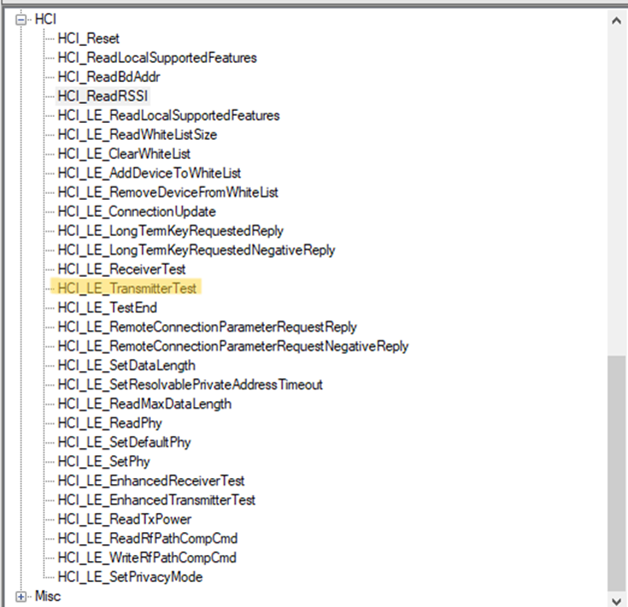
106-1.png
然后、它们使用 HCI_ext cmd、hciext_settxpowerdbmcmd 来修改 pwr。
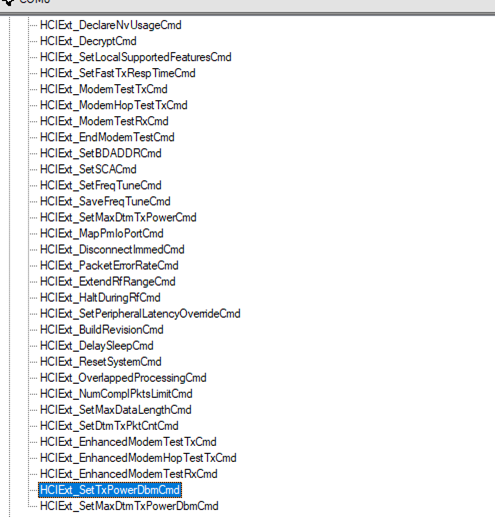
106-2.png

使用 HCI_le_transmittertest 再次测量 Tx 功率后、该值仍然为 8dBm。
请说明如何修改 Tx 功率。 谢谢你。  

  • 请注意,本文内容源自机器翻译,可能存在语法或其它翻译错误,仅供参考。如需获取准确内容,请参阅链接中的英语原文或自行翻译。

    您好!

    HCI_LE_TransmitterTest 是在直接测试模式下发送的 HCI 命令。 在此模式下、您应该使用 HCI TxPowerDDbmCmd、而不是使用 Ext_Set Ext_Set MaxDtmTxPowerDDbmCmd

    此致、
    Lea

  • 请注意,本文内容源自机器翻译,可能存在语法或其它翻译错误,仅供参考。如需获取准确内容,请参阅链接中的英语原文或自行翻译。

    尊敬的 Lea:

    感谢您的回复、使用  HCI Ext_Set TxPowerdbmCmd 后、它能够调整蓝牙功率。

    很棒!

    B.R.

    Brian