请注意,本文内容源自机器翻译,可能存在语法或其它翻译错误,仅供参考。如需获取准确内容,请参阅链接中的英语原文或自行翻译。
器件型号:LP-EM-CC2340R5 主题中讨论的其他器件:CC2340R5、 SysConfig
工具与软件:
尊敬的 TI 团队:
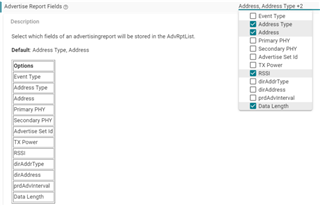
当 CC2340R5 (中央模式)扫描蓝牙设备时、为什么它无法检测到外设的名称和信号强度? 但是、智能手机应用程序(simplink)可在扫描期间显示外设的名称和信号强度。
void Central_ScanEventHandler(uint32 event, BLEAppUtil_msgHdr_t *pMsgData)
{
BLEAppUtil_ScanEventData_t *scanMsg = (BLEAppUtil_ScanEventData_t *)pMsgData;
switch (event)
{
case BLEAPPUTIL_SCAN_ENABLED:
{
centralScanIndex = 0;
MenuModule_printf(APP_MENU_SCAN_EVENT, 0, "Scan status: Scan started...");
break;
}
case BLEAPPUTIL_SCAN_DISABLED:
{
uint8 i;
for(i = 0; i < APP_MAX_NUM_OF_ADV_REPORTS; i++)
{
memset(¢ralScanRes[i], 0, sizeof(App_scanResults));
}
// Go over the advertise reports that was saved in the host level and save it
for (i = 0; i < scanMsg->pBuf->pScanDis.numReport; i++)
{
GapScan_Evt_AdvRpt_t advReport;
// Get the address from the report
GapScan_getAdvReport(i, &advReport);
memcpy(watchchar[i],advReport.pData,advReport.dataLen);
// Add the report to the scan list
Central_addScanRes(&advReport);
}
UART2_write(uart, (const char *)"scan finish !!!\r\n\r\n", strlen((const char *)"scan finish !!!\r\n\r\n"), NULL);
MenuModule_printf(APP_MENU_SCAN_EVENT, 0, "Scan status: Scan disabled - "
"Reason: " MENU_MODULE_COLOR_YELLOW "%d " MENU_MODULE_COLOR_RESET
"Num results: " MENU_MODULE_COLOR_YELLOW "%d " MENU_MODULE_COLOR_RESET,
scanMsg->pBuf->pScanDis.reason,
scanMsg->pBuf->pScanDis.numReport);
break;
}
advReport.pData = 0 advReport.dataLen = 0
memcpy(watchchar[i],advReport.pData,advReport.dataLen);