


Other Parts Discussed in Thread: C2000WARE
请注意,本文内容源自机器翻译,可能存在语法或其它翻译错误,仅供参考。如需获取准确内容,请参阅链接中的英语原文或自行翻译。
器件型号:TMDSCNCD28379D 主题中讨论的其他器件:C2000WARE
您好!
我正在尝试使 USB 引导加载程序示例正常工作- C:\ti\cc2000\C2000Ware_4_03_00_00\utilities\flash_programmers\usb_flash_programmer。 我已经阅读过其他一些帖子、但没有看到解决方案。
以下是我的步骤。
- 已启动包含项目的 CC
- 在 CC 内选择的 CPU 复位
- 已转到0x0D00存储器位置
- 将0x0D00设置为0x0C5A 并启动工程
- 右键单击 F28x7x_USB_Boot_Loader.inf、位于 C:\ti\c2000\C2000Ware_4_03_00_00\utilities\flash_programmers\usb_flash_programmer\windows_driver、以安装器件驱动程序
- 将 MCU 控制板 USB 主机控制器 J8插入计算机我安装了设备驱动程序
- 在 C:\ti\c2000\c2000\C2000Ware_4_03_00_00\utilities\flash_programmers\usb_flash_programmer 中键入以下 usb_flash_programr.exe -l
- 然后、我得到以下输出

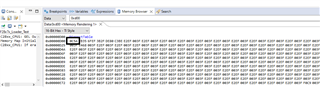
此处显示的是设置0X0D00至0x0C5A
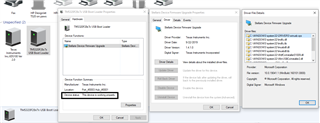
以下是在我插入设备时查看的设备:
注意:我已经 成功运行 usb_ex7_host_msc.c 以及 usb_ex4_dev_bulk.c、并在批量示例中安装了相应的器件驱动程序。
我们非常感谢您对我的所作所为的任何见解。
