This thread has been locked.

If you have a related question, please click the "Ask a related question" button in the top right corner. The newly created question will be automatically linked to this question.

[参考译文] TMS320F28377D:Hi-3593 SPI 接口驱动程序问题

Guru**** 2529560 points
Other Parts Discussed in Thread: C2000WARE

请注意,本文内容源自机器翻译,可能存在语法或其它翻译错误,仅供参考。如需获取准确内容,请参阅链接中的英语原文或自行翻译。

https://e2e.ti.com/support/microcontrollers/c2000-microcontrollers-group/c2000/f/c2000-microcontrollers-forum/1279531/tms320f28377d-hi-3593-spi-interface-driver-issues

器件型号:TMS320F28377D
主题中讨论的其他器件:C2000WARE

我将尝试复制 HI-3593应用手册中给出的 SPI 驱动器。

ap-southeast-1-02900067-inspect.menlosecurity.com/.../

为不同的控制器(MC9S12XD)编写了驱动程序示例

我正在尝试复制两个函数 R_Register ()和 W_CommandValue ():
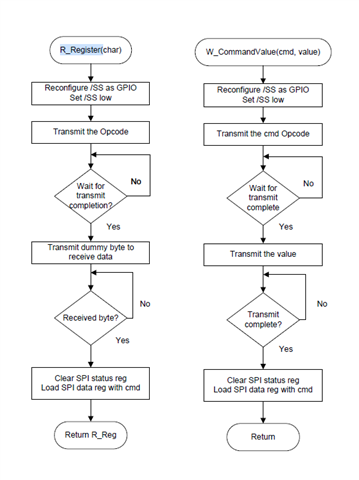
以下是应用手册中针对以下两个函数的代码:

/* ------------------------------------------------------------------
 / Read HI-3110 Register Read Function
 / ------------------------------------------------------------------
 Argument(s): Register to read
 Return: 8-bit Register Value
 */
unsigned char R_Register(char Reg)
{
    unsigned char R_Reg;
    SPI0CR1 = SPI0CR1 & ~SPI0CR1_SSOE_MASK; // disable auto /SS output, reset /SS Output Enable
    SPI0CR2 = SPI0CR2 & ~SPI0CR2_MODFEN_MASK; // disable auto /SS output, reset SPI0 Mode Fault
    SPI0_nSS = 0; // assert the SPI0 /SS strobe
    R_Reg = txrx8bits(Reg, 1); // send op code (ignore returned data byte)
    R_Reg = txrx8bits(0x00, 1); // send dummy data / receive Status Reg byte
    SPI0_nSS = 1; // negate the SPI0 /SS strobe
    SPI0CR1 = SPI0CR1 | SPI0CR1_SSOE_MASK; // enable auto /SS output, set /SS Output Enable
    SPI0CR2 = SPI0CR2 | SPI0CR2_MODFEN_MASK; // enable auto /SS output, set SPI0 Mode Fault
    return R_Reg;
}

// Write SPI Command with a Value to HI-3593
void W_CommandValue(uint8 cmd, uint8 value)
{
    uint8 dummy;
    SPI0CR1 = SPI0CR1 & ~SPI0CR1_SSOE_MASK; // disable auto /SS output, reset /SS Output
    SPI0CR2 = SPI0CR2 & ~SPI0CR2_MODFEN_MASK; // disable auto /SS output, reset SPI0 Mode
    SPI0_nSS = 0; // assert the SPI0 /SS strobe
    dummy = SPI0SR; // clear SPI status register
    SPI0DR = cmd; // SPI command
    while (!SPI0SR_SPIF)
        ;
    dummy = SPI0DR; // read Rx data in Data Reg to reset SPIF
    dummy = SPI0SR; // clear SPI status register
    SPI0DR = value; // Reset values
    while (!SPI0SR_SPIF)
        ;
    dummy = SPI0DR; // read Rx data in Data Reg to reset SPIF
    SPI0_nSS = 1; // negate the SPI0 /SS strobe
    SPI0CR1 = SPI0CR1 | SPI0CR1_SSOE_MASK; // enable auto /SS output, set /SS Output Enable
    SPI0CR2 = SPI0CR2 | SPI0CR2_MODFEN_MASK; // enable auto /SS output, set SPI0 Mode Default
}

这些是我的等效函数:

void W_CommandValue(uint16_t cmd, uint16_t value)
{
    //Pull the cs pin to low.
    GPIO_writePin(SPIA_CS_PIN, 0);
    //Wait for 100 us.
    DEVICE_DELAY_US(100);
    //Read the dummy data.
    SPI_readDataNonBlocking(A429_SPI);
    //Wait for 100 us.
    DEVICE_DELAY_US(100);
    //Write the command.
    SPI_writeDataNonBlocking(A429_SPI, cmd);
    //Wait for 100 us.
    DEVICE_DELAY_US(100);
    //Read the dummy data.
    SPI_readDataNonBlocking(A429_SPI);
    //Wait for 100 us.
    DEVICE_DELAY_US(100);
    //Write the value.
    SPI_writeDataNonBlocking(A429_SPI, value);
    //wait 100 us.
    DEVICE_DELAY_US(100);
    //Read the dummy data.
    SPI_readDataNonBlocking(A429_SPI);
    //wait 100 us.
    DEVICE_DELAY_US(100);
    //Pull the cs pin to high.
    GPIO_writePin(SPIA_CS_PIN, 1);
    //wait 100 us.
    DEVICE_DELAY_US(100);
}

uint16_t R_Register(uint16_t cmd)
{
    uint16_t value = 0;
    //Pull the cs pin to low.
    GPIO_writePin(SPIA_CS_PIN, 0);
    //Wait for 100 us.
    DEVICE_DELAY_US(100);
    //Write the command.
    SPI_writeDataNonBlocking(A429_SPI, cmd);
    //Wait for 100 us.
    DEVICE_DELAY_US(100);
    //Read the dummy byte.
    SPI_readDataNonBlocking(A429_SPI);
    //Wait for 100 us.
    DEVICE_DELAY_US(100);
    //Transmit dummy data.z
    SPI_writeDataNonBlocking(A429_SPI, 0x00);
    //Wait for 100 us.
    DEVICE_DELAY_US(100);
    //Read the received byte.
    value = SPI_readDataNonBlocking(A429_SPI);
    //Wait for 100 us.
    DEVICE_DELAY_US(100);
    //Pull the cs pin to high.
    GPIO_writePin(SPIA_CS_PIN, 1);
    return value;
}

但 无法 正常通信。

我测试了两个函数、如下所示:

void initHI3593()
{
//将上升沿赋予 HI-3593以执行硬件复位。
GPIO_writePin (A429_CA_RESET、0);
device_delay_us (100);
GPIO_writePin (A429_CA_RESET、1);

//写入 ACLK 分频寄存器(0x1400)
device_delay_us (100);
W_CommandValue (0x3800、0x1400);
device_delay_us (100);
testVar = R_Register (0xD400);

testVar 的值应该是0x14、但是得到的值是0x00。

有任何关于什么问题的疑虑吗?

  • 请注意,本文内容源自机器翻译,可能存在语法或其它翻译错误,仅供参考。如需获取准确内容,请参阅链接中的英语原文或自行翻译。

    AK、

    以便弄清楚、F28377D 所用的工作模式是什么? 我注意到您有器件读写 HI-3593、但反之亦然。

    如果您尚未参阅 我在此处链接的 SPI 第18.3.1节(操作简介)、18.3.10节(SPI 3线模式说明)和18.4.5节(SPI 3线模式代码示例)以供参考。 对于如何配置器件和特定寄存器以发送/接收虚拟数据、有特定的说明和示例代码。 在代码中包含此信息应该可以帮助您查看 testVar 数据。

    此致、

    艾什瓦里亚

  • 请注意,本文内容源自机器翻译,可能存在语法或其它翻译错误,仅供参考。如需获取准确内容,请参阅链接中的英语原文或自行翻译。

    尊敬的 Aishwarya:

    我在  HI-3552的数据表中以模式0运行、SPI 的时钟频率为5MHz。

    这是我的 SPI 总线配置:

    //
    // Setup SPI for A429
    //
    void HAL_setupSPI_A429(uint32_t base)
    {
        //GPIO Configuration
            // GPIO58->SPISIMOA->A429_C1_SI
        GPIO_setMasterCore(58, GPIO_CORE_CPU1);
        GPIO_setPinConfig(GPIO_58_SPISIMOA);
        GPIO_setDirectionMode(58, GPIO_DIR_MODE_OUT);
        GPIO_setPadConfig(58, GPIO_PIN_TYPE_STD);
        GPIO_writePin(58,0);
    
        // GPIO59->SPISOMIA->A429_C1_CO
        GPIO_setMasterCore(59, GPIO_CORE_CPU1);
        GPIO_setPinConfig(GPIO_59_SPISOMIA);
        GPIO_setDirectionMode(59, GPIO_DIR_MODE_IN);
        GPIO_setPadConfig(59, GPIO_PIN_TYPE_STD);
    
        // GPIO60->SPICLKA->A429_C1_SCK
        GPIO_setMasterCore(60, GPIO_CORE_CPU1);
        GPIO_setPinConfig(GPIO_60_SPICLKA);
        GPIO_setDirectionMode(60, GPIO_DIR_MODE_OUT);
        GPIO_setPadConfig(60, GPIO_PIN_TYPE_STD);
        GPIO_writePin(60,0);
    
        // GPIO61->SPISTEA->A429_C1_CSn
        GPIO_setMasterCore(61, GPIO_CORE_CPU1);
    //    GPIO_setPinConfig(GPIO_61_SPISTEA);
        GPIO_setPinConfig(GPIO_61_GPIO61);
        GPIO_setDirectionMode(61, GPIO_DIR_MODE_OUT);
        GPIO_setPadConfig(61, GPIO_PIN_TYPE_STD);
        GPIO_writePin(61,0);
    
        //
        // Must put SPI into reset before configuring it
        //
        SPI_disableModule(base);
        //
        // SPI configuration.
        //
        SPI_setConfig(base, DEVICE_LSPCLK_FREQ, SPI_PROT_POL0PHA0,
                      SPI_MODE_MASTER, 500000, 8);
        //
        // FIFO and interrupt configuration
        //
        SPI_disableFIFO(base);
        SPI_clearInterruptStatus(base, SPI_INT_RX_DATA_TX_EMPTY);
        SPI_disableInterrupt(base, SPI_INT_RX_DATA_TX_EMPTY);
        SPI_disableLoopback(base);
        SPI_setEmulationMode(base, SPI_EMULATION_STOP_AFTER_TRANSMIT);
        //
        // Configuration complete. Enable the module.
        //
        SPI_enableModule(base);
        return;
    }

    我能够与  HI-3593通信、虽然我可以避免使用非阻塞 SPI 读/写、但时间要求非常严格。

    我开始使用阻塞呼叫并取得了一些成功。

    这是我所做的:

    void W_CommandValue(uint16_t cmd, uint16_t value)
    {
        //Pull the cs pin to low.
        GPIO_writePin(SPIA_CS_PIN, 0);
        //Wait for 100 us.
        DEVICE_DELAY_US(100);
        SPI_writeDataBlockingNonFIFO(A429_SPI, cmd);    //transmit the opcode
        SPI_writeDataBlockingNonFIFO(A429_SPI, value);  //transmit the value
        //wait 100 us.
        DEVICE_DELAY_US(100);
        //Pull the cs pin to high.
        GPIO_writePin(SPIA_CS_PIN, 1);
        //wait 100 us.
        DEVICE_DELAY_US(100);
    }
    
    uint16_t R_Register(uint16_t cmd)
    {
        uint16_t value = 0;
        //Pull the cs pin to low.
        GPIO_writePin(SPIA_CS_PIN, 0);
        //Wait for 100 us.
        DEVICE_DELAY_US(100);
        SPI_writeDataBlockingNonFIFO(A429_SPI, cmd);        //Send opcode
        SPI_writeDataBlockingNonFIFO(A429_SPI, 0x1000);     //Send 0x10 as dummy data
        value = SPI_readDataBlockingNonFIFO(A429_SPI);      //Read received byte
        //Wait for 100 us.
        DEVICE_DELAY_US(100);
        //Pull the cs pin to high.
        GPIO_writePin(SPIA_CS_PIN, 1);
    
        return value;
    }
    
    void initHI3593()
    {
        //Give raising edge to HI-3593 to do a hardware reset.
        GPIO_writePin(A429_CA_RESET, 0);
        DEVICE_DELAY_US(100);
        GPIO_writePin(A429_CA_RESET, 1);
    
        //Write to ACLK Division Register(send 0xD4 and read back 0x14)
        DEVICE_DELAY_US(100);
        W_CommandValue(0x3800, 0x1400);
        DEVICE_DELAY_US(100);
        testVar4 = R_Register(0xD400);
    }


    到目前为止,我按应用手册中的建议手动控制芯片选择:

    您能否建议 发送/接收 多个字节的正确方式。

    我当时在查看 C2000ware 库、但在 spi.h 标题中不确定哪个函数会执行此操作。

  • 请注意,本文内容源自机器翻译,可能存在语法或其它翻译错误,仅供参考。如需获取准确内容,请参阅链接中的英语原文或自行翻译。

    AK、

    这些函数可以发送/接收2至4字节的数据: SPI_TRANSPI_BYTE 和 SPI_receive16Bits、SPI_transreceive24Bits 和 SPI_receive24Bits 和 SPI_translation32Bits、但它们使用 SPI 轮询。

    或者、您可以使用 Simple for Loop 通过编写的函数确定希望发送/接收的数据位数。 我们没有确切的 F28377D 示例、因此我随附了一个 F2838x 器件外部环回示例的屏幕截图、该示例执行的操作与您尝试执行的操作类似。  

    需要考虑的其他因素:检查 GPIO 引脚、时钟极性和时钟相位、并确保它们一切都同步。

    //#############################################################################
    //
    // FILE:   spi_ex3_external_loopback.c
    //
    // TITLE:  SPI Digital Loopback without using FIFOs and Interrupts
    //
    //! \addtogroup driver_example_list
    //! <h1>SPI Digital External Loopback without FIFO Interrupts</h1>
    //!
    //! This program uses the external loopback between two SPI modules. Both
    //! the SPI FIFOs and interrupts are not used in this example. SPIA is
    //! configured as a peripheral and SPI B is configured as controller. This example
    //! demonstrates full duplex communication where both controller and peripheral transmits
    //! and receives data simultaneously.
    //!
    //!
    //! \b External \b Connections \n
    //!  -GPIO24 and GPIO16 - SPIPICO
    //!  -GPIO25 and GPIO17 - SPIPOCI
    //!  -GPIO26 and GPIO18 - SPICLK
    //!  -GPIO27 and GPIO19 - SPIPTE
    //!
    //! \b Watch \b Variables \n
    //!  - \b TxData_SPIA - Data send from SPIA (peripheral)
    //!  - \b TxData_SPIB - Data send from SPIB (controller)
    //!  - \b RxData_SPIA - Data received by SPIA (peripheral)
    //!  - \b RxData_SPIB - Data received by SPIB (controller)
    //!
    //
    //#############################################################################
    // $Copyright:  $
    //###########################################################################
    
    //
    // Included Files
    //
    #include "driverlib.h"
    #include "device.h"
    #include "board.h"
    
    //
    // Main
    //
    void main(void)
    {
        uint16_t i;
    
        uint16_t TxData_SPIA[] = {0x00, 0x01, 0x02, 0x03, 0x04, 0x05, 0x06, 0x07, 0x08, 0x09, 0x0A, 0x0B, 0x0C, 0x0D, 0x0E, 0x0F};
        uint16_t RxData_SPIA[] = {0x00, 0x00, 0x00, 0x00, 0x00, 0x00, 0x00, 0x00, 0x00, 0x00, 0x00, 0x00, 0x00, 0x00, 0x00, 0x00};
    
        uint16_t TxData_SPIB[] = {0x10, 0x11, 0x12, 0x13, 0x14, 0x15, 0x16, 0x17, 0x18, 0x19, 0x1A, 0x1B, 0x1C, 0x1D, 0x1E, 0x1F};
        uint16_t RxData_SPIB[] = {0x00, 0x00, 0x00, 0x00, 0x00, 0x00, 0x00, 0x00, 0x00, 0x00, 0x00, 0x00, 0x00, 0x00, 0x00, 0x00};
    
        //
        // Initialize device clock and peripherals
        //
        Device_init();
    
        //
        // Disable pin locks and enable internal pullups.
        //
        Device_initGPIO();
    
        //
        // Initialize PIE and clear PIE registers. Disables CPU interrupts.
        //
        Interrupt_initModule();
    
        //
        // Initialize the PIE vector table with pointers to the shell Interrupt
        // Service Routines (ISR).
        //
        Interrupt_initVectorTable();
    
        //
        // Board initialization
        //
        Board_init();
    
        //
        // Loop forever. Suspend or place breakpoints to observe the buffers.
        //
        for(i = 0; i < 16; i++)
        {
            //
            // Set the TX buffer of peripheral SPI.
            //
            SPI_writeDataNonBlocking(SPIA_BASE, TxData_SPIA[i]);
    
            //
            // Set the the controller TX buffer. This triggers the data transmission
            //
            SPI_writeDataNonBlocking(SPIB_BASE, TxData_SPIB[i]);
    
            //
            // Read the received data
            //
            RxData_SPIA[i] = SPI_readDataBlockingNonFIFO(SPIA_BASE);
            RxData_SPIB[i] = SPI_readDataBlockingNonFIFO(SPIB_BASE);
    
            //
            // Check the received data
            //
            if(RxData_SPIA[i] != TxData_SPIB[i])
            {
                ESTOP0;
            }
            if(RxData_SPIB[i] != TxData_SPIA[i])
            {
                ESTOP0;
            }
        }
    
        //
        // Loop forever
        //
        while(1);
    }
    

    此致、

    艾什瓦里亚

  • 请注意,本文内容源自机器翻译,可能存在语法或其它翻译错误,仅供参考。如需获取准确内容,请参阅链接中的英语原文或自行翻译。

    尊敬的 Aishwarya:

    谢谢详细的答复,一个更多的问题我需要从你清除, TRM 手册说 SPI 数据进入 SPITXBuf 寄存器是左对齐的,所以如果 SPI 总线配置为8位模式,例如,如果我想发送0x01 , 我需要将其移位8、然后发送(0x0100)。

    在使用  SPI_TRANSPISHByte 和 SPI_receive16Bits、SPI_transreceive24Bits 和 SPI_receive24Bits 以及 SPI_TRANCMC32Bits 和 SPI_TRANCMC32Bits 时是否应该手动执行相同的操作?

  • 请注意,本文内容源自机器翻译,可能存在语法或其它翻译错误,仅供参考。如需获取准确内容,请参阅链接中的英语原文或自行翻译。

    AK、

    SPI 寄存器 SPITXBUF 和 SPIDAT 的长度为16位、因此您无需对16/24/32位运算执行相同的操作、但请注意总共发送和存储了多少字节。

    请注意、接收到的数据将始终正确对齐、因为它被移入 SPIDAT 的 LSB。