


请注意,本文内容源自机器翻译,可能存在语法或其它翻译错误,仅供参考。如需获取准确内容,请参阅链接中的英语原文或自行翻译。
器件型号:TMS320F28335 尊敬的专家:
我正在尝试使用 FIFO 和中断连续发送一系列字符。 例如、在代码中、我使用的是包含16个字符的"S+0123456789ABCD"。 我需要这些字符以从"S"到"D"的顺序显示在 RX 上。
我已根据示例"example_2833xSci_FFDLB_int"修改了程序。 我正在使用 SCI-B、波特率为9600 (LSPCLK = 75 MHz)、并且代码正在 环回模式 。
#include "DSP28x_Project.h"     // Device Headerfile and Examples Include File

// Prototype statements for functions found within this file.
interrupt void scibTxFifoIsr(void);
interrupt void scibRxFifoIsr(void);
void scib_fifo_init_user(void);

// Global variables
Uint16 sdataB[16];    // Send data for SCI-B
Uint16 rdataB[16];    // Received data for SCI-B

int send_b_count = 0;
int receive_b_count = 0;

char receive_b_char[17];

Uint16 count_b_S	= 0;
Uint16 count_b_plus	= 0;
Uint16 count_b_0	= 0;
Uint16 count_b_1	= 0;
Uint16 count_b_2	= 0;
Uint16 count_b_3	= 0;
Uint16 count_b_4	= 0;
Uint16 count_b_5	= 0;
Uint16 count_b_6	= 0;
Uint16 count_b_7	= 0;
Uint16 count_b_8	= 0;
Uint16 count_b_9	= 0;
Uint16 count_b_A	= 0;
Uint16 count_b_B	= 0;
Uint16 count_b_C	= 0;
Uint16 count_b_D	= 0;

void main(void)

{

	// Step 1. Initialize System Control:
	// PLL, WatchDog, enable Peripheral Clocks
	// This example function is found in the DSP2833x_SysCtrl.c file.
	InitSysCtrl();

	EALLOW;
	SysCtrlRegs.LOSPCP.bit.LSPCLK = 1;
	EDIS;

	// HISPCP prescale register settings, normally it will be set to default values
	EALLOW;   // This is needed to write to EALLOW protected registers
	SysCtrlRegs.HISPCP.all = 0x0000;
	EDIS;   // This is needed to disable write to EALLOW protected registers


	// Step 2. Initalize GPIO:
	// This example function is found in the DSP2833x_Gpio.c file and
	// illustrates how to set the GPIO to it's default state.
	//InitGpio();

	// Setup only the GP I/O only for SCI-A and SCI-B functionality
	// This function is found in DSP2833x_Sci.c
	InitScibGpio();


	// Step 3. Clear all interrupts and initialize PIE vector table:
	// Disable CPU interrupts
	DINT;

	// Initialize PIE control registers to their default state.
	// The default state is all PIE interrupts disabled and flags
	// are cleared.
	// This function is found in the DSP2833x_PieCtrl.c file.
	InitPieCtrl();

	// Disable CPU interrupts and clear all CPU interrupt flags:
	IER = 0x0000;
	IFR = 0x0000;

	// Initialize the PIE vector table with pointers to the shell Interrupt
	// Service Routines (ISR).
	// This will populate the entire table, even if the interrupt
	// is not used in this example.  This is useful for debug purposes.
	// The shell ISR routines are found in DSP2833x_DefaultIsr.c.
	// This function is found in DSP2833x_PieVect.c.
	InitPieVectTable();

	// Interrupts that are used in this example are re-mapped to
	// ISR functions found within this file.
	EALLOW; // This is needed to write to EALLOW protected registers
	PieVectTable.SCIRXINTB = &scibRxFifoIsr;
	PieVectTable.SCITXINTB = &scibTxFifoIsr;
	EDIS;   // This is needed to disable write to EALLOW protected registers


	// Step 4. Initialize all the Device Peripherals:
	// This function is found in DSP2833x_InitPeripherals.c
	// InitPeripherals(); // Not required for this example

	scib_fifo_init_user();  // Init SCI-B


	// Step 5. User specific code:

	// Enable EPWM1_INT in the PIE: Group 3 interrupt 1
	PieCtrlRegs.PIECTRL.bit.ENPIE = 1;   // Enable the PIE block
	PieCtrlRegs.PIEIER9.bit.INTx3 = 1;     // PIE Group 9, INT3, SCIRXINTB
	PieCtrlRegs.PIEIER9.bit.INTx4 = 1;     // PIE Group 9, INT4, SCITXINTB

	IER |= M_INT9;                    // Enable INT9 of CPU

	EINT;   // Enable Global interrupt INTM

	// Step 6. IDLE loop. Just sit and loop forever (optional):
	for(;;);

}

interrupt void scibTxFifoIsr(void)
{

    sdataB[0] = (int)'S';
    sdataB[1] = (int)'+';
    sdataB[2] = (int)'0';
    sdataB[3] = (int)'1';
    sdataB[4] = (int)'2';
    sdataB[5] = (int)'3';
    sdataB[6] = (int)'4';
    sdataB[7] = (int)'5';
    sdataB[8] = (int)'6';
    sdataB[9] = (int)'7';
    sdataB[10] = (int)'8';
    sdataB[11] = (int)'9';
    sdataB[12] = (int)'A';
    sdataB[13] = (int)'B';
    sdataB[14] = (int)'C';
    sdataB[15] = (int)'D';

	Uint16 kb;
	for(kb = 0; kb < 16; kb++) {
	   ScibRegs.SCITXBUF = sdataB[kb];     // Send data
	}

	send_b_count++;

	ScibRegs.SCIFFTX.bit.TXFFINTCLR = 1;  // Clear Interrupt flag

	PieCtrlRegs.PIEACK.all |= 0x100;      // Issue PIE ACK
}


interrupt void scibRxFifoIsr(void)
{

	Uint16 kbrx;
	for (kbrx = 0; kbrx < 16 ; kbrx++) {
	  rdataB[kbrx] = ScibRegs.SCIRXBUF.all;	 // Read data

	  if (rdataB[kbrx] == (int)'S') {
		  ++count_b_S;
	  }

	  if (rdataB[kbrx] == (int)'+') {
		  ++count_b_plus;
	  }

	  if (rdataB[kbrx] == (int)'0') {
		  ++count_b_0;
	  }

	  if (rdataB[kbrx] == (int)'1') {
		  ++count_b_1;
	  }

	  if (rdataB[kbrx] == (int)'2') {
		  ++count_b_2;
	  }

	  if (rdataB[kbrx] == (int)'3') {
		  ++count_b_3;
	  }

	  if (rdataB[kbrx] == (int)'4') {
		  ++count_b_4;
	  }

	  if (rdataB[kbrx] == (int)'5') {
		  ++count_b_5;
	  }

	  if (rdataB[kbrx] == (int)'6') {
		  ++count_b_6;
	  }

	  if (rdataB[kbrx] == (int)'7') {
		  ++count_b_7;
	  }

	  if (rdataB[kbrx] == (int)'8') {
		  ++count_b_8;
	  }

	  if (rdataB[kbrx] == (int)'9') {
		  ++count_b_9;
	  }

	  if (rdataB[kbrx] == (int)'A') {
		  ++count_b_A;
	  }

	  if (rdataB[kbrx] == (int)'B') {
		  ++count_b_B;
	  }

	  if (rdataB[kbrx] == (int)'C') {
		  ++count_b_C;
	  }

	  if (rdataB[kbrx] == (int)'D') {
		  ++count_b_D;
	  }

	  receive_b_char[kbrx] = (char)rdataB[kbrx];

	}

	receive_b_count++;

	ScibRegs.SCIFFRX.bit.RXFFOVRCLR = 1; // Clear Overflow flag
	ScibRegs.SCIFFRX.bit.RXFFINTCLR = 1; // Clear Interrupt flag

	PieCtrlRegs.PIEACK.all |= 0x100;		 // Issue PIE ack
}

void scib_fifo_init_user()
{
    ScibRegs.SCICCR.all = 0x0007;   // 1 stop bit,  No loopback
                                    // No parity, 8 char bits,
                                    // async mode, idle-line protocol
    ScibRegs.SCICTL1.all = 0x0003;  // enable TX, RX, internal SCICLK,
                                    // Disable RX ERR, SLEEP, TXWAKE
    ScibRegs.SCICTL2.bit.TXINTENA = 1;
    ScibRegs.SCICTL2.bit.RXBKINTENA = 1;
    ScibRegs.SCIHBAUD = 0x0003;     // 9600 baud @LSPCLK = 75MHz.
    ScibRegs.SCILBAUD = 0x00CF;
    ScibRegs.SCICCR.bit.LOOPBKENA = 1; // Enable loop back

    //ScibRegs.SCIFFTX.all = 0xC028;
    ScibRegs.SCIFFTX.all = 0xC029;
    //ScibRegs.SCIFFTX.all = 0xC02F;
    ScibRegs.SCIFFTX.all = 0xC030;

    //ScibRegs.SCIFFRX.all = 0x0028;
    ScibRegs.SCIFFRX.all = 0x0029;
    ScibRegs.SCIFFRX.all = 0x0030;

    ScibRegs.SCIFFCT.all = 0x00;

    ScibRegs.SCICTL1.all = 0x0023;     // Relinquish SCI from Reset
    ScibRegs.SCIFFTX.bit.TXFIFOXRESET = 1;
    ScibRegs.SCIFFRX.bit.RXFIFORESET = 1;
}


//===========================================================================
// No more.
//===========================================================================
问题是我没有让字符以正确的顺序出现。 此外、当我计算 RX 中断中每个字符的外观时、我会得到计算的值不同。 如图所示,与其他字符相比,"S"字符似乎出现得非常频繁。


我还尝试了另一个大小的 FIFO 深度、例如使用9的 FIFO 深度。 并更改每行代码(从16更改为9):
ScibRegs.SCIFFTX.all = 0xC029;
ScibRegs.SCIFFRX.all = 0x0029;

for (kbrx = 0; kbrx < 9 ; kbrx++) { … }

for (kb = 0; kb < 9; kb++) { … }
但是存在前两个字符("S"和"+")不出现在 RX 侧的问题(请参阅图)。
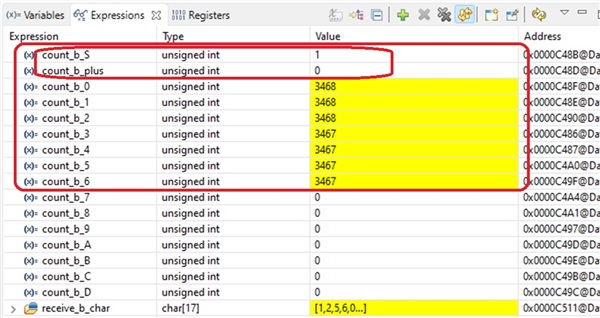
那么、我的问题是:
- 如何以正确的顺序发送字符? 此外、如何避免从 TX FIFO 接收数据时 RX FIFO 中出现多个相同的字符?
- 如何确定 FIFO 深度的正确大小? 我觉得这个示例使用的是8大小深度的 FIFO、因为数据被8次发送到 SCITXBUF。 但是、当我在代码中将 FIFO 大小设置为9时、为什么我会丢失前两个字节、尽管我已经将其设置为像示例一样向 SCITXBUF 发送9次?
我真诚地希望尽快收到您的来信。
此致、
阿里夫
