This thread has been locked.

If you have a related question, please click the "Ask a related question" button in the top right corner. The newly created question will be automatically linked to this question.

[参考译文] UNIFLASH、是否从 GUI 解锁 MSP432E41Y?

Guru**** 2589265 points
Other Parts Discussed in Thread: UNIFLASH, TM4C129ENCPDT, MSP432E401Y, MSP-EXP432E401Y, EK-TM4C1294XL

请注意,本文内容源自机器翻译,可能存在语法或其它翻译错误,仅供参考。如需获取准确内容,请参阅链接中的英语原文或自行翻译。

https://e2e.ti.com/support/tools/code-composer-studio-group/ccs/f/code-composer-studio-forum/1008038/uniflash-unlock-msp432e41y-from-gui

主题中讨论的其他器件:UNIFLASHTM4C129ENCPDTMSP432E401YMSP-EXP432E401YEK-TM4C1294XL

我仍然希望能够回答有关使用 Uniflash GUI 解锁的问题。  TI 没有人知道 Uniflash 是如何工作的?  此产品似乎没有任何文档。

  • 请注意,本文内容源自机器翻译,可能存在语法或其它翻译错误,仅供参考。如需获取准确内容,请参阅链接中的英语原文或自行翻译。

    我看到您在https://e2e.ti.com/support/tools/code-composer-studio-group/ccs/f/code-composer-studio-forum/1007072/uniflash-unlock-msp432e41y-from-gui/3721302?tisearch=e2e-sitesearch&keymatch=unlock%20MSP432E41Y#3721302上发布了一个线程

    在我检查时、您可以使用 Uniflash 的 CMD 工具来解锁器件。

  • 请注意,本文内容源自机器翻译,可能存在语法或其它翻译错误,仅供参考。如需获取准确内容,请参阅链接中的英语原文或自行翻译。

    是的、我知道命令行工具可用于解锁器件、我想知道 GUI 是否可用于执行同样的操作、如果是、如何操作?  为什么 TI 发布了一个没有文档的工具?

  • 请注意,本文内容源自机器翻译,可能存在语法或其它翻译错误,仅供参考。如需获取准确内容,请参阅链接中的英语原文或自行翻译。

    下面是有关用户指南的内容:

    software-dl.ti.com/.../uniflash_quick_start_guide.html

  • 请注意,本文内容源自机器翻译,可能存在语法或其它翻译错误,仅供参考。如需获取准确内容,请参阅链接中的英语原文或自行翻译。

    请告诉我、您可以找到有关使用 GUI 解锁的确切信息吗?  在链接的网页上搜索"解锁"或"锁定"不会为我返回任何结果。

  • 请注意,本文内容源自机器翻译,可能存在语法或其它翻译错误,仅供参考。如需获取准确内容,请参阅链接中的英语原文或自行翻译。
    [引用 userid="161796" URL"~/support/tools/code-composer-studio-group/ccs/f/code-composer-studio-forum/1008038/uniflash-unlock-msp432e41y-from-gui/3725262 #3725262"]是的,我知道命令行工具可用于解锁器件,我想知道的是,GUI 是否可用于执行相同的操作,如果是,如何操作?

    MSP432E 和 TM4C129器件被记录为具有解锁器件的相同过程、因此、如果 Unflash GUI 在理论上支持 TM4C129器件的解锁、它应该支持 MSP432E 器件的解锁。

    在 Windows 10下使用 UniFlash 6.3.0:

    1. 通过 Tiva  TM4C129ENCPDT 和 Stellaris 内电路调试接口、Uniflash GUI 将显示用于调试端口解锁的选项
    2. 使用 Tiva TM4C129ENCPDT 和不同的调试接口(例如 XDS110)、Uniflash GUI显示调试端口解锁选项
    3. 使用 MSP432E401Y 和 Stellaris 内电路调试接口、Uniflash GUI  显示调试端口解锁选项。

    以下命令行能够使用   MSP-EXP432E401Y 上的内置 XDS110、使用 Uniflash 4.6.0或6.30安装解锁 MSP432E401Y:

    C:\ti\uniflash_4.6.0\deskdb\content\TICloudAgent\win\ccs_base\common\uscif>dbgjtag.exe -f @xds110 -Y unlock,mode=msp432
    
    Executing the unlock procedure.
    
    Assert and hold reset while powering up the device.
    Press any key to continue.
    
    Release reset.
    Press any key to continue.
    
    Power cycle the board to complete the unlock procedure.

    C:\ti\uniflash_6.3.0\deskdb\content\TICloudAgent\win\ccs_base\common\uscif>dbgjtag.exe -f @xds110 -Y unlock,mode=msp432
    
    Executing the unlock procedure.
    
    Assert and hold reset while powering up the device.
    Press any key to continue.
    
    Release reset.
    Press any key to continue.
    
    Power cycle the board to complete the unlock procedure.

    鉴于 Uniflash 安装具有支持  使用 XDS110解锁 MSP432E401Y 的命令行界面、我了解了如何控制 Uniflash GUI 中的可用选项。

    C:\ti\uniflash_6.3.0\desktopdb\content\TIC扩音器\win\ccs_base\DebugServer\propertyDB\TM4Cx_FlashProperties.xml 中的部分可在 TM4C 器件上启用调试端口解锁支持、但在 Linux 或 OSX 下不使用 XDS 连接:

    	<property id="FlashDebugPortUnlockText">
    		<target>TMS470REX</target>
    		<name>The following operation will erase the internal flash and the non-volatile user registers. 
    Often the user registers are used to store the Ethernet MAC address. You should consider 
    noting the current value of the user registers for reprogramming at a later time using the 
    User Register Programming utility.</name>
    		<valueType>Text</valueType>
    		<disableIf>
    			<os>linux</os>
    			<os>osx</os>
    			<connection>xds</connection>
    		</disableIf>
    		<categories>
    			<category>DebugPortUnlock</category>
    		</categories>
    	</property>

    而 C:\ti\uniflash_6.3.0\desktopdb\content\TIC扩音器\win\ccs_base\DebugServer\propertyDB\MSP432E401Y_FlashProperties.xml 文件中没有启用调试端口解锁支持的段。

    我将尝试修改 C:\ti\uniflash_6.3.0\desktopdb\content\TIC扬 声器\win\ccs_base\DebugServer\propertyDB\MSP432E401Y_FlashProperties.xml、并查看是否启用 GUI 支持。

  • 请注意,本文内容源自机器翻译,可能存在语法或其它翻译错误,仅供参考。如需获取准确内容,请参阅链接中的英语原文或自行翻译。
    [引用 userid="91588" URL"~/support/tools/code-composer-studio-group/ccs/f/code-composer-studio-forum/1008038/uniflash-unlock-msp432e41y-from-gui/3729426 #3729426"]我将尝试修改 C:\ti\uniflash_6.3.0\desktopdb\content\TICAgent\win\ccs_base\DebugServer\propertyDB\MSP432E401Y_FlashProperties.xml、并查看这是否支持 GUI。

    我已将调试端口解锁相关部分从  TM4Cx_FlashProperties.xml 复制到 MSP432E401Y_FlashProperties.xml 文件、并已删除  XDS 线。

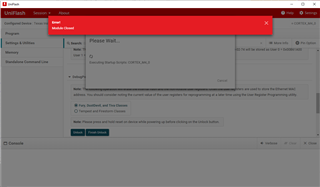
    允许 Uniflash GUI 显示  使用 XDS110的 MSP432E401Y 的调试端口解锁选项。 但是、解锁失败并显示错误:

    因此、只编辑 XML 并不足以使 Uniflash GUI 允许器件解锁。

  • 请注意,本文内容源自机器翻译,可能存在语法或其它翻译错误,仅供参考。如需获取准确内容,请参阅链接中的英语原文或自行翻译。

    切斯特、

    这是一项很好的检测工作。  感谢您付出的巨大努力。  似乎我必须坚持使用命令行来使用 XDS110解锁 MSP432E401Y。  希望工具团队中的某个人能够研究这个问题。 我想知道这是否是 XDS 限制、如果 XDS110在命令行中工作、这会让我感到惊讶。

    -Phil

  • 请注意,本文内容源自机器翻译,可能存在语法或其它翻译错误,仅供参考。如需获取准确内容,请参阅链接中的英语原文或自行翻译。
    [引用 userid="161796" URL"~/support/tools/code-composer-studio-group/ccs/f/code-composer-studio-forum/1008038/uniflash-unlock-msp432e41y-from-gui/3729456 #3729456"]我想知道这是否是 XDS 限制,如果 XDS110在命令行中运行,这会让我感到惊讶。

    我刚刚使用 具有板载 Stellaris IDCI 的 EK-TM4C1294XL 进行了尝试。 使用 Uniflash GUI 尝试在  EK-TM4C1294XL 上解锁 失败、并显示"Error! 模块已关闭"错误、因为我尝试编辑 上面的 MSP432E401Y_FlashProperties.xml:

    尝试使用 Uniflash GUI 解锁 EK-TM4C1294XL 失败、并显示与 Uniflash v4.6.0、v5.3.1或 v6.3.0相同的错误。