
我仍然希望能够回答有关使用 Uniflash GUI 解锁的问题。 TI 没有人知道 Uniflash 是如何工作的? 此产品似乎没有任何文档。
This thread has been locked.
If you have a related question, please click the "Ask a related question" button in the top right corner. The newly created question will be automatically linked to this question.
我仍然希望能够回答有关使用 Uniflash GUI 解锁的问题。 TI 没有人知道 Uniflash 是如何工作的? 此产品似乎没有任何文档。
在我检查时、您可以使用 Uniflash 的 CMD 工具来解锁器件。
下面是有关用户指南的内容:
MSP432E 和 TM4C129器件被记录为具有解锁器件的相同过程、因此、如果 Unflash GUI 在理论上支持 TM4C129器件的解锁、它应该支持 MSP432E 器件的解锁。
在 Windows 10下使用 UniFlash 6.3.0:
以下命令行能够使用 MSP-EXP432E401Y 上的内置 XDS110、使用 Uniflash 4.6.0或6.30安装解锁 MSP432E401Y:
C:\ti\uniflash_4.6.0\deskdb\content\TICloudAgent\win\ccs_base\common\uscif>dbgjtag.exe -f @xds110 -Y unlock,mode=msp432 Executing the unlock procedure. Assert and hold reset while powering up the device. Press any key to continue. Release reset. Press any key to continue. Power cycle the board to complete the unlock procedure.
C:\ti\uniflash_6.3.0\deskdb\content\TICloudAgent\win\ccs_base\common\uscif>dbgjtag.exe -f @xds110 -Y unlock,mode=msp432 Executing the unlock procedure. Assert and hold reset while powering up the device. Press any key to continue. Release reset. Press any key to continue. Power cycle the board to complete the unlock procedure.
鉴于 Uniflash 安装具有支持 使用 XDS110解锁 MSP432E401Y 的命令行界面、我了解了如何控制 Uniflash GUI 中的可用选项。
C:\ti\uniflash_6.3.0\desktopdb\content\TIC扩音器\win\ccs_base\DebugServer\propertyDB\TM4Cx_FlashProperties.xml 中的部分可在 TM4C 器件上启用调试端口解锁支持、但在 Linux 或 OSX 下不使用 XDS 连接:
<property id="FlashDebugPortUnlockText"> <target>TMS470REX</target> <name>The following operation will erase the internal flash and the non-volatile user registers. Often the user registers are used to store the Ethernet MAC address. You should consider noting the current value of the user registers for reprogramming at a later time using the User Register Programming utility.</name> <valueType>Text</valueType> <disableIf> <os>linux</os> <os>osx</os> <connection>xds</connection> </disableIf> <categories> <category>DebugPortUnlock</category> </categories> </property>
而 C:\ti\uniflash_6.3.0\desktopdb\content\TIC扩音器\win\ccs_base\DebugServer\propertyDB\MSP432E401Y_FlashProperties.xml 文件中没有启用调试端口解锁支持的段。
我将尝试修改 C:\ti\uniflash_6.3.0\desktopdb\content\TIC扬 声器\win\ccs_base\DebugServer\propertyDB\MSP432E401Y_FlashProperties.xml、并查看是否启用 GUI 支持。
我已将调试端口解锁相关部分从 TM4Cx_FlashProperties.xml 复制到 MSP432E401Y_FlashProperties.xml 文件、并已删除 XDS 线。
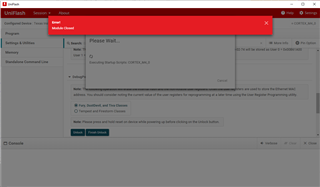
允许 Uniflash GUI 显示 使用 XDS110的 MSP432E401Y 的调试端口解锁选项。 但是、解锁失败并显示错误:

因此、只编辑 XML 并不足以使 Uniflash GUI 允许器件解锁。
我刚刚使用 具有板载 Stellaris IDCI 的 EK-TM4C1294XL 进行了尝试。 使用 Uniflash GUI 尝试在 EK-TM4C1294XL 上解锁 失败、并显示"Error! 模块已关闭"错误、因为我尝试编辑 上面的 MSP432E401Y_FlashProperties.xml:

尝试使用 Uniflash GUI 解锁 EK-TM4C1294XL 失败、并显示与 Uniflash v4.6.0、v5.3.1或 v6.3.0相同的错误。