
This thread has been locked.

If you have a related question, please click the "Ask a related question" button in the top right corner. The newly created question will be automatically linked to this question.

[参考译文] DLPDLCR2000EVM:在 BeagleBone Black 上未检测到 I2C

Guru**** 2524550 points
Other Parts Discussed in Thread: DLPDLCR2000EVM

请注意,本文内容源自机器翻译,可能存在语法或其它翻译错误,仅供参考。如需获取准确内容,请参阅链接中的英语原文或自行翻译。

https://e2e.ti.com/support/dlp-products-group/dlp/f/dlp-products-forum/1559638/dlpdlcr2000evm-i2c-not-detect-on-beaglebone-black

器件型号:DLPDLCR2000EVM


工具/软件:

您好、  

我将 DLPDLCR2000EVM 与 BeagleBone Black 连接在一起。 根据  【常见问题解答】DLPDLCR2000EVM:快速入门教程 和 首先启动 EVM、 我只能在  BeagleBone Black 上检测 EEPROM。  未检测到 0x1b。
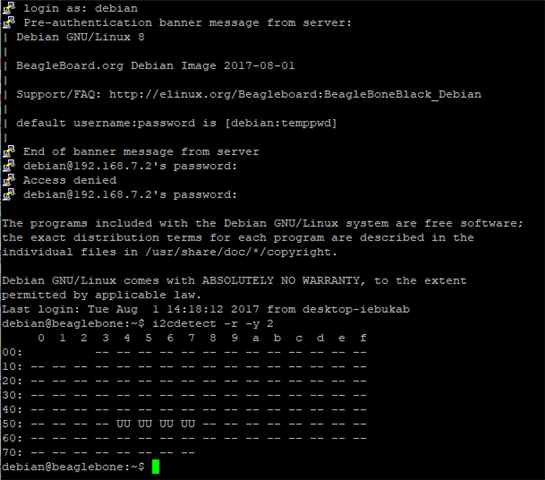
我的联系:

 BeagleBone Black 由连接到 PC 的迷你 USB 供电。 我通过 Putty 来控制它。  Debian 是 bone-debian-8.9-lxqt-4gb-armhf- 2017年08月01日 4GB.img、建议在教程中使用。  

该 EVM 通过连接到 J2 连接器的外部 5V3A 供电。 其他引脚连接到  BeagleBone Black。

我的 意见:

当 EVM 未连接到 BeagleBone Black 时、它会快速引导至启动画面。 D2 (HOST_IRQ)​​从高电平变为低电平。 当系统完成引导后、D3 (PROJ_ON) 开启。

当 EVM 连接到 BeagleBone Black 时、D2 和 D3 都关闭、即使 EVM 由外部供电也是如此。 当 BeagleBone Black 上电时、D2 保持亮起、但 EVM 无法完成系统引导。 D3 始终关闭。

- 我也尝试了连接 P2_6 到 J3 电源,但没有检测到 I2C 连接。
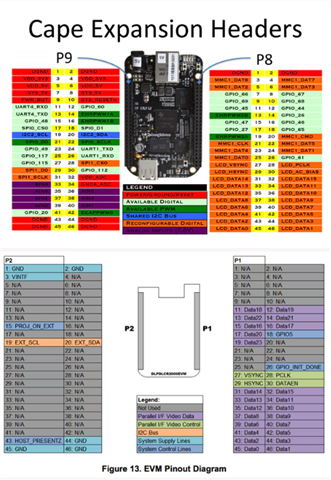
有人可以帮助解决这个问题吗? 干杯!

  • 请注意,本文内容源自机器翻译,可能存在语法或其它翻译错误,仅供参考。如需获取准确内容,请参阅链接中的英语原文或自行翻译。

    我通过 Cape 覆层解决了 I2C 连接。


    echo DLPDLCR2000 | sudo tee /sys/devices/platform/bone_capemgr/slots

    (来自  DLP2000:带 BeagleBone Black 的 DLP LightCrafter Display 2000 EVM 无法启动) 

    但是、我遇到了一个 新问题  使用命令后、无法在投影仪上启动 BeagleBone Desktop。

    i2cdetect -r -y 2
    i2cset -y 2 0x1b 0x0b 0x00 0x00 0x00 0x00 i
    i2cset -y 2 0x1b 0x0c 0x00 0x00 0x00 0x1b I
    

    它 仅显示启动界面。 另外、我遵循了  第 11 步至第 14 步。  她没有说话,只是缓缓的低下头。  

    debian@beaglebone:/opt/scripts/device/bone/capes/DLPDLCR2000$ i2cdetect -r -y 2
         0  1  2  3  4  5  6  7  8  9  a  b  c  d  e  f
    00:          -- -- -- -- -- -- -- -- -- -- -- -- --
    10: -- -- -- -- -- -- -- -- -- -- -- 1b -- -- -- --
    20: -- -- -- -- -- -- -- -- -- -- -- -- -- -- -- --
    30: -- -- -- -- -- -- -- -- -- -- -- -- -- -- -- --
    40: -- -- -- -- -- -- -- -- -- -- -- -- -- -- -- --
    50: -- -- -- -- UU UU UU UU -- -- -- -- -- -- -- --
    60: -- -- -- -- -- -- -- -- -- -- -- -- -- -- -- --
    70: -- -- -- -- -- -- -- --
    debian@beaglebone:/opt/scripts/device/bone/capes/DLPDLCR2000$ python MplayerTest.py
    set slave address: 27
    Make sure the display port is set. For example export DISPLAY=:0
    
    1
    SourceSel.EXTERNAL_VIDEO_PARALLEL_I_F_
    2
    Resolution.NHD_LANDSCAPE
    ##################################################################
    play video
    nhd_test.mp4
    MPlayer2 2.0-728-g2c378c7-4+b1 (C) 2000-2012 MPlayer Team
    Cannot open file '/home/debian/.mplayer/input.conf': No such file or directory
    Failed to open /home/debian/.mplayer/input.conf.
    Cannot open file '/etc/mplayer/input.conf': No such file or directory
    Failed to open /etc/mplayer/input.conf.
    
    Playing nhd_test.mp4.
    Detected file format: QuickTime / MOV (libavformat)
    [lavf] stream 0: video (h264), -vid 0
    Clip info:
     major_brand: mp42
     minor_version: 1
     compatible_brands: mp42avc1
     creation_time: 2017-07-07 14:32:35
    Load subtitles in .
    Failed to open VDPAU backend libvdpau_nvidia.so: cannot open shared object file: No such file or directory
    [vdpau] Error when calling vdp_device_create_x11: 1
    [VO_XV] It seems there is no Xvideo support for your video card available.
    [VO_XV] Run 'xvinfo' to verify its Xv support and read
    [VO_XV] DOCS/HTML/en/video.html#xv!
    [VO_XV] See 'mplayer -vo help' for other (non-xv) video out drivers.
    [VO_XV] Try -vo x11.
    [ass] auto-open
    Selected video codec: H.264 / AVC / MPEG-4 AVC / MPEG-4 part 10 [libavcodec]
    Audio: no sound
    Starting playback...
    VIDEO:  640x360  30.000 fps  3600.5 kbps (450.1 kB/s)
    VO: [x11] 640x360 => 640x360 Planar YV12  [fs]
    [swscaler @ 0xb5d01980]No accelerated colorspace conversion found from yuv420p to rgb565le.
    [swscaler @ 0xb5d01980]using unscaled yuv420p -> rgb565le special converter
    V:   0.0   0/  0 ??% ??% ??,?% 0 0
    Dead key input on file descriptor 0
    V:  22.9   0/  0 36% 35%  0.0% 0 0
    
    
    Exiting... (End of file)
    None
    Does the video play on the screen? (Pass/Fail/Stop) (Pass/Fail/Stop) and comment: Test passed


  • 请注意,本文内容源自机器翻译,可能存在语法或其它翻译错误,仅供参考。如需获取准确内容,请参阅链接中的英语原文或自行翻译。

    我 与编辑了/boot/uEnv.txt  

    uboot_overlay_addr4=/lib/firmware/DLPDLCR2000-00A0.dtbo
    。 它现在可以正常工作。