This thread has been locked.

If you have a related question, please click the "Ask a related question" button in the top right corner. The newly created question will be automatically linked to this question.

[参考译文] DRV3901-Q1EVM:DRV3901-Q1EVM-GUI:Composer Runtime 未安装

Guru**** 2826755 points
请注意,本文内容源自机器翻译,可能存在语法或其它翻译错误,仅供参考。如需获取准确内容,请参阅链接中的英语原文或自行翻译。

https://e2e.ti.com/support/motor-drivers-group/motor-drivers/f/motor-drivers-forum/1630035/drv3901-q1evm-drv3901-q1evm-gui-composer-runtime-not-installing

器件型号: DRV3901-Q1EVM

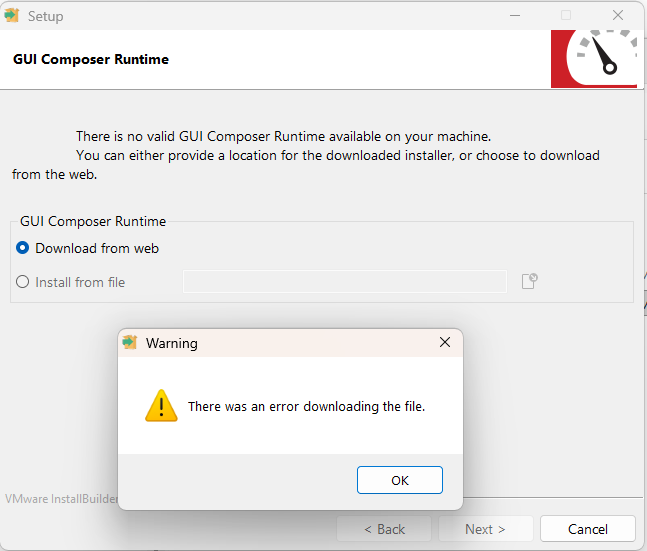
我遵循 DRV3901-Q1EVM-GUI 用户指南、安装过程应自动安装 GUI Composer Runtime: image.png

但是、由于出现错误、我无法安装它:

image.png

我应从何处安装 GUI Composer Runtime?

  • 请注意,本文内容源自机器翻译,可能存在语法或其它翻译错误,仅供参考。如需获取准确内容,请参阅链接中的英语原文或自行翻译。

    您好、Michelle:

    当计算机中的防火墙设置不允许下载 Runtime 安装程序时、通常会发生这种情况。 要在这种情况下安装 Runtime、您应使用以下方法。  

    1.打开浏览器 https://dev.ti.com/gallery 并使用 myTI 凭据进行登录。  

    2.将 GUI 版本 1.1.1 的 Runtime 安装程序下载到计算机上。  software-dl.ti.com/.../gcruntime-11.2.0-windows-installer.exe。  

    3.将 GUI 版本 1.1.1 安装程序下载到计算机上。  https://dev.ti.com/gallery/dl/MotorDriversBSM/DRV3901-Q1EVM-GUI/ver/1.1.1?platform=win。 

    4.首先运行 GUI v1.1.1 安装程序。    

    5.进入此步骤后,选择“从文件安装“并指向下载到计算机的运行时安装程序。 完成安装。  

    上述步骤将解决此安装问题。  

    此致、Murugavel  

  • 请注意,本文内容源自机器翻译,可能存在语法或其它翻译错误,仅供参考。如需获取准确内容,请参阅链接中的英语原文或自行翻译。

    谢谢!