


尊敬的 Amiel:
感谢您在执行 E2&E3命令时对提供新版本 GUI 的大力支持。
目前、我在执行 Vout 校准偏移(0x23)命令时遇到了另一种错误情况、请参阅以下错误消息。 请在此处分享您的评论吗?
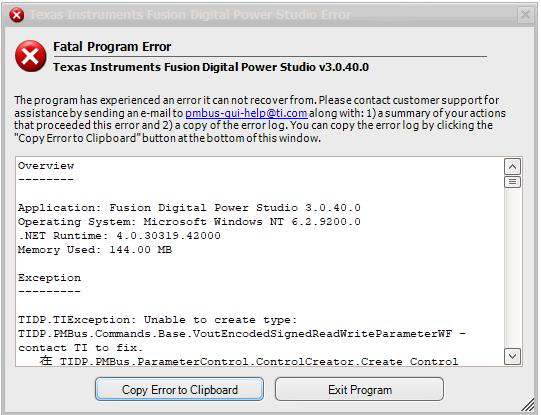
概述
----
应用:Fusion Digital Power Studio 3.0.40.0
操作系统:Microsoft Windows NT 6.2.9200.0
.NET 运行时:4.0.30319.42000
使用的内存:143.00 MB
异常
------
TIDP.TIException:无法创建类型:TIDP.PMBus.Commands.Base.VoutEncodedSignedReadWriteParameterWF -请联系 TI 进行修复。
在 TIDP.PMBus.ParameterControl.ControlCreator.Create_Control[TCProps](IParameterControl`1 parent_control)
在 TIDP.PMBus.ParameterControl.ReadOnlyParameterControl`5.b ()
在 TIDP.PMBus.ParameterControl.ReadOnlyParameterControl`5.con构(CommandID Command_id、PMBusDevice 设备、Nullable`1模式)
在 TIDP.PMBus.ParameterControl.ReadOnlyParameterControl`5.ctor (CommandID Command_id、PMBusDevice 设备、Nullable`1模式)
在 TIDP.PMBus.ParameterControls.VOUT_CAL_OFFSET.ctor (PMBusDevice 器件、可支持的`1模式)
在 TIDP.PMBus.ParameterControls.ParameterControlCreator.Create_Control (CommandID Command_id、PMBusDevice 设备、Nullable`1模式)
在 TIDP.PMBus.Controls.ParameterGridControl.A (参数基 A_0、ControlMode A_1)
在 TIDP.PMBus.Controls.ParameterGridControl.b (b a_0)
在 TIDP.PMBus.Controls.ParameterGridControl.c ()
在 TIDP.PMBus.Controls.ParameterGridControl.b (布尔 A_0)
在 TIDP.PMBus.Controls.ParameterGridControl.b (对象 A_0、EventArgs A_1)
在 System.Windows.Forms.Timer.OnTick (EventArgs e)
在 System.Windows.Forms.Timer.TimerNativeWindow.WndProc (消息和 m)
在 System.Windows.Forms.NativeWindow.Callback (IntPtr HWND、Int32 msg、IntPtr wparam、IntPtr lparam)
已装入装配体
--------
DevExpress.Data.v6.2.
版本:6.2.10.0
信息版本:
位置:文件://C:/程序文件(x86)/德州仪器(TI)/Fusion Digital Power Studio/bin/DevExpress.Data.v6.2.DLL
公钥令牌:79868B8147B5EAE4
DevExpress.Utils.v6.2
版本:6.2.10.0
信息版本:
位置:文件:///C:/Program Files (x86)/Texas Instruments/Fusion Digital Power Studio/bin/DevExpress.Utils.v6.2.DLL
公钥令牌:79868B8147B5EAE4
DevExpress.XtraBars.v6.2
版本:6.2.10.0
信息版本:
位置:文件:///C:/Program Files (x86)/Texas Instruments/Fusion Digital Power Studio/bin/DevExpress.XtraBars.v6.2.DLL
公钥令牌:79868B8147B5EAE4
DevExpress.XtraEditors.v6.2
版本:6.2.10.0
信息版本:
位置:文件:///C:/Program Files (x86)/Texas Instruments/Fusion Digital Power Studio/bin/DevExpress.XtraEditors.v6.2.DLL
公钥令牌:79868B8147B5EAE4
DevExpress.XtraGrid.v6.2.
版本:6.2.10.0
信息版本:
位置:文件:///C:/Program Files (x86)/Texas Instruments/Fusion Digital Power Studio/bin/DevExpress.XtraGrid.v6.2.DLL
公钥令牌:79868B8147B5EAE4
DevExpress.XtraNavBar.v6.2.
版本:6.2.10.0
信息版本:
位置:文件:///C:/Program Files (x86)/Texas Instruments/Fusion Digital Power Studio/bin/DevExpress.XtraNavBar.v6.2.DLL
公钥令牌:79868B8147B5EAE4
DundasWinChart
版本:7.1.0.1810
信息版本:
位置:文件:///C:/Program Files (x86)/Texas Instruments/Fusion Digital Power Studio/bin/DundasWinChart.DLL
公钥令牌:A4C03DCE5DB22406
Free.CommandLine
版本:3.0.8.30690
信息版本:
位置:文件://C:/程序文件(x86)/德州仪器(TI)/Fusion Digital Power Studio/bin/Free.CommandLine.DLL
公钥令牌:
FREE.HID
版本:3.0.8.27724
信息版本:
位置:文件:///C:/Program Files (x86)/Texas Instruments/Fusion Digital Power Studio/bin/free.HID.DLL
公钥令牌:
FREE.Misc.(其他
版本:3.0.8.30690
信息版本:
位置:文件:///C:/Program Files (x86)/Texas Instruments/Fusion Digital Power Studio/bin/free.Misc.DLL
公钥令牌:
FREE.WinForms.Misc
版本:2.0.88.26527
信息版本:
位置:文件:///C:/Program Files (x86)/Texas Instruments/Fusion Digital Power Studio/bin/free.WinForms.Misc.DLL
公钥令牌:
Fusion Digital Power Studio
版本:3.0.40.0
信息版本:
位置:文件://C:/程序文件(x86)/德州仪器(TI)/Fusion Digital Power Studio/bin/Fusion Digital Power Studio.exe
公钥令牌:
Microsoft.GeneratedCode
版本:1.0.0.0
信息版本:
位置:文件:///C:/Windows/Microsoft.Net/assembly/GAC_MSIL/System.Xml/v4.0_4.0.0.0__b77a5c561934e089/System.Xml.dll
公钥令牌:
Microsoft.Mshtml
版本:7.0.3300.0
信息版本:
位置:文件:///C:/Windows/assembly/GAC/Microsoft.mshtml/7.0.3300.0__b03f5f7f11d50a3a/Microsoft.mshtml.dll
公钥令牌:B03F5F7F11D50A3A
mscorlib
版本:4.0.0.0
信息版本:
4.8.3752.0
位置:文件:///C:/Windows/Microsoft.NET/Framework64/v4.0.30319/mscorlib.dll
公钥令牌:b77a5c561934e089
mscorlib.resources
版本:4.0.0.0
信息版本:
位置:文件:///C:/Windows/Microsoft.Net/assembly/GAC_MSIL/mscorlib.resources/v4.0_4.0.0.0_zh-Hans_b77a5c561934e089/mscorlib.resources.dll
公钥令牌:b77a5c561934e089
系统
版本:4.0.0.0
信息版本:
4.8.3752.0
位置:文件:///C:/Windows/Microsoft.Net/assembly/GAC_MSIL/System/v4.0_4.0.0.0__b77a5c561934e089/System.dll
公钥令牌:b77a5c561934e089
系统配置
版本:4.0.0.0
信息版本:
4.8.3752.0
位置:文件:///C:/Windows/Microsoft.Net/assembly/GAC_MSIL/System.Configuration/v4.0_4.0.0.0__b03f5f7f11d50a3a/System.Configuration.dll
公钥令牌:B03F5F7F11D50A3A
系统核心
版本:4.0.0.0
信息版本:
4.8.3752.0
位置:文件:///C:/Windows/Microsoft.Net/assembly/GAC_MSIL/System.Core/v4.0_4.0.0.0__b77a5c561934e089/System.Core.dll
公钥令牌:b77a5c561934e089
系统数据
版本:4.0.0.0
信息版本:
4.8.3752.0
位置:文件:///C:/Windows/Microsoft.Net/assembly/GAC_64/System.Data/v4.0_4.0.0.0__b77a5c561934e089/System.Data.dll
公钥令牌:b77a5c561934e089
系统工程图
版本:4.0.0.0
信息版本:
4.8.3752.0
位置:文件:///C:/Windows/Microsoft.Net/assembly/GAC_MSIL/System.Drawing/v4.0_4.0.0.0__b03f5f7f11d50a3a/System.Drawing.dll
公钥令牌:B03F5F7F11D50A3A
System. Numerics
版本:4.0.0.0
信息版本:
4.8.3752.0
位置:文件:///C:/Windows/Microsoft.Net/assembly/GAC_MSIL/System.Numerics/v4.0_4.0.0.0__b77a5c561934e089/System.Numerics.dll
公钥令牌:b77a5c561934e089
system.resources
版本:4.0.0.0
信息版本:
位置:文件:///C:/Windows/Microsoft.Net/assembly/GAC_MSIL/System.resources/v4.0_4.0.0.0_zh-Hans_b77a5c561934e089/System.resources.dll
公钥令牌:b77a5c561934e089
System.Windows.Forms
版本:4.0.0.0
信息版本:
4.8.3752.0
位置:文件:///C:/Windows/Microsoft.Net/assembly/GAC_MSIL/System.Windows.Forms/v4.0_4.0.0.0__b77a5c561934e089/System.Windows.Forms.dll
公钥令牌:b77a5c561934e089
System.Windows.Forms.Resources
版本:4.0.0.0
信息版本:
位置:文件:///C:/Windows/Microsoft.Net/assembly/GAC_MSIL/System.Windows.Forms.resources/v4.0_4.0.0.0_zh-Hans_b77a5c561934e089/System.Windows.Forms.resources.dll
公钥令牌:b77a5c561934e089
System.XML
版本:4.0.0.0
信息版本:
4.8.3752.0
位置:文件:///C:/Windows/Microsoft.Net/assembly/GAC_MSIL/System.Xml/v4.0_4.0.0.0__b77a5c561934e089/System.Xml.dll
公钥令牌:b77a5c561934e089
TIDP.DevEx.Skin1.
版本:1.0.0.0
信息版本:
位置:文件:///C:/Program Files (x86)/Texas Instruments/Fusion Digital Power Studio/bin/TIDP.DevEx.Skin1.DLL
公钥令牌:95FC6C5621878F0A
TIDP.Misc
版本:3.0.8.27636
信息版本:
位置:文件:///C:/Program Files (x86)/Texas Instruments/Fusion Digital Power Studio/bin/TIDP.Misc.DLL
公钥令牌:
TIDP.Net.ProxyPrefs
版本:1.4.0.0
信息版本:
位置:文件://C:/程序文件(x86)/德州仪器(TI)/Fusion Digital Power Studio/bin/TIDP.Net.ProxyPrefs.DLL
公钥令牌:
TIDP.PMBus
版本:3.0.8.28796
信息版本:
位置:文件:///C:/Program Files (x86)/Texas Instruments/Fusion Digital Power Studio/bin/TIDP.PMBus.DLL
公钥令牌:
TIDP.PMBus.DeviceGUI.UCD3000
版本:1.9.63.28805
信息版本:
位置:文件:///C:/Program Files (x86)/Texas Instruments/Fusion Digital Power Studio/bin/TIDP.PMBus.DeviceGUI.UCD3000.DLL
公钥令牌:
TIDP.PMBus.WinForms
版本:2.0.88.28804
信息版本:
位置:文件:///C:/Program Files (x86)/Texas Instruments/Fusion Digital Power Studio/bin/TIDP.PMBus.WinForms.DLL
公钥令牌:
TIDP.SAA
版本:3.0.8.27726
信息版本:
位置:文件:///C:/Program Files (x86)/Texas Instruments/Fusion Digital Power Studio/bin/TIDP.SAA.DLL
公钥令牌:
TIDP.SAA.WinForms.Misc
版本:2.0.88.27726
信息版本:
位置:文件:///C:/Program Files (x86)/Texas Instruments/Fusion Digital Power Studio/bin/TIDP.SAA.WinForms.Misc.DLL
公钥令牌:
TIDP.WinForms.Apps.DPGUI
版本:1.9.63.28805
信息版本:
位置:文件:///C:/Program Files (x86)/Texas Instruments/Fusion Digital Power Studio/bin/TIDP.WinForms.Apps.DPGUI.DLL
公钥令牌:
TIDP.WinForms.Apps.DPGUI.DPGUI1.
版本:1.9.63.28807
信息版本:
位置:文件:///C:/Program Files (x86)/Texas Instruments/Fusion Digital Power Studio/bin/TIDP.WinForms.Apps.DPGUI.DPGUI.DPGUI.DLL
公钥令牌:
TIDP.WinForms.Apps.DPGUI.HelpCenter
版本:1.9.63.27640
信息版本:
位置:文件:///C:/Program Files (x86)/Texas Instruments/Fusion Digital Power Studio/bin/TIDP.WinForms.Apps.DPGUI.HelpCenter.DLL
公钥令牌:
TIDP.WinForms.Misc
版本:2.0.88.27639
信息版本:
位置:文件:///C:/Program Files (x86)/Texas Instruments/Fusion Digital Power Studio/bin/TIDP.WinForms.Misc.DLL
公钥令牌:
TIDP.WinForms.Util
版本:3.0.8.27637
信息版本:
位置:文件:///C:/Program Files (x86)/Texas Instruments/Fusion Digital Power Studio/bin/TIDP.WinForms.Util.DLL
公钥令牌:
XtraDataTempAssembly
版本:0.0.0.0
信息版本:
位置:文件://C:/程序文件(x86)/德州仪器(TI)/Fusion Digital Power Studio/bin/DevExpress.Data.v6.2.dll
公钥令牌:
