Thread:TDA4VM 中讨论的其他器件
工具/软件:
您好、
此 SPI 端口当前正在使用中
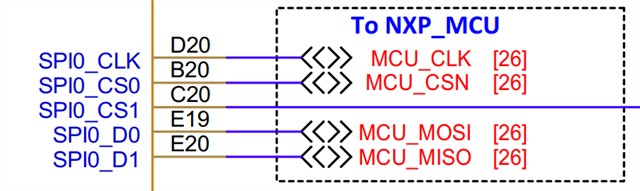
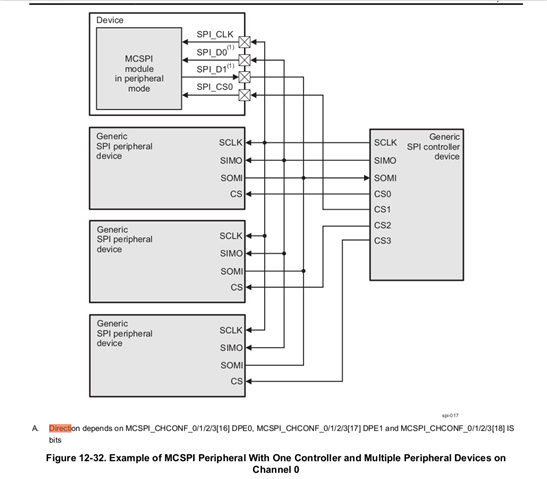
如何为 MIS0 配置 SPI0_D0、为 MOSI 配置 SPI0_D1。
2.如何在 DTS 上添加和设置从模式
请注意、
Cesar
This thread has been locked.
If you have a related question, please click the "Ask a related question" button in the top right corner. The newly created question will be automatically linked to this question.
工具/软件:
您好、
此 SPI 端口当前正在使用中

如何为 MIS0 配置 SPI0_D0、为 MOSI 配置 SPI0_D1。
2.如何在 DTS 上添加和设置从模式
请注意、
Cesar

尊敬的 Cesar:
请参考此常见问题解答: 【常见问题解答】J722SXH01EVM:如何在 J722SXH01EVM 的 40 引脚用户扩展接头上启用 McSPI?
常见问题解答不使用主 SPI0、但可用作一般启用 McSPI 所需更改的参考。 另一个参考、常见问题解答还包含指向应用手册的链接、该应用手册包含更多详细信息且仍然相关、但使用 TDA4VM。
此致、
Takuma
尊敬的 Takuma:
修改
@@ -3399,7 +3399,10 @@ CONFIG_SPI_OMAP24XX=m CONFIG_SPI_SPIDEV=m # CONFIG_SPI_LOOPBACK_TEST is not set # CONFIG_SPI_TLE62X0 is not set -# CONFIG_SPI_SLAVE is not set +CONFIG_SPI_SLAVE=y +CONFIG_SPI_SLAVE_TIME=y +CONFIG_SPI_SLAVE_SYSTEM_CONTROL=y +CONFIG_SPI_DYNAMIC=y # CONFIG_SPMI is not set # CONFIG_HSI is not set
&main_pmx0 {
main_spi0_pins_default: main-spi0-pins-default {
pinctrl-single,pins = <
J722S_IOPAD(0x01bc, PIN_INPUT, 0) /* (D20) SPI0_CLK */
J722S_IOPAD(0x01b4, PIN_INPUT, 0) /* (B20) SPI0_CS0 */
J722S_IOPAD(0x01c0, PIN_INPUT, 0) /* (E19) SPI0_D0 */
J722S_IOPAD(0x01c4, PIN_INPUT, 0) /* (E20) SPI0_D1 */
>;
};
};
&main_spi0 {
status = "okay";
#address-cells = <1>;
#size-cells = <0>;
pinctrl-0 = <&main_spi0_pins_default>;
pinctrl-names = "default";
spi-slave;
spidev@0 {
/*
* Using spidev compatible is warned loudly,
* thus use another equivalent compatible id
* from spidev.
*/
compatible = "rohm,dh2228fv";
spi-max-frequency = <24000000>;
reg = <0>;
};
};
1.从模式失败

2.

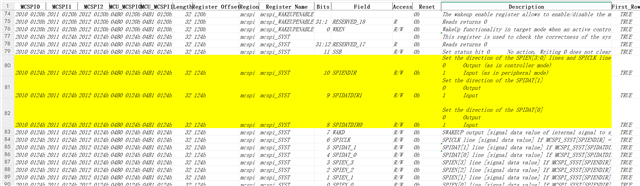
设置的方向与此:类似
TI、pindir-d0-in-D1-out;
此致、
Cesar
尊敬的 Cesar:
看起来像复位值。 您可以运行“ls -l /sys/class/spi *“并 共享日志吗?
如果 ts 已正确初始化、您应该会看到与应用手册类似的日志: https://www.ti.com/lit/an/sprad26/sprad26.pdf?SPI=1756502475801&ref_url=https ps%253A%252F%252Fwww.google.com%252F
如果未显示 SPI、请仔细阅读之前分享的应用手册和/或常见问题解答、以确保遵循所有步骤、并确保没有打印出与 SPI 相关的错误。
警告: 在编写应用手册后、Linux 内核驱动程序发生了一处更改、那就是 spidev 驱动程序不接受“spidev"作为“作为较新内核版本中的兼容字段。 因此、应保留当前器件树中使用的“Rohm、dh2228fv“。
此致、
Takuma
尊敬的 Takuma:
root@j722s-evm:~# ls -l /sys/class/spi* /sys/class/spi_master: total 0 lrwxrwxrwx 1 root root 0 Jan 8 18:22 spi0 -> ../../devices/platform/bus@f0000/fc00000.bus/fc40000.spi/spi_master/spi0 /sys/class/spi_slave: total 0 lrwxrwxrwx 1 root root 0 Jan 8 18:23 spi1 -> ../../devices/platform/bus@f0000/20100000.spi/spi_slave/spi1 /sys/class/spidev: total 0 lrwxrwxrwx 1 root root 0 Jan 8 18:23 spidev1.0 -> ../../devices/platform/bus@f0000/20100000.spi/spi_slave/spi1/spi1.0/spidev/spidev1.0 root@j722s-evm:~# root@j722s-evm:~# devmem2 0x20100124 /dev/mem opened. Memory mapped at address 0xffff94e4a000. Read at address 0x20100124 (0xffff94e4a124): 0x00000000
请注意、
Cesar
尊敬的 Cesar:
SPI 寻求得到枚举。
至于 mcspi_syst 寄存器、我尝试查看我们的驱动程序和 TRM。 看起来驱动程序不对 “OMAP2_MCSPI_SYST"寄存“寄存器进行编程。 和方向由写入 SPI-OMAP2-mcspi.c 驱动器中的 MCSPI_CHCONF 寄存器控制。

在任何情况下、SPI 通信现在是否有效、SPI_SLAVE 和 spidev 都已注册?
此致、
Takuma