
This thread has been locked.

If you have a related question, please click the "Ask a related question" button in the top right corner. The newly created question will be automatically linked to this question.

[参考译文] TDA4VH-Q1:在同一 VLAN 组中、TDA4VH 带宽限制为 100MB

Guru**** 2557330 points


请注意,本文内容源自机器翻译,可能存在语法或其它翻译错误,仅供参考。如需获取准确内容,请参阅链接中的英语原文或自行翻译。

https://e2e.ti.com/support/processors-group/processors/f/processors-forum/1569230/tda4vh-q1-tda4vh-within-the-same-vlan-group-bandwidth-is-limited-to-100mb

器件型号:TDA4VH-Q1
Thread 中讨论的其他器件:TDA4VH

工具/软件:

您好 TI。

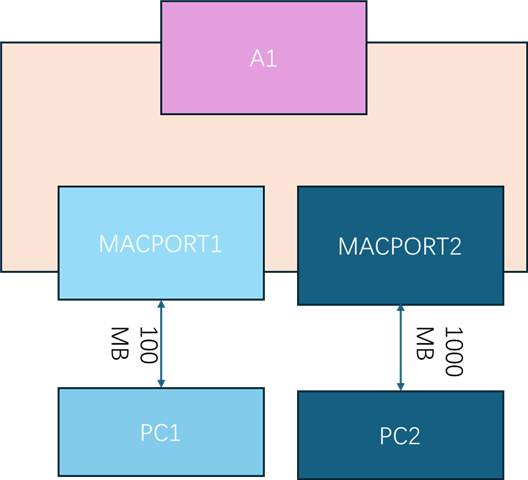
在 SDK0900 的 TDA4VH 平台 ethfw CPSW9G 上、hostmacport、macport1 和 macport2 在 VLAN8 中配置。

连接到 MACPORT1 的物理接口的工作速率为 100MB、

MACPORT2 的互联 PHY 以 1000MB 的速率运行。

在 MACPORT2 的带宽测试期间、

我们遇到带宽限制问题、吞吐量限制为 100MB
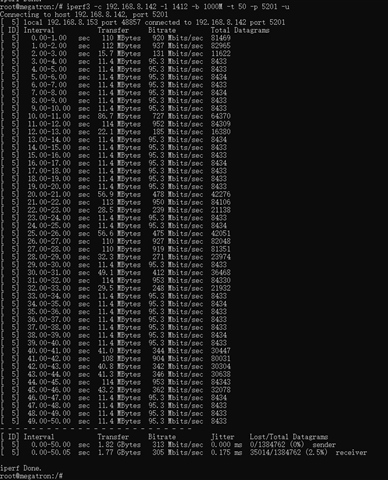
对于 UDP、TDA4VH Linux 运行命令“iperf3 -c 192.168.8.142 -u -l 1412 -b 1000M -t 50“、 但是、TCP 可以达到 1000MB。
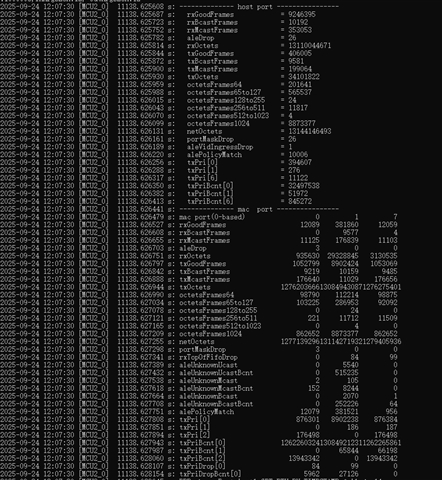
在 UDP 传输期间、MACPORT1 (0) 上的 octestframes1024 计数随着 MACPORT2 (1) 的增长而急剧增加。
  • 请注意,本文内容源自机器翻译,可能存在语法或其它翻译错误,仅供参考。如需获取准确内容,请参阅链接中的英语原文或自行翻译。

    您好、

    我可以在中看到吞吐量越来越高并且越来越下降、您是在主机端口与 MAC 端口 1 之间执行任何数据传输吗。
    另外、您能否确认吞吐量测试是否正确使用单播帧。

    在 SDK0900 的 TDA4VH 平台 ethfw CPSW9G 上、hostmacport、macport1 和 macport2 在 VLAN8 中配置。

    您是否也可以在没有 VLAN 的情况下检查相同的配置?

    此致、
    Sudheer

  • 请注意,本文内容源自机器翻译,可能存在语法或其它翻译错误,仅供参考。如需获取准确内容,请参阅链接中的英语原文或自行翻译。

    尊敬的 dorela:

    我可以在中看到吞吐量越来越高并且越来越下降、您是在主机端口与 MAC 端口 1 之间执行任何数据传输吗。

    ->不可以、 主机端口到 MAC 端口 1 的数据增长是由此命令“iperf3 -c PC2_ip_address -l 1412 -b 1000MB -t 50“生成的数据流引起的

    另外、您能否确认吞吐量测试是否正确使用单播帧。

    ->是、iperf3 -c PC2_IP_address -u -b 1000MB -l 1412 -t 50

    您是否也可以在没有 VLAN 的情况下检查相同的配置?

    好的,我会打勾的

  • 请注意,本文内容源自机器翻译,可能存在语法或其它翻译错误,仅供参考。如需获取准确内容,请参阅链接中的英语原文或自行翻译。

    您好、

    [报价 userid=“505728" url="“ url="~“~/support/processors-group/processors/f/processors-forum/1569230/tda4vh-q1-tda4vh-within-the-same-vlan-group-bandwidth-is-limited-to-100mb/6043167

    您是否也可以在没有 VLAN 的情况下检查相同的配置?

    好的,我会打勾的

    [/报价]

    请确保、在这种情况下、请检查任何端口掩码丢弃。

    只有可能的情况是 ALE 老化、如果所获知的 PC2 MAC 地址丢失、则数据包将被泛洪到 MAC 端口 1 和 MAC 端口 2、因为两者都是同一 VLAN 的一部分。

    另外、请确保 PC1 和 PC2 具有不同的 MAC 地址。

    此致、
    Sudheer

  • 请注意,本文内容源自机器翻译,可能存在语法或其它翻译错误,仅供参考。如需获取准确内容,请参阅链接中的英语原文或自行翻译。

    您好、

    此问题也可以在没有 VLAN 的情况下重现 

    这可能是由于主机端口 VLAN、它将在内部处理时添加到数据包、并在对数据包进行处理时未标记。

    您能否在运行测试时从 PC2 向 Linux 客户端运行 ping 测试、并检查吞吐量是否下降?

    此致、
    Sudheer

  • 请注意,本文内容源自机器翻译,可能存在语法或其它翻译错误,仅供参考。如需获取准确内容,请参阅链接中的英语原文或自行翻译。

    尊敬的 doredla:

    在测试从 PC2 到 Linux 客户端的带宽时、速度通常为 900MB

    root@megatron:/# iperf3 -s    
    -----------------------------------------------------------
    Server listening on 5201 (test #1)
    -----------------------------------------------------------
    Accepted connection from 192.168.8.142, port 56282
    [  5] local 192.168.8.153 port 5201 connected to 192.168.8.142 port 56292
    [ ID] Interval           Transfer     Bitrate
    [  5]   0.00-1.00   sec   109 MBytes   910 Mbits/sec                  
    [  5]   1.00-2.00   sec   111 MBytes   935 Mbits/sec                  
    [  5]   2.00-3.00   sec   107 MBytes   898 Mbits/sec                  
    [  5]   3.00-4.00   sec   107 MBytes   896 Mbits/sec                  
    [  5]   4.00-5.00   sec   100 MBytes   841 Mbits/sec                  
    [  5]   5.00-6.00   sec   103 MBytes   865 Mbits/sec                  
    [  5]   6.00-7.00   sec   106 MBytes   890 Mbits/sec                  
    [  5]   7.00-8.00   sec   101 MBytes   848 Mbits/sec                  
    [  5]   8.00-9.00   sec   107 MBytes   900 Mbits/sec                  
    [  5]   9.00-10.00  sec   107 MBytes   899 Mbits/sec                  
    [  5]  10.00-11.00  sec   109 MBytes   915 Mbits/sec                  
    [  5]  11.00-12.00  sec   109 MBytes   914 Mbits/sec                  
    [  5]  12.00-13.00  sec   108 MBytes   905 Mbits/sec                  
    [  5]  13.00-14.00  sec   110 MBytes   921 Mbits/sec                  
    [  5]  14.00-15.00  sec   108 MBytes   907 Mbits/sec                  
    [  5]  15.00-16.00  sec   111 MBytes   928 Mbits/sec                  
    [  5]  16.00-17.00  sec   110 MBytes   922 Mbits/sec                  
    [  5]  17.00-18.00  sec   111 MBytes   930 Mbits/sec                  
    [  5]  18.00-19.00  sec   109 MBytes   911 Mbits/sec                  
    [  5]  19.00-20.00  sec   110 MBytes   923 Mbits/sec                  
    [  5]  20.00-21.00  sec   111 MBytes   933 Mbits/sec                  
    [  5]  21.00-22.00  sec   110 MBytes   921 Mbits/sec                  
    [  5]  22.00-23.00  sec   109 MBytes   914 Mbits/sec                  
    [  5]  23.00-24.00  sec   110 MBytes   924 Mbits/sec                  
    [  5]  24.00-25.00  sec   108 MBytes   905 Mbits/sec                  
    [  5]  25.00-26.00  sec   105 MBytes   882 Mbits/sec                  
    [  5]  26.00-27.00  sec   109 MBytes   913 Mbits/sec                  
    [  5]  27.00-28.00  sec   107 MBytes   896 Mbits/sec                  
    [  5]  28.00-29.00  sec   110 MBytes   920 Mbits/sec                  
    [  5]  29.00-30.00  sec   111 MBytes   929 Mbits/sec                  
    [  5]  30.00-31.00  sec   109 MBytes   916 Mbits/sec                  
    [  5]  31.00-32.00  sec   111 MBytes   928 Mbits/sec                  
    [  5]  32.00-33.00  sec   109 MBytes   916 Mbits/sec                  
    [  5]  33.00-34.00  sec   107 MBytes   895 Mbits/sec                  
    [  5]  34.00-35.00  sec   109 MBytes   916 Mbits/sec                  
    [  5]  35.00-36.00  sec   108 MBytes   907 Mbits/sec                  
    [  5]  36.00-37.00  sec   107 MBytes   893 Mbits/sec                  
    [  5]  37.00-38.00  sec   106 MBytes   886 Mbits/sec                  
    [  5]  38.00-39.00  sec   106 MBytes   887 Mbits/sec                  
    [  5]  39.00-40.00  sec   108 MBytes   906 Mbits/sec                  
    [  5]  40.00-41.00  sec   112 MBytes   937 Mbits/sec                  
    [  5]  41.00-42.00  sec   111 MBytes   930 Mbits/sec                  
    [  5]  42.00-43.00  sec   109 MBytes   912 Mbits/sec                  
    [  5]  43.00-44.00  sec   108 MBytes   903 Mbits/sec                  
    [  5]  44.00-45.00  sec   106 MBytes   886 Mbits/sec                  
    [  5]  45.00-46.00  sec   109 MBytes   918 Mbits/sec                  
    [  5]  46.00-47.00  sec   110 MBytes   926 Mbits/sec                  
    [  5]  47.00-48.00  sec   107 MBytes   897 Mbits/sec                  
    [  5]  48.00-49.00  sec   111 MBytes   927 Mbits/sec                  
    [  5]  49.00-50.00  sec   108 MBytes   909 Mbits/sec                  
    - - - - - - - - - - - - - - - - - - - - - - - - -
    [ ID] Interval           Transfer     Bitrate
    [  5]   0.00-50.00  sec  5.28 GBytes   908 Mbits/sec                  receiver

    从 Linux 客户端到 PC2 的测试结果表明、带宽通常限制在 100MB、但有时会达到 900MB。

    ^Ciperf3: interrupt - the server has terminated
    root@megatron:/# sudo iperf3 -c 192.168.8.142 -l 1412 -b 1000M -u -t 50
    sh: sudo: command not found
    root@megatron:/# iperf3 -c 192.168.8.142 -l 1412 -b 1000M -u -t 50
    Connecting to host 192.168.8.142, port 5201
    [  5] local 192.168.8.153 port 62644 connected to 192.168.8.142 port 5201
    [ ID] Interval           Transfer     Bitrate         Total Datagrams
    [  5]   0.00-1.00   sec   107 MBytes   901 Mbits/sec  79779  
    [  5]   1.00-2.00   sec  34.8 MBytes   292 Mbits/sec  25848  
    [  5]   2.00-3.00   sec  11.4 MBytes  95.3 Mbits/sec  8434  
    [  5]   3.00-4.00   sec  11.4 MBytes  95.3 Mbits/sec  8435  
    [  5]   4.00-5.00   sec  11.4 MBytes  95.3 Mbits/sec  8434  
    [  5]   5.00-6.00   sec  11.4 MBytes  95.3 Mbits/sec  8435  
    [  5]   6.00-7.00   sec  40.9 MBytes   343 Mbits/sec  30354  
    [  5]   7.00-8.00   sec   101 MBytes   846 Mbits/sec  74903  
    [  5]   8.00-9.00   sec  35.0 MBytes   293 Mbits/sec  25974  
    [  5]   9.00-10.00  sec  23.9 MBytes   200 Mbits/sec  17745  
    [  5]  10.00-11.00  sec   105 MBytes   878 Mbits/sec  77720  
    [  5]  11.00-12.00  sec  40.6 MBytes   341 Mbits/sec  30181  
    [  5]  12.00-13.00  sec  11.4 MBytes  95.3 Mbits/sec  8435  
    [  5]  13.00-14.00  sec  11.4 MBytes  95.3 Mbits/sec  8434  
    [  5]  14.00-15.00  sec  11.4 MBytes  95.3 Mbits/sec  8435  
    [  5]  15.00-16.00  sec  11.4 MBytes  95.3 Mbits/sec  8434  
    [  5]  16.00-17.00  sec  11.4 MBytes  95.3 Mbits/sec  8435  
    [  5]  17.00-18.00  sec  11.4 MBytes  95.3 Mbits/sec  8434  
    [  5]  18.00-19.00  sec  11.4 MBytes  95.3 Mbits/sec  8435  
    [  5]  19.00-20.00  sec  16.9 MBytes   142 Mbits/sec  12577  
    [  5]  20.00-21.00  sec   111 MBytes   934 Mbits/sec  82706  
    [  5]  21.00-22.00  sec  46.3 MBytes   388 Mbits/sec  34380  
    [  5]  22.00-23.00  sec  11.4 MBytes  95.3 Mbits/sec  8435  
    [  5]  23.00-24.00  sec  11.4 MBytes  95.3 Mbits/sec  8434  
    [  5]  24.00-25.00  sec  48.5 MBytes   407 Mbits/sec  36041  
    [  5]  25.00-26.00  sec   113 MBytes   946 Mbits/sec  83759  
    [  5]  26.00-27.00  sec  50.7 MBytes   426 Mbits/sec  37683  
    [  5]  27.00-28.00  sec  11.4 MBytes  95.3 Mbits/sec  8435  
    [  5]  28.00-29.00  sec  11.4 MBytes  95.3 Mbits/sec  8435  
    [  5]  29.00-30.00  sec  40.2 MBytes   337 Mbits/sec  29824  
    [  5]  30.00-31.00  sec   102 MBytes   856 Mbits/sec  75782  
    [  5]  31.00-32.00  sec  53.1 MBytes   445 Mbits/sec  39418  
    [  5]  32.00-33.00  sec  11.4 MBytes  95.3 Mbits/sec  8434  
    [  5]  33.00-34.00  sec  36.2 MBytes   303 Mbits/sec  26848  
    [  5]  34.00-35.00  sec   114 MBytes   953 Mbits/sec  84345  
    [  5]  35.00-36.00  sec  56.5 MBytes   474 Mbits/sec  41953  
    [  5]  36.00-37.00  sec  11.4 MBytes  95.3 Mbits/sec  8435  
    [  5]  37.00-38.00  sec  11.4 MBytes  95.3 Mbits/sec  8434  
    [  5]  38.00-39.00  sec  11.4 MBytes  95.3 Mbits/sec  8435  
    [  5]  39.00-40.00  sec  11.4 MBytes  95.3 Mbits/sec  8434  
    [  5]  40.00-41.00  sec  91.2 MBytes   765 Mbits/sec  67694  
    [  5]  41.00-42.00  sec  60.3 MBytes   506 Mbits/sec  44779  
    [  5]  42.00-43.00  sec  40.7 MBytes   341 Mbits/sec  30215  
    [  5]  43.00-44.00  sec   105 MBytes   883 Mbits/sec  78154  
    [  5]  44.00-45.00  sec  52.1 MBytes   437 Mbits/sec  38671  
    [  5]  45.00-46.00  sec  11.4 MBytes  95.3 Mbits/sec  8434  
    [  5]  46.00-47.00  sec  11.4 MBytes  95.3 Mbits/sec  8435  
    [  5]  47.00-48.00  sec  11.4 MBytes  95.3 Mbits/sec  8434  
    [  5]  48.00-49.00  sec  11.4 MBytes  95.3 Mbits/sec  8435  
    [  5]  49.00-50.00  sec  11.4 MBytes  95.3 Mbits/sec  8434  
    - - - - - - - - - - - - - - - - - - - - - - - - -
    [ ID] Interval           Transfer     Bitrate         Jitter    Lost/Total Datagrams
    [  5]   0.00-50.00  sec  1.86 GBytes   320 Mbits/sec  0.000 ms  0/1418196 (0%)  sender
    [  5]   0.00-50.05  sec  1.77 GBytes   303 Mbits/sec  0.177 ms  73515/1418196 (5.2%)  receiver
    
    iperf Done.
    root@megatron:/# 

  • 请注意,本文内容源自机器翻译,可能存在语法或其它翻译错误,仅供参考。如需获取准确内容,请参阅链接中的英语原文或自行翻译。

    您好、

    从 Linux 客户端到 PC2 的测试结果表明、带宽通常限制在 100MB、但有时会达到 900MB。

    正如我之前所说的、这可能是由于 PC2 MAC 地址的老化。

    您是否可以与 iperf 客户端一起从 Linux 客户端到 PC2 运行普通 ping 命令。

    您是否还可以通过 在观察高吞吐量和 低吞吐量的同时转储 ALE 条目进行检查、并与我们共享 PC1、PC2、Linux 客户端的 ifconfig 信息。

    此致、
    Sudheer

  • 请注意,本文内容源自机器翻译,可能存在语法或其它翻译错误,仅供参考。如需获取准确内容,请参阅链接中的英语原文或自行翻译。

    尊敬的 Doredla:

    PC2 ifconfig 信息:

    mgbe2_0.8:flags=4163  MTU 1466

        INET 192.168.8.142 网络掩码 255.255.255.0 广播 0.0.0.0
        inet6 fe80:::4a49:52ff:fe41:719d prefixlen 64 scoeid 0x20
        以太网 48:49:52:41:71:9d txqueuelen 1000 (以太网)
        RX 数据包 2820273 字节 2115759921 (2.1 GB)
        RX 错误 0 丢弃 0 溢出 0 帧 0
        TX 数据包 33718299 字节 54428553905 (54.4 GB)
        TX 错误 0 丢弃 0 溢出 0 载波 0 冲突 0
    PC1 ifconfig 信息:
    192.168.8.144 48:49:52:41:40:90
    TDA4VH ifconfig 信息:
    eth1.8:flags=4163  MTU 1500
        iNet 192.168.8.153 网络掩码 255.255.255.0 广播 192.168.8.255
        inet6 fe80:::4a49:52ff:fe41:f0a0 prefixlen 64 scoeid 0x20
        以太网 48:49:52:41:f0:a0 txqueuelen 1000 (以太网)
        RX 数据包 14167000 字节 23417332365 (21.8 GiB)
        RX 错误 0 丢弃 0 溢出 0 帧 0
        TX 数据包 2813523 字节 2154748596 (2.0 GiB)
        TX 错误 0 丢弃 0 溢出 0 载波 0 冲突 0
    同时执行 ping 和 iperf3 带宽测试会得到正常结果
    root@megatron:/data/log/rproc_log# ping 192.168.8.142 & iperf3 -c 192.168.8.142 -t 50 -b 1000M -l 1412 -u
    [1] 10618
    PING 192.168.8.142 (192.168.8.142) 56(84) bytes of data.
    64 bytes from 192.168.8.142: icmp_seq=1 ttl=64 time=0.728 ms
    Connecting to host 192.168.8.142, port 5201
    [  5] local 192.168.8.153 port 61397 connected to 192.168.8.142 port 5201
    64 bytes from 192.168.8.142: icmp_seq=2 ttl=64 time=1.33 ms
    [ ID] Interval           Transfer     Bitrate         Total Datagrams
    [  5]   0.00-1.00   sec   106 MBytes   891 Mbits/sec  78877  
    64 bytes from 192.168.8.142: icmp_seq=3 ttl=64 time=1.33 ms
    [  5]   1.00-2.00   sec   114 MBytes   953 Mbits/sec  84345  
    64 bytes from 192.168.8.142: icmp_seq=4 ttl=64 time=1.34 ms
    [  5]   2.00-3.00   sec   109 MBytes   911 Mbits/sec  80633  
    64 bytes from 192.168.8.142: icmp_seq=5 ttl=64 time=1.31 ms
    [  5]   3.00-4.00   sec   110 MBytes   927 Mbits/sec  82034  
    64 bytes from 192.168.8.142: icmp_seq=6 ttl=64 time=1.30 ms
    [  5]   4.00-5.00   sec   110 MBytes   922 Mbits/sec  81601  
    64 bytes from 192.168.8.142: icmp_seq=7 ttl=64 time=1.40 ms
    [  5]   5.00-6.00   sec   111 MBytes   934 Mbits/sec  82713  
    64 bytes from 192.168.8.142: icmp_seq=8 ttl=64 time=1.30 ms
    [  5]   6.00-7.00   sec  98.1 MBytes   823 Mbits/sec  72847  
    64 bytes from 192.168.8.142: icmp_seq=9 ttl=64 time=1.23 ms
    [  5]   7.00-8.00   sec   114 MBytes   953 Mbits/sec  84345  
    64 bytes from 192.168.8.142: icmp_seq=10 ttl=64 time=1.33 ms
    [  5]   8.00-9.00   sec   114 MBytes   953 Mbits/sec  84326  
    64 bytes from 192.168.8.142: icmp_seq=11 ttl=64 time=0.792 ms
    [  5]   9.00-10.00  sec   107 MBytes   898 Mbits/sec  79531  
    64 bytes from 192.168.8.142: icmp_seq=12 ttl=64 time=1.31 ms
    [  5]  10.00-11.00  sec   107 MBytes   897 Mbits/sec  79383  
    64 bytes from 192.168.8.142: icmp_seq=13 ttl=64 time=1.46 ms
    [  5]  11.00-12.00  sec   114 MBytes   953 Mbits/sec  84339  
    64 bytes from 192.168.8.142: icmp_seq=14 ttl=64 time=1.43 ms
    [  5]  12.00-13.00  sec   114 MBytes   953 Mbits/sec  84347  
    64 bytes from 192.168.8.142: icmp_seq=15 ttl=64 time=1.31 ms
    [  5]  13.00-14.00  sec   112 MBytes   939 Mbits/sec  83105  
    64 bytes from 192.168.8.142: icmp_seq=16 ttl=64 time=1.29 ms
    [  5]  14.00-15.00  sec   114 MBytes   953 Mbits/sec  84345  
    64 bytes from 192.168.8.142: icmp_seq=17 ttl=64 time=1.16 ms
    [  5]  15.00-16.00  sec   114 MBytes   953 Mbits/sec  84342  
    64 bytes from 192.168.8.142: icmp_seq=18 ttl=64 time=1.36 ms
    [  5]  16.00-17.00  sec   113 MBytes   948 Mbits/sec  83905  
    64 bytes from 192.168.8.142: icmp_seq=19 ttl=64 time=1.24 ms
    [  5]  17.00-18.00  sec   106 MBytes   889 Mbits/sec  78678  
    64 bytes from 192.168.8.142: icmp_seq=20 ttl=64 time=1.29 ms
    [  5]  18.00-19.00  sec   114 MBytes   953 Mbits/sec  84346  
    64 bytes from 192.168.8.142: icmp_seq=21 ttl=64 time=1.38 ms
    [  5]  19.00-20.00  sec   114 MBytes   953 Mbits/sec  84345  
    64 bytes from 192.168.8.142: icmp_seq=22 ttl=64 time=1.30 ms
    [  5]  20.00-21.00  sec   112 MBytes   939 Mbits/sec  83087  
    64 bytes from 192.168.8.142: icmp_seq=23 ttl=64 time=0.680 ms
    [  5]  21.00-22.00  sec   113 MBytes   950 Mbits/sec  84143  
    [  5]  22.00-23.00  sec   113 MBytes   949 Mbits/sec  83983  
    64 bytes from 192.168.8.142: icmp_seq=24 ttl=64 time=1.29 ms
    [  5]  23.00-24.00  sec   103 MBytes   867 Mbits/sec  76731  
    64 bytes from 192.168.8.142: icmp_seq=25 ttl=64 time=1.19 ms
    [  5]  24.00-25.00  sec   108 MBytes   905 Mbits/sec  80126  
    64 bytes from 192.168.8.142: icmp_seq=26 ttl=64 time=1.34 ms
    [  5]  25.00-26.00  sec   113 MBytes   951 Mbits/sec  84210  
    64 bytes from 192.168.8.142: icmp_seq=27 ttl=64 time=1.39 ms
    [  5]  26.00-27.00  sec   114 MBytes   953 Mbits/sec  84334  
    64 bytes from 192.168.8.142: icmp_seq=28 ttl=64 time=1.35 ms
    [  5]  27.00-28.00  sec   114 MBytes   953 Mbits/sec  84346  
    64 bytes from 192.168.8.142: icmp_seq=29 ttl=64 time=1.33 ms
    [  5]  28.00-29.00  sec   105 MBytes   882 Mbits/sec  78106  
    64 bytes from 192.168.8.142: icmp_seq=30 ttl=64 time=1.37 ms
    [  5]  29.00-30.00  sec   114 MBytes   952 Mbits/sec  84303  
    64 bytes from 192.168.8.142: icmp_seq=31 ttl=64 time=1.30 ms
    [  5]  30.00-31.00  sec   109 MBytes   912 Mbits/sec  80716  
    64 bytes from 192.168.8.142: icmp_seq=32 ttl=64 time=1.32 ms
    [  5]  31.00-32.00  sec   114 MBytes   953 Mbits/sec  84361  
    64 bytes from 192.168.8.142: icmp_seq=33 ttl=64 time=1.32 ms
    [  5]  32.00-33.00  sec   113 MBytes   947 Mbits/sec  83850  
    64 bytes from 192.168.8.142: icmp_seq=34 ttl=64 time=1.35 ms
    [  5]  33.00-34.00  sec   114 MBytes   953 Mbits/sec  84345  
    64 bytes from 192.168.8.142: icmp_seq=35 ttl=64 time=1.34 ms
    [  5]  34.00-35.00  sec   113 MBytes   945 Mbits/sec  83622  
    64 bytes from 192.168.8.142: icmp_seq=36 ttl=64 time=1.33 ms
    [  5]  35.00-36.00  sec   107 MBytes   899 Mbits/sec  79573  
    64 bytes from 192.168.8.142: icmp_seq=37 ttl=64 time=1.31 ms
    [  5]  36.00-37.00  sec  95.0 MBytes   797 Mbits/sec  70541  
    64 bytes from 192.168.8.142: icmp_seq=38 ttl=64 time=1.31 ms
    [  5]  37.00-38.00  sec   112 MBytes   936 Mbits/sec  82874  
    64 bytes from 192.168.8.142: icmp_seq=39 ttl=64 time=1.35 ms
    [  5]  38.00-39.00  sec   108 MBytes   906 Mbits/sec  80196  
    64 bytes from 192.168.8.142: icmp_seq=40 ttl=64 time=1.31 ms
    [  5]  39.00-40.00  sec   112 MBytes   935 Mbits/sec  82810  
    64 bytes from 192.168.8.142: icmp_seq=41 ttl=64 time=0.776 ms
    [  5]  40.00-41.00  sec   110 MBytes   921 Mbits/sec  81519  
    64 bytes from 192.168.8.142: icmp_seq=42 ttl=64 time=1.37 ms
    [  5]  41.00-42.00  sec   103 MBytes   866 Mbits/sec  76635  
    64 bytes from 192.168.8.142: icmp_seq=43 ttl=64 time=1.30 ms
    [  5]  42.00-43.00  sec   109 MBytes   917 Mbits/sec  81173  
    64 bytes from 192.168.8.142: icmp_seq=44 ttl=64 time=1.32 ms
    [  5]  43.00-44.00  sec   114 MBytes   953 Mbits/sec  84344  
    64 bytes from 192.168.8.142: icmp_seq=45 ttl=64 time=1.33 ms
    [  5]  44.00-45.00  sec   114 MBytes   953 Mbits/sec  84347  
    64 bytes from 192.168.8.142: icmp_seq=46 ttl=64 time=1.31 ms
    [  5]  45.00-46.00  sec   114 MBytes   953 Mbits/sec  84345  
    64 bytes from 192.168.8.142: icmp_seq=47 ttl=64 time=1.34 ms
    [  5]  46.00-47.00  sec   109 MBytes   916 Mbits/sec  81074  
    64 bytes from 192.168.8.142: icmp_seq=48 ttl=64 time=1.40 ms
    [  5]  47.00-48.00  sec   102 MBytes   857 Mbits/sec  75857  
    64 bytes from 192.168.8.142: icmp_seq=49 ttl=64 time=1.31 ms
    [  5]  48.00-49.00  sec   112 MBytes   940 Mbits/sec  83222  
    64 bytes from 192.168.8.142: icmp_seq=50 ttl=64 time=1.33 ms
    [  5]  49.00-50.00  sec   111 MBytes   935 Mbits/sec  82782  
    - - - - - - - - - - - - - - - - - - - - - - - - -
    [ ID] Interval           Transfer     Bitrate         Jitter    Lost/Total Datagrams
    [  5]   0.00-50.00  sec  5.38 GBytes   925 Mbits/sec  0.000 ms  0/4093942 (0%)  sender
    [  5]   0.00-50.04  sec  5.15 GBytes   884 Mbits/sec  0.012 ms  179436/4093942 (4.4%)  receiver
  • 请注意,本文内容源自机器翻译,可能存在语法或其它翻译错误,仅供参考。如需获取准确内容,请参阅链接中的英语原文或自行翻译。

    您好、

    同时执行 ping 和 iperf3 带宽测试显示正常结果

    此外、检查端口 1 统计信息中是否没有跳转。

    通常、账龄 期间为 1 秒。 如果没有从对等端 MAC 条目接收到数据、则从 ALE 老化间隔开始将丢失。

    当您与 iperf3 UDP 同时运行 ping 时、PC2 将向 Linux 客户端发回 ping 响应、因此 PC2 的 MAC 条目存在于 ALE 中并且尚未过期。

    与 TCP 的情况相同、因为它是基于确认的通信、PC2 会为通信发送一些 ACK、因此 MAC 条目不会老化。

    您还能通过 在观察高吞吐量和 低吞吐量的同时转储 ALE 条目来检查吗、

    您可以通过在上述情况下转储 ALE 表条目来确认这一点。  

    此致、
    Sudheer

  • 请注意,本文内容源自机器翻译,可能存在语法或其它翻译错误,仅供参考。如需获取准确内容,请参阅链接中的英语原文或自行翻译。

    您好、

    这是因为老龄化。 如果没有从 PC2 到 CPSW 的传入流量、则 PC2 的 MAC 将被老化并从 ALE 表中删除。

    当 PC2 的 MAC 不在 ALE 表中时、ALE 不知道要转发 UDP 通信的端口。 因此、根据 VLAN 成员列表、UDP 数据包将发送到属于 VLAN 一部分的所有端口。 这就是您在端口 1 上观察到 TX 正常数据包计数增加的原因。

    因此、为了将流量发送到特定端口、您需要接收一些数据以在 ALE 表中包含对等设备的 MAC 地址、或者您需要在 ALE 中添加一个静态条目。

    此致、
    Sudheer