
This thread has been locked.

If you have a related question, please click the "Ask a related question" button in the top right corner. The newly created question will be automatically linked to this question.

[参考译文] AM6411:引导 AM6411

Guru**** 2587365 points
Other Parts Discussed in Thread: SK-AM62B, SYSCONFIG, AM6442, SK-AM64B, AM6411

请注意,本文内容源自机器翻译,可能存在语法或其它翻译错误,仅供参考。如需获取准确内容,请参阅链接中的英语原文或自行翻译。

https://e2e.ti.com/support/processors-group/processors/f/processors-forum/1572549/am6411-booting-am6411

器件型号:AM6411
主题中讨论的其他器件:SK-AM64B、SysConfig、AM6442、SK-AM62B

工具/软件:

我有一个源自 SK-AM64B 的定制 AM6411 电路板。  我有几个问题。

我已  烧录 Debian Trixie 11.00.09.04(2025 年 4 月 4 日)映像、并尝试引导。  无法正常工作、您可以看到下面的日志。  我不是很惊讶,因为...

  • 假设我需要构建一个新的 dtb 文件进行引导
  • 我是否还需要重新编译 U-Boot?

您能帮我简要介绍一下需要完成哪些工作吗?

我希望使用 SysConfig 工具生成 DTS 文件、但对此我有点困惑。  似乎有多种方法可以运行 SysConfig 工具。

(1) 我似乎无法在这里配置 DDR 存储器。
https://dev.ti.com/sysconfig

注意在这第一种运行 SysConfig 的方法中、我不选择软件产品。  我过去使用该工具来为 AM6442 配置不同的硬件(而选择 AM6442)。
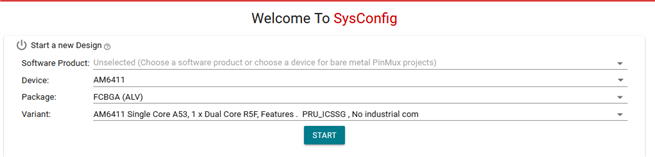
但我似乎无法让 DDR 实际配置?  这是我需要担心的吗?  我想我需要指定尺寸吗?
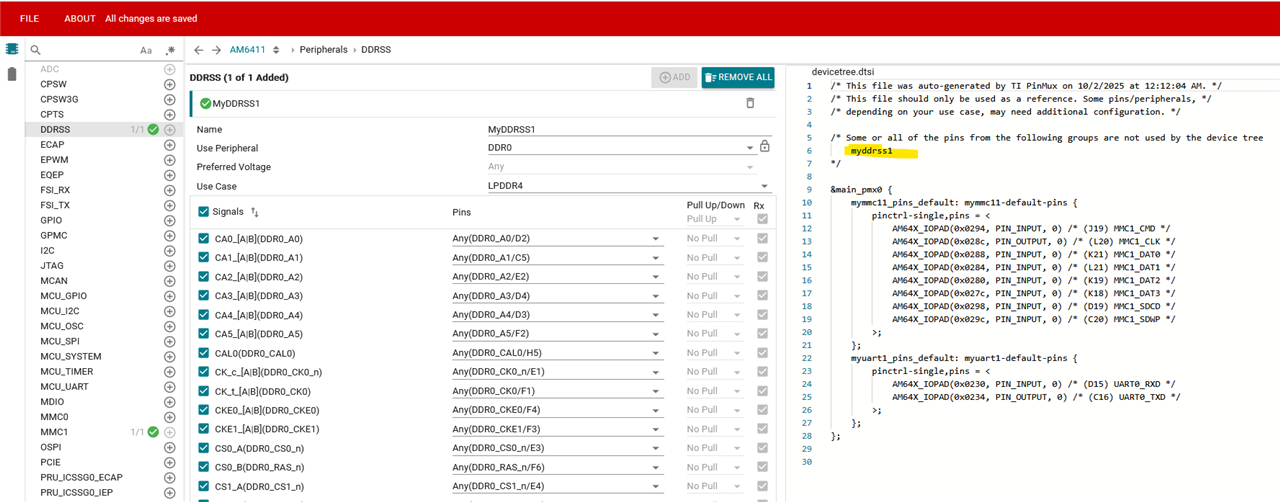
但是、我可以以不同的方式运行该工具、为 DDR 选择了软件产品。
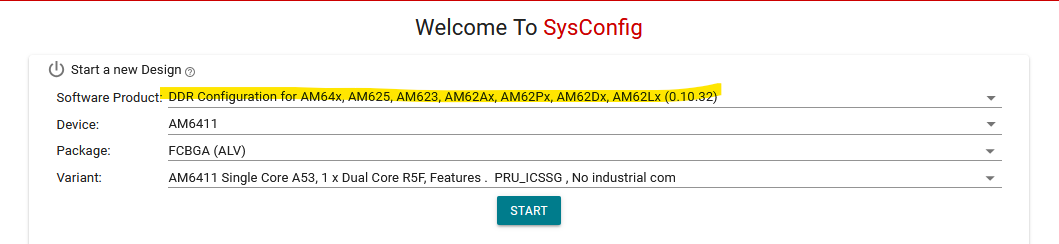
现在我得到了 DDR 配置的内容... 我应该如何使用它?  我看到您指向自述文件的链接: https://dev.ti.com/tirex/content/Processor_DDR_Config_0.10.32.0000/docs/README.html

但是、我认为我的内存可能是来自 AM6442 -->AM6411 的、因此理想情况下我不需要麻烦解决这个问题、但我很困惑、有点不明白如何以这些不同的方法运行 SysConfig。
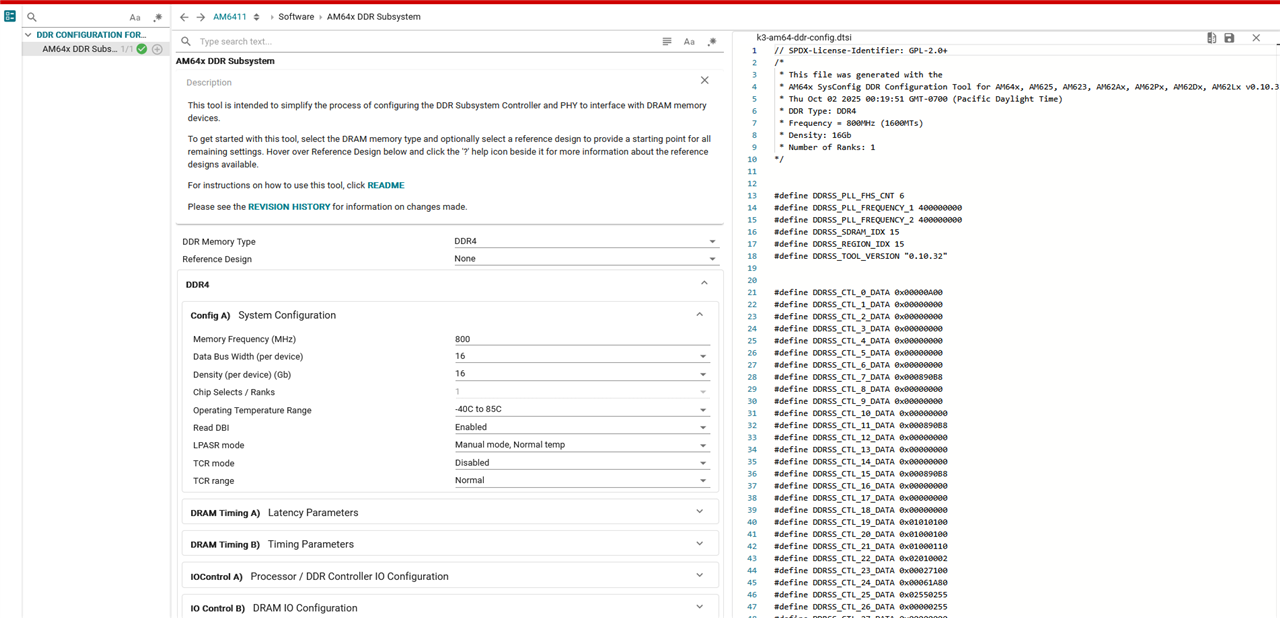
(2) 我使用 AM6411 之后、是否有办法禁用其他内核?

  • 与 SDK HIT 类似、它具有 k3-am642-sk.dts、其中包括 k3-am642.dtsi
    • 我是否需要创建新的 k3-am641.dtsi 这不包括第二个内核?
    • 并让自己成为 k3-am641-myboard.dts?
    • 有什么关于 U-boot 的吗?

在记录中、下面是我现在得到的结果的日志:

U-Boot SPL 2025.01-00406-gcd91d7360181 (Mar 25 2025 - 16:14:37 +0000)
Resetting on cold boot to workaround ErrataID:i2331
Please resend tiboot3.bin in case of UART/DFU boot
resetting ...

U-Boot SPL 2025.01-00406-gcd91d7360181 (Mar 25 2025 - 16:14:37 +0000)
SYSFW ABI: 4.0 (firmware rev 0x000b '11.0.7--v11.00.07 (Fancy Rat)')
EEPROM not available at 0x50, trying to read at 0x51
Reading on-board EEPROM at 0x51 failed -121
SPL initial stack usage: 13392 bytes

U-Boot SPL 2025.01-00406-gcd91d7360181 (Mar 25 2025 - 16:14:37 +0000)
Resetting on cold boot to workaround ErrataID:i2331
Please resend tiboot3.bin in case of UART/DFU boot
resetting ...

U-Boot SPL 2025.01-00406-gcd91d7360181 (Mar 25 2025 - 16:14:37 +0000)
SYSFW ABI: 4.0 (firmware rev 0x000b '11.0.7--v11.00.07 (Fancy Rat)')
EEPROM not available at 0x50, trying to read at 0x51
Reading on-board EEPROM at 0x51 failed -121
SPL initial stack usage: 13392 bytes

  • 请注意,本文内容源自机器翻译,可能存在语法或其它翻译错误,仅供参考。如需获取准确内容,请参阅链接中的英语原文或自行翻译。

    尊敬的 Timothy:

    首先、我修改了您的帖子、将控制台日志放入代码块、以便我们有用于通信的行号。

    在控制台日志中、第 12 行重复第 1 行。 您是否重启或热重置了导致第 12 行消息的主板? 还是在您不触摸电路板的情况下自动打印?

    我希望使用 SysConfig 工具生成 dts 文件、但对此我有点困惑。  似乎有多种运行 SysConfig 工具的方法。

    现在、让我们暂时搁置 SysConfig 工具。 如有必要、我们稍后会再讨论。

    但是、我认为我的内存可能与 AM6442 中的内存相同-->AM6411、

    您使用的 DDR 存储器(类型和大小)是否与 SK-AM62B EVM 完全相同?

    (2) 我是否应该能够禁用其他内核、因为我使用的是 AM6411?

    它仅在内核中相关、A53 内核的数量在 U-Boot 中无关紧要。 我们首先确保可以引导进入 U-Boot 命令行提示符。

  • 请注意,本文内容源自机器翻译,可能存在语法或其它翻译错误,仅供参考。如需获取准确内容,请参阅链接中的英语原文或自行翻译。

    尊敬的 Bin:  

    我与 Timothy 合作处理这个项目。 我可以确认、在打印第 10 行后对器件进行了下电上电、因此控制台日志会重复出现。  

  • 请注意,本文内容源自机器翻译,可能存在语法或其它翻译错误,仅供参考。如需获取准确内容,请参阅链接中的英语原文或自行翻译。

    尊敬的 Connor:

    感谢您的确认。

    我假设您的电路板没有 EEPROM? 请应用我在以下链接中发布的两个 U-Boot 补丁、看看它是否能让 U-Boot 在您的电路板上打印更多消息。

     AM6412:是否可以跳过电路板 ID 的读取 EEPROM? 

  • 请注意,本文内容源自机器翻译,可能存在语法或其它翻译错误,仅供参考。如需获取准确内容,请参阅链接中的英语原文或自行翻译。

    尊敬的 Bin:

    所以我取得了一定的进步。  我能够重新编译 U-Boot、但我不得不欺骗并从预编译目录中获取 bl31.bin 和 bl32.bin、因为我无法构建 optee 或可信固件->这可以吗?  我还展示了我的其他更新以尝试匹配另一个帖子中的两个更新。  您还没有尝试过。

    因此、我找到了 CONFIG_SPL_OF_LIST、但没有 CONFIG_OF_LIST。  更新了:

    ./ti-processor-sdk-linux-rt-am64xx-evm-11.00.09.04/board-support/ti-u-boot-2025.01+git/configs/am64x_evm_r5_defconfig
    -CONFIG_SPL_OF_LIST="k3-am642-r5-evm k3-am642-r5-sk"
    +CONFIG_SPL_OF_LIST="k3-am642-r5-sk"


    下面是其他更新...

    # This Kconfig path seen didn't seem right as seemed to be from other post, however...
    ./ti-processor-sdk-linux-rt-am64xx-evm-11.00.09.04/board-support/ti-u-boot-2025.01+git/board/ti/am64x/Kconfig
    
    # This Kconfig matches what you gave...
    ./ti-processor-sdk-linux-rt-am64xx-evm-11.00.09.04/board-support/ti-u-boot-2025.01+git/arch/arm/mach-k3/am64x/Kconfig
    Now I've got...
    ...
    config TARGET_AM642_R5_EVM
    	bool "TI K3 based AM642 EVM running on R5"
    	select CPU_V7R
    	select SYS_THUMB_BUILD
    	select K3_LOAD_SYSFW
    	select RAM
    	select SPL_RAM
    	select K3_DDRSS
    	select BINMAN
    	imply SYS_K3_SPL_ATF
    #	imply TI_I2C_BOARD_DETECT
    

    在这里、您可以看到我获取 bl31.bin 和 bl32.bin 的位置、并滞留在“输出“目录中、以便 U-Boot 可以构建。  我最终从预构建的 images 目录中获取它们、并能够进行完全编译。  我认为可以使用这些预构建的文件用于此目的吗?

    user@box:~/ti-processor-sdk-linux-rt-am64xx-evm-11.00.09.04/board-support$ find . | grep bl31.bin$
    ./prebuilt-images/am64xx-evm/bl31.bin
    ./trusted-firmware-a-2.12+git/build/k3/lite/release/bl31.bin
    user@box:~/ti-processor-sdk-linux-rt-am64xx-evm-11.00.09.04/board-support$ find . | grep bl32.bin$
    ./optee-os-4.5.0+git/out/arm-plat-k3/core/bl32.bin
    ./prebuilt-images/am64xx-evm/bl32.bin
    

    我想了解为什么我不能构建可接受软件和可信格式软件。  未找到 libgcc.a 时出现问题。

    *我能够通过运行 linux-devkit/environment-setup-aarch64-oe-linux 来消除这个错误
      *但随后必须取消设置 ARCH,该 ARCH 设置为 ARM64,并且没有 ARM64 目录。

    user@box:~/ti-processor-sdk-linux-rt-am64xx-evm-11.00.09.04/board-support/optee-os-4.5.0+git$ make CROSS_COMPILE="$CROSS_COMPILE_32" CROSS_COMPILE64="$CROSS_COMPILE_64" PLATFORM=k3-am64x CF
    ...
      CC      out/arm-plat-k3/ldelf-lib/libutils/ext/qsort_helpers.o
      CC      out/arm-plat-k3/ldelf-lib/libutils/ext/array.o
      CC      out/arm-plat-k3/ldelf-lib/libutils/ext/base64.o
      AS      out/arm-plat-k3/ldelf-lib/libutils/ext/arch/arm/atomic_a64.o
      CC      out/arm-plat-k3/ldelf-lib/libutils/ext/arch/arm/auxval.o
      AR      out/arm-plat-k3/ldelf-lib/libutils/libutils.a
      CPP     out/arm-plat-k3/ldelf/ldelf.lds
      LD      out/arm-plat-k3/ldelf/ldelf.elf
    ~/ti-processor-sdk-linux-rt-am64xx-evm-11.00.09.04/linux-devkit/sysroots/x86_64-arago-linux/usr/bin/aarch64-oe-linux/aarch64-oe-linux-ld.bfd: cannot find libgcc.a: No such file or directory
    make: *** [ldelf/link.mk:60: out/arm-plat-k3/ldelf/ldelf.elf] Error 1
    

    我还尝试了 ti-processor-sdk-linux-rt-am64xx-evm-11.01.05.03、但那时我缺少 python 加密库有问题?

    此命令的输出在两个 11.00... 和 11.01 ..;我想这是不完整的? 用户@框:~$查找。 | grep crypt | grep python

    /licenses/native/python3-cryptography-native
    /licenses/native/python3-cryptography-native/generic_BSD-3-Clause
    /licenses/native/python3-cryptography-native/recipeinfo
    /licenses/native/python3-cryptography-native/LICENSE.BSD
    /licenses/native/python3-cryptography-native/LICENSE
    /licenses/native/python3-cryptography-native/LICENSE.APACHE
    /licenses/native/python3-cryptography-native/generic_Apache-2.0
    /licenses/native/python3-pycryptodome-native
    /licenses/native/python3-pycryptodome-native/recipeinfo
    /licenses/native/python3-pycryptodome-native/generic_BSD-2-Clause
    /licenses/native/python3-pycryptodome-native/LICENSE.rst
    /licenses/native/python3-pycryptodome-native/generic_PD
    /linux-devkit/sysroots/aarch64-oe-linux/usr/lib/python3.12/crypt.py
    /linux-devkit/sysroots/aarch64-oe-linux/usr/lib/python3.12/lib-dynload/_crypt.cpython-312-aarch64-linux-gnu.so
    /linux-devkit/sysroots/aarch64-oe-linux/usr/lib/python3.12/__pycache__/crypt.cpython-312.pyc
    /linux-devkit/sysroots/aarch64-oe-linux/var/lib/opkg/info/python3-crypt.control
    /linux-devkit/sysroots/aarch64-oe-linux/var/lib/opkg/info/python3-crypt.list
    /linux-devkit/sysroots/x86_64-arago-linux/usr/lib/python3.12/crypt.py
    /linux-devkit/sysroots/x86_64-arago-linux/usr/lib/python3.12/lib-dynload/_crypt.cpython-312-x86_64-linux-gnu.so
    /linux-devkit/sysroots/x86_64-arago-linux/usr/lib/python3.12/__pycache__/crypt.cpython-312.pyc
    /linux-devkit/sysroots/x86_64-arago-linux/var/lib/opkg/info/nativesdk-python3-crypt.list
    /linux-devkit/sysroots/x86_64-arago-linux/var/lib/opkg/info/nativesdk-python3-crypt.control
    /k3r5-devkit/sysroots/x86_64-arago-linux/usr/lib/python3.12/crypt.py
    /k3r5-devkit/sysroots/x86_64-arago-linux/usr/lib/python3.12/lib-dynload/_crypt.cpython-312-x86_64-linux-gnu.so
    /k3r5-devkit/sysroots/x86_64-arago-linux/usr/lib/python3.12/__pycache__/crypt.cpython-312.pyc
    /k3r5-devkit/sysroots/x86_64-arago-linux/var/lib/opkg/info/nativesdk-python3-crypt.list
    /k3r5-devkit/sysroots/x86_64-arago-linux/var/lib/opkg/info/nativesdk-python3-crypt.control
    

    我的理解是将这些文件粘贴到 sdcard 的第一个分区中、看看情况如何?

    user@box:~/ti-processor-sdk-linux-rt-am64xx-evm-11.00.09.04/board-support/ti-u-boot-2025.01+git$ find . -printf "%s %TY-%Tm-%Td %TH:%TM %p\n" | grep tiboot3.bin$
    33 2025-10-02 16:29 ./out/r5/tiboot3.bin
    user@box:~/ti-processor-sdk-linux-rt-am64xx-evm-11.00.09.04/board-support/ti-u-boot-2025.01+git$ find . -printf "%s %TY-%Tm-%Td %TH:%TM %p\n" | grep tispl.bin$
    943711 2025-10-02 16:42 ./out/a53/tispl.bin
    user@box:~/ti-processor-sdk-linux-rt-am64xx-evm-11.00.09.04/board-support/ti-u-boot-2025.01+git$ find . -printf "%s %TY-%Tm-%Td %TH:%TM %p\n" | grep u-boot.img$
    645472 2025-10-02 16:29 ./out/r5/u-boot.img
    1443139 2025-10-02 16:42 ./out/a53/u-boot.img
    

    我挂载了 Debian 映像并检查了目标文件:

    timothy@box:~/Downloads$ ls -al
    total 3322181
    drwxr-xr-x  4 timothy timothy       4096 Oct  3 00:58 .
    drwxr-x--- 20 timothy timothy       4096 Oct  2 17:32 ..
    drwxr-xr-x  2 root    root           512 Dec 31  1969 m1
    drwxr-xr-x 18 root    root          4096 Apr  3  2025 m2
    -rwxr-xr-x  1 timothy timothy 2077415982 Oct  2 16:49 ti-processor-sdk-linux-rt-am64xx-evm-11.01.05.03-Linux-x86-Install.bin
    -rw-rw-r--  1 timothy timothy 5368709120 Oct  3 00:59 tisdk-debian-trixie-rt-am64xx-evm-11.00.09.04.wic
    timothy@box:~/Downloads$ ls -al m1
    total 2848
    drwxr-xr-x 2 root    root        512 Dec 31  1969 .
    drwxr-xr-x 4 timothy timothy    4096 Oct  3 00:58 ..
    -rwxr-xr-x 1 root    root     528270 Apr  3  2025 tiboot3.bin
    -rwxr-xr-x 1 root    root     939599 Apr  3  2025 tispl.bin
    -rwxr-xr-x 1 root    root    1442643 Apr  3  2025 u-boot.img
    timothy@box:~/Downloads$ 

    似乎上面的 tiboot3.bin 文件大小只是链接、下面是正确的文件:

    timothy@box:~/ti-processor-sdk-linux-rt-am64xx-evm-11.00.09.04/board-support/ti-u-boot-2025.01+git/out/r5$ ls -al tiboot3*
    -rw-rw-r-- 1 timothy timothy 501145 Oct  2 16:29 tiboot3-am64x-gp-evm.bin
    -rw-rw-r-- 1 timothy timothy    279 Oct  2 16:29 tiboot3-am64x-gp-evm.bin.map
    -rw-rw-r-- 1 timothy timothy 503734 Oct  2 16:29 tiboot3-am64x_sr2-hs-evm.bin
    -rw-rw-r-- 1 timothy timothy    328 Oct  2 16:29 tiboot3-am64x_sr2-hs-evm.bin.map
    -rw-rw-r-- 1 timothy timothy 503734 Oct  2 16:29 tiboot3-am64x_sr2-hs-fs-evm.bin
    -rw-rw-r-- 1 timothy timothy    331 Oct  2 16:29 tiboot3-am64x_sr2-hs-fs-evm.bin.map
    lrwxrwxrwx 1 timothy timothy     33 Oct  2 16:29 tiboot3.bin -> ./tiboot3-am64x_sr2-hs-fs-evm.bin
    -rw-rw-r-- 1 timothy timothy 506242 Oct  2 16:29 tiboot3-capsule.bin

    我担心我是否获得了写入文件、上面的 tiboot3.bin 链接中说明了几个文件。  此外、我是否需要启动 FIT 映像?

    73、
    Timothy

  • 请注意,本文内容源自机器翻译,可能存在语法或其它翻译错误,仅供参考。如需获取准确内容,请参阅链接中的英语原文或自行翻译。

    尊敬的 Timothy:

    我能够重新编译 U-Boot、但我不得不欺骗并从预编译目录中获取 bl31.bin 和 bl32.bin、因为我无法构建 optee 或可信固件-->这是否合适?

    是的、SDK 预编译的 bl31.bin 和 bl32.bin 可以用于重新编译 U-Boot。 除非修改了它们的源代码、否则无需重新编译它们。

    BTY、我不确定您如何重建 SDK U-Boot、最简单的方法是使用命令' 生成 u-boot “(位于 SDK 顶层目录)、输出二进制文件位于下 /board-support/u-boot-build 目录。

    所以我找到了 CONFIG_SPL_OF_LIST、但没有 CONFIG_OF_LIST。  更新到:

    CONFIG_OF_LIST 在 configs/am64x_EVM_中定义 A53 _defconfig。 您需要在此处进行修改。

    >#看到的这个 Kconfig 路径似乎不正确,因为似乎是从其他帖子,然而...
    >./ti-processor-sdk-linux-rt-am64xx-evm-11.00.09.04/board-support/ti-u-boot-2025.01+git/board/ti/am64x/Kconfig

    >#这个 Kconfig 匹配你给的...
    >./ti-processor-sdk-linux-rt-am64xx-evm-11.00.09.04/board-support/ti-u-boot-2025.01+git/arch/arm/mach-k3/am64x/Kconfig

    正确、EVM 板 Kconfig 选项已在较新的 U-Boot 版本中重新构建。

    >现在我已经得到了...
    >...
    > CONFIG TARGET_AM642_R5_EVM
    >   bool “R5 上运行、基于 TI K3 的 AM642 EVM “
    >   ...
    >   #  暗示 TI_I2C_Board_detect

    您还需要删除“ 意味着 TI_I2C_Board_detect 配置 TARGET_AM642_A53_EVM “条目。

    我想了解为什么我无法构建可接受软件和可信格式软件。  找不到 libgcc.a 时出现问题。

    我认为这是受信任固件代码中的错误、无法在 SDK 环境中构建。 但您可以忽略此错误、直接使用 SDK 中预编译的二进制文件。

    我的理解是将这些文件放在 sdcard 的第一个分区上、看看情况如何?

    是的、更新 SDcard 引导分区中的 3 个 U-Boot 二进制文件。

    似乎上面的 tiboot3.bin 文件大小只是链接、下面是正确的文件:

    > tiboot3.bin ->./tiboot3-am64x_sr2-hs-fs-evm.bin

    是的、这是 SK-AM62B 的 tiboot3.bin 二进制文件。

  • 请注意,本文内容源自机器翻译,可能存在语法或其它翻译错误,仅供参考。如需获取准确内容,请参阅链接中的英语原文或自行翻译。

    谢谢,我做了这些更新,并尝试从顶层构建,收到这个错误:

    user@box:~/ti-processor-sdk-linux-rt-am64xx-evm-11.00.09.04$ make clean
    
    user@box:~/ti-processor-sdk-linux-rt-am64xx-evm-11.00.09.04$ make u-boot
    ##snip##
      CC      spl/drivers/usb/host/xhci-ring.o
      AR      spl/drivers/usb/host/built-in.o
      AR      spl/drivers/built-in.o
      LD      spl/u-boot-spl
      OBJCOPY spl/u-boot-spl-nodtb.bin
      SYM     spl/u-boot-spl.sym
      CAT     spl/u-boot-spl-dtb.bin
      COPY    spl/u-boot-spl.bin
      BINMAN  .binman_stamp
    Image 'ti-spl' is missing external blobs and is non-functional: blob-ext
    
    /binman/ti-spl/fit/images/fdt-0/blob-ext (spl/dts/ti/k3-am642-evm.dtb):
       Missing blob
    
    Image 'ti-spl' has faked external blobs and is non-functional: k3-am642-evm.dtb
    
    binman: Filename 'spl/dts/ti/k3-am642-evm.dtb' not found in input path (.,/home/timothy/ti-processor-sdk-linux-rt-am64xx-evm-11.00.09.04/board-support/ti-u-boot-2025.01+git,/home/timothy/ti-processor-sdk-linux-rt-am64xx-evm-11.00.09.04/board-support/ti-u-boot-2025.01+git/board/ti/am64x,dts/upstream/src/arm64,/home/timothy/ti-processor-sdk-linux-rt-am64xx-evm-11.00.09.04/board-support/prebuilt-images/am64xx-evm) (cwd='/home/timothy/ti-processor-sdk-linux-rt-am64xx-evm-11.00.09.04/board-support/u-boot-build/a53')
    make[2]: *** [/home/timothy/ti-processor-sdk-linux-rt-am64xx-evm-11.00.09.04/board-support/ti-u-boot-2025.01+git/Makefile:1135: .binman_stamp] Error 1
    make[2]: Leaving directory '/home/timothy/ti-processor-sdk-linux-rt-am64xx-evm-11.00.09.04/board-support/u-boot-build/a53'
    make[1]: *** [Makefile:177: sub-make] Error 2
    make[1]: Leaving directory '/home/timothy/ti-processor-sdk-linux-rt-am64xx-evm-11.00.09.04/board-support/ti-u-boot-2025.01+git'
    make: *** [makerules/Makefile_u-boot:11: u-boot-a53] Error 2
    user@box:~/ti-processor-sdk-linux-rt-am64xx-evm-11.00.09.04$ 
    

    在按照以下链接中的说明构建 U-Boot 之前:

    https://software-dl.ti.com/processor-sdk-linux-rt/esd/AM64X/11_00_09_04/exports/docs/linux/Foundational_Components /U-Boot/UG-General-Info.html#build-u-boot

    我收到与上面类似的错误、现在执行此操作:

    user@box:~/ti-processor-sdk-linux-rt-am64xx-evm-11.00.09.04/board-support/ti-u-boot-2025.01+git$ make ARCH=arm CROSS_COMPILE="$CROSS_COMPILE_64" CC="$CC_64" BL31=$TFA_DIR/build/k3/lite/release/bl31.bin TEE=$OPTEE_DIR/out/arm-plat-k3/core/bl32.bin O=$UBOOT_DIR/out/a53 BINMAN_INDIRS=$TI_LINUX_FW_DIR
    ##SNIP##
      CC      spl/net/net-common.o
      AR      spl/net/built-in.o
      LDS     spl/u-boot-spl.lds
      LD      spl/u-boot-spl
      OBJCOPY spl/u-boot-spl-nodtb.bin
      FDTGREP spl/dts/ti/k3-am642-sk.dtb
      MKIMAGE spl/u-boot-spl.multidtb.fit
      CAT     spl/u-boot-spl-dtb.bin
      COPY    spl/u-boot-spl.bin
      SYM     spl/u-boot-spl.sym
      MKIMAGE u-boot.img
      COPY    u-boot.dtb
      MKIMAGE u-boot-dtb.img
      BINMAN  .binman_stamp
    Image 'ti-spl' is missing external blobs and is non-functional: blob-ext
    
    /binman/ti-spl/fit/images/fdt-0/blob-ext (spl/dts/ti/k3-am642-evm.dtb):
       Missing blob
    
    Image 'ti-spl' has faked external blobs and is non-functional: k3-am642-evm.dtb
    
    binman: Filename 'spl/dts/ti/k3-am642-evm.dtb' not found in input path (.,/home/timothy/ti-processor-sdk-linux-rt-am64xx-evm-11.00.09.04/board-support/ti-u-boot-2025.01+git,/home/timothy/ti-processor-sdk-linux-rt-am64xx-evm-11.00.09.04/board-support/ti-u-boot-2025.01+git/board/ti/am64x,dts/upstream/src/arm64,/home/timothy/workgit/ti-linux-firmware) (cwd='/home/timothy/ti-processor-sdk-linux-rt-am64xx-evm-11.00.09.04/board-support/ti-u-boot-2025.01+git/out/a53')
    make[1]: *** [/home/timothy/ti-processor-sdk-linux-rt-am64xx-evm-11.00.09.04/board-support/ti-u-boot-2025.01+git/Makefile:1135: .binman_stamp] Error 1
    make[1]: Leaving directory '/home/timothy/ti-processor-sdk-linux-rt-am64xx-evm-11.00.09.04/board-support/ti-u-boot-2025.01+git/out/a53'
    make: *** [Makefile:177: sub-make] Error 2
    user@box:~/ti-processor-sdk-linux-rt-am64xx-evm-11.00.09.04/board-support/ti-u-boot-2025.01+git$
    

    73、
    Timothy

  • 请注意,本文内容源自机器翻译,可能存在语法或其它翻译错误,仅供参考。如需获取准确内容,请参阅链接中的英语原文或自行翻译。

    好的、

    我重命名了 SDK 安装目录、并重新安装了 SDK。  使用成功构建:从顶层进行 u-boot。

    我应用了这些更改(我用#来注释掉,我认为这是正确的):

    /home/timothy/ti-processor-sdk-linux-rt-am64xx-evm-11.00.09.04/board-support/ti-u-boot-2025.01+git/arch/arm/mach-k3/am64x/Kconfig
    two removals of "imply TI_I2C_BOARD_DETECT"
    
    /home/timothy/ti-processor-sdk-linux-rt-am64xx-evm-11.00.09.04/board-support/ti-u-boot-2025.01+git/board/ti/common/Kconfig
    two removals of "depends on TI_I2C_BOARD_DETECT"
    
    /home/timothy/ti-processor-sdk-linux-rt-am64xx-evm-11.00.09.04/board-support/ti-u-boot-2025.01+git/configs/am64x_evm_a53_defconfig
    #CONFIG_OF_LIST="ti/k3-am642-evm ti/k3-am642-sk"
    CONFIG_OF_LIST="ti/k3-am642-sk"
    
    /home/timothy/ti-processor-sdk-linux-rt-am64xx-evm-11.00.09.04/board-support/ti-u-boot-2025.01+git/configs/am64x_evm_r5_defconfig
    #CONFIG_SPL_OF_LIST="k3-am642-r5-evm k3-am642-r5-sk"
    CONFIG_SPL_OF_LIST="k3-am642-r5-sk"


    我运行了 Make u-boot(没有清理)... 出现相同的错误...

      CC      spl/drivers/usb/host/xhci-ring.o
      AR      spl/drivers/usb/host/built-in.o
      AR      spl/drivers/built-in.o
      LD      spl/u-boot-spl
      OBJCOPY spl/u-boot-spl-nodtb.bin
      SYM     spl/u-boot-spl.sym
      CAT     spl/u-boot-spl-dtb.bin
      COPY    spl/u-boot-spl.bin
      BINMAN  .binman_stamp
    Image 'ti-spl' is missing external blobs and is non-functional: blob-ext
    
    /binman/ti-spl/fit/images/fdt-0/blob-ext (spl/dts/ti/k3-am642-evm.dtb):
       Missing blob
    
    Image 'ti-spl' has faked external blobs and is non-functional: k3-am642-evm.dtb
    
    binman: Filename 'spl/dts/ti/k3-am642-evm.dtb' not found in input path (.,/home/timothy/ti-processor-sdk-linux-rt-am64xx-evm-11.00.09.04/board-support/ti-u-boot-2025.01+git,/home/timothy/ti-processor-sdk-linux-rt-am64xx-evm-11.00.09.04/board-support/ti-u-boot-2025.01+git/board/ti/am64x,dts/upstream/src/arm64,/home/timothy/ti-processor-sdk-linux-rt-am64xx-evm-11.00.09.04/board-support/prebuilt-images/am64xx-evm) (cwd='/home/timothy/ti-processor-sdk-linux-rt-am64xx-evm-11.00.09.04/board-support/u-boot-build/a53')
    make[2]: *** [/home/timothy/ti-processor-sdk-linux-rt-am64xx-evm-11.00.09.04/board-support/ti-u-boot-2025.01+git/Makefile:1135: .binman_stamp] Error 1
    make[2]: Leaving directory '/home/timothy/ti-processor-sdk-linux-rt-am64xx-evm-11.00.09.04/board-support/u-boot-build/a53'
    make[1]: *** [Makefile:177: sub-make] Error 2
    make[1]: Leaving directory '/home/timothy/ti-processor-sdk-linux-rt-am64xx-evm-11.00.09.04/board-support/ti-u-boot-2025.01+git'
    make: *** [makerules/Makefile_u-boot:11: u-boot-a53] Error 2
    timothy@box:~/ti-processor-sdk-linux-rt-am64xx-evm-11.00.09.04$ 

    也尝试再次使用 Make Clean First、相同的问题。

    -----

    我会试着稍微弄乱一下。  例如、如果我要删除其他 EVM 内容、我想知道是否应该进行以下更改。
    /home/timothy/ti-processor-sdk-linux-rt-am64xx-evm-11.00.09.04/board-support/ti-u-boot-2025.01 + git/configs/am64x_evm_a53_defconfig
    config_default_device_tree=“ti/k3-am642-evm"  -“-?->“ti/k3-am642-sk"</s>“
    CONFIG_TARGET_AM642_A53_EVM=y  — ?->n


    /home/timothy/ti-processor-sdk-linux-rt-am64xx-evm-11.00.09.04/board-support/ti-u-boot-2025.01 + git/configs/am64x_evm_r5_defconfig
    config_default_device_tree=“k3-am642-r5-evm" -“-?->“k3-am642-r5-sk"</s>“
    CONFIG_TARGET_AM642_R5_EVM=y  — ?->n

    73、
    Timothy

  • 请注意,本文内容源自机器翻译,可能存在语法或其它翻译错误,仅供参考。如需获取准确内容,请参阅链接中的英语原文或自行翻译。

    上述项目没有成功。  我最终只做了应用第二个修复从其他电子邮件... 以卸下  

    • 意味着 TI_I2C_Board_detect
    • 取决于 TI_I2C_Board_detect

    我们将尝试一下。

  • 请注意,本文内容源自机器翻译,可能存在语法或其它翻译错误,仅供参考。如需获取准确内容,请参阅链接中的英语原文或自行翻译。

    尊敬的 Timothy:

    我刚刚尝试在 SDK11.01 U-Boot 中禁用 EEPROM 检测、并在 SK-AM64B 上进行测试。 以下是我使用的 U-Boot 补丁:

    diff --git a/arch/arm/mach-k3/am64x/Kconfig b/arch/arm/mach-k3/am64x/Kconfig
    index e8b7d54d7ac3..f2cc927b5204 100644
    --- a/arch/arm/mach-k3/am64x/Kconfig
    +++ b/arch/arm/mach-k3/am64x/Kconfig
    @@ -15,7 +15,6 @@ config TARGET_AM642_A53_EVM
            select BINMAN
            imply BOARD
            imply SPL_BOARD
    -       imply TI_I2C_BOARD_DETECT
     
     config TARGET_AM642_R5_EVM
            bool "TI K3 based AM642 EVM running on R5"
    @@ -27,7 +26,6 @@ config TARGET_AM642_R5_EVM
            select K3_DDRSS
            select BINMAN
            imply SYS_K3_SPL_ATF
    -       imply TI_I2C_BOARD_DETECT
     
     config TARGET_PHYCORE_AM64X_A53
            bool "PHYTEC phyCORE-AM64x running on A53"
    diff --git a/configs/am64x_evm_a53_defconfig b/configs/am64x_evm_a53_defconfig
    index 7b6720caa82c..2f3f87ed305b 100644
    --- a/configs/am64x_evm_a53_defconfig
    +++ b/configs/am64x_evm_a53_defconfig
    @@ -75,7 +75,7 @@ CONFIG_MMC_SPEED_MODE_SET=y
     CONFIG_OF_CONTROL=y
     CONFIG_SPL_OF_CONTROL=y
     CONFIG_OF_UPSTREAM=y
    -CONFIG_OF_LIST="ti/k3-am642-evm ti/k3-am642-sk"
    +CONFIG_OF_LIST="ti/k3-am642-sk"
     CONFIG_MULTI_DTB_FIT=y
     CONFIG_SPL_MULTI_DTB_FIT=y
     CONFIG_SPL_MULTI_DTB_FIT_NO_COMPRESSION=y
    diff --git a/configs/am64x_evm_r5_defconfig b/configs/am64x_evm_r5_defconfig
    index 5c342abbeb97..7fe0ea662722 100644
    --- a/configs/am64x_evm_r5_defconfig
    +++ b/configs/am64x_evm_r5_defconfig
    @@ -81,7 +81,7 @@ CONFIG_CMD_FAT=y
     CONFIG_OF_CONTROL=y
     CONFIG_SPL_OF_CONTROL=y
     CONFIG_SPL_MULTI_DTB_FIT=y
    -CONFIG_SPL_OF_LIST="k3-am642-r5-evm k3-am642-r5-sk"
    +CONFIG_SPL_OF_LIST="k3-am642-r5-sk"
     CONFIG_SPL_MULTI_DTB_FIT_NO_COMPRESSION=y
     CONFIG_SYS_RELOC_GD_ENV_ADDR=y
     CONFIG_SPL_DM=y

  • 请注意,本文内容源自机器翻译,可能存在语法或其它翻译错误,仅供参考。如需获取准确内容,请参阅链接中的英语原文或自行翻译。

    尊敬的 Bin:  

    以下是 我尝试从更新后的 u-boot 引导后的日志:  

    U-Boot SPL 2025.01-gcd91d7360181- Dirty (Oct 03 2025 - 09:12:52 –0700)

    在冷启动时重置以解决错误 ErrataID:i2331

    如果是 UART/DFU 引导、请重新发送 tiboot3.bin

    正在重置...


    U-Boot SPL 2025.01-gcd91d7360181- Dirty (Oct 03 2025 - 09:12:52 –0700)

    SYSFW ABI:4.0(固件版本 0x000b'11.0.7--v11.00.07 (Fancy Rat)')

    SPL 初始栈使用量:13392 字节

  • 请注意,本文内容源自机器翻译,可能存在语法或其它翻译错误,仅供参考。如需获取准确内容,请参阅链接中的英语原文或自行翻译。

    尊敬的 Connor:

    从日志中可以看出、U-Boot 可能卡在 DDR 初始化中。

    您的电路板使用的 DDR 是否与 SK-AM64B EVM 上的 DDR 完全相同? 如果没有、您必须使用 SysConfig 工具为电路板上的 DDR 器件生成正确的 DDR 配置数据、并在 U-Boot 中集成 DDR 配置数据。 到目前为止、我们只在 U-Boot 中禁用了电路板 EEPROM 检测。

  • 请注意,本文内容源自机器翻译,可能存在语法或其它翻译错误,仅供参考。如需获取准确内容,请参阅链接中的英语原文或自行翻译。

    好的、我们最终构建了 U-Boot。  我有点困惑,虽然...  我最初根据构建指令设置了环境变量。  我使用的是:

    export SDK_INSTALL_DIR=/home/timothy/ti-processor-sdk-linux-rt-am64xx-evm-11.00.09.04
    #export SDK_INSTALL_DIR=/home/timothy/ti-processor-sdk-linux-rt-am64xx-evm-11.01.05.03
    
    export CROSS_COMPILE_64="${SDK_INSTALL_DIR}/linux-devkit/sysroots/x86_64-arago-linux/usr/bin/aarch64-oe-linux/aarch64-oe-linux-"
    export SYSROOT_64="${SDK_INSTALL_DIR}/linux-devkit/sysroots/aarch64-oe-linux"
    export CC_64="${CROSS_COMPILE_64}gcc --sysroot=${SYSROOT_64}"
    export CROSS_COMPILE_32="${SDK_INSTALL_DIR}/k3r5-devkit/sysroots/x86_64-arago-linux/usr/bin/arm-oe-eabi/arm-oe-eabi-"
    
    export UBOOT_DIR="${SDK_INSTALL_DIR}"/board-support/ti-u-boot-2025.01+git
    export TI_LINUX_FW_DIR=~/workgit/ti-linux-firmware
    export TFA_DIR="${SDK_INSTALL_DIR}"/board-support/trusted-firmware-a-2.12+git
    export OPTEE_DIR="${SDK_INSTALL_DIR}"/board-support/optee-os-4.5.0+git
    

    我认为、在没有设置这些变量的情况下从 SDK 根目录运行编译 (make u-boot) 会使其正常工作。

    但是、鉴于它无法根据错误找到 evm.dtb、我努力处理:

      BINMAN  .binman_stamp
    Image 'ti-spl' is missing external blobs and is non-functional: blob-ext
    
    /binman/ti-spl/fit/images/fdt-0/blob-ext (spl/dts/ti/k3-am642-evm.dtb):
       Missing blob
    
    Image 'ti-spl' has faked external blobs and is non-functional: k3-am642-evm.dtb
    
    binman: Filename 'spl/dts/ti/k3-am642-evm.dtb' 

    我最终将 k3-am642-sk.dtb 复制到该 k3-am642-evm.dtb、并能够完成构建。

    ~/ti-processor-sdk-linux-rt-am64xx-evm-11.00.09.04/board-support/u-boot-build/a53/spl/dts/ti$ CP k3-am642-sk.dtb k3-am642-evm.dtb

    (或者在 11.01 之下-->注意:下面我们编译了具有 11.01 版本的 U-Boot、并将 11.01 SDK 映像用于 Yocto 和 Debian)

    但这样会导致启动失败。  我们已经尝试了以下两种方法:

    Processor SDK Linux RT AM64x Yocto - SD 卡映像:这里是日志...
    /cfs-file/__key/communityserver-discussions-components-files/791/Processor-SDK-LINUX-RT-AM64x-Yocto-_2D00_-SD-card-image.txt

    以下是最后几行。 它只是挂起的地方。

    [  2.204466]正在等待根设备 PARTUID=076c4a2a-02...
    [  12.270412] platform fa00000.mmc:递延探头待定: platform: supplier regulator-2 not ready
    [  12.270432]平台调节器–2:延迟探头待定:平台:供应商 1-0070 未就绪
    [  12.270439]平台 led 控制器:延迟探头挂起:LEDS-GPIO:无法获取 GPIO '/led-controller/led-0

    Processor SDK Linux RT AM64x Debian Trixie - SD 卡映像:下面是日志... 请注意、此循环将永远延续、而使用 Yocto 会看到挂起。
    /cfs-file/__key/communityserver-discussions-components-files/791/Processor-SDK-LINUX-RT-AM64x-Debian-Trixie-_2D00_-SD-card-image.txt

    以下是最后几行…

    按任意键停止自动引导: 0
    _omap24_i2c_xfer_msg:等待 ACK 时出错(状态= 0x116)
    OMAP_i2c_xfer:msg 0:–121 出错
    pca953x GPIO@70:读取输出寄存器时出错
    切换到分区#0、确定
    mmc1 是当前设备
    _omap24_i2c_xfer_msg:等待 ACK 时出错(状态= 0x116)
    OMAP_i2c_xfer:msg 0:–121 出错
    pca953x GPIO@70:读取输出寄存器时出错
    SD/MMC 位于器件 1 上
    在 0ms 内读取 256 个字节
    已从 uEnv.txt 加载 env
    正在从 mmc1 导入环境...
    正在运行 uenvcmd ...
    12406604 字节读取时间为 516 ms (22.9 MiB/s)
    ##错误:变量“fdtfile"未“未定义
    22626816 字节、在 934ms (23.1 MiB/s) 内读取
    无法加载'/dtb/'
    libfdt FDT_CHECK_HEADER():FDT_ERR_BATMAGIC
    未配置 FDT 存储器地址。 请配置
    FDT 地址(通过“FDT addr)

    “命令。
    正在中止!
    错误:找不到命令行展开的设备树
    找不到有效的设备树
    22626816 字节、在 934ms (23.1 MiB/s) 内读取
    无法加载'/dtb/'
    libfdt FDT_CHECK_HEADER():FDT_ERR_BATMAGIC
    未配置 FDT 存储器地址。 请配置
    FDT 地址(通过“FDT addr)
    “命令。
    正在中止!
    错误:找不到命令行展开的设备树
    找不到有效的设备树
    扫描所有 bootdev 中的引导流
    序列 方法    状态  Uclass  零件 名称            文件名
     ------------------------  -----  -----   --------------------------------  ------------------------
    mc@fa00000.bootbootdev “ dev“:
    没有针对'mc0'的 bootdev
    总线 USB@f400000:寄存器 2000840 NbrPorts 2.
    启动控制器
    USB XHCI 1.00
    扫描总线 USB@f400000 设备... 1.

    ——结束——

    我认为下一步是为我们的电路板编译特定的 dtb、除非此时有任何其他指导、否则可以尝试这样做。  谢谢。

    73、
    Timothy

  • 请注意,本文内容源自机器翻译,可能存在语法或其它翻译错误,仅供参考。如需获取准确内容,请参阅链接中的英语原文或自行翻译。

    尊敬的 Timothy:

    [quote userid=“88444" url="“ url="~“~/support/processors-group/processors/f/processors-forum/1572549/am6411-booting-am6411/6062068

    以下是最后几行。 它只是挂起的地方。

    [  2.204466]正在等待根设备 PARTUID=076c4a2a-02...
    [  12.270412] platform fa00000.mmc:递延探头待定: platform: supplier regulator-2 not ready
    [  12.270432]平台调节器–2:延迟探头待定:平台:供应商 1-0070 未就绪

    [/报价]

    我认为、定制电路板在 SD 卡电源中具有不同的设计。 SK EVM 使用 I/O 扩展器的 GPIO 引脚。

    要快速修复、请尝试以下内核补丁、看看是否可以引导进入 Linux 登录提示符。

    diff -git a/arch/arm64/boot/dts/ti/k3-am642-sk.dts b/arch/arm64/boot/dts/ti/k3-am642-sk.dts
    索引 1dea0be0085..b518dc14b4f 100644.
    -- A/arch/arm64/boot/dts/ti/k3-am642-sk.dts
    ++ b/arch/arm64/boot/dts/ti/k3-am642-sk.dts
    @@–149、9 + 149、8 @@ VDD_mmc1:稳压器–2{
            稳压器 — 最小-微伏=<3300000>;
            稳压器最大微伏=<3300000>;
            稳压器启动;
    -         使能高电平有效;
            VIN-SUPPLY =<&VCC_3V3_SYS>;
    -         GPIO =<&exp1 3 GPIO_ACTIVE_HIGH>;
    +         常开稳压器;
        };
     
        COM8_ls_en:调节器–3{

  • 请注意,本文内容源自机器翻译,可能存在语法或其它翻译错误,仅供参考。如需获取准确内容,请参阅链接中的英语原文或自行翻译。

    尊敬的 Bin:  

    在对 k3-am642-sk.dts 进行更新后、在 Debian 映像上、我看到它仍然像以前一样一直循环。 在 Yocto 映像上、我们会在控制台上多走几行、然后它会挂起:  


    [ 12.269602] platform led-controller: redelay probe pending: LEDs-gpio: failed to get GPIO '/led-controller/led-0
    [ 12.269623]平台调节器–2:延迟探头待定:平台:供应商 1-0070 未就绪
    [ 12.269628] platform fa00000.mmc:递延探头待定: platform: supplier regulator-2 not ready

    对于我们应该如何处理这个问题、您有什么建议吗? 是否可以强制启用这些线路上的所有 LDO 或其他元件?  

  • 请注意,本文内容源自机器翻译,可能存在语法或其它翻译错误,仅供参考。如需获取准确内容,请参阅链接中的英语原文或自行翻译。

    尊敬的 Connor:

    [12.269623]平台调节器–2:延迟探测待定:平台:供应商 1-0070 未就绪
    [ 12.269628] platform fa00000.mmc:递延探头待定: platform: supplier regulator-2 not ready

    您能否展示针对您所做的 k3-am642-sk.dts 更改的补丁? 我上面提供的补丁应该可以修复这个错误。

    请注意、此补丁适用于内核器件树、而不是 U-Boot。

  • 请注意,本文内容源自机器翻译,可能存在语法或其它翻译错误,仅供参考。如需获取准确内容,请参阅链接中的英语原文或自行翻译。

    嗨、Bin

    这是更新。  注意、我的里程没有达到预期、例如我只能通过复制 u-boot-build 目录中的 k3-am642-sk.dtb -> k3-am642-evm.dtb 来创建 u-boot 文件、因此它不会因为虚假的 blobs 而停止。

    	vdd_mmc1: regulator-2 {
    		/* TPS2051BD */
    		bootph-all;
    		compatible = "regulator-fixed";
    		regulator-name = "vdd_mmc1";
    		regulator-min-microvolt = <3300000>;
    		regulator-max-microvolt = <3300000>;
    		regulator-boot-on;
    		// enable-active-high;
    		vin-supply = <&vcc_3v3_sys>;
    		// gpio = <&exp1 3 GPIO_ACTIVE_HIGH>;
    		regulator-always-on;
    	};
    

    以下是~/ti-processor-sdk-linux-rt-am64xx-evm-11.01.05.03/board-support/ti-linux-kernel-6.12.35+git-ti-RT/arch/arm64/boot/dts/ti/k3-am642-dts 中的整个 dts

    /cfs-file/__key/communityserver-discussions-components-files/791/7711.k3_2D00_am642_2D00_sk.dts

    73、
    Timothy

  • 请注意,本文内容源自机器翻译,可能存在语法或其它翻译错误,仅供参考。如需获取准确内容,请参阅链接中的英语原文或自行翻译。

    尊敬的 Connor 和 Timothy:

    [12.269623]平台调节器–2:延迟探测待定:平台:供应商 1-0070 未就绪
    [ 12.269628] platform fa00000.mmc:递延探头待定: platform: supplier regulator-2 not ready

    我再次检查了 SK-AM64B EVM、如果应用了我的内核器件树补丁、则不应出现这些消息。

    您能否详细介绍编译内核以及将器件树文件更新到 SD 卡的步骤? 您运行的命令列表会有所帮助。

    请注意、此内核启动问题不应与 u-boot 相关。

  • 请注意,本文内容源自机器翻译,可能存在语法或其它翻译错误,仅供参考。如需获取准确内容,请参阅链接中的英语原文或自行翻译。

    尊敬的 Bin:

    我最新的测试表明、编译的 DTB 不是问题、因为我们永远无法达到这个阶段。  我通过删除所有 DTB 确认了这一点、我甚至删除了 Linux 映像文件、没有更改。

    好的、我们将使用由 tisdk-default-image-rt-am64xx-EVM-11.01.05.03.rootfs.wic.xz—624681 K Processor SDK Linux RT AM64x Yocto - SD 卡映像创建的 SD 卡

    我注意到、此图像包含两个分区。  下面我将从本地安装的磁盘映像副本中向您展示:

    我将从第二个分区(安装到 Yocto m2)开始。

    • 这里可以看到我要替换 k3-am642-sk.dtb 的位置。 -->但是我可以删除所有这些 dtb 文件、没有影响。
    • 您还可以看到我也删除了的 Yocto-m2/Image fitImage -->、它对引导没有影响。
    • 所以我们似乎从来没有达到这一点。  此时、使用我的编译器所做的工作不是问题。

    user@box:~/Downloads$ find yocto-m2/boot
    yocto-m2/boot
    yocto-m2/boot/Image
    yocto-m2/boot/dtb
    yocto-m2/boot/dtb/ti
    yocto-m2/boot/dtb/ti/k3-am642-evm.dtb
    yocto-m2/boot/dtb/ti/k3-am642-phyboard-electra-gpio-fan.dtbo
    yocto-m2/boot/dtb/ti/k3-am642-phyboard-electra-rdk.dtb
    yocto-m2/boot/dtb/ti/k3-am642-evm-nand.dtbo
    yocto-m2/boot/dtb/ti/k3-am642-evm-icssg1-dualemac.dtbo
    yocto-m2/boot/dtb/ti/k3-am642-tqma64xxl-mbax4xxl.dtb
    yocto-m2/boot/dtb/ti/k3-am642-evm-icssg1-dualemac-mii.dtbo
    yocto-m2/boot/dtb/ti/k3-am642-hummingboard-t.dtb
    yocto-m2/boot/dtb/ti/k3-am642-sk-pwm.dtbo
    yocto-m2/boot/dtb/ti/k3-am642-evm-pcie0-ep.dtbo
    yocto-m2/boot/dtb/ti/k3-am642-sk.dtb
    yocto-m2/boot/dtb/ti/k3-am642-phyboard-electra-pcie-usb2.dtbo
    yocto-m2/boot/dtb/ti/k3-am642-evm-sk-cpsw3g-pps.dtbo
    yocto-m2/boot/dtb/ti/k3-am642-hummingboard-t-usb3.dtb
    yocto-m2/boot/dtb/ti/k3-am642-hummingboard-t-pcie.dtb
    yocto-m2/boot/fitImage
    yocto-m2/boot/Image-6.12.35-ti-rt-00915-ge3e551586dfa
    yocto-m2/boot/EFI
    yocto-m2/boot/EFI/BOOT
    yocto-m2/boot/EFI/BOOT/bootaa64.efi
    yocto-m2/boot/EFI/BOOT/grub.cfg
    yocto-m2/boot/fitImage-6.12.35-ti-rt-00915-ge3e551586dfa

    在我将更新的 U-Boot 输出放置到的第一个分区中、我们还可以看到一个映像文件。

    • 这是~17MB、它是 Linux 内核。
    • 我相信这就是正在启动的内容、我想它包含正在使用的任何硬件描述。
    • 在此处更改映像的名称会导致 Linux 无法引导!

    user@box:~/Downloads$ find yocto-m1
    yocto-m1
    yocto-m1/EFI
    yocto-m1/EFI/BOOT
    yocto-m1/EFI/BOOT/bootaa64.efi
    yocto-m1/EFI/BOOT/grub.cfg
    yocto-m1/Image
    yocto-m1/tiboot3-am64x-gp-evm.bin
    yocto-m1/tiboot3-am64x_sr2-hs-evm.bin
    yocto-m1/tiboot3-am64x_sr2-hs-fs-evm.bin
    yocto-m1/tiboot3.bin
    yocto-m1/tispl.bin
    yocto-m1/u-boot.img
    yocto-m1/uEnv.txt

    -----

    为进行记录、将更新的 SD 卡(分区 1 上有 uboot、分区 2 上有 DTB 放入 AM64B-SK EVM 并进行引导后、我会得到以下结果:

    在这两种情况下、我们都会得到此文本... (我认为这与我们电路板的启动日志匹配)。  我还做了一个 diff 与我们的自定义引导。  这些线路对于我们的客户电路板引导也是相同的。  不同引导/设备之间唯一不同的是在分区 1 上读取 17000960 Linux 映像的时间。

    574 bytes read in 1 ms (560.5 KiB/s)
    Loaded env from uEnv.txt
    Importing environment from mmc1 ...
    17000960 bytes read in 657 ms (24.7 MiB/s)
    Failed to load '/boot/dtb/'
    libfdt fdt_check_header(): FDT_ERR_BADMAGIC
    No FDT memory address configured. Please configure
    the FDT address via "fdt addr <address>" command.
    Aborting!
    ERROR: Did not find a cmdline Flattened Device Tree
    Could not find a valid device tree
    Scanning for bootflows in all bootdevs
    Seq  Method       State   Uclass    Part  Name                      Filename
    ---  -----------  ------  --------  ----  ------------------------  ----------------
    Scanning bootdev 'mmc@fa00000.bootdev':
      0  efi          ready   mmc          1  mmc@fa00000.bootdev.part_ /EFI/BOOT/BOOTAA64.EFI
    ** Booting bootflow 'mmc@fa00000.bootdev.part_1' with efi
    Cannot persist EFI variables without system partition
    Booting /\EFI\BOOT\BOOTAA64.EFI
    error: no such device: ((hd0,msdos1)/EFI/BOOT)/EFI/BOOT/grub.cfg.
    error: serial port `com0' isn't found.
    
    
                                 GNU GRUB  version 2.12
    
     ┌────────────────────────────────────────────────────────────────────────────┐
     │*boot                                                                       │
    

    所以我想:

    • 也许我可以在 GNU GRUB 中进入命令提示符并指向分区 2 上的图像。
    • 向 uEnv.txt 添加指向适当 dtb 文件的选项。 和/或将 dtb 文件复制到分区 1。
      • 刚刚确认、分区 1 上的映像与 Parion2/boot 上的 Image-6.12.35-ti-RT-00915-ge3e551586dfa(映像指向)完全相同。
      • 你今天早些时候给了我一些建议,添加到 uEnv.txt 下面的行,然后我想把 dtb 放在 pariation1 /boot/dtb/ti/k3-am642-sk.dtb  ;可能会做的伎俩。
        • fdtfile=ti/k3-am642-sk.dtb
    • 我从之前的调试中了解到、如果没有 EEPROM、U-Boot 可能无法确定 DTB 的正确位置。

    我不知道您是否可以提供重新编译 U-Boot 的建议、这样即使没有 EEPROM、这样做是否正确?

    谢谢。

    73、
    Timothy

  • 请注意,本文内容源自机器翻译,可能存在语法或其它翻译错误,仅供参考。如需获取准确内容,请参阅链接中的英语原文或自行翻译。

    尊敬的 Timothy:

    如在星期五上所述、控制台日志消息

        无法加载'/boot/dtb /'

    显示未定义 u-Boot ENV“fdtfile",“,这、这会导致引导流程返回到 EFI 引导模式、这也无法为定制板正确设置。

    今天你给了我一些建议,添加到 uEnv.txt 下面的行,然后我想把 dtb 放在第 1 段/boot/dtb/ti/k3-am642-sk.dtb  ;可能会做的伎俩。
    • fdtfile=ti/k3-am642-sk.dtb
    [/报价]

    是的、这应该是解决方案:

    -将 WIC 映像“tisdk-default-image-rt-am64xx-evm-11.01.05.03.rootfs.wic.xz"刷“刷写到 sdcard;

    -复制使用 remove-eeprom-detect 补丁编译的 3 个 U-Boot 二进制文件,以覆盖 sdcard 分区 1 中预编译的 U-Boot 二进制文件;

    -将以下行添加到 sdcard 分区 1 中的.txt 文件中:

        fdtfile=ti/k3-am642-sk.dtb

    您不需要更改 sdcard 上的任何其他内容。

    [12.269623]平台调节器–2:延迟探测待定:平台:供应商 1-0070 未就绪
    [ 12.269628] platform fa00000.mmc:递延探头待定: platform: supplier regulator-2 not ready

    一旦您能够在定制电路板上再次看到此内核消息、我们将努力解决该问题。

    [/quote]
  • 请注意,本文内容源自机器翻译,可能存在语法或其它翻译错误,仅供参考。如需获取准确内容,请参阅链接中的英语原文或自行翻译。

    尊敬的 Bin:  

    我们对 fdtfile 进行了您建议的更改、并取得了一些良好的进展。 我在下面附上了更新后的日志。 我们现在陷入了“[ 13.598633] remoteproc remoteproc1: booting fw image am64-main-R5F1_0-fw、size 93260“

    /cfs-file/__key/communityserver-discussions-components-files/791/boot_2D00_after_2D00_udev_2D00_fix.txt

    以下是最后几行:  

    [  OK  ] Reached target Socket Units.
    [  OK  ] Finished Reboot and dump vmcore via kexec.
    [  OK  ] Started D-Bus System Message Bus.
    [   12.614594] omap-mailbox 29020000.mailbox: omap mailbox rev 0x66fc9100
    [   12.631064] omap-mailbox 29040000.mailbox: omap mailbox rev 0x66fc9100
    [   12.631343] omap-mailbox 29060000.mailbox: omap mailbox rev 0x66fc9100
    [   12.725454] at24 0-0051: supply vcc not found, using dummy regulator
    [   13.350942] platform 78000000.r5f: configured R5F for remoteproc mode
    [   13.359701] k3_r5_rproc bus@f4000:r5fss@78000000: split-mode not permitted, force configuring for single-cpu mode
    [   13.360406] platform 78000000.r5f: assigned reserved memory node r5f-dma-memory@a0000000
    [   13.389193] remoteproc remoteproc0: 78000000.r5f is available
    [   13.414346] remoteproc remoteproc0: powering up 78000000.r5f
    [   13.414415] remoteproc remoteproc0: Booting fw image am64-main-r5f0_0-fw, size 86352
    [   13.451871] rproc-virtio rproc-virtio.0.auto: assigned reserved memory node r5f-dma-memory@a0000000
    [   13.473319] virtio_rpmsg_bus virtio0: rpmsg host is online
    [   13.473378] rproc-virtio rproc-virtio.0.auto: registered virtio0 (type 7)
    [   13.473389] remoteproc remoteproc0: remote processor 78000000.r5f is now up
    [   13.474261] virtio_rpmsg_bus virtio0: creating channel rpmsg_chrdev addr 0xe
    [   13.514308] k3-m4-rproc 5000000.m4fss: assigned reserved memory node m4f-dma-memory@a4000000
    [   13.527984] k3-m4-rproc 5000000.m4fss: configured M4F for remoteproc mode
    [   13.528072] platform 78400000.r5f: configured R5F for remoteproc mode
    [   13.528185] k3_r5_rproc bus@f4000:r5fss@78400000: split-mode not permitted, force configuring for single-cpu mode
    [   13.528561] platform 78400000.r5f: assigned reserved memory node r5f-dma-memory@a2000000
    [   13.560432] remoteproc remoteproc1: 78400000.r5f is available
    [   13.572734] remoteproc remoteproc2: 5000000.m4fss is available
    [   13.598598] remoteproc remoteproc1: powering up 78400000.r5f
    [   13.598633] remoteproc remoteproc1: Booting fw image am64-main-r5f1_0-fw, size 93260
    

  • 请注意,本文内容源自机器翻译,可能存在语法或其它翻译错误,仅供参考。如需获取准确内容,请参阅链接中的英语原文或自行翻译。

    尊敬的 Connor:

    我今天离线与 Timothy 合作处理这方面的工作。

  • 请注意,本文内容源自机器翻译,可能存在语法或其它翻译错误,仅供参考。如需获取准确内容,请参阅链接中的英语原文或自行翻译。

    尊敬的 Bin:

    感谢您的帮助!  附件是工作的 dts/dtb。  对于记录、我们基本上删除/禁用/注释掉了与额外内核相关的所有内容、这些内容确实很有用。

    至于 U-Boot、我稍后会发布所需的差异。

    功能 AM6442 AM6411
    Arm Cortex-A53 微处理器子系统 双核 单核
    R5F 内核运行

    2 ×双核
    R5FSS0_CORE0
    R5FSS0_CORE1
    R5FSS1_CORE0
    R5FSS1_CORE1

    单核
    R5FSS0_CORE0

    ARM Cortex-M4F

    单核
    功能安全(可选)(4)

    单核

    这是 dts/dtb。

    /cfs-file/__key/communityserver-discussions-components-files/791/5822.k3_2D00_am642_2D00_sk.dts

    /cfs-file/__key/communityserver-discussions-components-files/791/8535.k3_2D00_am642_2D00_sk.dtb

    73、
    Timothy