This thread has been locked.

If you have a related question, please click the "Ask a related question" button in the top right corner. The newly created question will be automatically linked to this question.

[参考译文] SK-AM62P-LP:调试 AM62P Qt6 HMI 应用上的 RTP 摄像头流闪烁

Guru**** 2647705 points

Other Parts Discussed in Thread: AM62P

请注意,本文内容源自机器翻译,可能存在语法或其它翻译错误,仅供参考。如需获取准确内容,请参阅链接中的英语原文或自行翻译。

https://e2e.ti.com/support/processors-group/processors/f/processors-forum/1584193/sk-am62p-lp-debugging-rtp-camera-stream-flickering-on-am62p-qt6-hmi-application

器件型号: SK-AM62P-LP
主题: AM62PAM62P5 中讨论的其他器件

您好、我正在 EVM 中使用最新的 SDK (tisdk-default-image-am62pxx-evm-11.01.16.13.rootfs.wic.xz)  

我 使用 HDMI 连接器连接了显示器、并能够看到 ti-apps-launcher 应用。

我已禁用并停止 TI-apps-launcher 使用systemctl命令的 HMI 应用。 我创建了一个新的 Qt6 HMI 应用 sid_am62p_qt_hmi() 并设置相应的服务sid_am62p_qt_hmi ()、将其映射到位于的二进制文件/usr/bin/sid_am62p_qt_hmi/sid_am62p_qt_hmi。 然后我启用并启动了新服务。 现在可以在屏幕上看到我的 HMI 应用程序。 此外、我还成功地流式传输了 USB 摄像头(我从 ti-apps-launcher 中的 live_camera 模块中获取了参考)、并正在与以下流水线协同工作:  

image.png

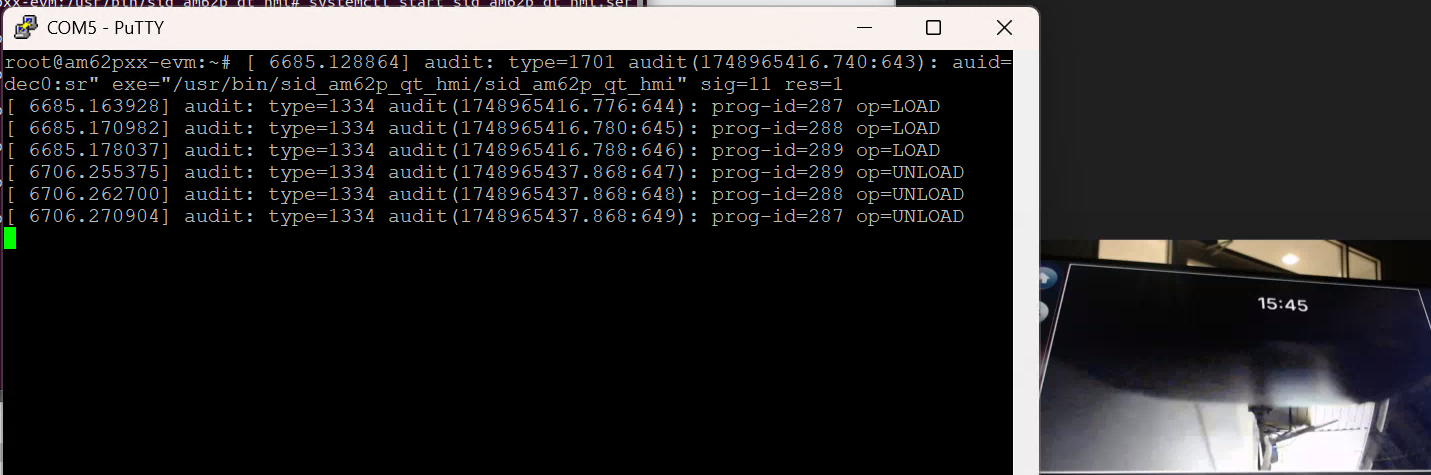
我现在正在尝试流式传输 RTP 摄像头 正在使用以下流水线。 流正在通过、但闪烁。 在闪烁期间、会生成以下日志消息。 我请求您的支持帮助我们解决此问题。
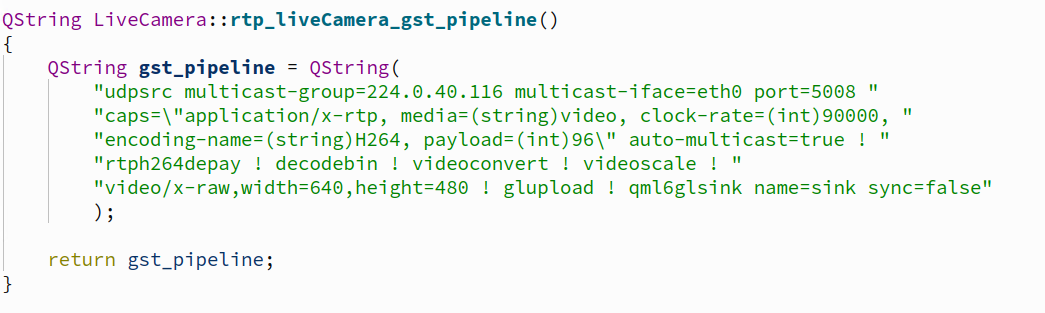
image.png

image.png

image.png

  • 请注意,本文内容源自机器翻译,可能存在语法或其它翻译错误,仅供参考。如需获取准确内容,请参阅链接中的英语原文或自行翻译。

    尊敬的 Karthikean:

    image.png

    上述没有应用程序的流水线是否显示任何闪烁?

    我的意思是:尝试使用命令行运行流水线、看看您是否可以正常运行。

    另外、在命令行上尝试以下流水线、让我们知道您是否仍然看到闪烁?

    gst-launch-1.0 -v udpsrc port=5008!  'application/x-RTP, media=(string)video, clock-rate=(int)90000, encoding-name=(string)H264, payload=(int)96'! \
    rtph264depay! h264parse! v4l2h264dec! kmssink driver-name=tidss sync=false  

    此致、

    Suren

  • 请注意,本文内容源自机器翻译,可能存在语法或其它翻译错误,仅供参考。如需获取准确内容,请参阅链接中的英语原文或自行翻译。

    感谢您的答复。 我们使用多播 RTP 摄像机、我已将 RTP 命令从单播(根据摄像机配置)调整为多播并进行测试、它不起作用。 屏幕截图是共享的、以供参考。

    gst-launch-1.0 -v udpsrc 多播组=224.0.40.116 多播组-iface=“eth0"端口“端口=5008! 'application/x-RTP, media=(string)video, clock-rate=(int)90000, encoding-name=(string)H264, payload=(int)96'! rtph264depay! h264parse! v4l2h264dec! kmssink driver-name=tidss sync=false

  • 请注意,本文内容源自机器翻译,可能存在语法或其它翻译错误,仅供参考。如需获取准确内容,请参阅链接中的英语原文或自行翻译。

    尊敬的 Karthikean

    以下渠道是否正常工作:

    gst-launch-1.0 -v udpsrc port=5008!  'application/x-RTP, media=(string)video, clock-rate=(int)90000, encoding-name=(string)H264, payload=(int)96'! \
    rtph264depay! h264parse! v4l2h264dec! kmssink driver-name=tidss sync=false  

    由于运行的流水线显示了一些内部数据流错误、导致无法链接流水线中的元素。

    此致、

    Suren

  • 请注意,本文内容源自机器翻译,可能存在语法或其它翻译错误,仅供参考。如需获取准确内容,请参阅链接中的英语原文或自行翻译。

    您分享的渠道对我来说不起作用。 这与我之前分享的屏幕截图相同。

  • 请注意,本文内容源自机器翻译,可能存在语法或其它翻译错误,仅供参考。如需获取准确内容,请参阅链接中的英语原文或自行翻译。

    尊敬的 Karthikean:

    当尝试在流水线中使用 v4l2h264decc 时、能否在 rtph264depay 元素中添加以下内容:

    rtph264depay wait-for-keyframe=1  

    此外、您是否使用 v4l2h264enc 通过 udpsink 进行编码和流式传输?

    此致、

    Suren

  • 请注意,本文内容源自机器翻译,可能存在语法或其它翻译错误,仅供参考。如需获取准确内容,请参阅链接中的英语原文或自行翻译。

    您好、Suren、

    感谢您的建议。 我根据您的建议进行了测试、这不起作用。 我共享的已测试命令和日志可供您参考。  

    测试命令:

    gst-launch-1.0 -v udpsrc multicast-group=224.0.40.116 multicast-iface=“eth0" port=5008“ port=5008 caps=“application/x-rtp、media=(string)video、clock-rate=(int)90000、encoding-name=(string)h264、payload=(int)96“自动多播=true! rtpjitterbuffer! rtph264depay wait-for-keyframe=1! h264parse! v4l2h264dec capture-io-mode=dmabuf! 视频转换! video/x-raw、format=NV12! kmssink driver-name=tidss sync=false

    测试日志:

    root@am62pxx-EVM:/usr/bin/sid_am62p_qt_hmi/videos clear
    [h[Jroot@am62pxx-EVM:/usr/bin/sid_am62p_qt_hmi/videos # gst-launch-1.0 -v udpsrc multicast-group=224.0.40.116 multicast-iface=“eth0"端口“端口=5008 caps=“application/x-
    -rtp、media=(string)video、clock-rate=(int)90000、coding-name=(string)H264、payload=(int)96“自动多播=true! rtpjitterbuffer! rtph264depay wait-for-k
    键架=1! h264parse! v4l2h264dec capture-io-mode=dmabuf! 视频转换! video/x-raw、format=NV12! kmssink driver-name=tidss sync=false
    正在将管道设置为已暂停...
    流水线是实时的,不需要 PREROLL ...
    /GstPipeline:pipLine0/GstKMSSink:kmssink0:显示宽度=1920
    /GstPipeline:pipLine0/GstKMSSink:kmssink0:显示高度=1080
    流水线是 PREROLLED。
    正在设置播放管道...
    /GstPipeline:pipaine0/GstUDPSrc:udpsrc0.GstPad:CAPS src = application/x-RTP、media=(字符串)视频、clock-rate=(int) 90000、coding-name=(字符串)H264、payload=(int)96
    /GstPipeline:pipaine0/GstRtpJitterBuffer:rtpjitterbuffer0.GstPad:Sink:cap = application/x-RTP、media=(字符串)视频、clock-rate=(int) 90000、encoding-name=(字符串)H264、payload=(int) 96
    新时钟:GstSystemClock
    /GstPipeline:pipaine0/GstRtpJitterBuffer:rtpjitterbuffer0.GstPad:CAPS src = application/x-RTP、media=(字符串)视频、clock-rate=(int) 90000、encoding-name=(字符串)H264、payload=(int) 96
    src:cap = video/x-h264、stream-format=(字符串)byte-stream、alignment =(字符串)au
    /GstPipeline:pipaine0/GstH264Parse:h264parse0.GstPad:caps src = video/x-h264、stream-format=(string) byte-stream、alignment =(string) au、parsed=(布尔值)true
    /GstPipeline:pipaine0/v4l2h264dec:v4l2h264dec0.GstPad:sink: cap = video/x-h264、stream-format=(字符串)byte-stream、align=(字符串)au、boolean=(已解析)true
    /GstPipeline:pipaine0/GstH264Parse:h264parse0.GstPad:sink: caps=video/x-h264, stream-format=(string)byte-stream, align=(string)au
    /GstPipeline:pipaine0/GstRtpH264Depay:rtph264depay0.GstPad:Sink:cap = application/x-RTP、media=(字符串)视频、clock-rate=(int) 90000、encoding-name=(字符串)H264、payload=(int) 96
    重新分配延迟...
    /GstPipeline:pipaine0/GstH264Parse:h264parse0.GstPad:CAPS src = video/x-h264、stream-format=(string) byte-stream、alignment =(string) au、width=(int) 1280、height=(int) 800、 帧速率=(分数)0/1、coded-picture-structure=(字符串)帧、chroma-format=(stri[84389.564507]-- 【在这里剪切】------
    NG) 4:2:0、bit-depth-luma=(uint) 8、bit-depth-chroma=(uint) 8、pars[84389.572654]警告:CPU:2 PID:27374、位于/drivers/media/common/videobuf2/videobuf2-core.c:1803 VB2_start_streaming+0x108/0x178 [videof2_common]
    ed=(boolean) true、profile=(string) constrained-baseline、level=(s[84389.591292]链接的模块:hid_multitouch rpmsg_crpmsg_car
    tring)5.1.
    /GstPipeline:v4l2h264dec:v4l2h264dec0.GstPa[84389.661158] CPU:2 UID:0 PID:27374 Comm:rtpjitterbuffer tainted:g W O 6.12.43-ti-01064-g3a3f87d0bf70 #1
    D:sink:cap = video/x-h264、stream-format=(string) byte-stream、[84389.677630]污染:[W]= WARN、[O]=OOT_MODULE
    alignment=(string) au、width=(int) 1280、height=(int) 800、帧速率[84389.687513]硬件名称:Texas Instruments AM62P5 SK (DT)
    E=(分数)0/1、coded-Picture-structure=(字符串)frame、chroma-f[84389.698613] pstate:600005 (nZCv daif -pan -uAO -TCO -DIT -SSB BTYPE=--)
    ormat=(string) 4:2:0、bit-depth-luma=(uint) 8、bit-depth-chroma=(u[84389.711097] PC:vb2_start_stream+0x108/0x178 [videobf2_common]
    int)8、已解析=(布尔值)true、profile=(string)constrained-baselin[84389.722891] lr:vb2_start_streaming+0x68/0x178 [videobuf2_common]
    e、Level=(string)5.1
    [84389.734598] sp : ffff8000838ebb40
    [84389.739805] x29:ffffff8000838ebb40 x28:ffffff00083656e010 x27:000000000000
    [84389.746936] x26:ffff000808a9b930 x25:ffff000806de8840 x24:000000000000
    [84389.754063] x23:ffff800079990618 x22:000000000000 x21:ffffff000837896e90
    [84389.761190] x20:ffff000837896da8 x19:00000000fffffffb x18:0000000000000001
    [84389.768315] X17:000000000000 x16:0000000000000000 x15:0113c484371c309a
    [84389.775439] x14:00ef8ecf230f3aba x13:ffffff000805600080 x12:0000000000000001
    [84389.782563] x11:00000000000000c0 x10:00000000000009e0 x9:ffffff8000838eb890
    [84389.789688] x8 : ffff00095af9b180 x7 : 000100000000x6 : 0000000000000003.
    [84389.7968812] x5 : 0001000000000 x4 : ffffff0008012325c0 x3 : 000000000000
    [84389.803936] x2 : 000000000000 x1 : ffff80007982c000 x0 : 000000000001.
    [84389.811062]呼叫跟踪:
    [84389.813499] VB2_start_streaming+0x108/0x178 [videobuf2_common]
    [84389.819421] VB2_core_streamon+0x100/0x1c4 [videobuf2_common]
    [84389.825167] VB2_streamon+0x18/0x64 [videobuf2_v4l2]
    [84389.830134] v4l2_m2M_ioctl_streamon+0x38/0x98 [v4l2_mem2mem]
    [84389.835889] V4L_streamon+0x24/0x30 [videodev]
    [84389.840392]__video_do_ioctl+0x330/0x3fc [videodev]
    [84389.845402] video_usercopy+0x2e0/0x67c [videodev]
    [84389.850234] video_ioctl2+0x18/0x28 [videodev]
    [84389.854711] v4l2_ioctl+0x40/0x60 [videodev]
    [84389.859013]__arm64_sys_ioctl+0xac/0xf0
    [84389.862932] invoke_syscall+0x48/0x10c
    [84389.866675] el0_Svc_common.constprop.0+0xc0/0xe0
    [84389.871370] Do_el0_Svc+0x1c/0x28
    [84389.874677] el0_Svc+0x28/0x98
    [84389.877726] el0t_64_SYNC_HANDLER+0x120/0x12c
    [84389.882073] el0t_64_SYNC+0x190/0x194
    [84389.885728]--[结束跟踪 000000000000 ]-----
    错误:从元素/GstPipeline:pipaine0/v4l2h264dec:v4l2h264dec0:无法从资源读取。
    其他调试信息:
    /usr/usr/debug/gstreamer1.0-plugins-good/1.22.12/sys/v4l2/gstv4l2object.c(5746) src:gst_v4l2_object_poll ():/GstPipine:pipaine0/v4l2h264dec:v4l2h264dec0:
    轮询错误 1:成功 (0)
    执行在 0:00:00.684586525 之后结束
    正在将管道设置为空...
    正在释放管道...
    Root@am62pxx-EVM:/usr/bin/sid_am62p_qt_hmi/videos

  • 请注意,本文内容源自机器翻译,可能存在语法或其它翻译错误,仅供参考。如需获取准确内容,请参阅链接中的英语原文或自行翻译。

    尊敬的 Karthikean:

    您能否在 v4l2h264dec 上不使用 capture-io-mod=dmabuf 的情况下运行流水线、并在视频转换后删除视频转换和 cap 筛选器、并在出现故障时再次为我提供流水线和日志。

    v4l2h264dec capture-io-mode=dmabuf! 视频转换! video/x-raw、format=NV12  

    此致、

    Suren

  • 请注意,本文内容源自机器翻译,可能存在语法或其它翻译错误,仅供参考。如需获取准确内容,请参阅链接中的英语原文或自行翻译。

    你好 Suren ,根据你的建议,我尝试了以下命令,我得到了直播. 是否需要任何更新? 请告诉我。

    gst-launch-1.0 -v udpsrc multicast-group=224.0.40.116 multicast-iface=“eth0" port=5008“ port=5008 caps=“application/x-rtp、media=(string)video、clock-rate=(int)90000、encoding-name=(string)h264、payload=(int)96“自动多播=true! rtpjitterbuffer delay=0 drop-on-delay=true! rtph264depay wait-for-keyframe=1! 视频/x-h264、宽度=1280、高度=800、帧速率=30/1! h264parse! 队列 max-size-buffers=4 泄漏=下游! v4l2h264dec! kmssink driver-name=tidss sync=false

  • 请注意,本文内容源自机器翻译,可能存在语法或其它翻译错误,仅供参考。如需获取准确内容,请参阅链接中的英语原文或自行翻译。

    尊敬的 Karthikean:  

    我很高兴你能使管道正常工作。  

    如果需要有关此主题的任何进一步帮助、请告诉我。

    此致、

    Suren

  • 请注意,本文内容源自机器翻译,可能存在语法或其它翻译错误,仅供参考。如需获取准确内容,请参阅链接中的英语原文或自行翻译。

    您好、Suren、

    感谢您的支持。 它在终端中尝试时工作正常、但它在 qt6 中挂起。 我已经分享了下面的流水线。 是否请求您的支持?  

    string LiveCamera::rtp_liveCamera/GST_pipeline HW (int port){
    返回 QString(
    “udpsrc 多播组=224.0.40.116 多播接口=eth0 端口=%1 “
    “CAPS="application/x-RTP, media=(string)video,“ media=(string)video, clock-rate=(int)90000,“
    “encoding-name=(string)H264, payload=(int)96\“ auto-multicroplics=true! “
    “rtpjitterbuffer delay=0 drop-on-delay=true! “
    “rtph264depay wait-for-keyframe=1! “
    “视频/x-h264,宽度=1280,高度=800,帧速率=30/1! “
    “h264parse! 队列 max-size-buffers=4 泄漏=下游! “
    “v4l2h264dec! “
    “ glupload! qml6glsink name=sink sync=false“
    ). arg(端口);
    }

  • 请注意,本文内容源自机器翻译,可能存在语法或其它翻译错误,仅供参考。如需获取准确内容,请参阅链接中的英语原文或自行翻译。

    你可以添加 glcolorconvert ! gldownload 之前的 gml6glsink 元素,并给它一个尝试?

    此致、

    Suren