器件型号: TDA4VM-Q1
主题中讨论的其他器件: Midas
我从 TI 的 modelzoo (https://github.com/TexasInstruments/edgeai-modelzoo) 获取了 MidasSmall 、并由此生成了工件、使用在 TIDLRT 上生成的工件时、在板上运行 onnxrt_ep.py 和 TIDLRT 后生成的输出与此处的精度下降不同
为了供您参考、我分享了 onnxrt_ep.py 和 TIDLRT (Classification.cpp) 的预处理和后处理 proc
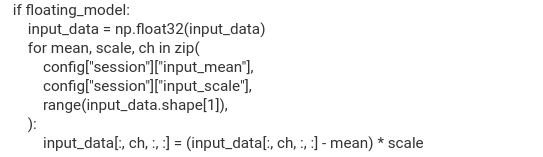
Onnxrt_ep.py
下面是预处理
DEF 推断_图像 (sess、image_files、config):
'''
调用运行时会话
:param sess:运行时会话
:param image_files:输入图像文件名列表
:param config:配置字典
:返回:输入图像
:返回:输出张量
:返回:总处理时间
:返回:子图处理时间
:返回:输入张量的高度
:返回:输入张量的宽度
'''
#获取会话的输入详细信息
input_details = sess.get_inputs()
input_name = input_details[0].name
float_model = input_details[0].type =“tensor (float)“
高度= input_details[0].shape[2]
width = input_details[0].shape[3]
通道= input_details[0].shape[1]
批处理= input_details[0].shape[0]
IMG =[]
形状=【批次,通道,高度,宽度】
#准备输入数据
input_data = np.zero(形状)
对于 I IN 范围(批次):
imgs.append(
image.open (image_files[i])
.convert(“RGB")“)
.resize(宽度,高度)、PIL.Image.Lanczos)
)
Temp_input_data = np.expand_dims (imgs[i]、axis=0)
Temp_input_data = np.transposal (temp_input_data、(0、3、1、2))
INPUT_DATA[i]= temp_input_data[0]
如果是 float_model:
INPUT_DATA = NP.float32 (INPUT_DATA)
对于 Mean、scale、ch in zip(
CONFIG[“session"]["input_mean"],“,</s>“ “、
CONFIG[“session"]["input_SCALE "]“ "],“,</s>“ 、
范围 (input_data.shape[1])、
):
input_data[:、ch、:、:]=(input_data[:、ch、 :、:]-均值)*比例
否则:
INPUT_DATA = np.uint8 (INPUT_DATA)
CONFIG[“session"]["input_mean"]=“=[0“[0,“,0、0、0]
CONFIG[“session"]["input_SCALE "]“ "]=“=[1“[1、1、1]
#调用会话
start_time = time.time ()
输出= list (sess.run(None、{input_name:input_data})
stop_time = time.time ()
推断时间= stop_time - start_time
COPY_TIME、sub_graphs_proc_time、totaltime、DDR_bw = get_benchmark_output (SESS)
proc_time = totaltime - copy_time
返回 IM、输出、proc_time、sub_graphs_proc_time、DDR_bw、 高度、宽度
postproc 如下
Elif CONFIG[“task_type"]=="midasTI"“=="midasTI":“:</s>“
#运行输出
深度= OUTPUT [0] #[1、1、H、W]
打印(“输出形状:“、depth.shape)
#挤压到[H, W]
depth_np = depth.express ()
#标准化为 0–255(完全像你的独立脚本)
depth_norm =(depth_NP - depth_np.min ())/(
depth_np.max ()- depth_np.min ()
255.
cv2.imwrite(“depth_result.png “、depth_norm.astype (np.uint8))
depth512 = CV2.resize (depth_norm、(512,512)、插值= CV2.inter_cubic)
depth1920 = cv2.resize (depth_norm、(1,920,1080)、插值= cv2.inter_cubic)
CV2.imwrite(“Depth_1920.png",“,depth1920、depth1920)
CV2.imwrite(“Depth_512.png",“,depth512、depth512)
打印(“已保存:depth_result.png “)
打印(“已保存:depth_1920.png“)
打印(“已保存:depth_512.png“)
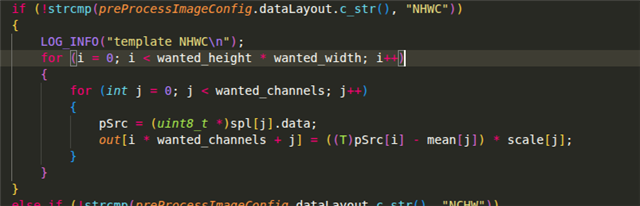
belos 是 TIDLRT 的预处理和后处理
下面是预处理
模板
int preprocImageMidasTI (const std::string &input_image_name、T *out、int wanged_height、int wanged_width、int wanged_channels、 浮点数*平均值、浮点数*标度)
{
int i;
uint8_t *pSrc;
CV::Mat image = cv::imread (input_image_name、cv::IMREAD_COLOR);
CV::cvtColor(图像,CV::COLOR_BGR2RGB);
// cv::resize(图像,图像,cv::size (wanged_width、wanged_height)、0、 0、cv::inter_area);
cv::resize(图像,图像,cv::size (wanged_width、wanged_height)、0、 0、cv::inter_cubic);
if (image.channels!= wanged_channels)
{
printf(“警告:所需的通道数与实际图像中的通道数不同\n“);
返回(–1);
}
pSrc =(uint8_t *) image.data;
for (i = 0;i < waned_height * waned_width * waned_channels;i++)
{
INT channel = I % waned_channels;
OUT[i]=((T) pSrc[i]- mean[channel])/ scale[channel];
}
cv::imwrite(“preProcImage.png “,图像);
printf(“已保存深度图:preProcImage.png \n“);
返回 0;
}
下面是 postproc
void postProcMidasTI (float *depth_data)
{
// float *depth_data =(float *) out[j]->ptr;
INT TOTAL = MIDAS_W_H * MIDAS_W_H;
//查找最小值和最大值
float min_val = depth_data[0];
float max_val = depth_data[0];
for (int i = 1;i < total;i++)
{
if (depth_data[i]< min_val) min_val = depth_data[i];
if (depth_data[i]> max_val) max_val = depth_data[i];
}
printf(“深度最小值:%f\n“、min_val);
printf(“Depth max:%f\n“、max_val);
//标准化为 0-255 并保存
CV::Mat depth_map (MIDAS_W_H、MIDAS_W_H、CV_8UC1);
for (int i = 0;i < total;i++)
{
depth_map.data[i]=(uint8_t)(
((depth_data[i]- min_val)/
(max_val - min_val))* 255.0f);
}
CV::imwrite(“Depth_result.png “、depth_map);
printf(“已保存深度图:depth_result.png\n“);
}