您好!
SDK:TI-processor-sdk-android-am57xx-evm-06.03.00.106
客户指南: https://www.ti.com/lit/an/spraco0/spraco0.pdf
构建源代码:
导出 KERNELDIR=xxx/xxx/ti-processor-sdk-android-am57xx-evm-06.03.00.106/board-support/linux-4.19.98+gitAUTOINC+8a8fd7ef1c-g8a8fd7ef1c
清理-J8
源代码构建/envsetup.sh
午餐 beagle_x15_auto-userdebug
nohup make -J8 > make.out 2>&1 &
准备 eMMC_FILES:
CP -RV 预构建映像 eMMC_FILES
cp -v ./AoSP-9.0/out/target/product/beagle_x15/{boot.img,boot_fit.img,recovery.img,system.img,userdata.img,fender.img} eMMC_files
cp -v ./AOSP-9.0/device/ti/beagle_x15/fastboot.sh eMMC_files
cp -v ./AOSP-9.0/out/host/linux-x86/bin/{simg2img、mkbootmg, fastboot、adb}eMMC_files
cp -v ./linux-4.19.98+gitAUTOINC+8a8fd7ef1c-g8a8fd7ef1c/arch/arm/boot/zImage eMMC_files/zImage-beagle_x15.bin
cp -v ./linux-4.19.98+gitAUTOINC+8a8fd7ef1c-g8a8fd7ef1c/arch/arm/boot/dts/am57*.dtb eMMC_files
cp -v ./u-boot-2019.01+gitAUTOINC+333c7e72d3-g333c7e72d3/MLO eMMC_files
cp -v ./u-boot-2019.01+gitAUTOINC+333c72d3-g333c72d3/u-boot.img eMMC_files
引导:
=> fastboot 0
$ CD ~/ti-processor-sdk-android--/board-support/emmc_files
$ sudo ./fastboot.sh;sudo ./fastboot reboot
问题:
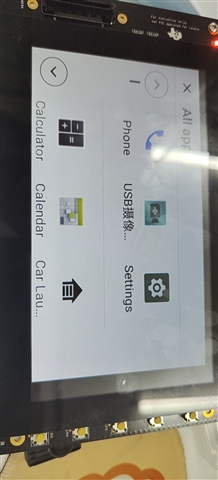
1、屏幕未完全显示、导航栏未显示。
2、无法连接 wifi