
请注意,本文内容源自机器翻译,可能存在语法或其它翻译错误,仅供参考。如需获取准确内容,请参阅链接中的英语原文或自行翻译。
器件型号:SK-AM62A-LP 您好、TI 团队、
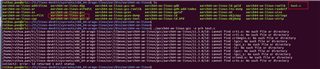
我想编译. C 文件使用 aarch64-OE-linux-gcc、但 现在编译时存在许多链接错误。
我试图通过搜索博客来解决它,但它仍然没有解决。 可以帮帮我吗?
此致、
瑞华市
This thread has been locked.
If you have a related question, please click the "Ask a related question" button in the top right corner. The newly created question will be automatically linked to this question.
您好、TI 团队、
我想编译. C 文件使用 aarch64-OE-linux-gcc、但 现在编译时存在许多链接错误。
我试图通过搜索博客来解决它,但它仍然没有解决。 可以帮帮我吗?

此致、
瑞华市
Unknown 说:我想编译. C 文件使用 aarch64-OE-linux-gcc,但 现在编译时有许多链接错误。[/引号]如果您想直接使用编译器,则需要使用 --sysroot 参数指定正确的 sysroot。 不过、只获取提供的交叉编译 ENV 脚本会更容易、该脚本将为您进行处理、如下所示:
a0797059@dasso:~/ti/ti-processor-sdk-linux-edgeai-am62axx-evm-09_01_00_07/linux-devkit $ source environment-setup [linux-devkit]:~/ti/ti-processor-sdk-linux-edgeai-am62axx-evm-09_01_00_07/linux-devkit> cat << EOF > helloworld.c > #include <stdio.h> int main() { printf ("Hello World from TI!!!\n"); return 0; } > EOF [linux-devkit]:~/ti/ti-processor-sdk-linux-edgeai-am62axx-evm-09_01_00_07/linux-devkit> cat helloworld.c #include <stdio.h> int main() { printf ("Hello World from TI!!!\n"); return 0; } [linux-devkit]:~/ti/ti-processor-sdk-linux-edgeai-am62axx-evm-09_01_00_07/linux-devkit> $CC helloworld.c -o helloworld [linux-devkit]:~/ti/ti-processor-sdk-linux-edgeai-am62axx-evm-09_01_00_07/linux-devkit> file helloworld helloworld: ELF 64-bit LSB executable, ARM aarch64, version 1 (SYSV), dynamically linked, interpreter /lib/ld-linux-aarch64.so.1, BuildID[sha1]=d692d61d922a4ab3f47e32a28561740efaf64694, for GNU/Linux 3.14.0, with debug_info, not stripped有关这方面的相应文档可在以下位置找到: https://software-dl.ti.com/processor-sdk-linux/esd/AM62AX/09_01_00/exports/docs/linux/Overview/GCC_ToolChain.html#linux-devkit
此致、Andreas