


请注意,本文内容源自机器翻译,可能存在语法或其它翻译错误,仅供参考。如需获取准确内容,请参阅链接中的英语原文或自行翻译。
器件型号:TDA4VH-Q1 主题中讨论的其他器件:TDA4VH
您好专家,
我目前使用的是 SDK 8.6所含的 TDA4VH 开发板。
我在本机驱动程序模式下使用 cpsw9g 交换机、并希望通过 cpsw2g 交换机的 eth0发送数据包。 因此、我进行了以下配置。
ifconfig eth0 down

ifconfig eth0 hw ether 00:11:22:33:44:01

ethtool -L eth0 tx 8

ethtool --set-priv-flags eth0 p0-rx-ptype-rrobin off

ifconfig eth0 up

sleep 6

# add vlan

vconfig add eth0 11


sleep 2

# set qbv
base=0

tc qdisc replace dev eth0 parent root handle 100 taprio \
    num_tc 8 \
    map 0 1 2 3 4 5 6 7 0 0 0 0 0 0 0 0 \
    queues 1@0 1@1 1@2 1@3 1@4 1@5 1@6 1@7 \
    base-time ${base} \
    sched-entry S 40 200000 \
    sched-entry S bf 4800000 \
    flags 2

ip link set eth0.11 type vlan egress 0:0 1:1 2:2 3:3 4:4 5:5 6:6 7:7
ifconfig eth0.11 192.168.11.1
echo "eth0 set ok!"
但当我运行它时、我会收到以下错误:
root@j784s4-evm:~/tsn_test_tda4_1/qbv_test# ./set_eth0.sh
[  111.333088] am65-cpsw-nuss 46000000.ethernet eth0: Link is Down
[  111.351108] genirq: Failed to request resources for 46000000.ethernet-tx7 (irq 103) on irqchip MSI-INTA
[  111.360502] am65-cpsw-nuss 46000000.ethernet: failure requesting tx7 irq 103, -22
[  111.368028] am65-cpsw-nuss 46000000.ethernet: Failed to add tx NAPI -22
netlink error: Invalid argument
[  111.390965] am65-cpsw-nuss 46000000.ethernet eth0: PHY [46000f00.mdio:00] driver [TI DP83867] (irq=POLL)
[  111.400464] am65-cpsw-nuss 46000000.ethernet eth0: configuring for phy/rgmii-rxid link mode
[  113.071150] br0: port 1(eth1) entered disabled state
[  113.076118] am65-cpsw-nuss c000000.ethernet eth1: Link is Down
[  115.119496] am65-cpsw-nuss c000000.ethernet eth1: Link is Up - 1Gbps/Full - flow control rx/tx
[  115.128150] br0: port 1(eth1) entered blocking state
[  115.133110] br0: port 1(eth1) entered forwarding state
[  115.503489] am65-cpsw-nuss 46000000.ethernet eth0: Link is Up - 1Gbps/Full - flow control rx/tx
[  115.512205] IPv6: ADDRCONF(NETDEV_CHANGE): eth0: link becomes ready
[  117.424216] 8021q: 802.1Q VLAN Support v1.8
[  117.428429] 8021q: adding VLAN 0 to HW filter on device eth0
[  117.434128] 8021q: adding VLAN 0 to HW filter on device eth1
[  117.439797] 8021q: adding VLAN 0 to HW filter on device eth2
[  117.445462] 8021q: adding VLAN 0 to HW filter on device eth3
[  117.451126] 8021q: adding VLAN 0 to HW filter on device eth4
[  117.456791] 8021q: adding VLAN 0 to HW filter on device eth5
[  117.462877] am65-cpsw-nuss 46000000.ethernet: Adding vlan 11 to vlan filter
[  117.469929] am65-cpsw-nuss 46000000.ethernet: get: wrong ale fld id 2
[  117.476362] am65-cpsw-nuss 46000000.ethernet: get: wrong ale fld id 1
eth0 set ok!
root@j784s4-evm:~/tsn_test_tda4_1/qbv_test# [  129.582007] ------------[ cut here ]------------
[  129.586625] NETDEV WATCHDOG: eth0 (am65-cpsw-nuss): transmit queue 7 timed out
[  129.593869] WARNING: CPU: 0 PID: 0 at net/sched/sch_generic.c:467 dev_watchdog+0x320/0x328
[  129.602110] Modules linked in: 8021q garp mrp sch_taprio bridge stp llc bluetooth ecdh_generic ecc rfkill cdns3 udc_core roles usbcore cdns_csi2rx rpmsg_c6
[  129.656811] CPU: 0 PID: 0 Comm: swapper/0 Tainted: G           O      5.10.162-g76b3e88d56 #1
[  129.665312] Hardware name: Texas Instruments J784S4 EVM (DT)
[  129.670954] pstate: 20000005 (nzCv daif -PAN -UAO -TCO BTYPE=--)
[  129.676942] pc : dev_watchdog+0x320/0x328
[  129.680936] lr : dev_watchdog+0x320/0x328
[  129.684928] sp : ffff8000112bbdb0
[  129.688229] x29: ffff8000112bbdb0 x28: ffff0008022cf940
[  129.693526] x27: 0000000000000004 x26: 0000000000000140
[  129.698822] x25: 00000000ffffffff x24: 0000000000000000
[  129.704118] x23: ffff0008022ce3dc x22: ffff0008022ce000
[  129.709414] x21: ffff0008022ce480 x20: ffff800011117000
[  129.714710] x19: 0000000000000007 x18: 0000000000000010
[  129.720006] x17: 0000000000000000 x16: 0000000000000000
[  129.725302] x15: ffff800011121f10 x14: 00000000000002a7
[  129.730598] x13: ffff800011121f10 x12: 00000000ffffffea
[  129.735894] x11: ffff8000111a05b0 x10: ffff800011188570
[  129.741190] x9 : ffff8000111885c8 x8 : 0000000000017fe8
[  129.746486] x7 : c0000000ffffefff x6 : 0000000000000003
[  129.751782] x5 : 0000000000000000 x4 : 0000000000000000
[  129.757078] x3 : 0000000000000100 x2 : 0000000000000100
[  129.762374] x1 : 0f219d646ae3c500 x0 : 0000000000000000
[  129.767670] Call trace:
[  129.770105]  dev_watchdog+0x320/0x328
[  129.773757]  call_timer_fn.isra.0+0x24/0x80
[  129.777925]  run_timer_softirq+0x400/0x438
[  129.782007]  efi_header_end+0x120/0x268
[  129.785829]  irq_exit+0xc0/0xe0
[  129.788957]  __handle_domain_irq+0x68/0xc0
[  129.793040]  gic_handle_irq+0x58/0x128
[  129.796774]  el1_irq+0xcc/0x180
[  129.799904]  arch_cpu_idle+0x18/0x28
[  129.803466]  default_idle_call+0x20/0x68
[  129.807375]  do_idle+0xc0/0x128
[  129.810502]  cpu_startup_entry+0x24/0x60
[  129.814410]  rest_init+0xd4/0xe4
[  129.817627]  arch_call_rest_init+0x10/0x1c
[  129.821707]  start_kernel+0x478/0x4b0
[  129.825355] ---[ end trace 93eb64b1304599a2 ]---
[  129.829971] am65-cpsw-nuss 46000000.ethernet eth0: txq:7 DRV_XOFF:0 tmo:10320 dql_avail:-134 free_desc:515
[  131.342229] Initializing XFRM netlink socket
[  135.470018] am65-cpsw-nuss 46000000.ethernet eth0: txq:7 DRV_XOFF:0 tmo:15964 dql_avail:-134 free_desc:515
[  140.590006] am65-cpsw-nuss 46000000.ethernet eth0: txq:7 DRV_XOFF:0 tmo:21084 dql_avail:-134 free_desc:515
[  145.454006] am65-cpsw-nuss 46000000.ethernet eth0: txq:7 DRV_XOFF:0 tmo:25948 dql_avail:-134 free_desc:515
[  150.574013] am65-cpsw-nuss 46000000.ethernet eth0: txq:7 DRV_XOFF:0 tmo:31068 dql_avail:-134 free_desc:515
[  155.438004] am65-cpsw-nuss 46000000.ethernet eth0: txq:7 DRV_XOFF:0 tmo:35932 dql_avail:-134 free_desc:515
[  160.558003] am65-cpsw-nuss 46000000.ethernet eth0: txq:7 DRV_XOFF:0 tmo:41052 dql_avail:-134 free_desc:515
[  165.422007] am65-cpsw-nuss 46000000.ethernet eth0: txq:7 DRV_XOFF:0 tmo:45916 dql_avail:-134 free_desc:515
[  170.542005] am65-cpsw-nuss 46000000.ethernet eth0: txq:7 DRV_XOFF:0 tmo:51036 dql_avail:-134 free_desc:515
[  175.662005] am65-cpsw-nuss 46000000.ethernet eth0: txq:7 DRV_XOFF:0 tmo:56156 dql_avail:-134 free_desc:515
[  181.550007] am65-cpsw-nuss 46000000.ethernet eth0: txq:7 DRV_XOFF:0 tmo:62044 dql_avail:-134 free_desc:515
[  186.414006] am65-cpsw-nuss 46000000.ethernet eth0: txq:7 DRV_XOFF:0 tmo:66908 dql_avail:-134 free_desc:515
[  191.534006] am65-cpsw-nuss 46000000.ethernet eth0: txq:7 DRV_XOFF:0 tmo:72028 dql_avail:-134 free_desc:515
[  196.654005] am65-cpsw-nuss 46000000.ethernet eth0: txq:7 DRV_XOFF:0 tmo:77148 dql_avail:-134 free_desc:515
[  202.542007] am65-cpsw-nuss 46000000.ethernet eth0: txq:7 DRV_XOFF:0 tmo:83036 dql_avail:-134 free_desc:515
我已经在另一个 TDA4VH 电路板上设置了相同的环境、并执行了相同的命令。 奇怪的是、它在该板上具有完美的运行性能。 造成这种差异的原因可能是什么?
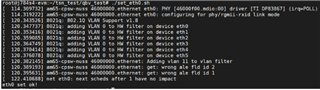
正确的执行屏幕截图如下所示。
此致
我的
