


Other Parts Discussed in Thread: SIMPLELINK-WIFI-TOOLBOX, SYSCONFIG
请注意,本文内容源自机器翻译,可能存在语法或其它翻译错误,仅供参考。如需获取准确内容,请参阅链接中的英语原文或自行翻译。
器件型号: CC3551E
Thread 中讨论的其他器件:SIMPLELINK-WIFI-TOOLBOX 、 SysConfig
您好、
我正在使用 CC35x1 LaunchPad Rev E3 和 network_terminal_CC35X1 _ LAUNCHXL_freertos_ticlang 来自 SimpleLink Wi-Fi SDK 的示例。 编译成功完成、但调试失败、并显示以下错误:
CCS 表明、.out即使工程构建时没有任何错误、调试器也无法找到该文件。
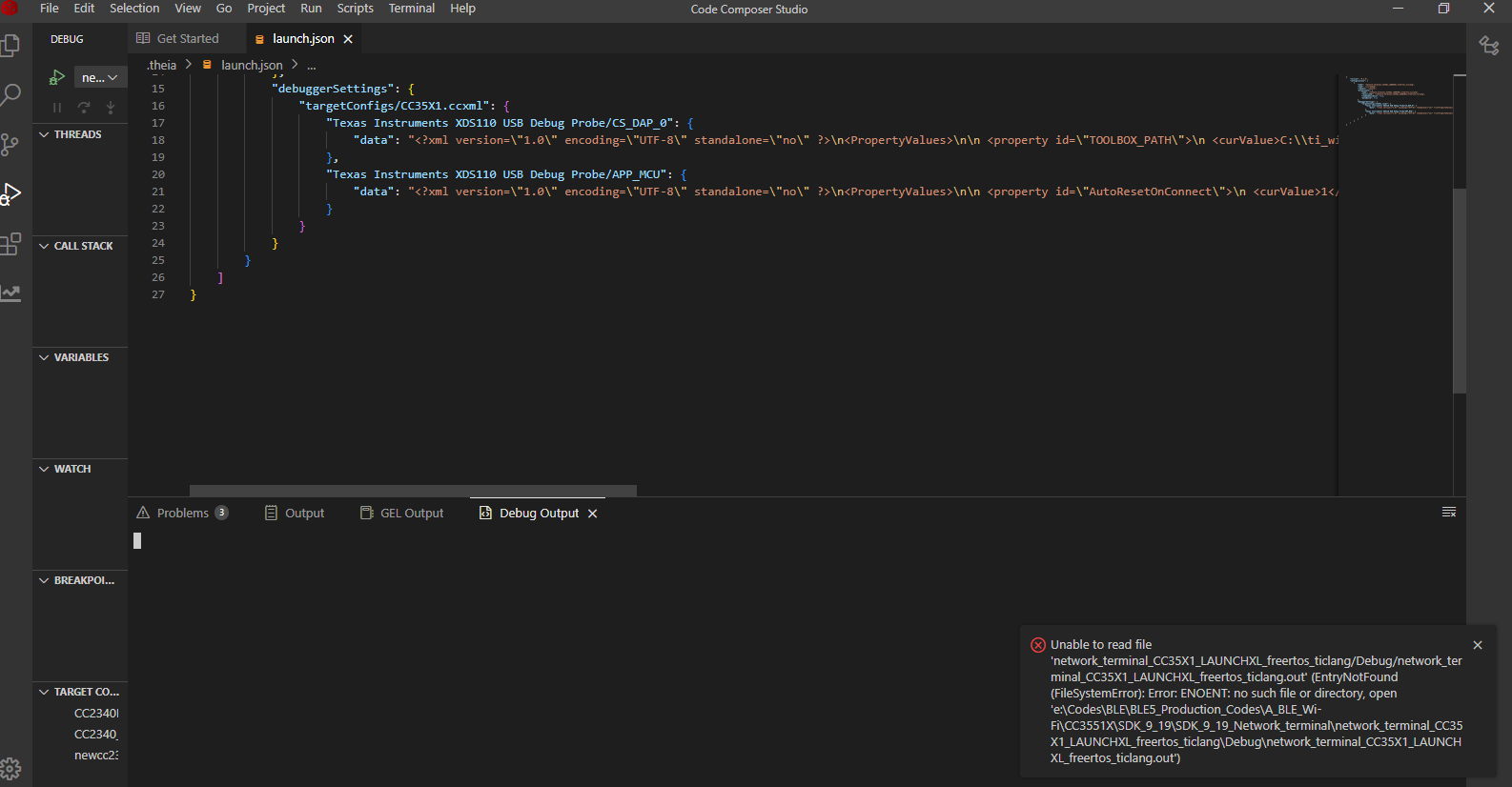
{
    "version": "0.2.0",
    "configurations": [
        {
            "name": "network_terminal_CC35X1_LAUNCHXL_freertos_ticlang",
            "type": "ccs-debug",
            "request": "launch",
            "projectInfo": {
                "name": "network_terminal_CC35X1_LAUNCHXL_freertos_ticlang",
                "resourceId": "/network_terminal_CC35X1_LAUNCHXL_freertos_ticlang",
                "loadSymbolsOnly": true,
                "autoBuild": true
            },
            "debuggerSettings": {
                "targetConfigs/CC35X1.ccxml": {
                    "Texas Instruments XDS110 USB Debug Probe/CS_DAP_0": {
                        "data": "<?xml version=\"1.0\" encoding=\"UTF-8\" standalone=\"no\" ?>\n<PropertyValues>\n\n <property id=\"TOOLBOX_PATH\">\n <curValue>C:\\ti_wifi_sdk_9_19\\simplelink_wifi_toolbox_win_3_1_21</curValue>\n </property>\n\n <property id=\"SERIAL_NUMBER\">\n <curValue>LS4208IE</curValue>\n </property>\n\n <property id=\"ACTION\">\n <curValue>Program and Debug</curValue>\n </property>\n\n </PropertyValues>\n"
                    },
                    "Texas Instruments XDS110 USB Debug Probe/APP_MCU": {
                        "data": "<?xml version=\"1.0\" encoding=\"UTF-8\" standalone=\"no\" ?>\n<PropertyValues>\n\n <property id=\"AutoResetOnConnect\">\n <curValue>1</curValue>\n </property>\n\n</PropertyValues>\n"
                    }
                }
            }
        }
    ]
}
我已经:
-
已清理并重新编译工程
-
已验证 Debug 文件夹是否存在
-
已执行编程指南中的所有步骤:
simplelink_mcu_sdk/html/cc35xx/programming.html -
已确认现在已正确检测到 XDS110
CCS 似乎正在.out使用中创建的不正确或过时的路径搜索文件 launch.json 或自动生成的调试器配置中。
请提供任何指导。
谢谢、
Vignesh

