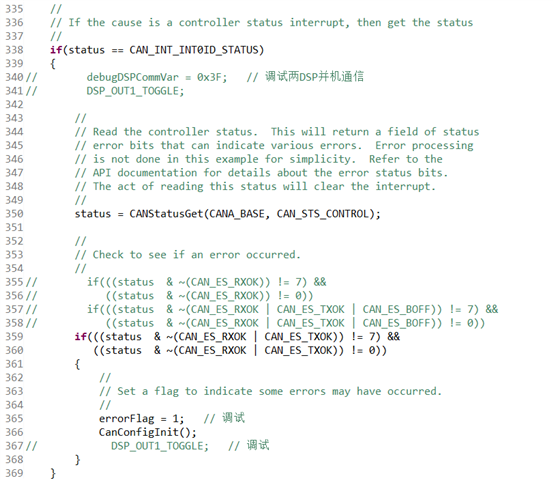
问题描述:。
主从机均为TMS320F28377S,通过CAN通信交互数据,波特率500kHz。
主机每1ms发送一帧数据给从机,长度5个字节。
从机采用中断方式接收主机数据,开始一段时间接收正常,过一段时间后,从机接收不到主机的数据,间隔时间不固定,有时很长时间也没有接收不到的现象。
另:从机接收不到主机数据现象发生后,通过Can工具给从机DSP发送其他帧ID数据,从机还能成功接收。
请问:
该现象是怎么产生的?应该如何解决呢?
This thread has been locked.
If you have a related question, please click the "Ask a related question" button in the top right corner. The newly created question will be automatically linked to this question.
问题描述:。
主从机均为TMS320F28377S,通过CAN通信交互数据,波特率500kHz。
主机每1ms发送一帧数据给从机,长度5个字节。
从机采用中断方式接收主机数据,开始一段时间接收正常,过一段时间后,从机接收不到主机的数据,间隔时间不固定,有时很长时间也没有接收不到的现象。
另:从机接收不到主机数据现象发生后,通过Can工具给从机DSP发送其他帧ID数据,从机还能成功接收。
请问:
该现象是怎么产生的?应该如何解决呢?
没有,逆变器跑的大功率。主机的数据还在发送,通过CANTest工具可以看到,从机接收不到了。
从机接收不到主机的数据时,从机程序也没进入上面CAN通信错误中断中。会是因为我程序还有个1ms中断,把CAN接收中断影响了吗?
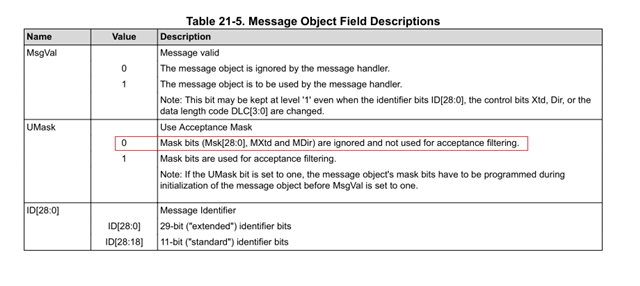

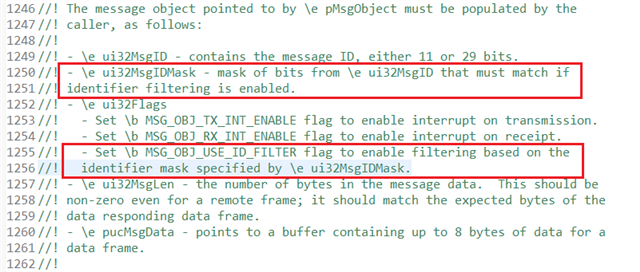
总结一下就是,异常发生时,主机还可以发送该帧ID的数据,从机还可以接收其它帧ID的数据。
另:从机接收不到主机数据现象发生后,通过Can工具给从机DSP发送其他帧ID数据,从机还能成功接收。
如果用Can工具给从机发送该帧ID的数据,从机能接收到吗?
会是因为我程序还有个1ms中断,把CAN接收中断影响了吗?
这个是什么中断?
(1)如果用Can工具给从机发送该帧ID的数据,从机能接收到吗?
==== 从机也接收不到。
(2)这个是什么中断?
==== 这个是定时器中断,用来处理其他任务的,1ms中断中程序的执行时间测试最长有70us。
(1)有检查过中间的连接正常吗?
==== 中间连接是正常的。
(2)can的相关配置如下:
// ====================================================================
// === 1. 主函数初始化部分 ============================================
// ====================================================================
void main(void)
{
//
// Initialize the CAN controllers
//
CANInit(CANA_BASE);
//
// Setup CAN to be clocked off the PLL output clock
//
CANClkSourceSelect(CANA_BASE, 0);
//
// Set up the CAN bus bit rate to 500kHz for each module
// This function sets up the CAN bus timing for a nominal configuration.
// You can achieve more control over the CAN bus timing by using the
// function CANBitTimingSet() instead of this one, if needed.
// Additionally, consult the device data sheet for more information about
// the CAN module clocking.
//
CANBitRateSet(CANA_BASE, 200000000, 500000);
// CANBitRateSet(CANA_BASE, 200000000, 1000000);
//
// Enable interrupts on the CAN A peripheral.
//
// CANIntEnable(CANA_BASE, CAN_INT_MASTER | CAN_INT_ERROR | CAN_INT_STATUS);
CANIntEnable(CANA_BASE, CAN_INT_MASTER | CAN_INT_ERROR);
// Enable AutoBusOn
CAN_enableAutoBusOn(CANA_BASE);
CAN_setAutoBusOnTime(CANA_BASE, 100000);
CAN_disableRetry(CANA_BASE);
//
// Enable the CAN-A interrupt signal
//
CANGlobalIntEnable(CANA_BASE, CAN_GLB_INT_CANINT0);
CanObjInit();
//
// Start CAN module A operations
//
CANEnable(CANA_BASE);
}
// ====================================================================
// === 2. 主机DSP CanObjInit()初始化配置邮箱,及发送程序 =============
// ====================================================================
void CanObjInit()
{
// 两DSP CAN通信,发送
sTXCANMsgDspComm01.ui32MsgID = 0x0C100201;
sTXCANMsgDspComm01.ui32MsgIDMask = 0;
sTXCANMsgDspComm01.ui32Flags = 0;
sTXCANMsgDspComm01.ui32MsgLen = 5;
sTXCANMsgDspComm01.pucMsgData = TxMsgDspCommData01;
}
// ====== 发送部分程序,1ms发送1次 =====================================
// 发送给从机电流设定值
TxMsgDspCommData01[0] = ((int)(onGridCloseLoopIdref * 100) & 0x00FF);
TxMsgDspCommData01[1] = ((int)(onGridCloseLoopIdref * 100) & 0xFF00) >> 8;
TxMsgDspCommData01[2] = ((int)(onGridCloseLoopIqref * 100) & 0x00FF);
TxMsgDspCommData01[3] = ((int)(onGridCloseLoopIqref * 100) & 0xFF00) >> 8;
TxMsgDspCommData01[4] = 0;
CANMessageSet(CANA_BASE, 4, &sTXCANMsgDspComm01, MSG_OBJ_TYPE_TX);
// ====================================================================
// === 3. 从机DSP CanObjInit()初始化配置邮箱,及接收程序 =============
// ====================================================================
void CanObjInit()
{
// 两DSP CAN通信,接收
sRXCANMsgDspComm01.ui32MsgID = 0x0C100201;
sRXCANMsgDspComm01.ui32MsgIDMask = 0;
sRXCANMsgDspComm01.ui32Flags = MSG_OBJ_RX_INT_ENABLE;
sRXCANMsgDspComm01.ui32MsgLen = 5;
sRXCANMsgDspComm01.pucMsgData = RxMsgDspCommData01;
CANMessageSet(CANA_BASE, 15, &sRXCANMsgDspComm01, MSG_OBJ_TYPE_RX);
}
// ======== 在中断中接收主机发送过来的数据(status = 15时接收该帧 ) ============================
#if (G9_5PL != 0)
__interrupt void CANA0_ISR(void) // CAN-A
{
// Set interrupt priority:
volatile Uint16 TempPIEIER = PieCtrlRegs.PIEIER9.all;
IER |= M_INT9;
IER &= MINT9; // Set "global" priority
PieCtrlRegs.PIEIER9.all &= MG9_5; // Set "group" priority
PieCtrlRegs.PIEACK.all = 0xFFFF; // Enable PIE interrupts
__asm(" NOP");
EINT;
uint32_t status;
//
// Read the CAN-A interrupt status to find the cause of the interrupt
//
status = CANIntStatus(CANA_BASE, CAN_INT_STS_CAUSE);
//
// If the cause is a controller status interrupt, then get the status
//
if(status == CAN_INT_INT0ID_STATUS)
{
// DSP_OUT1_TOGGLE;
//
// Read the controller status. This will return a field of status
// error bits that can indicate various errors. Error processing
// is not done in this example for simplicity. Refer to the
// API documentation for details about the error status bits.
// The act of reading this status will clear the interrupt.
//
status = CANStatusGet(CANA_BASE, CAN_STS_CONTROL);
//
// Check to see if an error occurred.
//
// if(((status & ~(CAN_ES_RXOK)) != 7) &&
// ((status & ~(CAN_ES_RXOK)) != 0))
// if(((status & ~(CAN_ES_RXOK | CAN_ES_TXOK | CAN_ES_BOFF)) != 7) &&
// ((status & ~(CAN_ES_RXOK | CAN_ES_TXOK | CAN_ES_BOFF)) != 0))
if(((status & ~(CAN_ES_RXOK | CAN_ES_TXOK)) != 7) &&
((status & ~(CAN_ES_RXOK | CAN_ES_TXOK)) != 0))
{
//
// Set a flag to indicate some errors may have occurred.
//
errorFlag = 1; // 调试
CanConfigInit();
// DSP_OUT1_TOGGLE; // 调试
}
}
else if(status == 15)
{
DSP_OUT1_TOGGLE;
errorFlag = 0;
CanReceiveDsp01();
CANIntClear(CANA_BASE, 15);
}
else if(status == 16)
{
CanReceiveDsp02();
CANIntClear(CANA_BASE, 16);
}
else if(status == 17)
{
// DSP_OUT1_TOGGLE; // 调试
CanReceiveDsp03();
CANIntClear(CANA_BASE, 17);
}
//
// Check if the cause is the CAN-A receive message object 1
//
else if(status == 25)
{
//
// Get the received message
//
// CANMessageGet(CANA_BASE, 2, &sRXCANMsgChkInfo, true);
CanReceiveSrhInfo();
//
// Getting to this point means that the RX interrupt occurred on
// message object 1, and the message RX is complete. Clear the
// message object interrupt.
//
CANIntClear(CANA_BASE, 25);
//
// Increment a counter to keep track of how many messages have been
// received. In a real application this could be used to set flags to
// indicate when a message is received.
//
// rxMsgCount++;
//
// Since the message was received, clear any error flags.
//
// errorFlag = 0;
}
else if(status == 26)
{
CanReceiveRdSet();
CANIntClear(CANA_BASE, 26);
}
else if(status == 27)
{
CanReceiveCtlSet();
CANIntClear(CANA_BASE, 27);
}
else if(status == 28)
{
CanReceiveParaSet();
CANIntClear(CANA_BASE, 28);
}
//
// If something unexpected caused the interrupt, this would handle it.
//
else
{
//
// Spurious interrupt handling can go here.
//
// errorFlag = 2; // 调试
}
//
// Clear the global interrupt flag for the CAN interrupt line
//
CANGlobalIntClear(CANA_BASE, CAN_GLB_INT_CANINT0);
//
// Restore registers saved:
//
DINT;
PieCtrlRegs.PIEIER9.all = TempPIEIER;
}
#endifWhat could be happening is that the interrupts are not being serviced promptly leading to the impression that messages are being lost.
===== 什么会导致中断程序没有被及时服务呢?
If masking is not used and the message object is retaining the correct MSGID (ARBID), it will receive a transmitted message. It cannot suddenly stop receiving messages.
===== 程序中掩码没有用,MSGID (ARBID)也没有更改。
怎么去进一步定位到问题呢?
麻烦再帮忙问一下:
If a message was indeed over-written (because it was not read in time by the software), this bit would be set.
===== 消息被重写丢失后,出错的消息对象会一直收不到数据吗?
The application could either configure more message objects for receive or otherwise ensure that CAN interrupts are serviced on time.
===== 我可以使用两个不同的消息对象接收同一个ID的数据吗?
谢谢!
No, the fact that a message was overwritten before being read should not prevent that message object from receiving future messages.
Only if the message objects are part of a FIFO.
===== 我现在是出问题的消息对象再也接收不到消息了。我能通过配置成FIFO接收模式解决吗?如果可以的话,麻烦给下配置成FIFO接收模式的例程。谢谢。
Please have customer check the MsgLst (Receive Message Lost) bit for the suspected message object. If a message was indeed over-written (because it was not read in time by the software), this bit would be set.
===== 我按以下方法检查MsgLst位,发现从机接收不到主机数据时,从机出错消息对象的MsgLst没有被置位。
if( (sRXCANMsgDspComm05.ui32Flags & MSG_OBJ_DATA_LOST) == 1)
{
systemFault.bit.DebugFault = 1; // Send to the upper computer for observation
}
我还能做哪些调试?