TMS320C5515: TMS320C5515: The CSL_USB_MSC_dmaExample example cannot run when downloaded to the development board

Part Number: TMS320C5515

I downloaded the CSL_USB_MSC_dmaExample_Out.bin file generated by hex55.exe to the IIC EEPROM on the control board with the TMS320C5515 chip as the processor using the programmer_c5515evm_ccs4 program, but the program does not run as expected, although it runs correctly during debug.
The command I entered using hex55.exe is as follows

.\hex55.exe -i CSL_USB_MSC_dmaExample_Out.out -o CSL_USB_MSC_dmaExample_Out.bin -boot -v5505 -serial8 -b

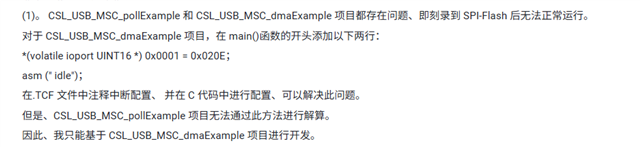
I noticed that a post described this issue as follows:

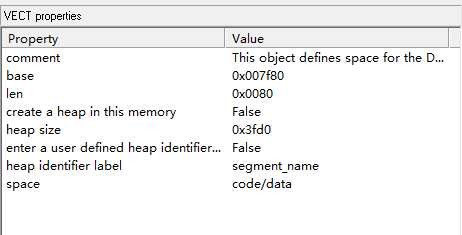
Therefore, I changed the positions of SARAM and the interrupt vector table in the TCF file, as shown in the figure. 
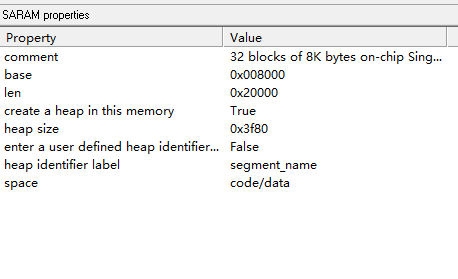
image.pngimage.png

But it still doesn't work. After downloading it, it still doesn't start. Could it be that I configured it incorrectly, or is there some other issue I haven't solved?

  • Hi,

    We have received your post and the investigation will take some time. Thank you for your patience.

  • According to the sprabd7d.pdf:

    SARAM31 (byte address 0x4E000 – 0x4FFFF) is reserved for the bootloader.

    Make sure your application program is not using this memory area.

    Another thing is the C5515/14/05/04 has a fixed order in which it checks for a valid boot-image on each supported boot device. The device order is NOR Flash, NAND Flash, 16-bit SPI EEPROM, I2C EEPROM, and MMC/SD. The first device with valid boot-image is used to load and execute user code. Make sure there is no boot image in NOR Flash, NAND Flash, 16-bit SPI EEPROM (boot devices before I2C EEPROM).

    Best regards,

  • But I allocated the SARAM memory space as: 0x10000-0x4E000, excluding SARAM31, and the program still doesn't start. Additionally, my development board doesn't have NOR Flash, NAND Flash, or 16-bit SPI EEPROM storage peripherals. Could there be other hidden bugs in this example? I really can't figure out why this example debugs without issues but still fails to start. Other examples can start up normally, such as the CSL_UART_IntExample (which doesn't include the BIOS operating system). Could you try running this example?

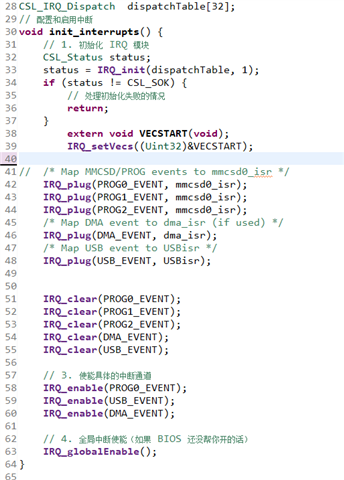
    Additionally, I found a post on a Chinese forum about how to solve this problem, as shown in the picture below. I tried the method shown in the picture, but I still didn't succeed. My interrupt configuration code is shown in the picture below, but I still didn't succeed. Therefore, I really can't find what the issue is. I'm asking for help from TI experts to see if this problem can be solved.

  • Hello,

    // enable the MPORT and disable HWA
    *(volatile ioport Uint16 *)0x0001 = 0x020E;
    asm(" idle");

    is used to enable the M-PORT which was disabled by the ROM bootloader. MPORT is used by the USB CDMA.

    To identify where your flashed image went wrong, you can add the following code at the beginning of your main():

    int loopFlag = 1;

    while (loopFlag)

    {

    }

    After you run your application, then you use JTAG to halt the DSP (without using GEL file). You should be at the while loop. If you change the loopFlag to 0, then you can single step through your code. Start with the debug version. With load symbol from the *.OUT file, you should be able to do the source code single step.

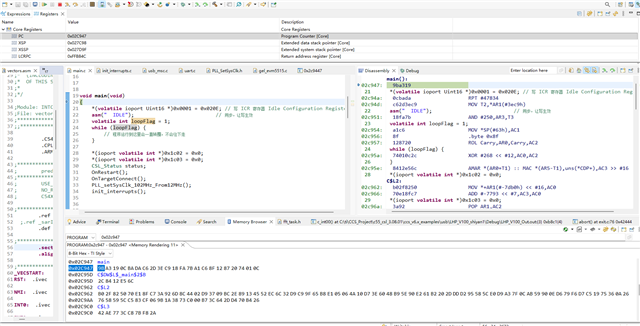
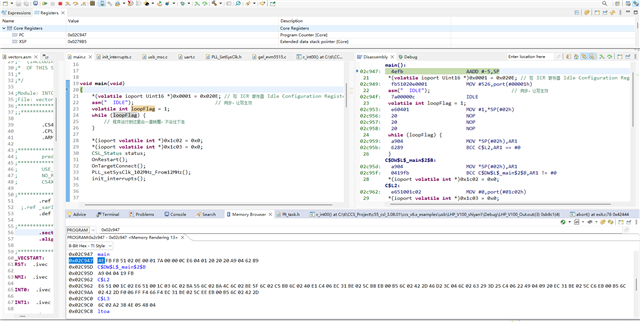
  • Why can't my project Load Symbols Only debug jump to the main function, I set the main address through the pc register to jump to the main function, and the assembly code is different from the load program, is there a problem with the process of downloading my code to eeprom? Or is it a mistake in the process of chip startup carrying from eeprom to RAM?

    Load Symbols Only:


    load program:


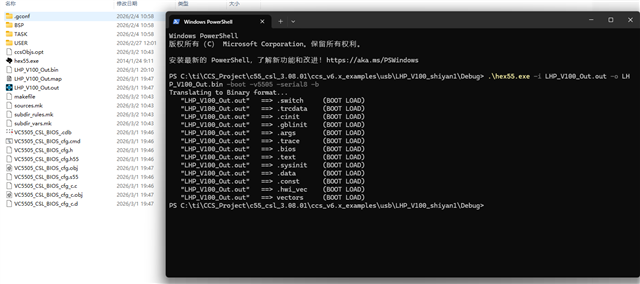
    The process of downloading my code to eeprom is as follows:
    1. Open the hex55.exe under the Debug folder and enter the following code to generate a bin file
    .hex55.exe -i LHP_V100_Out.out -o LHP_V100_Out.bin -boot -v5505 -serial8 -b


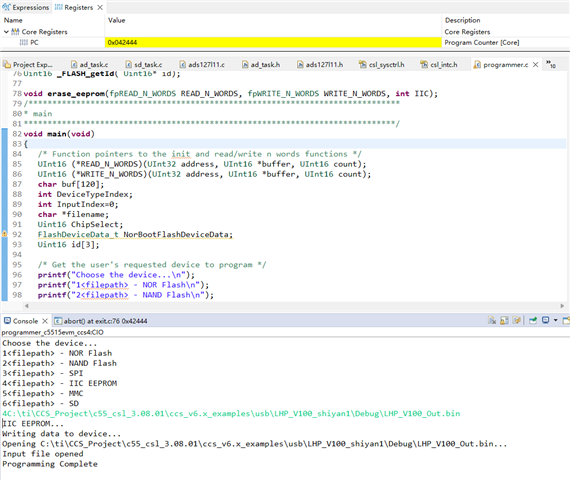
    2. Use the programmer_c5515evm_ccs4 example. Download it as shown in the figure. After a successful download, 'program complete' will be displayed.

    In addition, I successfully used other examples to download to my development board and run them successfully, using the same method. I don't know why this example failed, and I hope an expert can help me answer this question.

  • After your dev board boot from EEPROM, are you able to halt the DSP using the JTAG (without using the GEL file)? If you can, what is the address?

    After you halt the DSP, you can then load the symbol form LHP_V100_Out.out. If the address is not in the on-chip memory, it may indicate the ROM code is still running. Your screen capture is too small, I cannot see the details.

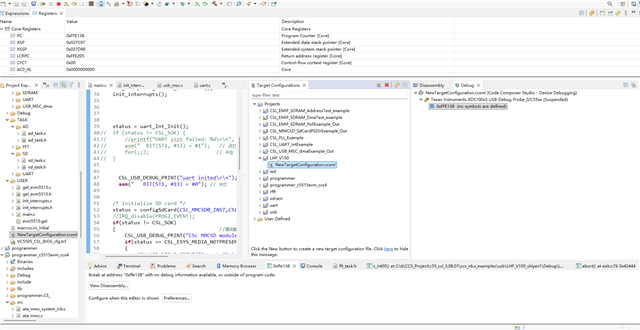
  • IIdownloaded the code EEPROM again  and  launched the configuration without a GEL file. After connecting and halting, the PC is at 0xFFE138. When I load symbols, I can see that my application code in SARAM/DARAM consists of incorrect data (random noise) compared to a successful JTAG load. This may confirms the ROM Bootloader is stuck and not copying the image from the external EEPROM. how can i solve this problem?In addition, I updated the image for the previous question, hoping that you can see it clearly this time.

    After connecting and halting:

    Load Symbols Only:

  • The PC is at 0xFFE138 is indicating that the code is in the ROM bootloader, something is wrong with your flashed image in EEPROM. If you load the symbol of the application image for the ROM bootloader, then the disassembly is meaningless.

    You can try the different boot image other than the USB example code and do the same debug processing. Hopefully, you will halt the DSP at different location other than the PC at 0xFFE138.

  • Thank you for the explanation. I have verified that a simple UART example (evm5515_v1\tests\uart) works perfectly using the same flashing method and boot settings. However, my custom USB project fails to boot, with the PC stuck at 0xFFE138 as previously mentioned.

    To help diagnose the issue, I have uploaded my problematic project to GitHub for your review: https://github.com/xuk5682-gif/my-project-with-problem.git

    Key observations:

    • The UART example boots successfully and I can halt it in RAM.

    • With this USB project, the memory data at the entry point after a power cycle is completely different (random noise) compared to a successful JTAG load.

    • The total size of the .text section is quite large (approx 117KB), whereas the UART example is much smaller.

    Could you please help check if there are specific requirements in the Boot Table or memory allocation for such a large project to boot from I2C EEPROM?