Part Number: DCA1000EVM
Other Parts Discussed in Thread: IWR6843
Part Number: DCA1000EVM
Other Parts Discussed in Thread: IWR6843
Hello,
Please check the following link
This does not match my situation. I have already tried all the solutions from various tutorials and blogs, both for software and hardware.
As I mentioned, no errors occur when using another set of equipment under the same configuration.
During cross‑validation between the IWR6843 and DCA1000, this problem only appears with my own DCA1000, while our radar works without any errors when paired with the other DCA1000.
This issue has existed since I purchased the device. Could it be a hardware problem with the DCA1000?
More importantly, this issue occurs randomly.Our workflow requires 30 one-minute data acquisitions. Sometimes the data can be captured continuously without problems, but at other times we cannot establish a stable connection for one or two days.This is the most frustrating part for us.
If this only occurs on one DCA1000, then there is probably something wrong with it. Especially if nothing changes after reflashing the FPGA. These EVMs are very sensitive to ESD and its possible a small part is malfunctioning.
Hello,
You can contact TI customer service and discuss replacement details with them.
I tried collecting data again. The first connection to the FPGA was unsuccessful, but the second attempt succeeded, and I completed three data acquisitions. I will now post the logs below:
GM: Constructor
GM: Thu Mar 19 21:33:24 2026
RSTD.Transmit("/Settings")
[21:33:24]
[21:33:24] ### Running Startup script: "D:\ti\mmwave_studio_02_01_01_00\mmWaveStudio\Scripts\Startup.lua" ###
[21:33:24] RSTD.SetAndTransmit ("/Settings/Scripter/Display DateTime" , "1")
[21:33:24] RSTD.SetAndTransmit ("/Settings/Scripter/DateTime Format" , "HH:mm:ss")
[21:33:24] Scripter ignored: Attempt to UnBuild() again or before Build.
[21:33:24] RSTD.SetVar ("/Settings/Clients/Client 0/Dll" , "D:\\ti\\mmwave_studio_02_01_01_00\\mmWaveStudio\\Clients\\\\LabClient.dll")
[21:33:24] RSTD.SetVar ("/Settings/Clients/Client 0/Use" , "TRUE")
[21:33:24] RSTD.SetVar ("/Settings/Clients/Client 1/Use" , "FALSE")
[21:33:24] RSTD.SetVar ("/Settings/Clients/Client 2/Use" , "FALSE")
[21:33:24] RSTD.SetVar ("/Settings/Clients/Client 3/Use" , "FALSE")
[21:33:24] RSTD.SetVar ("/Settings/Clients/Client 4/Use" , "FALSE")
[21:33:24] RSTD.SetVar ("/Settings/AL Client/AL Dll" , "D:\\ti\\mmwave_studio_02_01_01_00\\mmWaveStudio\\RunTime\\SAL.dll")
[21:33:24] RSTD.SetVar ("/Settings/Clients/Client 0/GuiDll" , "")
[21:33:24] RSTD.SetVar ("/Settings/AutoUpdate/Enabled" , "TRUE")
[21:33:24] RSTD.SetVar ("/Settings/AutoUpdate/Interval" , "1")
[21:33:24] RSTD.SetVar ("/Settings/Monitors/UpdateDisplay" , "TRUE")
[21:33:24] RSTD.SetVar ("/Settings/Monitors/OneClickStart" , "TRUE")
[21:33:24] RSTD.SetVar ("/Settings/Automation/Automation Mode" , "false")
[21:33:24] RSTD.Transmit("/")
[21:33:24] RSTD.SaveSettings(): Settings saved to "C:\Users\Windows11\AppData\Roaming\RSTD\config.xml"
[21:33:24] RSTD.Build()
[21:33:24] RSTD.SaveSettings(): Settings saved to "C:\Users\Windows11\AppData\Roaming\RSTD\config.xml"
[21:33:24] RSTD.Transmit("/")
[21:33:24] RSTD.AL_Build()
[21:33:24] RSTD.AL_LoadXml()
[21:33:24] RSTD.Transmit("/")
[21:33:24] RSTD.AL_Init()
[21:33:24] RSTD.Clients_Build()
[21:33:24] GM: Init
[21:33:24] GM: Loaded 'D:\ti\mmwave_studio_02_01_01_00\mmWaveStudio\Clients\\LabClient.dll'
[21:33:24] GM: 1 Guest (s) init
[21:33:24] GM: 1 Module(s) init
[21:33:24] GM: 2 Tab (s) init
[21:33:24] RSTD.Client_LoadXml()
[21:33:24] [RadarAPI]: ar1.selectRadarMode(0)
[21:33:24] [RadarAPI]: Status: Passed
[21:33:24] Matlab Runtime Engine is installed
[21:33:24] [RadarAPI]: Starting Matlab Engine..
[21:33:27] [RadarAPI]: Matlab Engine Started!
[21:33:28] [RadarAPI]: ar1.selectCascadeMode(0)
[21:33:28] [RadarAPI]: Status: Passed
[21:33:28] [RadarAPI]: ar1.LoadSettings('C:\Users\Windows11\AppData\Roaming\RSTD\ar1gui.ini')
[21:33:28] TESTING = false
[21:33:28] RstdNet: Port 2777: Listening..
[21:33:28]
[21:33:28] ***Script completed successfully.***
[21:33:30] [RadarAPI]: ar1.frequencyBandSelection("60G")
[21:33:31] [RadarAPI]: ar1.SelectChipVersion("IWR6843")
[21:33:31] [RadarAPI]: Status: Passed
[21:33:31] [RadarAPI]: ar1.deviceVariantSelection("IWR6843")
[21:33:31] [RadarAPI]: Status: Passed
[21:33:34] [RadarAPI]: Opening Gpio Control Port()
[21:33:34] [RadarAPI]: Status: Passed
[21:33:35] [RadarAPI]: Opening Board Control Port()
[21:33:35] [RadarAPI]: Status: Passed
[21:33:36] [RadarAPI]: ar1.FullReset()
[21:33:36] [RadarAPI]: Status: Passed
[21:33:36] [RadarAPI]: Closing Board Control Port()
[21:33:36] [RadarAPI]: Status: Passed
[21:33:36] [RadarAPI]: Closing Gpio Control Port()
[21:33:36] [RadarAPI]: Status: Passed
[21:33:36] [RadarAPI]: ar1.SOPControl(2)
[21:33:36] [RadarAPI]: Status: Passed
[21:33:37] [RadarAPI]: ar1.Connect(5,921600,1000)
[21:33:40] [RadarAPI]: Warning: Connected with baudrate 115200
[21:33:41] [RadarAPI]: Warning: Disconnected existing BaudRate
[21:33:41] [RadarAPI]: Warning: Trying to connect with baudrate 921600
[21:33:43] [RadarAPI]: ar1.Calling_IsConnected()
[21:33:44] [RadarAPI]: ar1.SelectChipVersion("IWR6843")
[21:33:44] [RadarAPI]: Status: Passed
[21:33:44] [RadarAPI]: ar1.SelectChipVersion("IWR6843")
[21:33:44] [RadarAPI]: Status: Passed
[21:33:44] Device Status : IWR6843/ASIL-B/SOP:2/ES:2
[21:33:44] [RadarAPI]: ar1.SaveSettings('C:\Users\Windows11\AppData\Roaming\RSTD\ar1gui.ini')
[21:33:46] [RadarAPI]: ar1.DownloadBSSFw("D:\\ti\\mmwave_studio_02_01_01_00\\mmWaveStudio\\Scripts\\..\\..\\rf_eval_firmware\\radarss\\xwr68xx_radarss.bin")
[21:33:47] [RadarAPI]: Downloading BSS ROM RPRC Binary..
[21:33:54] [RadarAPI]: ar1.GetBSSFwVersion()
[21:33:54] [RadarAPI]: BSSFwVersion:(06.02.01.05 (09/03/20))
[21:33:55] [RadarAPI]: ar1.DownloadMSSFw("D:\\ti\\mmwave_studio_02_01_01_00\\mmWaveStudio\\Scripts\\..\\..\\rf_eval_firmware\\masterss\\xwr68xx_masterss.bin")
[21:33:55] [RadarAPI]: Downloading MSS RPRC Binary..
[21:33:59] [RadarAPI]: ar1.GetMSSFwVersion()
[21:33:59] [RadarAPI]: MSSFwVersion:(02.00.00.03 (27/08/19))
[21:34:03] MSS power up done async event received!
[21:34:03] [RadarAPI]: ar1.PowerOn(0, 1000, 0, 0)
[21:34:03] [RadarAPI]: Status: Passed
[21:34:04] [RadarAPI]: ar1.SelectChipVersion("IWR6843")
[21:34:04] [RadarAPI]: Status: Passed
[21:34:04] [RadarAPI]: ar1.SelectChipVersion("IWR6843")
[21:34:04] [RadarAPI]: Status: Passed
[21:34:04] Device Status : IWR6843/ASIL-B/SOP:2/ES:2
[21:34:04] [RadarAPI]: ar1.RfEnable()
[21:34:05] BSS power up done async event received!
[21:34:05] [RadarAPI]: Status: Passed
[21:34:05] [RadarAPI]: ar1.GetMSSFwVersion()
[21:34:05] [RadarAPI]: MSSFwVersion:(02.00.00.03 (27/08/19))
[21:34:05] [RadarAPI]: ar1.GetBSSFwVersion()
[21:34:05] [RadarAPI]: BSSFwVersion:(06.02.01.05 (09/03/20))
[21:34:09] [RadarAPI]: ar1.ChanNAdcConfig(1, 1, 1, 1, 1, 1, 1, 2, 1, 0)
[21:34:09] [RadarAPI]: Status: Passed
[21:34:10] [RadarAPI]: ar1.LPModConfig(0, 0)
[21:34:10] [RadarAPI]: Status: Passed
[21:34:10] [RadarAPI]: ar1.RfInit()
[21:34:10] RF Init async event received!
[21:34:10] [RadarAPI]: Time stamp, Temperture: 5875,43; APLL Status, Update: 1, 0; SynthVCO1 Status, Update: 1, 1; SynthVCO2 Status, Update: 1, 1; LODist Status, Update: 1, 1; RxADCDC Status, Update: 1, 1; HPFcutoff Status, Update: 1, 1; LPFcutoff Status, Update: 1, 1; PeakDetector Status, Update: 1, 1; TxPower Status, Update: 1, 1; RxGain Status, Update: 1, 1; TxPhase Status, Update: 1, 1; RxIQMM Status, Update: 1, 1;
[21:34:10] [RadarAPI]: Status: Passed
[21:34:12] [RadarAPI]: ar1.DataPathConfig(513, 1216644097, 0)
[21:34:12] [RadarAPI]: Status: Passed
[21:34:12] [RadarAPI]: ar1.LvdsClkConfig(1, 1)
[21:34:12] [RadarAPI]: Status: Passed
[21:34:13] [RadarAPI]: ar1.LVDSLaneConfig(0, 1, 1, 0, 0, 1, 0, 0)
[21:34:13] [RadarAPI]: Status: Passed
[21:34:20] [RadarAPI]: ar1.ProfileConfig(0, 60, 7, 6, 50, 0, 0, 0, 0, 0, 0, 29.982, 0, 256, 6250, 0, 131072, 30)
[21:34:20] [RadarAPI]: Status: Passed
[21:34:21] [RadarAPI]: ar1.ChirpConfig(0, 0, 0, 0, 0, 0, 0, 1, 0, 0)
[21:34:21] [RadarAPI]: Status: Passed
[21:34:21] Test Source Already Disabled...!!!
[21:34:21] [RadarAPI]: ar1.DisableTestSource(0)
[21:34:21] [RadarAPI]: Status: Passed
[21:34:21] [RadarAPI]: ar1.FrameConfig(0, 0, 1200, 128, 50, 0, 0, 1)
[21:34:21] [RadarAPI]: Status: Passed
[21:34:22] [RadarAPI]: ar1.GetCaptureCardDllVersion()
[21:34:22] [RadarAPI]: Sending dll_version command to DCA1000
[21:34:22] [RadarAPI]:
[21:34:22] DLL Version : 1.0
[21:34:22] [RadarAPI]: ar1.SelectCaptureDevice("DCA1000")
[21:34:22] [RadarAPI]: Status: Passed
[21:34:22] [RadarAPI]: ar1.CaptureCardConfig_EthInit("192.168.33.30", "192.168.33.180", "12:34:56:78:90:12", 4096, 4098)
[21:34:22] [RadarAPI]: ar1.CaptureCardConfig_Mode(1, 2, 1, 2, 3, 30)
[21:34:22] [RadarAPI]: ar1.CaptureCardConfig_PacketDelay(25)
[21:34:23] [RadarAPI]: Sending fpga command to DCA1000
[21:34:23] [RadarAPI]:
[21:34:23] FPGA Configuration command : Success
[21:34:23] [RadarAPI]: Sending record command to DCA1000
[21:34:23] [RadarAPI]:
[21:34:23] Configure Record command : Success
[21:34:23] [RadarAPI]: ar1.GetCaptureCardFPGAVersion()
[21:34:23] [RadarAPI]: Sending fpga_version command to DCA1000
[21:34:23] [RadarAPI]:
[21:34:23]
[21:34:23] FPGA Version : 2.8 [Record]
[21:34:23]
[21:34:33] [RadarAPI]: ar1.CaptureCardConfig_StartRecord("E:\\Project2data\\FMCWdata\\subject31\\data01\\adc.bin", 1)
[21:34:33] [RadarAPI]: Sending start_record command to DCA1000
[21:34:37] [RadarAPI]: ar1.StartFrame()
[21:34:37] [RadarAPI]: Status: Passed
[21:34:37] Frame start async event received!
[21:35:37] [RadarAPI]: Frame Ended
[21:35:39] [RadarAPI]:
[21:35:39] Start Record command : Success
[21:35:39]
[21:35:39] Record is completed
[21:35:39]
[21:35:39] Record stop is done successfully
[21:35:39] Frame End async event received!
[21:35:39] [RadarAPI]:
[21:35:59] [RadarAPI]: ar1.CaptureCardConfig_StartRecord("E:\\Project2data\\FMCWdata\\subject31\\data02\\adc.bin", 1)
[21:35:59] [RadarAPI]: Sending start_record command to DCA1000
[21:36:02] [RadarAPI]: ar1.StartFrame()
[21:36:02] [RadarAPI]: Status: Passed
[21:36:02] Frame start async event received!
[21:37:02] Frame End async event received!
[21:37:02] [RadarAPI]: Frame Ended
[21:37:04] [RadarAPI]:
[21:37:04] Start Record command : Success
[21:37:04]
[21:37:04] Record is completed
[21:37:04]
[21:37:04] Record stop is done successfully
[21:37:04] [RadarAPI]:
[21:37:40] [RadarAPI]: ar1.CaptureCardConfig_StartRecord("E:\\Project2data\\FMCWdata\\subject31\\data03\\adc.bin", 1)
[21:37:40] [RadarAPI]: Sending start_record command to DCA1000
[21:37:42] [RadarAPI]: ar1.StartFrame()
[21:37:42] [RadarAPI]: Status: Passed
[21:37:42] Frame start async event received!
[21:38:42] [RadarAPI]: Frame Ended
[21:38:54] [RadarAPI]:
[21:38:54] Start Record command : Success
[21:38:54]
[21:38:54] Record is completed
[21:38:54]
[21:38:54] Record stop failed
[21:38:54] Frame End async event received!
[21:38:54] [RadarAPI]:
[21:39:01] [RadarAPI]: ar1.CaptureCardConfig_StartRecord("E:\\Project2data\\FMCWdata\\subject31\\data04\\adc.bin", 1)
[21:39:01] [RadarAPI]: Sending start_record command to DCA1000
[21:39:04] [RadarAPI]: ar1.StartFrame()
[21:39:04] [RadarAPI]: Status: Passed
[21:39:04] Frame start async event received!
[21:39:11] [RadarAPI]:
[21:39:11] Start Record :
[21:39:11] Timeout Error! System disconnected
[21:40:04] [RadarAPI]: Frame Ended
[21:40:04] Frame End async event received!
This is what it looks like after the failure.
It is worth noting that after the time out prompt appeared, the acquisition indicator light still kept flashing intermittently until the set acquisition event finished.
However, no data was collected in this failed attempt, unlike the previous three successful ones.
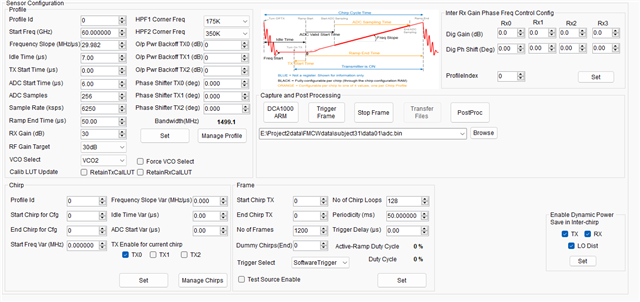
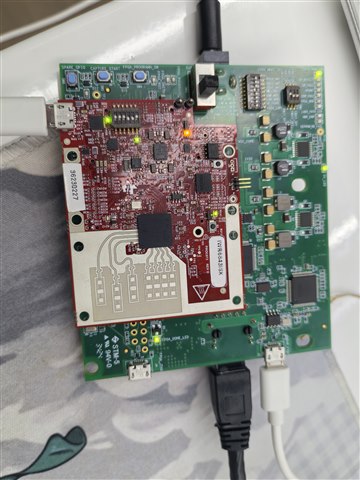
The chirp profile seems okay, based on the values used for configuration. Have you tried a default configuration of some sort? The timeout error is from the Radar sensor itself not starting. The FPGA error is communication exclusively between PC and DCA1000 but that seems to have been sorted out. Can you take a picture of your physical setup? Have you ever been able to capture data successfully?

You can get steps to reflashing the FPGA starting from page 22 of the DCA1000 PDF User Guide.
https://www.ti.com/lit/ug/spruij4a/spruij4a.pdf
For your convenience I have attached 2.9 below
e2e.ti.com/.../DCA1000_5F00_FPGA_5F00_RECORD_5F00_V2.9_5F00_21JUL2022.bit