
This thread has been locked.

If you have a related question, please click the "Ask a related question" button in the top right corner. The newly created question will be automatically linked to this question.

AWR1843BOOST: DCA1000

Part Number: AWR1843BOOST
Other Parts Discussed in Thread: AWR1843, DCA1000EVM

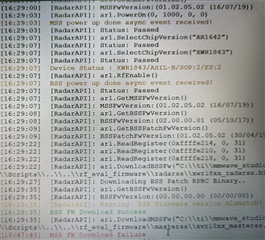
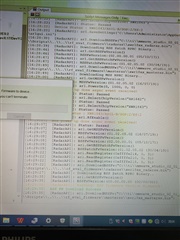
您好,我完成了上个相关问题进行原始数据采集的步骤,但是在利用mmwave_studio进行RUN文件DataCaptureDemo_xWR.lua的时候,在downloading MSS的时候一直加载为0,等待了十几分钟一直如此。请问该如何解决呢。我再认为终止程序之后,显示MSS FW Download failure的报错
  • 请问在修改lua之前,可以下载mss firmware吗?如果修改后不行的话,麻烦贴一下lua代码。

  • 没有尝试运行修改之前的代码。修改之后代码如下,我是用的板子是AWR1843,可以正常运行driver vital sign的程序并出现结果;参考原问题找到的相关步骤,我只按照driver vital sign的xwr1642_profile_VitalSigns_20fps_Front文件修改了ar1.ProfileConfig,ar1.ChirpConfig,ar1.FrameConfig的参数

    --BSS and MSS firmware download
    info = debug.getinfo(1,'S');
    file_path = (info.source);
    file_path = string.gsub(file_path, "@","");
    file_path = string.gsub(file_path, "DataCaptureDemo_xWR.lua","");
    fw_path   = file_path.."..\\..\\rf_eval_firmware"
    
    --Export bit operation file
    bitopfile = file_path.."\\".."bitoperations.lua"
    dofile(bitopfile)
    
    --Read part ID
    --This register address used to find part number for ES2 and ES3 devices
    res, efusedevice = ar1.ReadRegister(0xFFFFE214, 0, 31)
    res, efuseES1device = ar1.ReadRegister(0xFFFFE210, 0, 31)
    efuseES2ES3Device = bit_and(efusedevice, 0x03FC0000)
    efuseES2ES3Device = bit_rshift(efuseES2ES3Device, 18)
    
    --if part number is zero then those are ES1 devices 
    if(efuseES2ES3Device == 0) then
    	if (bit_and(efuseES1device, 3) == 0) then
    		partId = 1243
    	elseif (bit_and(efuseES1device, 3) == 1) then
    		partId = 1443
    	else
    		partId = 1642
    	end
    elseif(efuseES2ES3Device == 0xE0 and (bit_and(efuseES1device, 3) == 2)) then
    		partId = 6843
    		ar1.frequencyBandSelection("60G")
    --if part number is non-zero then those are ES12 and ES3 devices
    else
       if(efuseES2ES3Device == 0x20 or efuseES2ES3Device == 0x21 or efuseES2ES3Device == 0x80) then
    		partId = 1243
    	elseif(efuseES2ES3Device == 0xA0 or efuseES2ES3Device == 0x40)then
    		partId = 1443
    	elseif(efuseES2ES3Device == 0x60 or efuseES2ES3Device == 0x61 or efuseES2ES3Device == 0x04 or efuseES2ES3Device == 0x62 or efuseES2ES3Device == 0x67) then
    		partId = 1642
    	elseif(efuseES2ES3Device == 0x66 or efuseES2ES3Device == 0x01 or efuseES2ES3Device == 0xC0 or efuseES2ES3Device == 0xC1) then
    		partId = 1642
    	elseif(efuseES2ES3Device == 0x70 or efuseES2ES3Device == 0x71 or efuseES2ES3Device == 0xD0 or efuseES2ES3Device == 0x05) then
    		partId = 1843
    	elseif(efuseES2ES3Device == 0xE0 or efuseES2ES3Device == 0xE1 or efuseES2ES3Device == 0xE2 or efuseES2ES3Device == 0xE3 or efuseES2ES3Device == 0xE4) then
    		partId = 6843
    		ar1.frequencyBandSelection("60G")
    	else
    		WriteToLog("Inavlid Device part number in ES2 and ES3 devices\n" ..partId)
        end
    end 
    
    --ES version
    res, ESVersion = ar1.ReadRegister(0xFFFFE218, 0, 31)
    ESVersion = bit_and(ESVersion, 15)
    
    --ADC_Data file path
    data_path     = file_path.."..\\PostProc"
    adc_data_path = data_path.."\\adc_data.bin"
    
    -- Download Firmware
    if(partId == 1642) then
        BSS_FW    = fw_path.."\\radarss\\xwr16xx_radarss.bin"
        MSS_FW    = fw_path.."\\masterss\\xwr16xx_masterss.bin"
    elseif(partId == 1243) then
        BSS_FW    = fw_path.."\\radarss\\xwr12xx_xwr14xx_radarss.bin"
        MSS_FW    = fw_path.."\\masterss\\xwr12xx_xwr14xx_masterss.bin"
    elseif(partId == 1443) then
        BSS_FW    = fw_path.."\\radarss\\xwr12xx_xwr14xx_radarss.bin"
        MSS_FW    = fw_path.."\\masterss\\xwr12xx_xwr14xx_masterss.bin"
    elseif(partId == 1843) then
        BSS_FW    = fw_path.."\\radarss\\xwr18xx_radarss.bin"
        MSS_FW    = fw_path.."\\masterss\\xwr18xx_masterss.bin"
    elseif(partId == 6843) then
        BSS_FW    = fw_path.."\\radarss\\xwr68xx_radarss.bin"
        MSS_FW    = fw_path.."\\masterss\\xwr68xx_masterss.bin"
    else
        WriteToLog("Invalid Device partId FW\n" ..partId)
        WriteToLog("Invalid Device ESVersion\n" ..ESVersion)
    end
    
    -- Download BSS Firmware
    if (ar1.DownloadBSSFw(BSS_FW) == 0) then
        WriteToLog("BSS FW Download Success\n", "green")
    else
        WriteToLog("BSS FW Download failure\n", "red")
    end
    
    -- Download MSS Firmware
    if (ar1.DownloadMSSFw(MSS_FW) == 0) then
        WriteToLog("MSS FW Download Success\n", "green")
    else
        WriteToLog("MSS FW Download failure\n", "red")
    end
    
    -- SPI Connect
    if (ar1.PowerOn(1, 1000, 0, 0) == 0) then
        WriteToLog("Power On Success\n", "green")
    else
       WriteToLog("Power On failure\n", "red")
    end
    
    -- RF Power UP
    if (ar1.RfEnable() == 0) then
        WriteToLog("RF Enable Success\n", "green")
    else
        WriteToLog("RF Enable failure\n", "red")
    end
    
    if (ar1.ChanNAdcConfig(1, 1, 0, 1, 1, 1, 1, 2, 1, 0) == 0) then
        WriteToLog("ChanNAdcConfig Success\n", "green")
    else
        WriteToLog("ChanNAdcConfig failure\n", "red")
    end
    
    if (partId == 1642) then
        if (ar1.LPModConfig(0, 1) == 0) then
            WriteToLog("LPModConfig Success\n", "green")
        else
            WriteToLog("LPModConfig failure\n", "red")
        end
    else
        if (ar1.LPModConfig(0, 0) == 0) then
            WriteToLog("Regualar mode Cfg Success\n", "green")
        else
            WriteToLog("Regualar mode Cfg failure\n", "red")
        end
    end
    
    if (ar1.RfInit() == 0) then
        WriteToLog("RfInit Success\n", "green")
    else
        WriteToLog("RfInit failure\n", "red")
    end
    
    RSTD.Sleep(1000)
    
    if (ar1.DataPathConfig(1, 1, 0) == 0) then
        WriteToLog("DataPathConfig Success\n", "green")
    else
        WriteToLog("DataPathConfig failure\n", "red")
    end
    
    if (ar1.LvdsClkConfig(1, 1) == 0) then
        WriteToLog("LvdsClkConfig Success\n", "green")
    else
        WriteToLog("LvdsClkConfig failure\n", "red")
    end
    
    if((partId == 1642) or (partId == 1843) or (partId == 6843)) then
        if (ar1.LVDSLaneConfig(0, 1, 1, 0, 0, 1, 0, 0) == 0) then
            WriteToLog("LVDSLaneConfig Success\n", "green")
        else
            WriteToLog("LVDSLaneConfig failure\n", "red")
        end
    elseif ((partId == 1243) or (partId == 1443)) then
        if (ar1.LVDSLaneConfig(0, 1, 1, 1, 1, 1, 0, 0) == 0) then
            WriteToLog("LVDSLaneConfig Success\n", "green")
        else
            WriteToLog("LVDSLaneConfig failure\n", "red")
        end
    end
    
    if (ar1.SetTestSource(4, 3, 0, 0, 0, 0, -327, 0, -327, 327, 327, 327, -2.5, 327, 327, 0, 0, 0, 0, -327, 0, -327, 
                          327, 327, 327, -95, 0, 0, 0.5, 0, 1, 0, 1.5, 0, 0, 0, 0, 0, 0, 0) == 0) then
        WriteToLog("Test Source Configuration Success\n", "green")
    else
        WriteToLog("Test Source Configuration failure\n", "red")
    end
    
    if((partId == 1642) or (partId == 1843)) then
        if(ar1.ProfileConfig(0, 77, 7, 6, 57, 0, 0, 70, 1, 200, 4000, 0, 0, 48) == 0) then
            WriteToLog("ProfileConfig Success\n", "green")
        else
            WriteToLog("ProfileConfig failure\n", "red")
        end
    elseif((partId == 1243) or (partId == 1443)) then
        if(ar1.ProfileConfig(0, 77, 7, 6, 57, 0, 0, 0, 0, 0, 0, 70.006, 1, 100, 2000, 0, 0, 40) == 0) then
            WriteToLog("ProfileConfig Success\n", "green")
        else
            WriteToLog("ProfileConfig failure\n", "red")
        end
    elseif(partId == 6843) then
        if(ar1.ProfileConfig(0, 77, 7, 6, 57, 0, 0, 0, 0, 0, 0, 70.006, 1, 100, 2000, 0, 0, 48) == 0) then
    		WriteToLog("ProfileConfig Success\n", "green")
        else
            WriteToLog("ProfileConfig failure\n", "red")
        end
    end
    
    if (ar1.ChirpConfig(0, 0, 0, 0, 0, 0, 0, 1) == 0) then
        WriteToLog("ChirpConfig Success\n", "green")
    else
        WriteToLog("ChirpConfig failure\n", "red")
    end
    
    if (ar1.EnableTestSource(1) == 0) then
        WriteToLog("Enabling Test Source Success\n", "green")
    else
        WriteToLog("Enabling Test Source failure\n", "red")
    end
    
    if (ar1.FrameConfig(0, 0, 2, 0, 50, 1, 0) == 0) then
        WriteToLog("FrameConfig Success\n", "green")
    else
        WriteToLog("FrameConfig failure\n", "red")
    end
    
    -- select Device type
    if (ar1.SelectCaptureDevice("DCA1000") == 0) then
        WriteToLog("SelectCaptureDevice Success\n", "green")
    else
        WriteToLog("SelectCaptureDevice failure\n", "red")
    end
    
    --DATA CAPTURE CARD API
    if (ar1.CaptureCardConfig_EthInit("192.168.33.30", "192.168.33.180", "12:34:56:78:90:12", 4096, 4098) == 0) then
        WriteToLog("CaptureCardConfig_EthInit Success\n", "green")
    else
        WriteToLog("CaptureCardConfig_EthInit failure\n", "red")
    end
    
    --AWR12xx or xWR14xx-1, xWR16xx or xWR18xx or xWR68xx- 2 (second parameter indicates the device type)
    if ((partId == 1642) or (partId == 1843) or (partId == 6843)) then
        if (ar1.CaptureCardConfig_Mode(1, 2, 1, 2, 3, 30) == 0) then
            WriteToLog("CaptureCardConfig_Mode Success\n", "green")
        else
            WriteToLog("CaptureCardConfig_Mode failure\n", "red")
        end
    elseif ((partId == 1243) or (partId == 1443)) then
        if (ar1.CaptureCardConfig_Mode(1, 1, 1, 2, 3, 30) == 0) then
            WriteToLog("CaptureCardConfig_Mode Success\n", "green")
        else
            WriteToLog("CaptureCardConfig_Mode failure\n", "red")
        end
    end
    
    if (ar1.CaptureCardConfig_PacketDelay(25) == 0) then
        WriteToLog("CaptureCardConfig_PacketDelay Success\n", "green")
    else
        WriteToLog("CaptureCardConfig_PacketDelay failure\n", "red")
    end
    
    --Start Record ADC data
    ar1.CaptureCardConfig_StartRecord(adc_data_path, 1)
    RSTD.Sleep(1000)
    
    --Trigger frame
    ar1.StartFrame()
    RSTD.Sleep(5000)
    
    --Post process the Capture RAW ADC data
    ar1.StartMatlabPostProc(adc_data_path)
    WriteToLog("Please wait for a few seconds for matlab post processing .....!!!! \n", "green")
    RSTD.Sleep(10000)
    

  • 请先不要用Lua,按照下面网站上的步骤看一下能不能手动加载MSS firmware。
    https://e2echina.ti.com/blogs_/b/the_process/posts/dca1000evm

  • 您好,事实上,不论是用lua还是按照您说的步骤进行操作,load C:\ti\mmwave_studio_02_01_01_00\mmWaveStudio\Scripts\..\..\rf_eval_firmware\masterss\xwr18xx_masterss.bin都是可以成功的。

    另外在不用lua,按照您给的操作步骤,在最后一步遇到了问题,即FPGA Version读取失败,详细报错如下。

    我在进行了相关搜索之后,有人说是因为千兆网口才可以,我检查了自己的网口并不是千兆网口,是因为这个原因导致我FPGA Version读取失败么?又或者说正是因为这个原因导致我用lua的时候一直无法加载成功?

    [10:30:38]  [RadarAPI]: ar1.CaptureCardConfig_EthInit("192.168.33.30", "192.168.33.180", "12:34:56:78:90:12", 4096, 4098)
    [10:30:38]  [RadarAPI]: ar1.CaptureCardConfig_Mode(1, 2, 1, 2, 3, 30)
    [10:30:38]  [RadarAPI]: ar1.CaptureCardConfig_PacketDelay(25)
    [10:30:38]  [RadarAPI]: Sending fpga command to DCA1000
    [10:30:48]  [RadarAPI]: 
    [10:30:48]  FPGA Configuration : 
    [10:30:48]  Timeout Error! System disconnected
    [10:30:49]  [RadarAPI]: Sending record command to DCA1000
    [10:30:59]  [RadarAPI]: 
    [10:30:59]  Configure Record : 
    [10:30:59]  Timeout Error! System disconnected
    [10:30:59]  [RadarAPI]: ar1.GetCaptureCardFPGAVersion()
    [10:30:59]  [RadarAPI]: Sending fpga_version command to DCA1000
    [10:31:09]  [RadarAPI]: 
    [10:31:09]  
    [10:31:09]  Unable to read FPGA Version. [error -5]

  • 1. 那上面的报错信息“MSS FW download failure”很奇怪。

    2. 请看一下是否用网线直接连电脑网口的?

  • 是的,我使用的是台式电脑,台式电脑直接和网线相连连接到板子上。

    至于最开始我截图报错信息,是因为我在等待了运行lua十几分钟之后一直不再加载,停留在download mss的进度,因此关闭了运行,然后报错该信息。

    请问是和我的网口并非千兆网口有关么?如果是,请问有详细的讲解么?如果不是,请问又是什么原因导致的呢?

  • 需要千兆以太网,请看DCA1000EVM手册。
    https://www.ti.com.cn/cn/lit/ug/spruij4a/spruij4a.pdf
    • HOST PC configuration:

    – Intel Core i5 2.5 GHz or above
    – 8 GB RAM or above
    – Windows 10 Pro operating system
    – Static IP Address – 192.168.33.30
    – 1-Gbps Ethernet port

  • 感谢,那我是否可以理解为,如果我不是用千兆以太网,那么DCA1000就无法使用?采集原始数据就必定无法成功?

  • 请问如果我通过购买usb千兆网卡转换器,将dca的网线通过该转换器连接到电脑上,是否可以满足dca的使用要求?

  • 建议直接用网线连接,用转换器的可能会出错。

  • 感谢您的建议,也就是说我最好使用本身就是千兆以太网的主机来完成网线的连接对么?

  • 是的,建议换台电脑尝试。

  • 谢谢Shine,我现在正在尝试换一台电脑进行尝试,后续结果将会继续分享在该问题下

  • 好的,谢谢!