工程师你好,
最近在使用AWR2944EVM,使用EVM的OOB中的enetStream demo时遇到了如下问题。希望可以帮忙解答,非常感谢
1.在使用visualizer发送。cfg文件时,可以正常配置以太网,并可以从tcpserver.py中读取到数据。
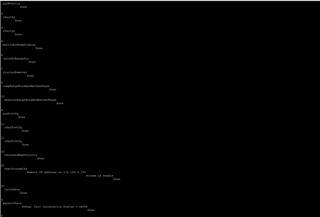
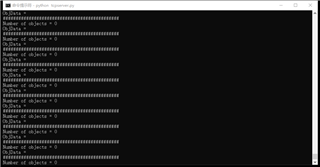
2.通过CLI_ByPassApi()函数配置以太网参数时,会出现问题,如图1所示,在配置完以太网的remoteIp之后,板子就无响应了,(图中表示为done只打印了don),

图1
图2为radarcmdString中的配置信息
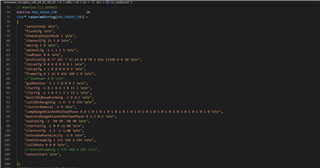
图2
3.我确认localIP已经被正确配置,连接方式为EVM-router-PC,router具有DHCP功能,通过queryLocalIP得到LocalIP的地址为172.168.4.207,remoteIp为172.168.4.195
#ifndef CLI_BYPASS
#define CLI_BYPASS
static void CLI_task(void* args)
{
    #ifndef CLI_BYPASS
    uint8_t                 cmdString[READ_LINE_BUFSIZE];
    char*                   tokenizedArgs[CLI_MAX_ARGS];
    char*                   ptrCLICommand;
    char                    delimitter[] = " \r\n";
    uint32_t                argIndex;
    CLI_CmdTableEntry*      ptrCLICommandEntry;
    int32_t                 cliStatus, status;
    uint32_t                index;

    /* Do we have a banner to be displayed? */
    if (gCLI.cfg.cliBanner != NULL)
    {
        /* YES: Display the banner */
        CLI_write (gCLI.cfg.cliBanner);
    }
        CLI_write("CLI_task\n");
        while(1)
        {
            if(enet_init_flag)
            {
            CLI_write("get localIp\n");
            break;
            }
        }
    /* Loop around forever: */
    while (1)
    {
        /* Demo Prompt: */
        CLI_write (gCLI.cfg.cliPrompt);

        /* Reset the command string: */
        memset ((void *)&cmdString[0], 0, sizeof(cmdString));

        status = CLI_readLine(gCLI.cfg.cliUartHandle, (char*)&cmdString[0], READ_LINE_BUFSIZE);
        if(status != SystemP_SUCCESS)
        {
            CLI_write("Error reading\n");
        }

        /* Reset all the tokenized arguments: */
        memset ((void *)&tokenizedArgs, 0, sizeof(tokenizedArgs));
        argIndex      = 0;
        ptrCLICommand = (char*)&cmdString[0];

        /* comment lines found - ignore the whole line*/
        if (cmdString[0]=='%' || cmdString[1]=='%')
        {
            CLI_write ("Skipped\n");
            continue;
        }

        /* Set the CLI status: */
        cliStatus = -1;

        /* The command has been entered we now tokenize the command message */
        while (1)
        {
            /* Tokenize the arguments: */
            tokenizedArgs[argIndex] = strtok(ptrCLICommand, delimitter);
            if (tokenizedArgs[argIndex] == NULL)
                break;

            /* Increment the argument index: */
            argIndex++;
            if (argIndex >= CLI_MAX_ARGS)
                break;

            /* Reset the command string */
            ptrCLICommand = NULL;
        }

        /* Were we able to tokenize the CLI command? */
        if (argIndex == 0)
            continue;

        /* Cycle through all the registered CLI commands: */
        for (index = 0; index < gCLI.numCLICommands; index++)
        {
            ptrCLICommandEntry = &gCLI.cfg.tableEntry[index];

            /* Do we have a match? */
            if (strcmp(ptrCLICommandEntry->cmd, tokenizedArgs[0]) == 0)
            {
                /* YES: Pass this to the CLI registered function */
                cliStatus = ptrCLICommandEntry->cmdHandlerFxn (argIndex, tokenizedArgs);
                if (cliStatus == 0)
                {
                    CLI_write ("Done\r\n");
                }
                else
                {
                    CLI_write ("Error %d\r\n", cliStatus);
                }
                break;
            }
        }

        /* Did we get a matching CLI command? */
        if (index == gCLI.numCLICommands)
        {
            /* NO matching command found. Is the mmWave extension enabled? */
            if (gCLI.cfg.enableMMWaveExtension == 1U)
            {
                /* Yes: Pass this to the mmWave extension handler */
                cliStatus = CLI_MMWaveExtensionHandler (argIndex, tokenizedArgs);
            }

            /* Was the CLI command found? */
            if (cliStatus == -1)
            {
                /* No: The command was still not found */
                CLI_write ("'%s' is not recognized as a CLI command\n", tokenizedArgs[0]);
            }
        }
    }
    #else
    CLI_write("BYPASS_API\n");
    if(enet_init_flag)
    CLI_write("LocalIp have  been set\n");
	CLI_ByPassApi(&gCLI.cfg);
    CLI_write("LocalIp SET\n");
#endif
}
#endif