If you have a related question, please click the "Ask a related question" button in the top right corner. The newly created question will be automatically linked to this question.
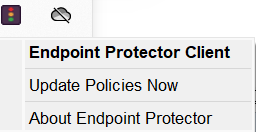
Our team member shared a way to solve the installation issue. It is because Endpoint Protector was blocking the installer from running and this issue was fixed by adding to the 'Allow' list' and updating local policies. I solve this by updating my local policies by right clicking on the Endpoint Protector icon (the one that looks like a traffic light) in the system tray and selecting "Update Policies Now".
They can make sure they are not using VPN as the tool needs to verify license info. Likewise have them check IT for firewall. But that usually impacts download, not install.
Please have the customer try this following updates to their system:
System policies are preventing execution of the algorithm used by installer.
a). Open Windows Control Panel->Administrative tools->Local Security Policy
(b). On the left hand side column, select Local Policies->Security Options
(c). On the right hand side column, select System Cryptography: Use FIPS compliant algorithms for encryption, hashing and signing. Double click on this and set it to disabled if it is enabled.
(d). Restart the machine and perform installation again