
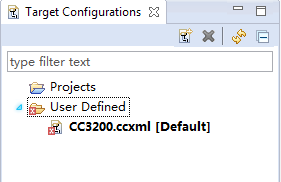
在进行Target Configurations 的时候,出现了如上图的错误信息,
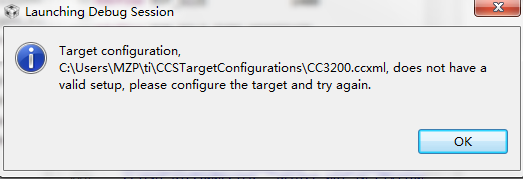
当我进行Debug 调试时,又弹出如下的错误警告:
我的开发环境是 Win7上面装的CCS6.0,使用的平台是 CC3200 Lunchpad,请问这是怎么回事,
CC3200.ccxml 根本无法设置为 default 选项!谢谢
This thread has been locked.
If you have a related question, please click the "Ask a related question" button in the top right corner. The newly created question will be automatically linked to this question.
在进行Target Configurations 的时候,出现了如上图的错误信息,
当我进行Debug 调试时,又弹出如下的错误警告:
我的开发环境是 Win7上面装的CCS6.0,使用的平台是 CC3200 Lunchpad,请问这是怎么回事,
CC3200.ccxml 根本无法设置为 default 选项!谢谢
http://processors.wiki.ti.com/index.php/CC31xx_%26_CC32xx_FAQ#CCS
Uninstall CCS and re-install the latest CCS. CC3200 support is included starting from CCS 6.0.1. You only need to add RTOS Support for CC3xxx from AppCenter. All other steps described in the Getting Started Document are still valid.
是的,按着这个步骤来,在app center上只发现了TI-RTOS for SimpleLink,没有发现 TI_RTOS for CC3200.
我是用下面的,是OK的,你试试看能不能工作。
<?xml version="1.0" encoding="UTF-8" standalone="no"?>
<configurations XML_version="1.2" id="configurations_0">
<configuration XML_version="1.2" id="Stellaris In-Circuit Debug Interface_0">
<instance XML_version="1.2" desc="Stellaris In-Circuit Debug Interface_0" href="connections/Stellaris_ICDI_Connection.xml" id="Stellaris In-Circuit Debug Interface_0" xml="Stellaris_ICDI_Connection.xml" xmlpath="connections"/>
<connection XML_version="1.2" id="Stellaris In-Circuit Debug Interface_0">
<instance XML_version="1.2" href="drivers/stellaris_cs_icepick.xml" id="drivers" xml="stellaris_cs_icepick.xml" xmlpath="drivers"/>
<instance XML_version="1.2" href="drivers/stellaris_cs_dap.xml" id="drivers" xml="stellaris_cs_dap.xml" xmlpath="drivers"/>
<instance XML_version="1.2" href="drivers/stellaris_cortex_m4.xml" id="drivers" xml="stellaris_cortex_m4.xml" xmlpath="drivers"/>
<platform XML_version="1.2" id="platform_0">
<instance XML_version="1.2" desc="CC3200_0" href="devices/CC3200.xml" id="CC3200_0" xml="CC3200.xml" xmlpath="devices"/>
</platform>
</connection>
</configuration>
</configurations>