Part Number: TCAN4550-Q1
Other Parts Discussed in Thread: TCAN4550
我们使用的是NVIDIA Jetson Thor平台,通过SPI拓展CAN,具体电路如下:
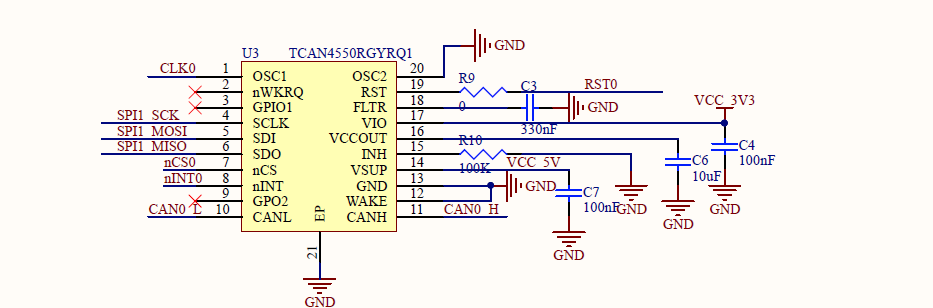
VSUP已经链接到了12V,并将R9电阻取消焊接,
使用的驱动代码是:
m_can - drivers/net/can/m_can - Linux source code (v6.8.12) - Bootlin Elixir Cross Referencer
设备树配置如下:
spi@810c590000 {
                        status = "okay";
                        spi@0 {
                                status = "okay";
                                compatible = "ti,tcan4x5x";
                                reg = <0x0>;
                                #address-cells = <1>;
                                #size-cells = <1>;
                                spi-max-frequency = <10000000>;
                                bosch,mram-cfg = <0x0 0 0 16 0 0 1 1>;
                                clocks = <&tcan4x5x_clk>, <&tcan4x5x_clk>;
                                clock-names = "hclk", "cclk";
                                interrupt-parent = <&gpio_aon>;
                                interrupts = <TEGRA264_AON_GPIO(DD, 4) IRQ_TYPE_LEVEL_LOW>;
                                //device-state-gpios = <&gpio3 21 GPIO_ACTIVE_HIGH>;
                                //device-wake-gpios = <&gpio1 15 GPIO_ACTIVE_HIGH>;
                                reset-gpios = <&gpio_aon TEGRA264_AON_GPIO(DD, 3) GPIO_ACTIVE_HIGH>;
                                controller-data {
                                        nvidia,enable-hw-based-cs;
                                        nvidia,rx-clk-tap-delay = <0x10>;
                                        nvidia,tx-clk-tap-delay = <0x0>;
                                };
                        };
加载驱动之后的日志如下:
[  109.198684] irq: IRQ398: trimming hierarchy from :bus@0:pmc@c800000
[  109.201510] tcan4x5x spi0.0: Detected TCAN device version generic
[  109.201669] tcan4x5x spi0.0: ----plink----tcan4x5x_clear_interrupts ----
[  109.203484] tcan4x5x spi0.0: ----plink----tcan4x5x_clear_interrupts ----
[  109.204219] tcan4x5x spi0.0: m_can device registered (irq=398, version=32)
[  109.204225] tcan4x5x spi0.0 can4: TCAN4X5X successfully initialized.
操作如下:
nvidia@tegra-ubuntu:~$ sudo modprobe can
[sudo] password for nvidia:
nvidia@tegra-ubuntu:~$ sudo modprobe can-raw
nvidia@tegra-ubuntu:~$ sudo insmod m_can.ko
nvidia@tegra-ubuntu:~$ sudo insmod tcan4x5x.ko
nvidia@tegra-ubuntu:~$ sudo ip link set can4 type can bitrate 500000
nvidia@tegra-ubuntu:~$ sudo ip link set up can4
nvidia@tegra-ubuntu:~$ sudo ip link set down can4
当通过IP link打开can总线之后,dmesg日志会一直输出下述内容:
[  155.365846] ----plink---- m_can_open ----
[  155.383143] tcan4x5x spi0.0: ----plink----tcan4x5x_clear_interrupts ----
[  157.480670] tcan4x5x spi0.0: ECR=0x00000000 (TEC=0, REC=0)
[  157.480683] ----plink---- m_can_isr ----
[  157.480687] tcan4x5x spi0.0: ----plink---- m_can_interrupt_handler ----
[  157.480787] tcan4x5x spi0.0: ----plink----tcan4x5x_clear_interrupts ----
[  157.481023] tcan4x5x spi0.0: ISR triggered: IR=0x00000000 PSR=0x0000070f

[  159.578596] tcan4x5x spi0.0: ECR=0x00000000 (TEC=0, REC=0)
[  159.578608] ----plink---- m_can_isr ----
[  159.578612] tcan4x5x spi0.0: ----plink---- m_can_interrupt_handler ----
[  159.578721] tcan4x5x spi0.0: ----plink----tcan4x5x_clear_interrupts ----
[  159.578965] tcan4x5x spi0.0: ISR triggered: IR=0x00000000 PSR=0x0000070f

[  161.675261] tcan4x5x spi0.0: ECR=0x00000000 (TEC=0, REC=0)
[  161.675273] ----plink---- m_can_isr ----
[  161.675276] tcan4x5x spi0.0: ----plink---- m_can_interrupt_handler ----
[  161.675707] tcan4x5x spi0.0: ----plink----tcan4x5x_clear_interrupts ----
[  161.676621] tcan4x5x spi0.0: ISR triggered: IR=0x00000000 PSR=0x0000070f

[  163.773759] tcan4x5x spi0.0: ECR=0x00000000 (TEC=0, REC=0)
[  163.773780] ----plink---- m_can_isr ----
[  163.773787] tcan4x5x spi0.0: ----plink---- m_can_interrupt_handler ----
[  163.774490] tcan4x5x spi0.0: ----plink----tcan4x5x_clear_interrupts ----
[  163.775033] tcan4x5x spi0.0: ISR triggered: IR=0x00000000 PSR=0x0000070f
[  165.870509] tcan4x5x spi0.0: ECR=0x00000000 (TEC=0, REC=0)
[  165.870534] ----plink---- m_can_isr ----
[  165.870541] tcan4x5x spi0.0: ----plink---- m_can_interrupt_handler ----
[  165.871268] tcan4x5x spi0.0: ----plink----tcan4x5x_clear_interrupts ----
[  165.871837] tcan4x5x spi0.0: ISR triggered: IR=0x00000000 PSR=0x0000070f
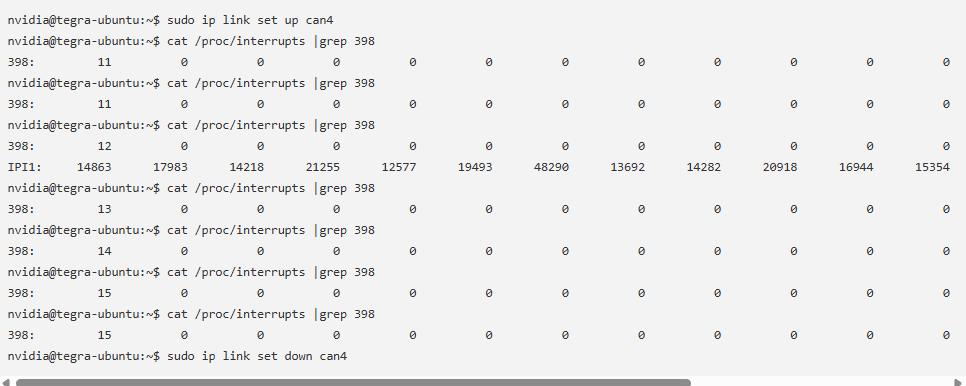
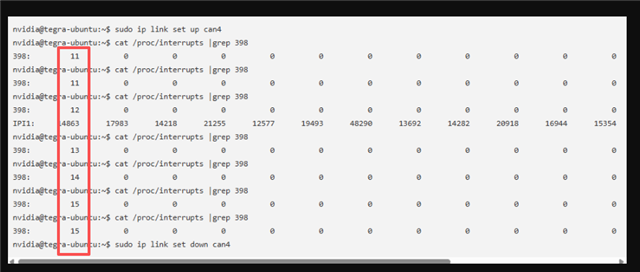
同时中断计数会一直增加,直到关闭CAN总线
现象如下:
nvidia@tegra-ubuntu:~$ sudo ip link set up can4
nvidia@tegra-ubuntu:~$ cat /proc/interrupts |grep 398
398:         11          0          0          0          0          0          0          0          0          0          0          0          0          0 cf00000.gpio  22 Level     can4
nvidia@tegra-ubuntu:~$ cat /proc/interrupts |grep 398
398:         11          0          0          0          0          0          0          0          0          0          0          0          0          0 cf00000.gpio  22 Level     can4
nvidia@tegra-ubuntu:~$ cat /proc/interrupts |grep 398
398:         12          0          0          0          0          0          0          0          0          0          0          0          0          0 cf00000.gpio  22 Level     can4
IPI1:     14863      17983      14218      21255      12577      19493      48290      13692      14282      20918      16944      15354      53524      23989       Function call interrupts
nvidia@tegra-ubuntu:~$ cat /proc/interrupts |grep 398
398:         13          0          0          0          0          0          0          0          0          0          0          0          0          0 cf00000.gpio  22 Level     can4
nvidia@tegra-ubuntu:~$ cat /proc/interrupts |grep 398
398:         14          0          0          0          0          0          0          0          0          0          0          0          0          0 cf00000.gpio  22 Level     can4
nvidia@tegra-ubuntu:~$ cat /proc/interrupts |grep 398
398:         15          0          0          0          0          0          0          0          0          0          0          0          0          0 cf00000.gpio  22 Level     can4
nvidia@tegra-ubuntu:~$ cat /proc/interrupts |grep 398
398:         15          0          0          0          0          0          0          0          0          0          0          0          0          0 cf00000.gpio  22 Level     can4
nvidia@tegra-ubuntu:~$ sudo ip link set down can4
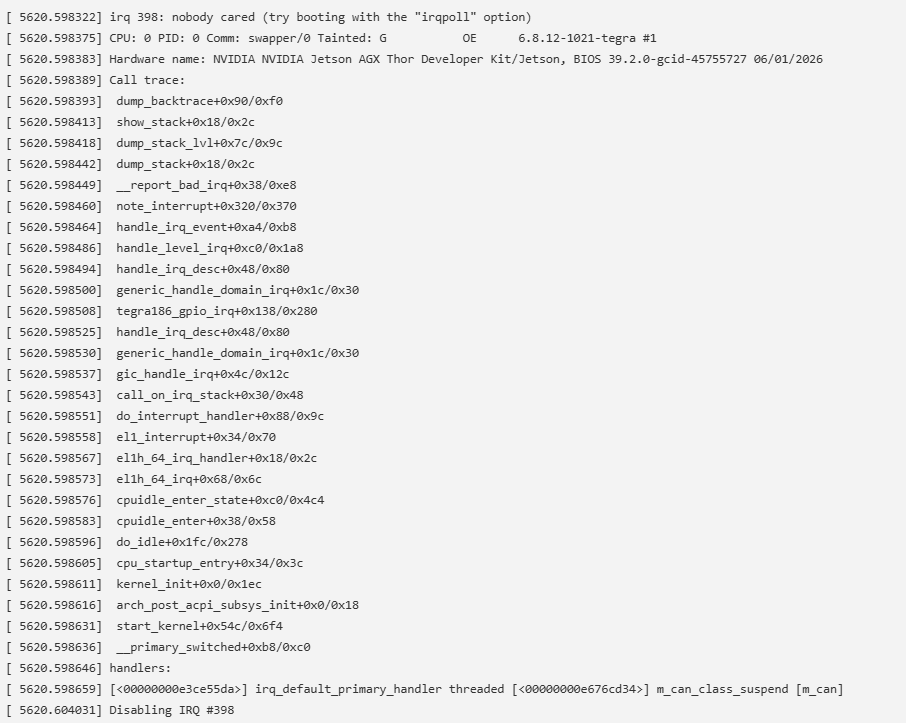
这个情况会持续到系统自动禁用该中断,并且系统日志输出如下内容:
[ 5620.598322] irq 398: nobody cared (try booting with the "irqpoll" option)
[ 5620.598375] CPU: 0 PID: 0 Comm: swapper/0 Tainted: G           OE      6.8.12-1021-tegra #1
[ 5620.598383] Hardware name: NVIDIA NVIDIA Jetson AGX Thor Developer Kit/Jetson, BIOS 39.2.0-gcid-45755727 06/01/2026
[ 5620.598389] Call trace:
[ 5620.598393]  dump_backtrace+0x90/0xf0
[ 5620.598413]  show_stack+0x18/0x2c
[ 5620.598418]  dump_stack_lvl+0x7c/0x9c
[ 5620.598442]  dump_stack+0x18/0x2c
[ 5620.598449]  __report_bad_irq+0x38/0xe8
[ 5620.598460]  note_interrupt+0x320/0x370
[ 5620.598464]  handle_irq_event+0xa4/0xb8
[ 5620.598486]  handle_level_irq+0xc0/0x1a8
[ 5620.598494]  handle_irq_desc+0x48/0x80
[ 5620.598500]  generic_handle_domain_irq+0x1c/0x30
[ 5620.598508]  tegra186_gpio_irq+0x138/0x280
[ 5620.598525]  handle_irq_desc+0x48/0x80
[ 5620.598530]  generic_handle_domain_irq+0x1c/0x30
[ 5620.598537]  gic_handle_irq+0x4c/0x12c
[ 5620.598543]  call_on_irq_stack+0x30/0x48
[ 5620.598551]  do_interrupt_handler+0x88/0x9c
[ 5620.598558]  el1_interrupt+0x34/0x70
[ 5620.598567]  el1h_64_irq_handler+0x18/0x2c
[ 5620.598573]  el1h_64_irq+0x68/0x6c
[ 5620.598576]  cpuidle_enter_state+0xc0/0x4c4
[ 5620.598583]  cpuidle_enter+0x38/0x58
[ 5620.598596]  do_idle+0x1fc/0x278
[ 5620.598605]  cpu_startup_entry+0x34/0x3c
[ 5620.598611]  kernel_init+0x0/0x1ec
[ 5620.598616]  arch_post_acpi_subsys_init+0x0/0x18
[ 5620.598631]  start_kernel+0x54c/0x6f4
[ 5620.598636]  __primary_switched+0xb8/0xc0
[ 5620.598646] handlers:
[ 5620.598659] [<00000000e3ce55da>] irq_default_primary_handler threaded [<00000000e676cd34>] m_can_class_suspend [m_can]
[ 5620.604031] Disabling IRQ #398
中断被禁用之后将无法再接受或者发送CAN数据
使用的内核版本如下:
nvidia@tegra-ubuntu:~$ uname -a
Linux tegra-ubuntu 6.8.12-1021-tegra #1 SMP PREEMPT Mon Jun 1 13:25:46 PDT 2026 aarch64 aarch64 aarch64 GNU/Linux
请问有什么好的解决方案嘛?