This thread has been locked.

If you have a related question, please click the "Ask a related question" button in the top right corner. The newly created question will be automatically linked to this question.

[参考译文] LAUNCHXL-F28379D:LAUNCHXL-F28379D 串行终端

Guru**** 2845830 points
请注意,本文内容源自机器翻译,可能存在语法或其它翻译错误,仅供参考。如需获取准确内容,请参阅链接中的英语原文或自行翻译。

https://e2e.ti.com/support/microcontrollers/c2000-microcontrollers-group/c2000/f/c2000-microcontrollers-forum/1590796/launchxl-f28379d-launchxl-f28379d-serial-terminal

器件型号: LAUNCHXL-F28379D

image.png

在最新版本的 Code Composer Studio 中找不到启动终端的选项。 如何对 UART 执行此操作?

下图来自 TI 提供的培训。 ed136618-3437-491a-a760-97adc5c5970a.png

  • 请注意,本文内容源自机器翻译,可能存在语法或其它翻译错误,仅供参考。如需获取准确内容,请参阅链接中的英语原文或自行翻译。

    您好:

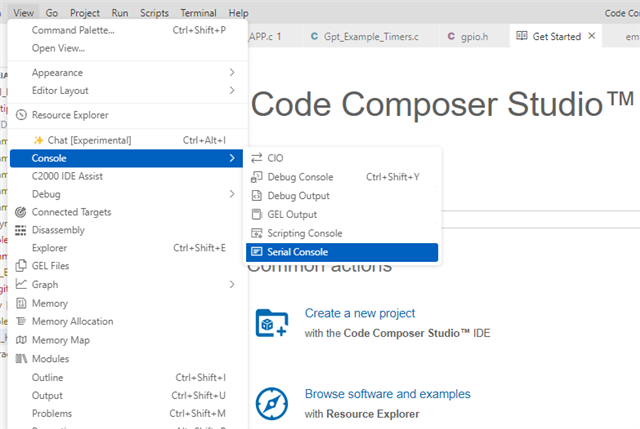
    如果您只是尝试打开串行控制台、则可以使用工具栏“View">"Console">"Serial“>"Serial Console"“ Console"来“来打开“打开串“串行控制台。  

    此时、应该会打开“Serial console(串行控制台)“窗口。 右上角的最左侧按钮可用于配置 COM 端口。  

    希望这对您有所帮助! 此外、还可以在线获取 CCS 用户指南。 此处引用了此信息: https://software-dl.ti.com/ccs/esd/documents/users_guide_ccs_20.0.2/ccs_ide.html?highlight=serial#view。  

    此致、

    Allison