This thread has been locked.

If you have a related question, please click the "Ask a related question" button in the top right corner. The newly created question will be automatically linked to this question.

[参考译文] XDS110ISO-EVM:XDS110ISO-EVM 可以&'t 连接到目标

Guru**** 2782625 points

Other Parts Discussed in Thread: XDS110ISO-EVM

请注意,本文内容源自机器翻译,可能存在语法或其它翻译错误,仅供参考。如需获取准确内容,请参阅链接中的英语原文或自行翻译。

https://e2e.ti.com/support/microcontrollers/c2000-microcontrollers-group/c2000/f/c2000-microcontrollers-forum/1605983/xds110iso-evm-xds110iso-evm-can-t-connect-to-target

器件型号: XDS110ISO-EVM

您好、

我购买了一个 XDS110ISO-EVM 探针、因为非隔离式探针在调试期间由于共模噪声而不断断开连接。 但是、我无法让它正常工作。

我将在定制电路板上使用 F280033 目标。 使用常规非隔离式 XDS110 探针可以很好地对目标进行编程。

但是,当使用 XDS110ISO-EVM 探头(完全相同的工程,完全相同的 ccxml 文件)时,我会收到以下错误消息:

image.png

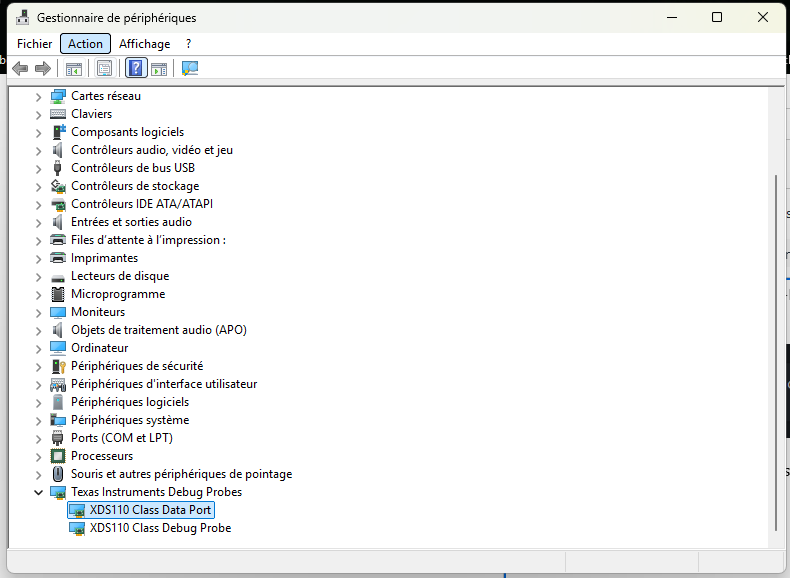
这是奇怪的,因为探头是正确地被 Windows 检测:  

image.png

当我进入高级模式并尝试测试连接时,我会得到以下结果:  


-----[Print the board config pathname(s)]------------------------------------

C:\Users\A0564~1.THU\AppData\Local\TEXASI~1\
CCS\CCS_20_4\0\0\BrdDat\testBoard.dat

-----[Print the reset-command software log-file]-----------------------------

This utility has selected a 100/110/510 class product.
This utility will load the adapter 'jioxds110.dll'.
The library build date was 'Nov 20 2025'.
The library build time was '14:44:07'.
The library package version is '20.4.0.3756'.
The library component version is '35.35.0.0'.
The controller does not use a programmable FPGA.
The controller has a version number of '5' (0x00000005).
The controller has an insertion length of '0' (0x00000000).
This utility will attempt to reset the controller.
This utility has successfully reset the controller.

-----[Print the reset-command hardware log-file]-----------------------------

The scan-path will be reset by toggling the JTAG TRST signal.
The controller is the XDS110 with USB interface.
The link from controller to target is direct (without cable).
The software is configured for XDS110 features.
The controller cannot monitor the value on the EMU[0] pin.
The controller cannot monitor the value on the EMU[1] pin.
The controller cannot control the timing on output pins.
The controller cannot control the timing on input pins.
The scan-path link-delay has been set to exactly '0' (0x0000).

-----[An error has occurred and this utility has aborted]--------------------

This error is generated by TI's USCIF driver or utilities.

The value is '-233' (0xffffff17).
The title is 'SC_ERR_PATH_BROKEN'.

The explanation is:
The JTAG IR and DR scan-paths cannot circulate bits, they may be broken.
An attempt to scan the JTAG scan-path has failed.
The target's JTAG scan-path appears to be broken
with a stuck-at-ones or stuck-at-zero fault.

同样、常规 XDS110 探针没有问题。  

请帮助我使其正常运行。

提前感谢、

Adrien


  • 请注意,本文内容源自机器翻译,可能存在语法或其它翻译错误,仅供参考。如需获取准确内容,请参阅链接中的英语原文或自行翻译。

    尊敬的 Adrien:

    您能看一下我们的 JTAG 调试指南吗? 更具体地说、请查看表 4-1、其中详细说明了调试您当前看到的错误所需执行的步骤。  

    此致、

    Aj Favela.  

  • 请注意,本文内容源自机器翻译,可能存在语法或其它翻译错误,仅供参考。如需获取准确内容,请参阅链接中的英语原文或自行翻译。

    您好、

    我已按照手册中的步骤操作。 启动模式似乎存在问题、因为 XRSx 在闪存启动模式下每~15ms 就会变为低电平。 我的工作假设是这是由于我正在使用的器件 (F280033) 存在引导加载程序问题、该器件是另一个线程(此处)的对象。 反正我已经(暂时)更改了等待引导、XRSn 恢复稳定。

    除此之外,没有什么特别的。 但是、错误消息已更改:

    IcePick_C_0: Error connecting to the target: (Error -2131 @ 0x0) Unable to access device register. Reset the device, and retry the operation. If error persists, confirm configuration, power-cycle the board, and/or try more reliable JTAG settings (e.g. lower TCLK). (Emulation package 20.4.0.3756) 
    

    按照表中的指令、我尝试了无工程调试、但仍然无法连接到内核(相同的错误消息)。

    此致

    Adrien

  • 请注意,本文内容源自机器翻译,可能存在语法或其它翻译错误,仅供参考。如需获取准确内容,请参阅链接中的英语原文或自行翻译。

    尊敬的 Adrien:

    填充新的错误消息后、您是否尝试过通过.ccxml 文件测试与电路板的连接? 如果这不起作用、您可以尝试对电路板进行下电上电并重新尝试?

    此致、

    Aj Favela.  

  • 请注意,本文内容源自机器翻译,可能存在语法或其它翻译错误,仅供参考。如需获取准确内容,请参阅链接中的英语原文或自行翻译。

    尊敬的 AJ:

    是的、我已经尝试通过 ccxml 文件进行连接。 相同消息、包括 下电上电后。

    此致、

    Adrien

  • 请注意,本文内容源自机器翻译,可能存在语法或其它翻译错误,仅供参考。如需获取准确内容,请参阅链接中的英语原文或自行翻译。

    尊敬的 Adrien:

    您是否 尝试过 表 4-1 中所述的所有其他调试步骤以解决错误–2131?

    此致、

    Aj Favela.  

  • 请注意,本文内容源自机器翻译,可能存在语法或其它翻译错误,仅供参考。如需获取准确内容,请参阅链接中的英语原文或自行翻译。

    尊敬的 AJ:

    是的,我有,就像我 2 天前说的。

    按照表中的说明、我尝试了无项目调试、但仍然无法连接到核心(相同的错误消息)。

    Adrien

  • 请注意,本文内容源自机器翻译,可能存在语法或其它翻译错误,仅供参考。如需获取准确内容,请参阅链接中的英语原文或自行翻译。

    您好、

    是否可能获得一些支持、请提供支持?

    我们真的需要一个隔离式 JTAG 探针工作!

    Adrien

  • 请注意,本文内容源自机器翻译,可能存在语法或其它翻译错误,仅供参考。如需获取准确内容,请参阅链接中的英语原文或自行翻译。

    尊敬的 Adrien:

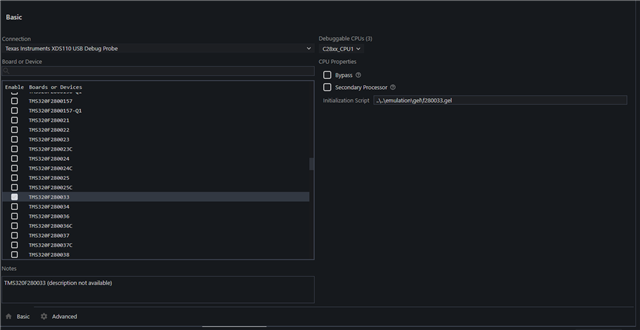
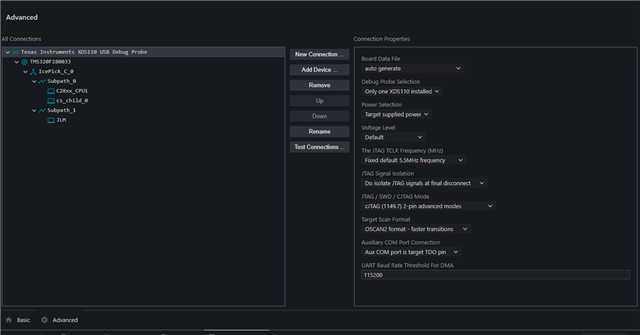
    对延迟回复表示歉意。 您是否可以向我发送.ccxml 文件的屏幕截图(包括基本选项卡和高级选项卡)?

    此致、
    Aj Favela.  

  • 请注意,本文内容源自机器翻译,可能存在语法或其它翻译错误,仅供参考。如需获取准确内容,请参阅链接中的英语原文或自行翻译。

    尊敬的 AJ:

    在这里。

    如果需要、我可以将 ccxml 文件发送给您。

    我尝试了将速度降低至 1MHz、没有任何影响。

    我还在 ccxml 文件中尝试了 JTAG/SWD 的所有组合并在评估板上切换、没有效果。

    Adrien

  • 请注意,本文内容源自机器翻译,可能存在语法或其它翻译错误,仅供参考。如需获取准确内容,请参阅链接中的英语原文或自行翻译。

    尊敬的 Adrien:

    是的、您可以向我发送您的.ccxml 文件吗? 如果可能、我想在我这边进行测试

    此致、
    Aj Favela.

  • 请注意,本文内容源自机器翻译,可能存在语法或其它翻译错误,仅供参考。如需获取准确内容,请参阅链接中的英语原文或自行翻译。

    尊敬的 AJ:

    在这里。

    <?xml version="1.0" encoding="UTF-8" standalone="no"?>
    <configurations XML_version="1.2" id="configurations_0">
        <configuration XML_version="1.2" id="configuration_0">
            <instance XML_version="1.2" desc="Texas Instruments XDS110 USB Debug Probe" href="connections/TIXDS110_Connection.xml" id="Texas Instruments XDS110 USB Debug Probe" xml="TIXDS110_Connection.xml" xmlpath="connections"/>
            <connection XML_version="1.2" id="Texas Instruments XDS110 USB Debug Probe">
                <instance XML_version="1.2" href="drivers/tixds510icepick_c.xml" id="drivers" xml="tixds510icepick_c.xml" xmlpath="drivers"/>
                <instance XML_version="1.2" href="drivers/tixds510c28x.xml" id="drivers" xml="tixds510c28x.xml" xmlpath="drivers"/>
                <instance XML_version="1.2" href="drivers/tixds510cs_child.xml" id="drivers" xml="tixds510cs_child.xml" xmlpath="drivers"/>
                <instance XML_version="1.2" href="drivers/tixds510ajsm.xml" id="drivers" xml="tixds510ajsm.xml" xmlpath="drivers"/>
                <property Type="choicelist" Value="4" id="SWD Mode Settings">
                    <choice Name="cJTAG (1149.7) 2-pin advanced modes" value="enable">
                        <property Type="choicelist" Value="1" id="XDS110 Aux Port"/>
                    </choice>
                </property>
                <platform XML_version="1.2" id="platform_0">
                    <instance XML_version="1.2" desc="TMS320F280033" href="devices/f280033.xml" id="TMS320F280033" xml="f280033.xml" xmlpath="devices"/>
                </platform>
            </connection>
        </configuration>
    </configurations>

    Adrien

  • 请注意,本文内容源自机器翻译,可能存在语法或其它翻译错误,仅供参考。如需获取准确内容,请参阅链接中的英语原文或自行翻译。

    尊敬的 Adrien:  

    我看到您正在尝试使用 cJTAG、能否确认您已将 XDS110ISO-EVM 上的开关 (S1) 设置为使用 cJTAG。

    此外、您能给我发送 EVM 当前设置的图片吗?

    此致、

    Aj Favela.   

  • 请注意,本文内容源自机器翻译,可能存在语法或其它翻译错误,仅供参考。如需获取准确内容,请参阅链接中的英语原文或自行翻译。

    尊敬的 AJ:

    是的、正如我之前所说、我尝试了将开关同时置于 JTAG 和 cJTAG 位置、并在 ccxml 文件中将这两个位置都设置为所有 JTAG/cJTAG/SWD 选项。

    我还尝试了 ccxml 文件中的所有 JTAG/SWD 组合并在评估板上切换、没有效果。

    以下是一张设置照片。

    Adrien

  • 请注意,本文内容源自机器翻译,可能存在语法或其它翻译错误,仅供参考。如需获取准确内容,请参阅链接中的英语原文或自行翻译。

    尊敬的 Adrien:

    我很抱歉迟来的回复、我正在与团队讨论这个问题。

    您能否确认使用的是最新的 CCS 、因为问题可能是由于没有最新的驱动程序而引起的、并且还需要重新刷写。  

    最后、可在 XDS110SupportReadMe.pdf 中找到一些更有用的文档、这些文档可在以下路径中找到。  C:\ti\ccsXXX\ccs\ccs_base\common\uscif\xds110

    此致、
    Aj Favela.