
请注意,本文内容源自机器翻译,可能存在语法或其它翻译错误,仅供参考。如需获取准确内容,请参阅链接中的英语原文或自行翻译。
器件型号:MSP432P401R 工具/软件:TI-RTOS
从看门狗示例开始、我尝试设置超时。 但调用 Watchdog_convertMsToTicks()(return 0)和 Watchdog_setReload (return -3)都返回到 MSP432不支持的状态。
那么、如何更改看门狗超时?
谢谢。
This thread has been locked.
If you have a related question, please click the "Ask a related question" button in the top right corner. The newly created question will be automatically linked to this question.
工具/软件:TI-RTOS
从看门狗示例开始、我尝试设置超时。 但调用 Watchdog_convertMsToTicks()(return 0)和 Watchdog_setReload (return -3)都返回到 MSP432不支持的状态。
那么、如何更改看门狗超时?
谢谢。
您好!
目前、MSP432不支持这些 API。
/* === 看门狗 MSP432_setReload === // int_fast16_t WatchdogMSP432_setReload (Watchdog_Handle handle、uint32_t value) { MSP432不支持/* DebugP_assert (false); 返回(Watchdog_STATUS_UNSUPPORTED); } /* === WatchdogMSP432_convertMsToTicks === /uint32_t WatchdogMSP432_convertMsToTicks (uint32_t milliseconds) { MSP432不支持/* 返回(0); }
希望它们能在不久的将来得到实施。
此致、
David
您好!
是的、这是可能的、有几种方法可以实现这一点。
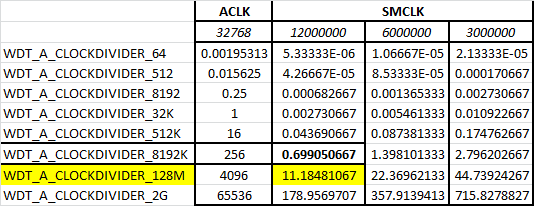
将 看门狗 MSP432HWAttrs 中的时钟分频器从 WDT_A_CLOCKDIVIDER_8192K 更改为 WDT_A_CLOCKDIVIDER_128M 的最简单方法。
const WatchdogMSP432_HWAttrs WatchdogMSP432HWAttrs[MSP_EXP432P401R_WATCHDOGCOUNT]={ { baseAddr = WDT_A_base、 .intNum = INT_WDT_A、 .intPriority =(~0)、 时钟源= WDT_A_CLOCKSOURCE_SMCLK、 时钟分频器= WDT_A_CLOCKDIVIDER_128M } };
这将提供~11秒的计时器、请参阅下表。
另一种方法是更改时钟源速度(例如从12MHz 到6MHz)或将时钟源从 SMCLK 更改为 ACLK。
希望这对您有所帮助。
David