
This thread has been locked.

If you have a related question, please click the "Ask a related question" button in the top right corner. The newly created question will be automatically linked to this question.

[参考译文] TPS389C03-Q1:如何更改看门狗输出设置?

Guru**** 2847400 points

Other Parts Discussed in Thread: TPS389C03-Q1

请注意,本文内容源自机器翻译,可能存在语法或其它翻译错误,仅供参考。如需获取准确内容,请参阅链接中的英语原文或自行翻译。

https://e2e.ti.com/support/power-management-group/power-management/f/power-management-forum/1635783/tps389c03-q1-how-do-i-change-the-watchdog-output-settings

器件型号: TPS389C03-Q1

各位专家、您好!

规范中的看门狗计时器运行说明指出“当发生违规时
计数达到最大值、TPS389C03-Q1 WDO (LATCHED) LOW “。

但是、时序图显示了到锁存和延迟状态的转换。  

我想知道如何更改器件型号为 TPS389C03A26RTERQ1 的看门狗计时器设置。
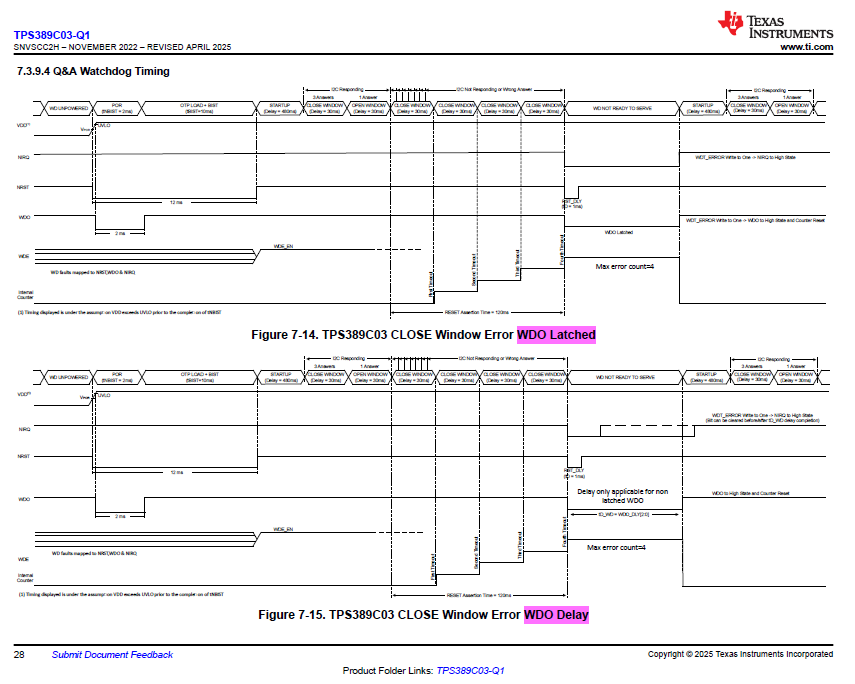
image.png


此致、

Yu Sato

  • 请注意,本文内容源自机器翻译,可能存在语法或其它翻译错误,仅供参考。如需获取准确内容,请参阅链接中的英语原文或自行翻译。

    您好 Sato-san、

    感谢您的提问!

    TPS389C03 系列器件提供两个 WDO 输出选项:锁存和超时(延迟)。 对于每个器件、此设置由出厂时通过一次性可编程 (OTP) 烧录进行设置、并且 在 OTP 烧录后无法更改。

    TPS389C03A26RTER-Q1 具有锁存 WDO 功能。

    此致、

    Andrew Li