器件型号: AM6421
您好团队:
我需要支持如何在 10Mb 大小内减少内核和 rootfs 文件 ystm 的占用空间。 我希望通过 QSPI 加载、它具有基本功能、最少的外设工作、例如以太网、USB、UART、SPI 和 GPIO。
需要获得有关可以添加或删除哪些封装的支持。
此致、
Shraddha N.
This thread has been locked.
If you have a related question, please click the "Ask a related question" button in the top right corner. The newly created question will be automatically linked to this question.
器件型号: AM6421
您好团队:
我需要支持如何在 10Mb 大小内减少内核和 rootfs 文件 ystm 的占用空间。 我希望通过 QSPI 加载、它具有基本功能、最少的外设工作、例如以太网、USB、UART、SPI 和 GPIO。
需要获得有关可以添加或删除哪些封装的支持。
此致、
Shraddha N.
尊敬的 Shraddha:
您可能需要构建 tisdk-tiny-image 或 tisdk-tiny-initramfs、以便获得适合您用例的最小图像。
您可以使用 Yocto 构建这些映像并尝试一下。
此致、
Suren
您好、Suren、
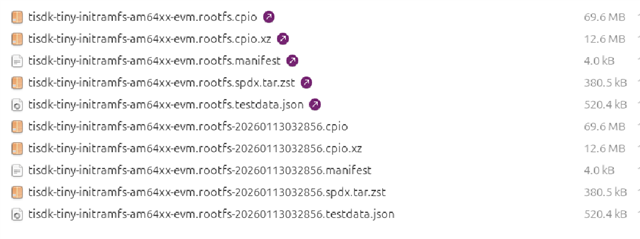
对于 rootfs、我看到下面的文件、但当我们刷写到 NOR 或 NAND 闪存时、我们需要 img 格式的闪存。 因此、我应该使用哪些文件以及如何将其转换为 img 格式。

此外、我可以看到 rootfs.cpio 文件的大小为 70MB、我期望在使用 tiny-initramfs 配置时小于 10MB。
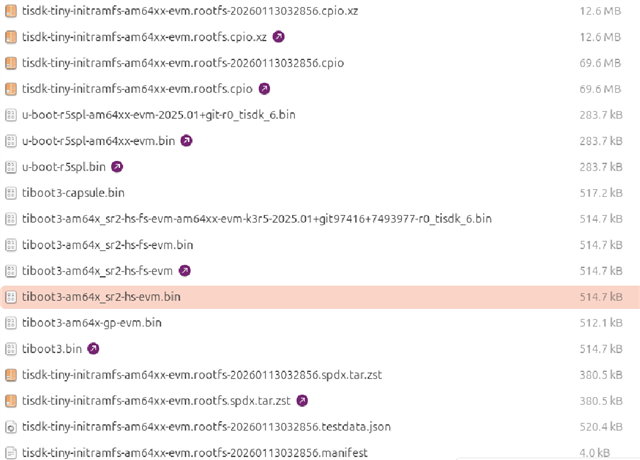
对于 tispl.bin 和 u-boot.img 文件没有可用的 hs-fs 文件、那么我 是否应该使用 tispl.bin 和 u-boot.img、对吗?

此致
Shraddha
尊敬的 Shraddha:
您能否查看包含可用作 AM64x 参考的 tinyfs 的 AM62x Processor SDK 安装程序、看看它是否有所帮助
此外、您可以在下面的链接中参阅、了解如何通过优化 Tiny initramfs 来缩短用户空间引导时间。
请告诉我该怎么做。
此致、
Suren
你好、 Suren Porwar
我构建了 tisdk-tiny-initramfs、rootfs、我以.cpio 格式获得、我尝试通过 USB DFU 将其加载到 eMMC 中。 刷写成功、但启动直至 Uboot、
然后在 Uboot 提示符下、输入以下命令从 eMMC 引导
=> setenv mmcdev 0
=> setenv bootpart 0
=>引导
这不会从 eMMC 引导、下面是日志
U-Boot SPL 2025.01-00766-g7493977a537f (Dec 03 2025 - 15:20:36 +0000) Resetting on cold boot to workaround ErrataID:i2331 Please resend tiboot3.bin in case of UART/DFU boot resetting ... U-Boot SPL 2025.01-00766-g7493977a537f (Dec 03 2025 - 15:20:36 +0000) SYSFW ABI: 4.0 (firmware rev 0x000b '11.2.5--v11.02.05 (Fancy Rat)') Set clock rates for '/a53@0', CPU: 1000MHz at Speed Grade 'S' SPL initial stack usage: 13536 bytes Trying to boot from MMC1 Authentication passed Authentication passed Loading Environment from nowhere... OK init_env from device 9 not supported! Authentication passed Authentication passed Starting ATF on ARM64 core... NOTICE: BL31: v2.13.0(release):v2.13.0-259-ge0c4d3903b-dirty NOTICE: BL31: Built : 07:01:36, Jul 1 2025 I/TC: I/TC: OP-TEE version: 4.7.0-47-ga9690ae39 (gcc version 13.4.0 (GCC)) #1 Thu Aug 7 15:25:10 UTC 2025 aarch64 I/TC: WARNING: This OP-TEE configuration might be insecure! I/TC: WARNING: Please check optee.readthedocs.io/.../porting_guidelines.html I/TC: Primary CPU initializing I/TC: GIC redistributor base address not provided I/TC: Assuming default GIC group status and modifier I/TC: SYSFW ABI: 4.0 (firmware rev 0x000b '11.2.5--v11.02.05 (Fancy Rat)') I/TC: Activated SA2UL device I/TC: Enabled firewalls for SA2UL TRNG device I/TC: EIP76D TRNG initialized I/TC: SA2UL Drivers initialized I/TC: HUK Initialized I/TC: Primary CPU switching to normal world boot U-Boot SPL 2025.01-00766-g7493977a537f (Dec 03 2025 - 15:20:36 +0000) SYSFW ABI: 4.0 (firmware rev 0x000b '11.2.5--v11.02.05 (Fancy Rat)') Trying to boot from MMC1 Authentication passed Authentication passed U-Boot 2025.01-00766-g7493977a537f (Dec 03 2025 - 15:20:36 +0000) SoC: AM64X SR2.0 HS-FS Model: Texas Instruments AM642 EVM Board: AM64-EVM rev D DRAM: 2 GiB Core: 111 devices, 34 uclasses, devicetree: separate MMC: mmc@fa10000: 0, mmc@fa00000: 1 Loading Environment from nowhere... OK In: serial@2800000 Out: serial@2800000 Err: serial@2800000 Net: eth0: ethernet@8000000port@1am65_cpsw_nuss_port ethernet@8000000port@2: phy_connect() failed , eth2: icssg1-eth-port@0 Hit any key to stop autoboot: 0 => setenv mmcdev 0 => setenv bootpart 0 => boot switch to partitions #0, OK mmc0(part 0) is current device SD/MMC found on device 0 Can't set block device Failed to load '/boot/Image' Failed to load '/boot/dtb/ti/k3-am642-evm.dtb' libfdt fdt_check_header(): FDT_ERR_BADMAGIC No FDT memory address configured. Please configure the FDT address via "fdt addr <address>" command. Aborting! Failed to load '/boot/dtb/ti/k3-am642-evm-onboard-clkgen-pcie-serdes.dtbo' Bad Linux ARM64 Image magic! Scanning for bootflows in all bootdevs Seq Method State Uclass Part Name Filename --- ----------- ------ -------- ---- ------------------------ ---------------- Scanning bootdev 'mmc@fa00000.bootdev': MMC: no card present MMC: no card present MMC: no card present Scanning bootdev 'mmc@fa10000.bootdev': No USB controllers found ethernet@8000000port@1 Waiting for PHY auto negotiation to complete......... TIMEOUT ! am65_cpsw_nuss_port ethernet@8000000port@1: phy_startup failed am65_cpsw_nuss_port ethernet@8000000port@1: am65_cpsw_start end error am65_cpsw_nuss_port ethernet@8000000ethernet@800000: phy_connect() failed MMC: no card present ** Bad device specification mmc 1 ** Couldn't find partition mmc 1:2 No UBIFS volume mounted! prueth_port icssg1-eth-port@0: failed to boot PRU0: -1 BOOTP broadcast 1 BOOTP broadcast 2 BOOTP broadcast 3 BOOTP broadcast 4 BOOTP broadcast 5 BOOTP broadcast 6 BOOTP broadcast 7 BOOTP broadcast 8 BOOTP broadcast 9
从上面的日志中、它找不到引导/映像
在器件 0 上找到 SD/MMC
无法设置块设备
无法加载/boot/Image
无法加载/boot/dtb/ti/k3-am642-evm.dtb
1.如果我提取 tar 文件,引导和根文件夹为空。
2.从 eMMC 引导、Uboot SPL 和 ubbot iamge 日期为 2025 年 12 月 3 日、但我最近已经按照 Yocto 构建过程的正确步骤构建了此映像。
这里有什么问题?
同样对 tisdk-tiny-image 进行观察。
我需要的另一个信息是,如果我使用微型图像,那么 rootfs 和 image 是否会有诸如 remoteproc 和 remoteproc 固件之类的基本模块来在 r5, hsr/prp 上运行应用?
此外、它我还生成具有 cpio 格式或 ext4 格式的微型映像、器件是否能够从 eMMC 或 GPMC nand 闪存引导?
谢谢、此致
Shraddha
您好、Suren
我仅刷写引导映像和 rootfs、内核映像和 dtb、我不会单独刷写它。
您是否修改了 Linux 内核器件树中的引导参数 、以便从 eMMC 引导? [/报价]因此未修改任何引导参数。 请告诉我需要进行哪些更改、以及如何单独刷写内核映像和从 eMMC 引导。
此外、如何将内核映像和 DTB 打包在 rootfs 的引导文件夹中?
我尝试在 build/conf/local.conf 文件中添加以下 coomand 并再次构建该映像
image_install:append =“kernel-image kernel-devicetree“
但通过上述更改、我没有看到内核映像和器件树已添加到 rootfs
此致
Shraddha