
This thread has been locked.

If you have a related question, please click the "Ask a related question" button in the top right corner. The newly created question will be automatically linked to this question.

[参考译文] AM625:EVK (PROC114E3)的 OSPI 闪存用作 QSPI 不工作

Guru**** 2553450 points


请注意,本文内容源自机器翻译,可能存在语法或其它翻译错误,仅供参考。如需获取准确内容,请参阅链接中的英语原文或自行翻译。

https://e2e.ti.com/support/processors-group/processors/f/processors-forum/1206334/am625-ospi-flash-memory-of-the-evk-proc114e3-as-a-qspi-not-working

器件型号:AM625

您好!


我们已经尝试测试了 EVK 的 OSPI 闪存( PROC114E3 )作为 QSPI、通过执行建议的硬件和软件修改、但我们无法将存储器检测为 QSPI、它可以很好地用作 OSPI。
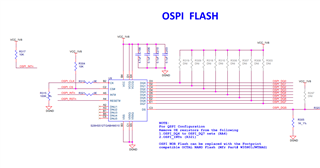
我们已遵循以下链接中提及的有关软件的建议、但该软件不起作用。

3.2.2.10. OSPI/QSPI–Processor SDK AM62x 文档

提示0 (&O){
       闪存@0{
               兼容="Spansion、s28hs512t"、"JEDEC、SPI-NOR";
               寄存器=<0x0>;
               SPI-TX-BUS-width =<1>;
               SPI-Rx-bus-width =<4>;
               SPI-max-frequency =<25000000>;
               CDN、tshsl-ns =<60>;
               CDN、tsd2d-ns =<60>;
               cdns,tchsh-ns =<60>;
               CDN、tslch-ns =<60>;
               CDN、读取延迟=<4>;
               CDN、phy-mode;


               分区{
                       兼容="固定分区";
                       #address-Cells =<1>;
                       #size-cells =<1>;


                       分区@0{
                               label ="ospi.tiboot3";
                               寄存器=<0x0 0x80000>;
                       };


                       分区@80000{
                               label ="ospi.tispl";
                               寄存器=<0x80000 0x200000>;
                       };


                       分区@280000 {
                               label ="ospi.u-boot";
                               REG =<0x280000 0x400000>;
                       };


                       分区@680000 {
                               label ="ospi.env";
                               REG =<0x680000 0x40000>;
                       };

                       分区@6c0000 {
                               label ="ospi.env.backup";
                               REG =<0x6c0000 0x40000>;
                       };


                       分区@800000{
                               label ="ospi.rootfs";
                               寄存器=<0x800000 0x37c0000>;
                       };


                       分区@3fc0000 {
                               label ="ospi.phypatern";
                               REG =<0x3fc0000 0x40000>;
                       };
               };
       };
};

错误:

[   1.133941] SPI spi0.0:设置:忽略不受支持的模式位200
[   1.140344] SPI-NOR spi0.0:无法识别的 JEDEC id 字节:FF ff ff ff FF

请提出您宝贵的想法和解决问题的方法。

谢谢。

金坛克

  • 请注意,本文内容源自机器翻译,可能存在语法或其它翻译错误,仅供参考。如需获取准确内容,请参阅链接中的英语原文或自行翻译。

    尊敬的  Chintan:

    让我找到其中一个开发板、看看需要如何配置它。 我们很快就会回复您。

    此致、Andreas

  • 请注意,本文内容源自机器翻译,可能存在语法或其它翻译错误,仅供参考。如需获取准确内容,请参阅链接中的英语原文或自行翻译。

    您可以通过进行以下更改在我们的 AM62-SK EVM 上演示4线 QSPI 模式:

    a0797059@dasso:~/git/linux (HEAD detached at 08.06.00.006)
    $ git diff
    diff --git a/arch/arm64/boot/dts/ti/k3-am625-sk.dts b/arch/arm64/boot/dts/ti/k3-am625-sk.dts
    index bd5463076e92..a2e484278dd8 100644
    --- a/arch/arm64/boot/dts/ti/k3-am625-sk.dts
    +++ b/arch/arm64/boot/dts/ti/k3-am625-sk.dts
    @@ -125,8 +125,8 @@ &ospi0 {
            spi_nor_flash: flash@0 {
                    compatible = "jedec,spi-nor";
                    reg = <0x0>;
    -               spi-tx-bus-width = <8>;
    -               spi-rx-bus-width = <8>;
    +               spi-tx-bus-width = <1>;
    +               spi-rx-bus-width = <4>;
                    spi-max-frequency = <25000000>;
                    cdns,tshsl-ns = <60>;
                    cdns,tsd2d-ns = <60>;
    diff --git a/arch/arm64/boot/dts/ti/k3-am62x-sk-common.dtsi b/arch/arm64/boot/dts/ti/k3-am62x-sk-common.dtsi
    index 95ca9e6482ba..2689f6a36dfe 100644
    --- a/arch/arm64/boot/dts/ti/k3-am62x-sk-common.dtsi
    +++ b/arch/arm64/boot/dts/ti/k3-am62x-sk-common.dtsi
    @@ -365,10 +365,6 @@ AM62X_IOPAD(0x00c, PIN_INPUT, 0) /* (E25) OSPI0_D0 */
                            AM62X_IOPAD(0x010, PIN_INPUT, 0) /* (G24) OSPI0_D1 */
                            AM62X_IOPAD(0x014, PIN_INPUT, 0) /* (F25) OSPI0_D2 */
                            AM62X_IOPAD(0x018, PIN_INPUT, 0) /* (F24) OSPI0_D3 */
    -                       AM62X_IOPAD(0x01c, PIN_INPUT, 0) /* (J23) OSPI0_D4 */
    -                       AM62X_IOPAD(0x020, PIN_INPUT, 0) /* (J25) OSPI0_D5 */
    -                       AM62X_IOPAD(0x024, PIN_INPUT, 0) /* (H25) OSPI0_D6 */
    -                       AM62X_IOPAD(0x028, PIN_INPUT, 0) /* (J22) OSPI0_D7 */
                            AM62X_IOPAD(0x008, PIN_INPUT, 0) /* (J24) OSPI0_DQS */
                    >;
            };

    然后使用该 DTB 文件引导、您在内核日志中获得以下条目、指示 OSPI 器件探针运行良好:

    root@am62xx-evm:~# dmesg | grep spi
    [    1.221081] spi-nor spi0.0: s28hs512t (65536 Kbytes)
    [    1.226115] 7 fixed-partitions partitions found on MTD device fc40000.spi.0
    [    1.233068] Creating 7 MTD partitions on "fc40000.spi.0":
    [    1.238462] 0x000000000000-0x000000080000 : "ospi.tiboot3"
    [    1.245188] 0x000000080000-0x000000280000 : "ospi.tispl"
    [    1.251529] 0x000000280000-0x000000680000 : "ospi.u-boot"
    [    1.257966] 0x000000680000-0x0000006c0000 : "ospi.env"
    [    1.264098] 0x0000006c0000-0x000000700000 : "ospi.env.backup"
    [    1.270876] 0x000000800000-0x000003fc0000 : "ospi.rootfs"
    [    1.277300] 0x000003fc0000-0x000004000000 : "ospi.phypattern"

    然后、作为一个附加实验、当我删除与芯片选择相关的 pinmux 条目
    AM62X_IOPAD (0x02c、PIN_OUTPUT、0)/*(F23) OSPI0_CSn0 */
    我基本上得到与您报告的错误相同的错误:

    root@am62xx-evm:~# dmesg | grep spi
    [    1.220831] spi-nor spi0.0: unrecognized JEDEC id bytes: ff ff ff ff ff ff
    [    1.227774] spi-nor: probe of spi0.0 failed with error -2

    此致、Andreas