This thread has been locked.

If you have a related question, please click the "Ask a related question" button in the top right corner. The newly created question will be automatically linked to this question.

[参考译文] TMS320F28379D:F28379

Guru**** 2528010 points


请注意,本文内容源自机器翻译,可能存在语法或其它翻译错误,仅供参考。如需获取准确内容,请参阅链接中的英语原文或自行翻译。

https://e2e.ti.com/support/microcontrollers/c2000-microcontrollers-group/c2000/f/c2000-microcontrollers-forum/1390451/tms320f28379d-f28379

器件型号:TMS320F28379D

工具与软件:

大家好!

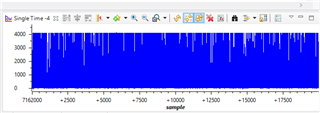
我正在从事一个辐射检测项目。 我需要在 C2000 Launchpad 中使用 ADC 对放大器电路(Cremat)的输出进行采样。 我确信代码和连接正常。 当我用示波器测量放大器的输出时、可以看到 γ 峰值、如下图所示。 然而、当我将放大器的输出连接到 C2000的 ADC 输入时、 我可以在图形上看到奇怪的数据。 如果我错过了阻抗匹配等方面的信息、您能给我提供帮助吗?

  • 请注意,本文内容源自机器翻译,可能存在语法或其它翻译错误,仅供参考。如需获取准确内容,请参阅链接中的英语原文或自行翻译。

    您好!

    请参阅我们的 ADC 输入电路设计应用手册: https://www.ti.com/lit/spract6

    我不认为该应用手册中包含的内容会导致您出现错误、因为这通常会导致您的输出低于预期。

    您是否确定已正确设置图形? 如果你将 ADC 结果存储在一个缓冲器中、你是否看到大多数样本接近4096?  

    您是否使用了我们的示例? 如果是、哪一个?

    此致、

    Ben Collier

  • 请注意,本文内容源自机器翻译,可能存在语法或其它翻译错误,仅供参考。如需获取准确内容,请参阅链接中的英语原文或自行翻译。

    您好!

    是的、我正在使用缓冲器、正如您所说的、大多数样本4095。 图形应该没问题。 代码附在下面。 我使用 TI 示例作为缓冲器、左侧是我的工作。  

    //###########################################################################
    // Author: Halit Durukan
    //###########################################################################
    #include "F28x_Project.h"     // Device Headerfile and Examples Include File
    
    
    #define ADC_BUF_LEN 1000
    
    //###########################################################################
    // Global variables used in the project before main function. Declare other     // variables in this section of the code.
    //###########################################################################
    Uint16 Result = 0;
    Uint16 AdcBuf[ADC_BUF_LEN];
    //###########################################################################
    // Declare the service routines and functions
    //###########################################################################
    
    
    interrupt void xint1_isr(void);
    interrupt void cpu_timer(void);
    interrupt void adcint1_isr(void);
    
    //######################   Beginning of the main code #######################
    
    
    void main(void)
    {
    
    // Initialize System Control:
    // PLL, WatchDog, enable Peripheral Clocks
    // This example function is found in the F2837xD_SysCtrl.c file.
        InitSysCtrl();
    
    
    // Clear all interrupts and initialize PIE vector table:
    // Disable CPU interrupts
        DINT;
    
    // Initialize the PIE control registers to their default state.
    // The default state is all PIE interrupts disabled and flags
    // are cleared.
    // This function is found in the F2837xD_PieCtrl.c file.
        InitPieCtrl();
    
    // Disable CPU interrupts and clear all CPU interrupt flags:
        IER = 0x0000;
        IFR = 0x0000;
    
    // Initialize the PIE vector table with pointers to the shell Interrupt
    // Service Routines (ISR).
    // This will populate the entire table, even if the interrupt
    // is not used in this example.  This is useful for debug purposes.
    // The shell ISR routines are found in F2837xD_DefaultIsr.c.
    // This function is found in F2837xD_PieVect.c.
        InitPieVectTable();
    
    
    // Enable global Interrupts and higher priority real-time debug events:
        //EINT;  // Enable Global interrupt INTM
        //ERTM;  // Enable Global realtime interrupt DBGM
    
    
    //###########################################################################
    // User specific code: Your code comes here.
    //###########################################################################
        EALLOW;
    
        AdcaRegs.ADCCTL2.bit.PRESCALE = 6; //set ADCCLK divider to /4
        AdcaRegs.ADCCTL1.bit.ADCPWDNZ = 1; //power up the ADC
        AdcaRegs.ADCCTL1.bit.INTPULSEPOS = 1; //Set interrupt pulse positions to late
        AdcaRegs.ADCCTL2.bit.RESOLUTION = 0; // 12-bit resolution
        AdcaRegs.ADCCTL2.bit.SIGNALMODE = 0; // Single-ended (12-bit mode only)
        DELAY_US(1000); //have to delay at least 500 microseconds before using ADC
    
        AdcaRegs.ADCSOC0CTL.bit.CHSEL = 0; //SOC0 will convert pin ADCINA0
        AdcaRegs.ADCSOC0CTL.bit.ACQPS = 39; //0.2 micro seconds for sampling window (40 x 5ns = 0.2 micro secs)
        AdcaRegs.ADCSOC0CTL.bit.TRIGSEL = 0x01; //trigger on CPU Timer 0
    
        CpuTimer0Regs.PRD.all = 10000 - 1;//Load period value. 20 kHz sampling (50 micro seconds period)
        CpuTimer0Regs.TPR.bit.TDDR = 0;//Set the prescale value for the timer as 1.
        CpuTimer0Regs.TCR.bit.TSS = 1;//Stop the timer.
        CpuTimer0Regs.TCR.bit.TRB = 1;//Reload the timer.
        CpuTimer0Regs.TCR.bit.TIE = 1;//Enable the Timer0 interrupt in the peripheral level.
        CpuTimer0Regs.TCR.bit.TSS = 0;//Start the timer.
    
        AdcaRegs.ADCINTSEL1N2.bit.INT1SEL = 0; //EOC0 will set INT1 flag
        AdcaRegs.ADCINTSEL1N2.bit.INT1CONT = 1; //interrupts will be generated
         //whether the ADCINTFLG is
         //cleared or not
        AdcaRegs.ADCINTSEL1N2.bit.INT1E = 1; //enable INT1 flag
    
    //Redirect the address of the ISR:
        PieVectTable.ADCA1_INT = &adcint1_isr;
    
        PieCtrlRegs.PIECTRL.bit.ENPIE = 1; // Enable the PIE block
        PieCtrlRegs.PIEIER1.bit.INTx1 = 1; // Enable PIE Group 1 INT1 ADCA1
    
        IER |= M_INT1;//Enable CPU INT1 includes Xint1
        EINT;//Enable global interrupt mask INTM.
        ERTM;
        EDIS;
    
    
        for (;;)
        {
    
        }
    }
    
    //######################   End of main code #######################
    
    
    //#################### Interrupt Service Routines #################
    
    interrupt void adcint1_isr(void)
    {
        static Uint16 *AdcBufPtr = AdcBuf;
        *AdcBufPtr++ = AdcaResultRegs.ADCRESULT0;
        // Brute Force the circular buffer
        if (AdcBufPtr == (AdcBuf + ADC_BUF_LEN))
        {
            AdcBufPtr = AdcBuf;
        }
        //Result = AdcaResultRegs.ADCRESULT0;
        GpioDataRegs.GPBTOGGLE.bit.GPIO32 = 1;
        PieCtrlRegs.PIEACK.all = PIEACK_GROUP1;
    }


  • 请注意,本文内容源自机器翻译,可能存在语法或其它翻译错误,仅供参考。如需获取准确内容,请参阅链接中的英语原文或自行翻译。

    亲爱的本杰明:  

    我解决了我的问题,但想告诉你,我面临的问题,因为解决方案和问题本身非常有趣:D 我最后一次得到正确的结果是昨天。 从那时起、我就搜索了从产品说明书到论坛的每一个文档。 我正在更改采样窗口(ACQPS)和采样频率、但它根本不起作用。 在无数同样的琐碎之后,我开始觉得像一个白痴,因为它突然工作! 您能猜到发生了什么变化吗? 只是 PC 被拔下:D 出于某种原因,我需要在过去修理我的电脑,现在很清楚,几个电缆或螺钉出来:D 当我插入 PC 并使用 C2000时,它读周期性的噪音有某种原因。